
Oakcastle IR200
د اوک کاسل IR200 انټرنیټ راډیو کارونکي لارښود
موډل: IR200
1. پیژندنه
Thank you for choosing the Oakcastle IR200 Internet Radio. This manual provides essential information for the safe and efficient operation of your device. Please read it thoroughly before use and retain it for future reference.
The Oakcastle IR200 is a versatile audio system offering multiple listening options, including Internet Radio, DAB+, FM, Bluetooth 5.3, and AUX input. It features a color display, remote control, and podcast support for a comprehensive audio experience.
2. د بسته محتويات
بکس په احتیاط سره خلاص کړئ او ډاډ ترلاسه کړئ چې لاندې لیست شوي ټول توکي شتون لري او په ښه حالت کې دي:
- Oakcastle IR200 Internet Radio Unit
- د بریښنا کیبل
- ریموټ کنټرول
- د کارونکي لارښود (دا لاسوند)
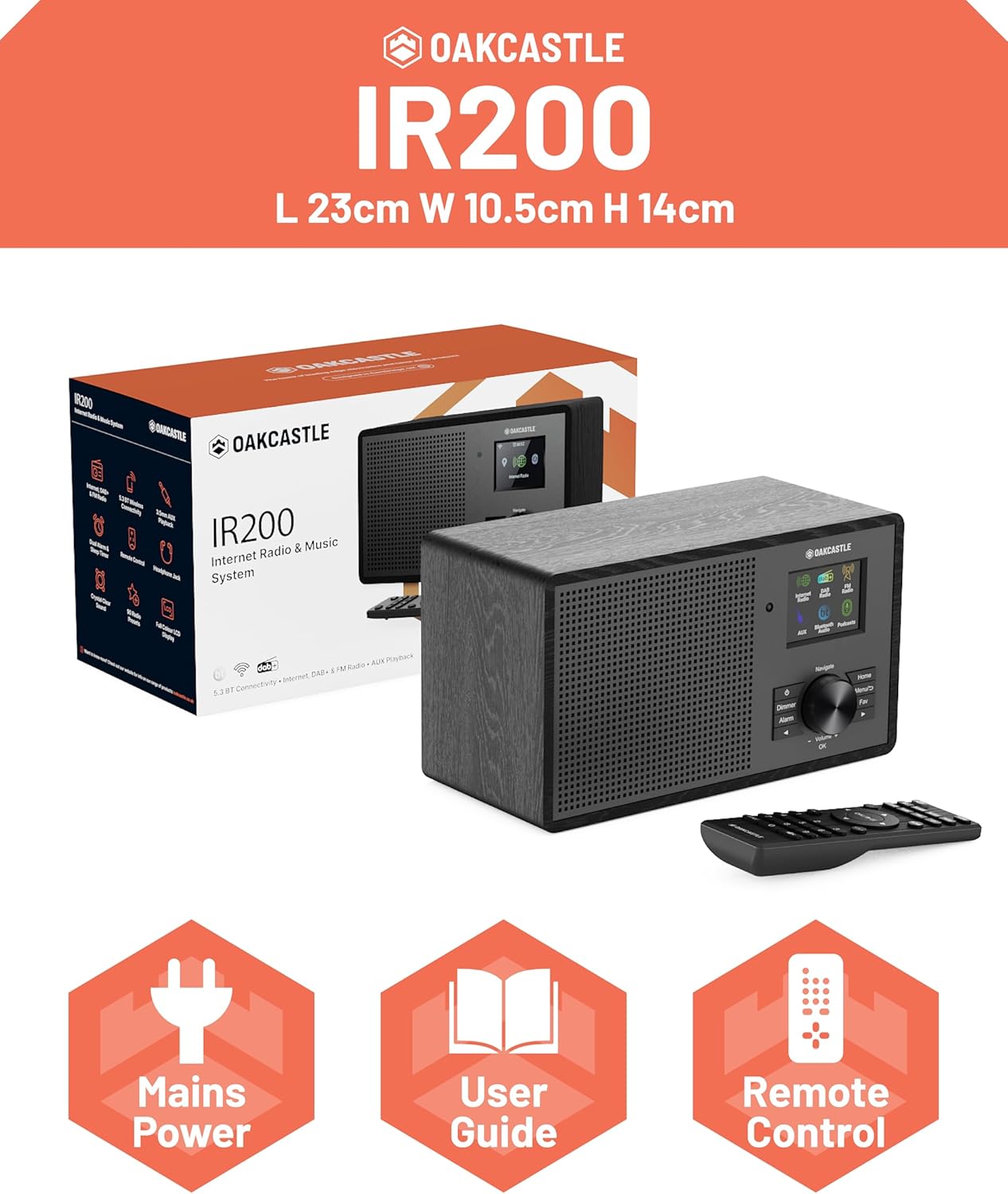
Image 2.1: Contents of the Oakcastle IR200 package, including the radio unit, its box, power cable, remote control, and user manual.
3. محصول ختم شوview
Familiarize yourself with the main components and controls of your Oakcastle IR200 radio.
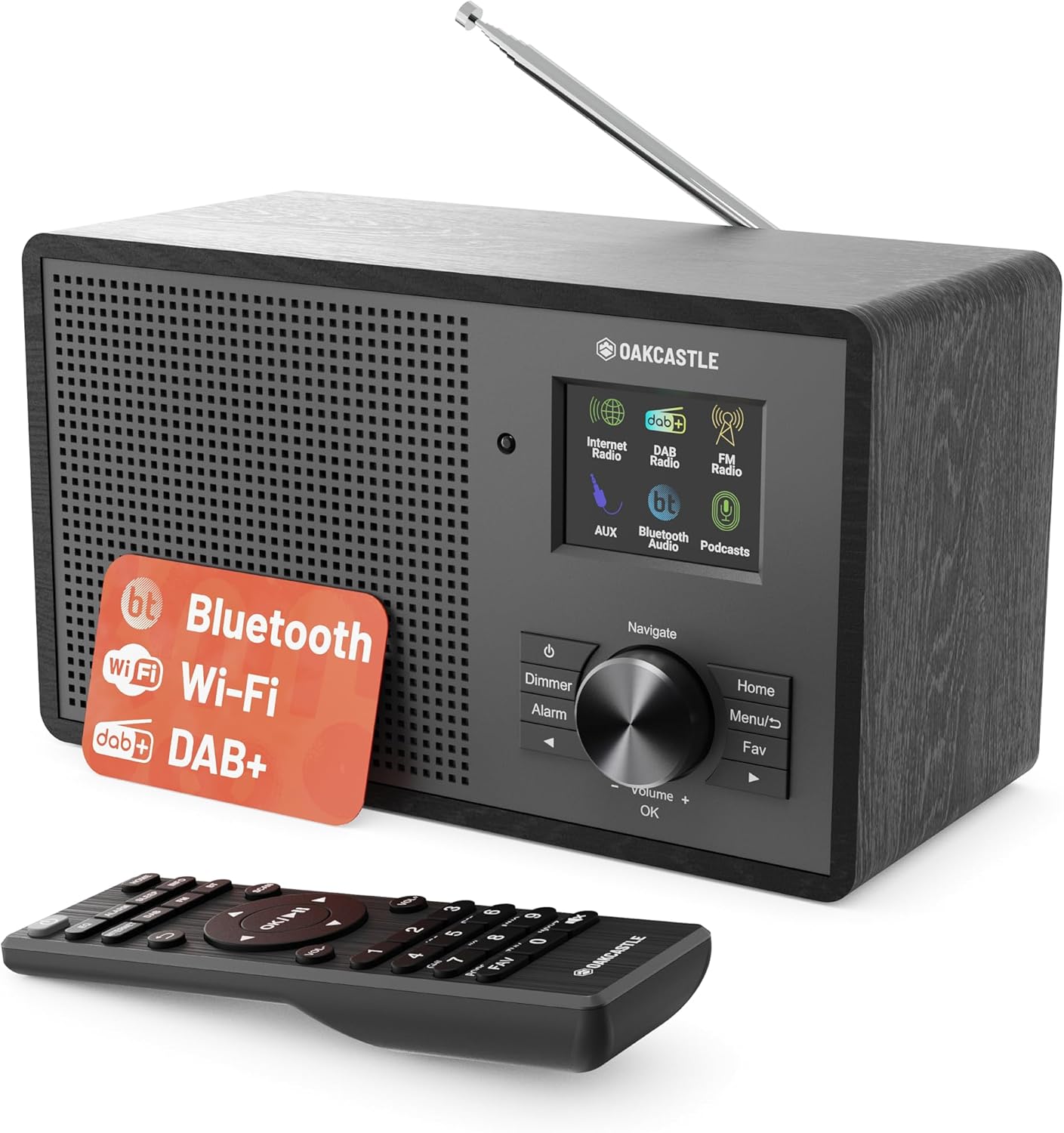
انځور 3.1: مخکی view of the Oakcastle IR200 radio, showcasing the display, control knob, buttons, and the included remote control.
3.1 د مخکني پینل کنټرولونه
- د ښودلو سکرین: د سټیشن معلومات، وخت، او د مینو اختیارونه ښیې.
- Navigate/Volume/OK Knob: Rotate to navigate menus or adjust volume; press to confirm selections.
- د بریښنا تڼۍ: واحد چالان/بندوي یا یې په سټینډ بای حالت کې اچوي.
- د ډیمر تڼۍ: د ښودنې روښانتیا تنظیموي.
- د الارم تtonۍ: د الارم ترتیباتو ته لاسرسی لري.
- د کور تڼۍ: اصلي مینو ته راستنیږي.
- د مینو تڼۍ: Accesses mode-specific menus.
- د خوښې تڼۍ: Accesses favorite station presets.
3.2 د شا پینل پیوستون

انځور 3.2: شاته view of the Oakcastle IR200, highlighting the headphone output and AUX input ports.
- دوربین انتن: د DAB+ او FM استقبال لپاره.
- AUX داخلول: بهرني آډیو وسایل وصل کړئ.
- د هیډفون محصول: د شخصي اوریدلو لپاره هیډفونونه وصل کړئ.
- په DC کې: د بریښنا اډاپټر پیوستون.
4. ابتدايي ترتیب
4.1 د بریښنا نښلول
- Insert the power cable into the DC IN port on the rear of the radio.
- د بریښنا کیبل بله پای د دیوال ساکټ سره وصل کړئ.
- د راډیو د چالانولو لپاره په مخکینۍ پینل یا ریموټ کنټرول کې د بریښنا تڼۍ فشار ورکړئ.
۵.۲ د انتن تنظیم کول
For optimal DAB+ and FM reception, fully extend the telescopic antenna located at the rear of the unit.
4.3 Network Connection (for Internet Radio)
- Upon first power-on, the radio will guide you through the network setup.
- له مینو څخه "د شبکې وزرډ" یا "وائی فای تنظیم" غوره کړئ.
- راډیو به د شته وای فای شبکو لپاره سکین وکړي. له لیست څخه خپل شبکه غوره کړئ.
- Enter your Wi-Fi password using the navigation knob and OK button.
- یوځل چې وصل شي، راډیو به د تایید پیغام ښکاره کړي.
5. عملیاتي طریقې
The Oakcastle IR200 offers several listening modes. Press the "Home" button to access the main menu and select your desired mode.
5.1 انټرنیټ راډیو
Access thousands of global radio stations via your Wi-Fi connection.

Image 5.1: The radio's display screen in Internet Radio mode, showing station information.
- د اصلي مینو څخه، "انټرنیټ راډیو" غوره کړئ.
- You can browse stations by location, genre, or search by name.
- Rotate the Navigate knob to scroll through options and press OK to select.
- To save a station as a favorite, press the "Fav" button during playback.
۶.۳ DAB+ راډیو
د لوړ کیفیت ډیجیټل راډیو خپرونو څخه خوند واخلئ.

Image 5.2: The radio's display screen in DAB+ Radio mode, showing the current station.
- د اصلي مینو څخه، "DAB+ راډیو" غوره کړئ.
- راډیو به په اتوماتيک ډول د شته DAB+ سټیشنونو لپاره سکین وکړي.
- Use the Navigate knob to select a station from the list.
- To save a station as a favorite, press the "Fav" button during playback.
5.3 ایف ایم راډیو
د دودیزو انالوګ ایف ایم خپرونو سره ځان وتړئ.
- د اصلي مینو څخه، "ایف ایم راډیو" غوره کړئ.
- To auto-scan for stations, press and hold the OK button or use the scan function via the menu.
- To manually tune, rotate the Navigate knob.
- To save a station as a favorite, press the "Fav" button during playback.
5.4 د بلوتوت ارتباط
د خپلو بلوتوث فعالو وسیلو څخه په بې سیم ډول آډیو جریان کړئ.

Image 5.3: The radio's display screen in Bluetooth mode, indicating readiness for pairing.
- له اصلي مینو څخه، "بلوتوث" غوره کړئ. راډیو به د جوړې کولو حالت ته ننوځي.
- On your external device (e.g., smartphone), enable Bluetooth and search for "Oakcastle IR200".
- Select "Oakcastle IR200" to pair. Once connected, you can stream audio.
5.5 AUX داخلول
د ۳.۵ ملي میتر آډیو کیبل په کارولو سره بهرنۍ آډیو سرچینې وصل کړئ.
- د 3.5 ملي میتر آډیو کیبل یوه پای د راډیو په شا کې د AUX IN پورټ سره وصل کړئ.
- بل پای د خپل بهرني وسیلې د هیډفون جیک یا آډیو آوټ پټ سره وصل کړئ.
- From the main menu, select "AUX".
- د خپل بهرني آلې څخه پلے بیک کنټرول کړئ.
5.6 پوډکاسټونه
Browse and listen to a wide range of podcasts.
- From the main menu, select "Podcasts".
- Browse podcasts by category or search for specific titles.
- Select a podcast to start listening.
۳. ترتیبات او ځانګړتیاوې
6.1 د سیسټم ترتیبات
Access general system settings via the main menu to configure time, language, display, and more.
- وخت/نیټه: Set time format, synchronize time.
- ژبه: Select your preferred language for the menu.
- ښکاره کول: Adjust backlight, color scheme.
- شبکه: Reconfigure Wi-Fi settings.
- د سافټویر تازه کول: Check for and install firmware updates.
6.2 برابرونکی (EQ)
Customize the audio output to your preference using the equalizer settings, accessible via the remote control or system menu.
6.3 مختاړي
The radio supports over 90 presets for your favorite Internet, DAB+, and FM stations. To recall a preset, press the "Fav" button and select from the list.
6.4 الارمونه
Set alarms to wake up to your favorite radio station or a buzzer sound. Access alarm settings via the "Alarm" button on the front panel or remote.
7. ریموټ کنټرول
The included remote control provides convenient access to all radio functions from a distance.
Ensure batteries are correctly inserted. Point the remote control towards the front of the radio for optimal response.
7.1 د ریموټ کنټرول فعالیتونه
- ځواک: On/Off/Standby.
- حجم +/-: د حجم کچه تنظیم کړئ.
- د نیویګیشن تڼۍ (پورته/ښکته/کیڼ/ښي): مینو ته لاړ شئ.
- سمه ده: انتخاب تایید کړئ.
- Mode Buttons (Internet, DAB, FM, Bluetooth, AUX): د موډلونو ترمنځ بدل کړئ.
- Preset Buttons (1-90+): Directly select saved favorite stations.
- EQ: د برابرولو ترتیباتو ته لاسرسی.
- مینو: Access mode-specific menus.
- خوښه: Access favorite station list.
8. ساتنه
8.1 پاکول
To clean the radio, use a soft, dry cloth. Do not use abrasive cleaners, waxes, or solvents as these may damage the finish.
8.2 عمومي پاملرنه
- واحد د مستقیم لمر وړانګو، تودوخې سرچینو او رطوبت څخه لرې وساتئ.
- د واحد له غورځولو یا د قوي اغیزو سره مخ کیدو څخه ډډه وکړئ.
- ډاډ ترلاسه کړئ چې د واحد په شاوخوا کې مناسب هوا ورکول.
9. ستونزه حل کول
| ستونزه | احتمالي لامل | د حل لاره |
|---|---|---|
| هیڅ ځواک نشته | د برېښنا کیبل نه دی وصل شوی؛ د دیوال ساکټ فعال نه دی. | Check power cable connection; try a different wall socket. |
| غږ نشته | غږ ډېر ټیټ دی؛ خاموش فعال شوی؛ ناسمه سرچینه غوره شوې ده. | Increase volume; Check mute status; Select correct input mode. |
| انټرنیټ راډیو نه نښلي | Incorrect Wi-Fi password; Weak Wi-Fi signal; Router issue. | Re-enter Wi-Fi password; Move radio closer to router; Restart router. |
| د DAB+/FM ضعیف استقبال | Antenna not extended; Poor signal area. | Fully extend antenna; Reposition radio for better signal. |
| بلوتوټ نه جوړیږي | Radio not in pairing mode; Device too far; Device already paired. | Ensure radio is in Bluetooth mode; Move device closer; Unpair from other devices. |
10. مشخصات
| فیچر | تفصیل |
|---|---|
| برانډ | اوکاسټل |
| ماډل | IR200 |
| رنګ | تور |
| د ارتباط ټیکنالوژي | Wi-Fi, Bluetooth 5.3, AUX |
| د ټون کولو ټیکنالوژي | انټرنیټ راډیو، DAB+، FM |
| ځانګړي ځانګړتیاوې | Bluetooth, EQ, Podcasts, Internet Radio, Remote Control |
| د بریښنا سرچینه | Electric Cable (Mains) |
| د محصول ابعاد (H x W x D) | ۱۴ سانتي متره x ۵.۲۳ سانتي متره x ۷.۰۶ سانتي متره (تقریبا) |
| د محصول وزن | 0.94 کیلو ګرامه |
| مطابقت لرونکې وسیلې | د MP3 پلیر، سمارټ فون، ټابلیټ |
11. تضمین او ملاتړ
11.1 د تضمین معلومات
The Oakcastle IR200 comes with a standard warranty. An extended 3-year warranty is available upon product registration on the manufacturer's website. Please refer to the warranty card included in your package or visit the official Oakcastle webد توضیحاتو لپاره سایټ.
11.2 د پیرودونکي ملاتړ
For technical assistance, troubleshooting, or further inquiries, please contact Oakcastle customer support. Contact details can typically be found on the official Oakcastle webپه سایټ یا د تضمین کارت کې.
Ask a question about this manual
Ask about setup, troubleshooting, compatibility, parts, safety, or missing instructions. Manuals+ will review the question and use this page’s manual context to help answer it.