
پیژندنه
Thank you for choosing the SABLUTE MA31 Ergonomic Wireless Keyboard and Mouse Combo. This manual provides essential information for setting up, operating, and maintaining your new peripheral set. Designed for comfort and efficiency, this combo features a full-size wave-key keyboard with a cushioned palm rest and a 3-DPI adjustable ergonomic mouse, offering seamless 2.4G wireless connectivity for various devices.
په بکس کې څه دي
- 1 x Ergonomic Wireless Keyboard (MA31)
- 1 x Ergonomic Wireless Mouse (MS801)
- 1 x 2.4GHz USB Receiver (shared for both keyboard and mouse, stored in mouse battery compartment)
- 1 x USB-A ته USB-C اډاپټر
- 1 x د کارونکي لارښود

Image: The contents of the product box, showing the ergonomic keyboard, ergonomic mouse, a small USB receiver, a USB-A to Type-C adapter, and the user manual.
د تنظیم کولو لارښوونې
- بیټرۍ نصب کړئ:
- کیبورډ: Insert two (2) AA batteries (not included) into the battery compartment on the underside of the keyboard.
- موږک: Insert one (1) AA battery (not included) into the battery compartment on the underside of the mouse. The 2.4GHz USB receiver is stored in this compartment.
- د USB رسیور ترلاسه کول: Carefully remove the 2.4GHz USB receiver from the mouse's battery compartment.
- د رسیدونکي سره وصل کړئ:
- Plug the USB receiver directly into an available USB-A port on your computer, laptop, tablet, or Mac.
- If your device only has USB-C ports, use the provided USB-A to USB-C adapter to connect the receiver.
- پاور آن:
- کیبورډ: Turn on the keyboard using the ON/OFF switch located on the side.
- موږک: د ON/OFF سویچ په کارولو سره موږک چالان کړئ چې په لاندې اړخ کې موقعیت لري.
- اتوماتیک پیوستون: The keyboard and mouse will automatically connect to your computer. No additional drivers are needed.

Image: A close-up of the USB-A receiver and the USB-A to Type-C adapter, illustrating how to connect the wireless peripherals to different types of ports on a computer.
عملیاتي لارښوونې
د کیبورډ ځانګړتیاوې
- ارګونومیک ډیزاین: The keyboard features a wave-shaped key layout and a cushioned faux lambskin palm rest for natural typing posture and reduced wrist strain.
- د تنظیم وړ خښتې پښې: Dual-angle tilt legs on the underside allow you to adjust the keyboard's elevation for comfortable typing while sitting or standing.
- خاموش ټایپ کول: The keys are designed for soft, quiet presses, minimizing noise during use.
- شارټ کټ کیلي: 9 dedicated multimedia shortcut keys are located at the top of the keyboard for quick access to functions like:
- Emoji (FN+Q for Windows, FN+W for Mac)
- محاسبه کوونکی
- د چاپ سکرین
- پخوانۍ سندره
- پلی/ودرول
- راتلونکی سندره
- حجم پورته
- حجم ښکته
- خاموش
- د فعالیت کیلي (F1-F12): These keys can be used in combination with the 'Fn' key for additional system-specific functions (e.g., screen brightness, search, window switch, sleep, lock screen). Refer to the included quick guide for a full layout.
- Compatibility Switch: Use FN+Q for Windows/ChromeOS and FN+W for macOS to optimize keyboard functions for your operating system.
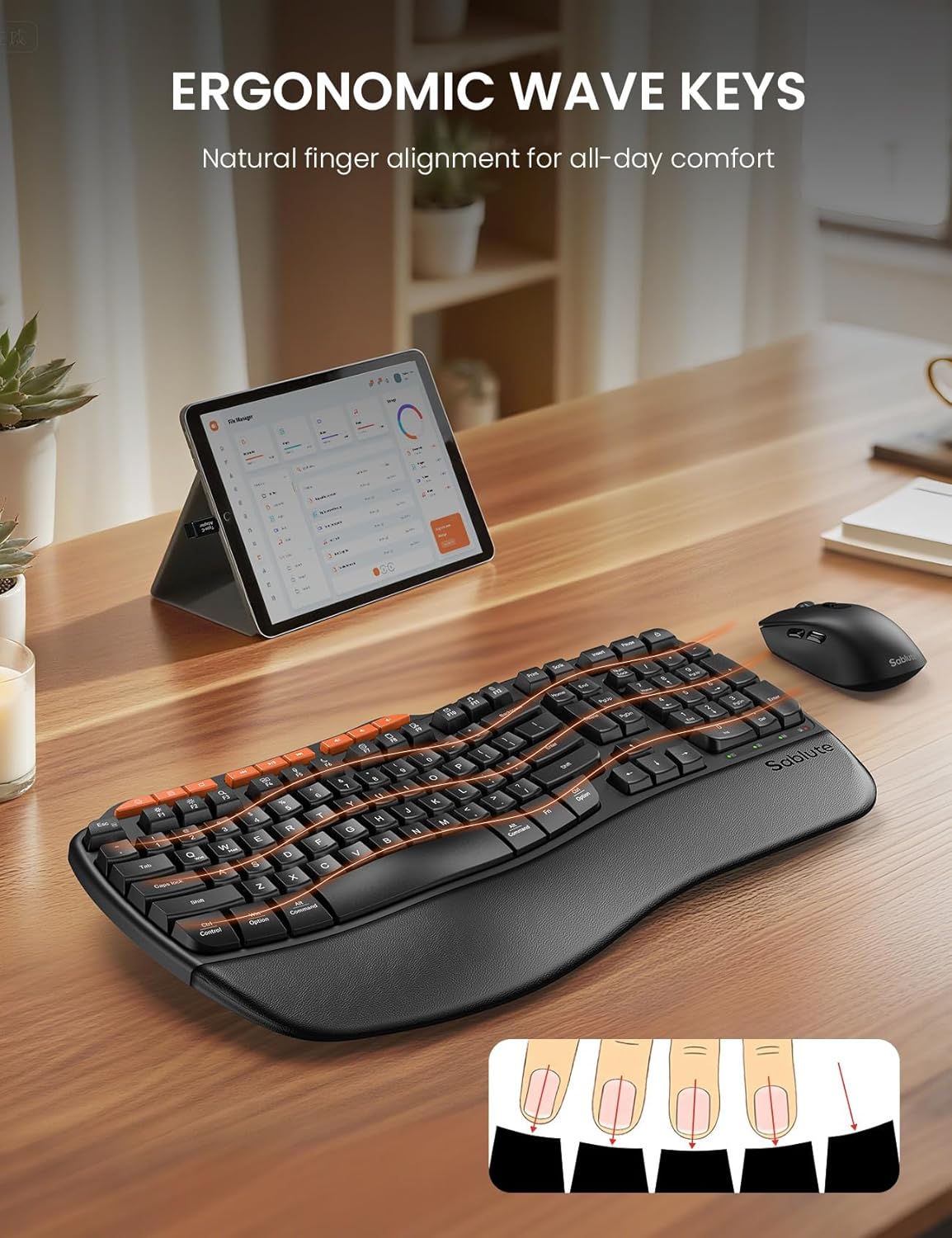
Image: The ergonomic keyboard with its distinctive wave-shaped keys and integrated wrist rest, designed for natural finger alignment and comfort.

Image: The underside of the keyboard with its dual-angle tilt legs extended, demonstrating how to adjust the keyboard for comfortable use in both sitting and standing postures.

انځور: یو مفصل view of the nine orange-colored multimedia shortcut keys located at the top of the keyboard, highlighting their accessibility.
د موږک ځانګړتیاوې
- Ergonomic Sculpted Design: The mouse is shaped to fit comfortably in the right hand, promoting a natural hand position.
- د تنظیم وړ DPI: Cycle through 3 DPI settings (800/1200/1600) using the dedicated DPI switch button to adjust cursor sensitivity for different tasks.
- د غاړې تڼۍ: Features forward and backward buttons on the side for enhanced navigation.
- خاموش کلیکونه: The mouse buttons and scroll wheel are designed for silent operation.
- د بریښنا سویچ: An ON/OFF switch on the underside helps conserve battery life when not in use.

Image: The ergonomic mouse, showcasing its sculpted shape designed to provide a comfortable and natural grip for the right hand.
بې سیم ارتباط
- ۲.۴GHz بېسیم: Both the keyboard and mouse connect wirelessly via a single 2.4GHz USB receiver.
- اغیزمن رینج: Enjoy a stable connection up to 33 feet (10 meters) with minimal lag or drops.
- نړیوال مطابقت: Compatible with 99% of devices including PCs, laptops, tablets, and Macs. Supports Windows, macOS, Chrome OS, Android, and Linux operating systems.
- یادونه: This combo connects to one device at a time; multi-device switching is not supported.

Image: The wireless keyboard and mouse in a professional setting, illustrating the 33-foot stable 2.4GHz wireless connection range.
ساتنه
- پاکول: یو نرم استعمال کړئ، دamp cloth to clean the surfaces of the keyboard and mouse. Avoid harsh chemicals or abrasive materials. The faux lambskin palm rest is sweat-proof and easy to maintain.
- د بیټرۍ بدلول: Replace batteries when performance degrades. The keyboard requires 2 AA batteries, and the mouse requires 1 AA battery.
- ذخیره کول: When not in use, turn off both the keyboard and mouse to conserve battery life. Store the USB receiver in the mouse's battery compartment to prevent loss.
د ستونزو حل کول
Keyboard/Mouse Loses Connection with USB
- د کیبورډ لپاره: Long-press the "ESC" + "=" keys for three seconds until the red light flashes. Then, immediately plug the USB receiver into your computer.
- د موږک لپاره: Press and hold the left, middle (scroll wheel click), and right buttons of the mouse for 3-5 seconds. Then, plug the USB receiver into your computer.
- بیټرۍ چیک کړئ: Ensure fresh batteries are installed in both devices.
- د USB پورټ وګورئ: هڅه وکړئ چې د USB ریسیور په خپل وسیله کې په بل USB پورټ کې ولګوئ.
- لاسوهنه: Move the devices closer to the USB receiver and away from other wireless devices that might cause interference.
مشخصات
| فیچر | تفصیل |
|---|---|
| برانډ | SABLUTE |
| د ماډل شمیره | MA31 |
| رنګ | تور |
| د ارتباط ټیکنالوژي | 2.4G USB بې سیم |
| مؤثره واټن | 33 فوټ (10m) |
| د کیبورډ ترتیب | QWERTY, Full Size (104 keys) |
| د کیبورډ ځانګړي ځانګړتیاوې | Ergonomic Wave Keys, Cushioned Wrist Rest, Dual-Angle Tilt Legs, 9 Multimedia Shortcut Keys, FN Function Keys, Non-Fading Keycaps |
| د موږک DPI ترتیبات | ۸۰۰/۱۲۰۰/۱۶۰۰ (د تعدیل وړ) |
| د موږک تڼۍ | Left, Right, Scroll Wheel, Forward, Backward, DPI Switch |
| د بریښنا سرچینه | Battery Powered (Keyboard: 2xAA, Mouse: 1xAA) |
| مطابقت لرونکې وسیلې | PCs, Laptops, Tablets, Mac, Gaming Consoles, Television |
| مطابقت لرونکي عملیاتي سیسټمونه | Windows (10+), macOS, Chrome OS (134+), Linux, Android |
| د توکي وزن | 2.7 پونډه |

Image: A diagram illustrating the dimensions of the full-size ergonomic keyboard (44.2cm x 24.13cm) and the ergonomic mouse (12.45cm x 6.35cm x 4.32cm).
تضمین او ملاتړ
- تضمین: دا محصول د 1 کلن تضمین سره راځي.
- راستنیدنه: د ۵۰ ورځو پیسو بیرته ورکولو تضمین څخه خوند واخلئ.
- بدلول: A 1-year free replacement policy is offered for manufacturing defects.
- د پیرودونکو خدمت: For any inquiries or support, please contact SABLUTE Inc.
- بریښنالیک: sabluteservices@outlook.com
- تلیفون: 1-888-858-1618 (امریکا)
- Operating Hours: Mon-Fri, 9am-6pm (Worktime), 1pm-2pm (Rest)
د محصول ویډیوګانې
SABLUTE Ergonomic Wireless Keyboard and Mouse Combo Overview
ویډیو: یو رسمي اوورview of the SABLUTE Ergonomic Wireless Keyboard and Mouse Combo, highlighting its key features and ergonomic design. This video is provided by a seller.
SABLUTE Wireless Keyboard with Cushioned Palm Rest
Video: A detailed look at the wireless keyboard, focusing on its cushioned palm rest and ergonomic benefits for comfortable typing. This video is provided by a seller.