
1. پیژندنه
Thank you for choosing the DazzlingStage 60W 9LED RGBW Stage Wall Wash Bar Light. This manual provides essential information for the safe and effective operation of your lighting fixture. Please read it thoroughly before installation and use, and retain it for future reference.
دا ایسtage light bar features 9 high-power RGBW LEDs, offering a wide spectrum of colors and dynamic lighting effects suitable for various events and venues.

انځور 1.1: اوورview of the DazzlingStage 60W 9LED RGBW Stage Wall Wash Bar Lights in various colors.
2. د خوندیتوب لارښوونې
- بریښنایی خوندیتوب: د بریښنا رسولو حجم ډاډمن کړئtage matches the specifications of the fixture. Always disconnect power before cleaning, servicing, or moving the unit.
- لګول: Install the fixture in a well-ventilated area, away from heat sources. Ensure secure mounting to prevent accidental falls.
- عملیات: Do not look directly into the light source when the fixture is operating, as it can cause eye damage. Avoid operating the unit in wet or damp شرایط
- ساتنه: ټول خدمات وړ پرسونل ته راجع کړئ. د واحد د ترمیم هڅه مه کوئ.
- ماشومان: وسیله د ماشومانو له لاسرسي لرې وساتئ.
3. د بسته محتويات
د خلاصولو پر مهال، مهرباني وکړئ تصدیق کړئ چې لاندې لیست شوي ټول توکي پکې شامل دي او په ښه حالت کې دي:
- حیرانونکېtage 60W 9LED RGBW Stage Wall Wash Bar Light (x1 per pack)
- Power Cord (x1 per pack)
- Remote Control (x1 per pack)
- Mounting Bracket (x1 per pack)
- Knobs (x2 per pack)
- Black Gaskets (x2 per pack)
- Instruction Manual (x1 per pack)

انځور ۲: هغه محتويات چې د محصول په کڅوړه کې شامل دي.
4. د محصول اجزا
Familiarize yourself with the main components of the light bar:
- د LED صف: 9 RGBW LEDs for color mixing.
- د تضمین اداره: Features a 4-digit LED display and control buttons (MENU, UP, DOWN, ENTER) for mode selection and parameter adjustment.
- د DMX دننه/بهر بندرونه: For connecting to a DMX controller or linking multiple units.
- Power IN/OUT: For power connection and daisy-chaining power to other units.
- د نصب کولو بریکٹ: Adjustable bracket for floor standing or truss mounting.
- د تودوخې سنک: Integrated cooling system to maintain optimal operating temperature.

Image 4.1: Key components and dimensions of the light bar.
5. ترتیب او نصب کول
The DazzlingStage Wall Wash Bar Light offers flexible installation options:
5.1 د بریکٹ ایښودل
Attach the included mounting bracket to the light bar using the provided knobs and gaskets. Ensure the bracket is securely fastened.
۴.۴ د ځای پر ځای کولو اختیارونه
- د پوړ موقف: The bracket allows the light bar to stand upright on a flat surface. Adjust the angle as needed.
- Truss Mounting: مناسب cl استعمال کړئamps (not included) to attach the bracket to a lighting truss. Ensure the truss and clamps can support the weight of the fixture.
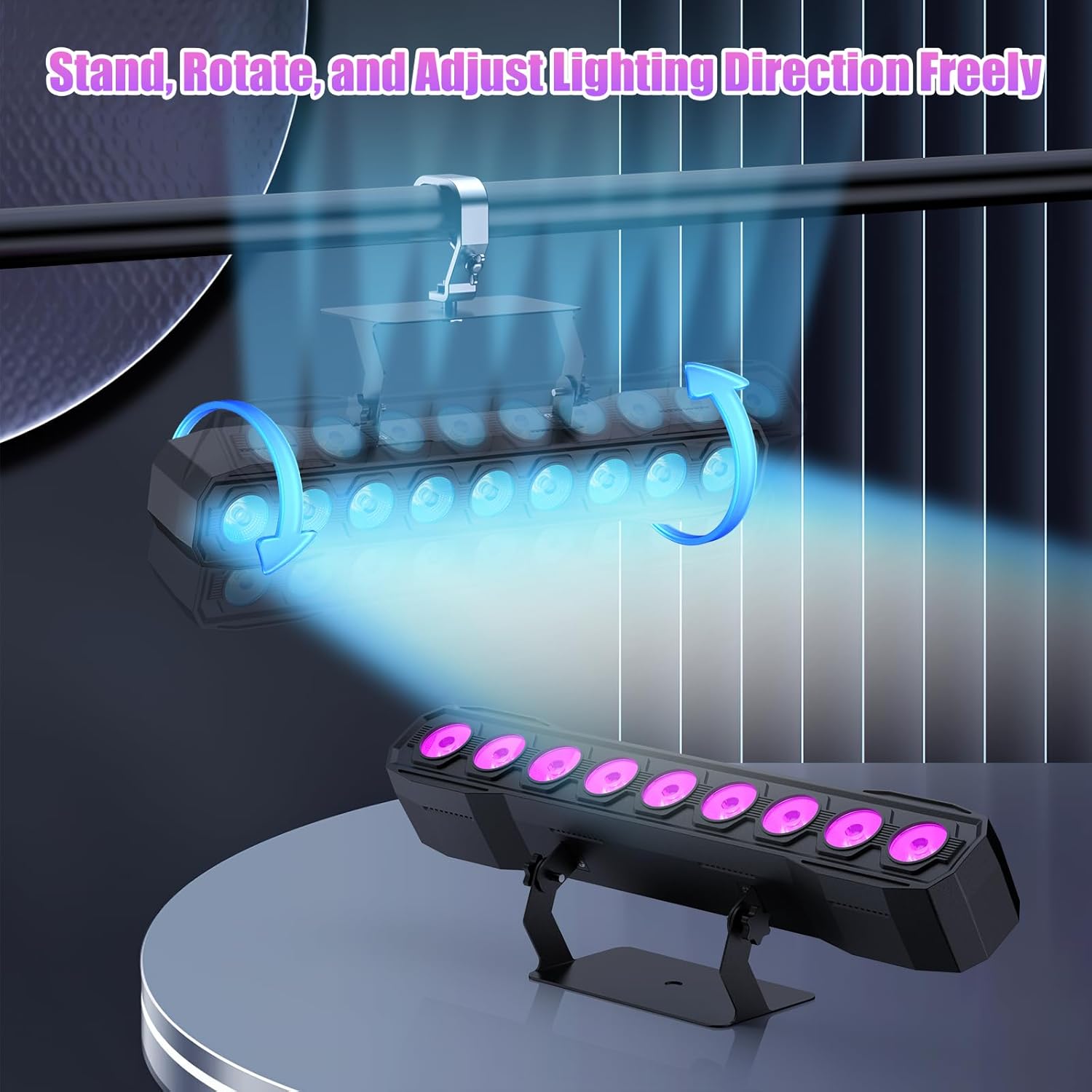
Image 5.1: Illustration of mounting and angle adjustment options.
5.3 د بریښنا نښلول
Connect the power cord to the Power IN port on the back of the fixture and then to a suitable power outlet. Multiple units can be daisy-chained using the Power OUT port to simplify wiring for larger setups.
6. عملیاتي طریقې
The DazzlingStage Wall Wash Bar Light supports several control modes:
- د DMX512 کنټرول: For professional control via a DMX console.
- د موټرو حالت: Pre-programmed lighting sequences.
- Sound-Activated Control: Lights react to ambient sound.
- ریموټ کنټرول: Convenient wireless control using the included remote.
- د ماسټر غلام حالت: Link multiple units where one acts as a master and others as slaves, synchronizing effects.
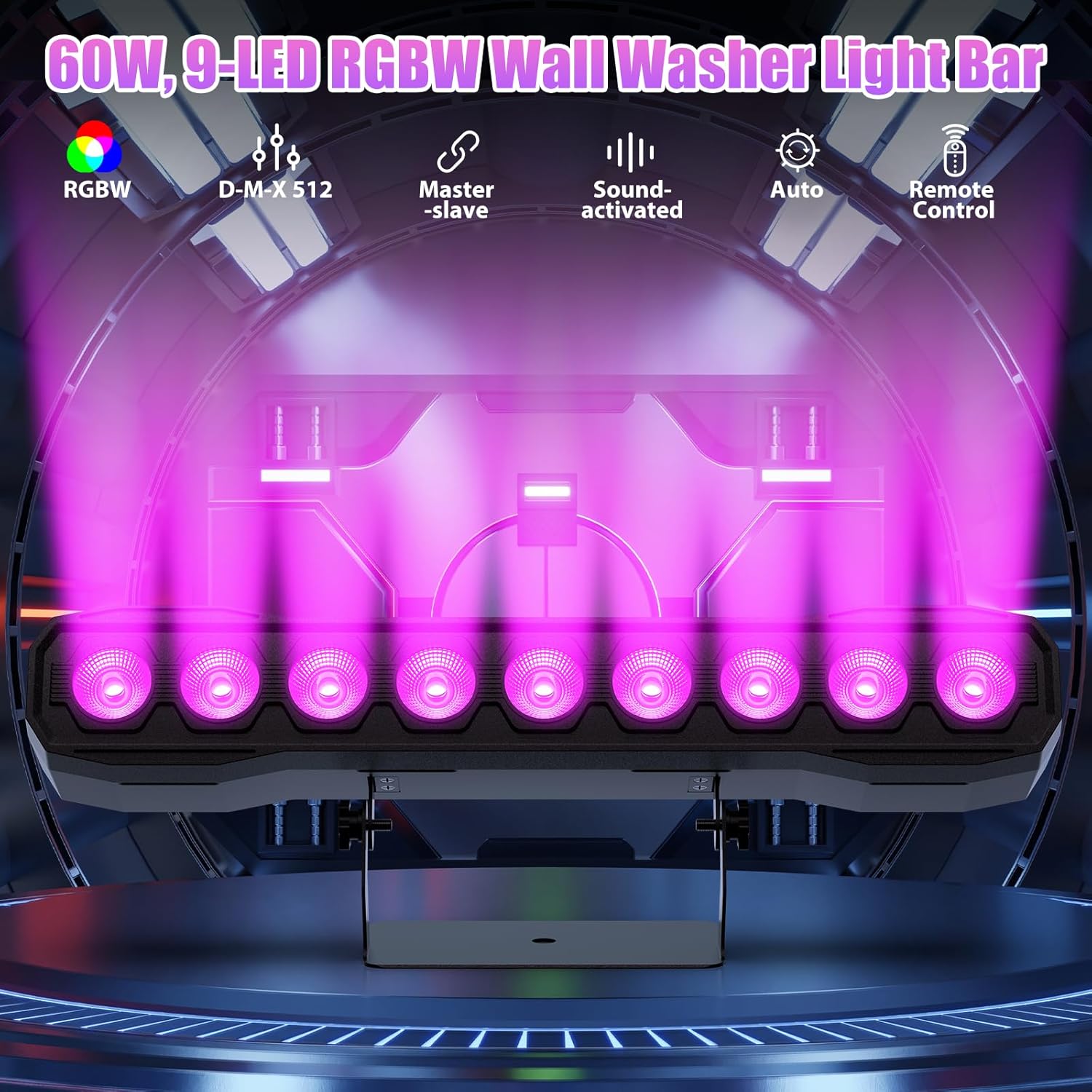
انځور 6.1: اوورview of available control modes.
6.1 Display Panel Operation
Use the buttons on the back of the fixture to navigate the menu and select modes:
- مینو: د اصلي مینو اختیارونو له لارې سایکل.
- اپ / ډاون: Adjusts values or navigates sub-menus.
- ننوتل: انتخاب تاییدوي.
۷ د رڼا اغیزې
The fixture supports various dynamic effects:
- د رنګ مخلوط کول: Over 16.7 million color combinations with 0-100% linear dimming.
- سټروب: Flashing effect.
- ټوپ: Instant color changes.
- رadeا کول: د رنګونو ترمنځ اسانه لیږدونه.
- نبض: Gradual changing effects.
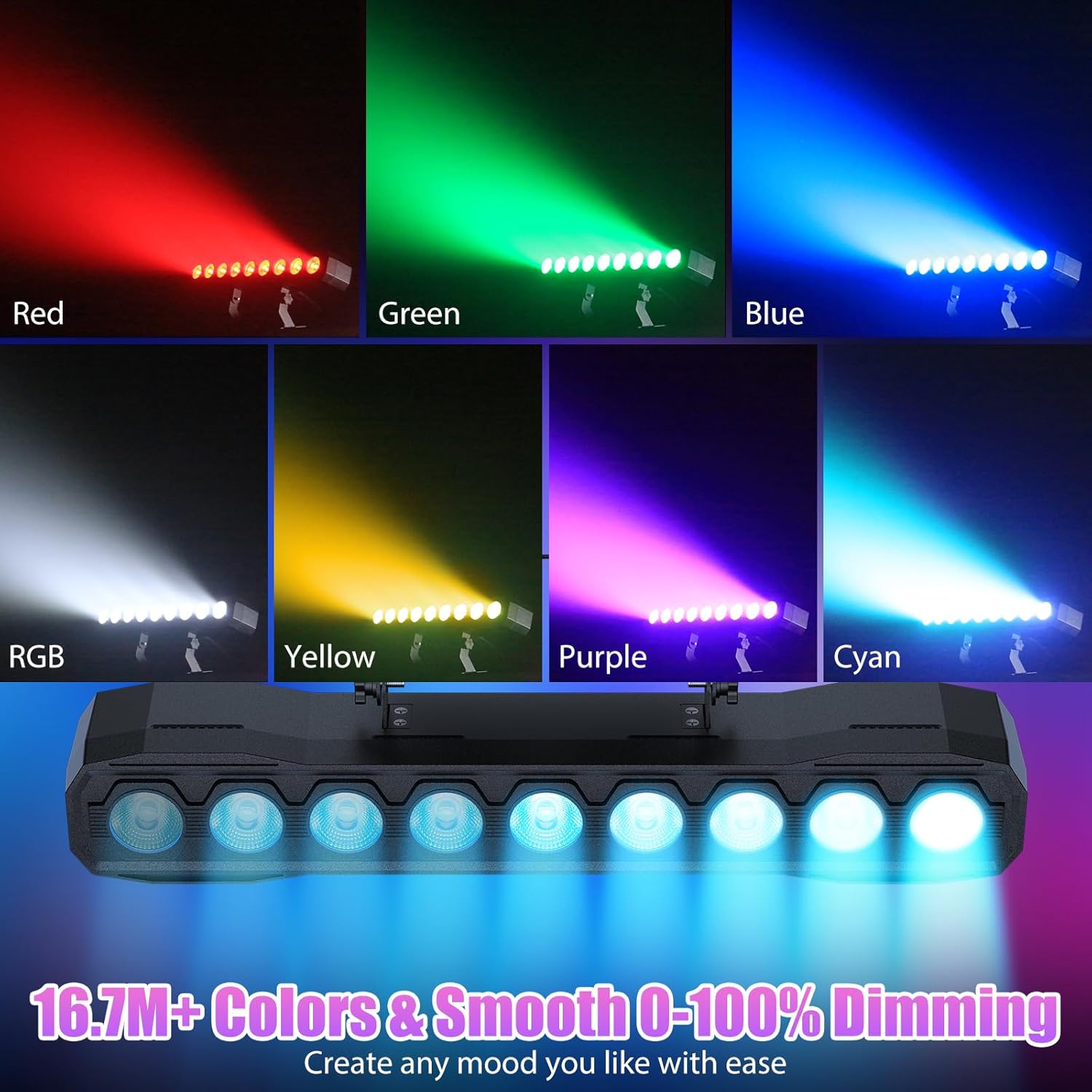
انځور ۶: پخوانیamples of color mixing and dimming capabilities.

Image 6.3: Visual representation of Strobe, Jump, Fade, and Pulse effects.
7. د ریموټ کنټرول افعالونه
شامل شوی ریموټ کنټرول مختلفو دندو ته اسانه لاسرسی چمتو کوي:
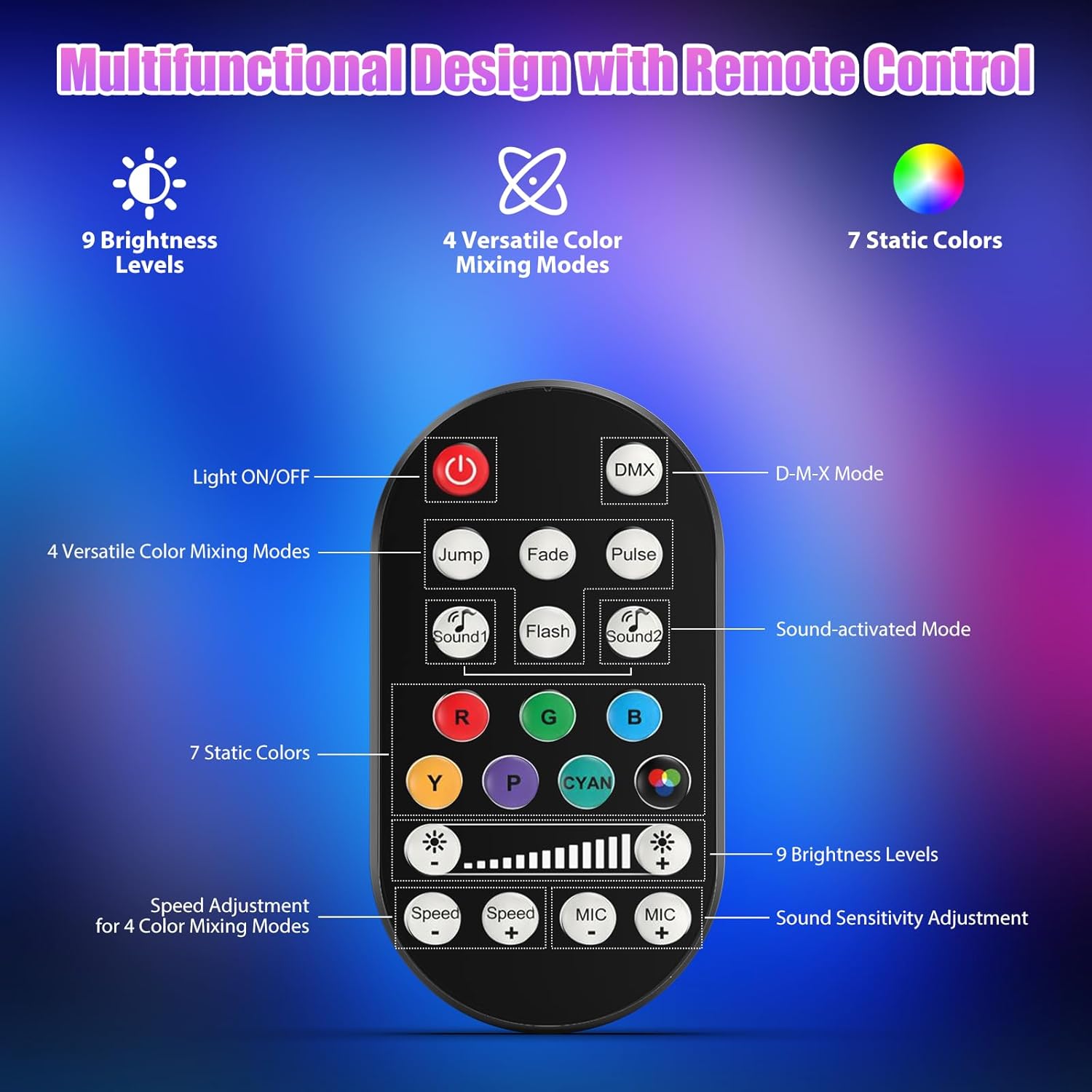
انځور ۶.۱: د ریموټ کنټرول ترتیب او دندې.
- څراغ فعال/بند: واحد فعال یا بندوي.
- DMX: Activates DMX control mode.
- Jump, Fade, Pulse, Flash: Selects different color mixing modes.
- Sound1, Sound2: Activates sound-activated modes with different sensitivities.
- R, G, B, Y, P, Cyan, White: Selects static colors.
- د روښانتیا کچه: Adjusts the overall intensity of the light (9 levels).
- سرعت +/-: د متحرک اغیزو سرعت تنظیموي.
- MIC +/-: Adjusts the sound sensitivity for sound-activated modes (15 levels).
8. DMX512 Control
For advanced control, connect the fixture to a DMX512 controller. The light bar typically uses 4 or 8 DMX channels. Refer to the display panel for DMX address setting and channel assignments.
۵.۲ د DMX پته ترتیب
Use the MENU, UP, DOWN, and ENTER buttons on the fixture's display panel to set the DMX starting address. The display will show 'AXXX' where XXX is the address (e.g., A001).
8.2 DMX Channel Functions (Example - 8 Channel Mode)
| چینل | فعالیت | د ارزښت رینج | تفصیل |
|---|---|---|---|
| CH1 | ماسټر ډیمر | 0-255 | په ټولیزه توګه روښانتیا (0٪ څخه تر 100٪) |
| CH2 | د سور شدت | 0-255 | Red LED brightness (0% to 100%) |
| CH3 | شنه شدت | 0-255 | Green LED brightness (0% to 100%) |
| CH4 | نیلي شدت | 0-255 | Blue LED brightness (0% to 100%) |
| CH5 | د سپینې شدت | 0-255 | White LED brightness (0% to 100%) |
| CH6 | Strobe/Effect | 0-255 | 0-10: No function; 11-255: Strobe speed (slow to fast) |
| CH7 | د آټو پروګرام | 0-255 | Selects and controls speed of built-in auto programs |
| CH8 | فعال غږ | 0-255 | Activates sound mode and adjusts sensitivity |
جدول 8.1: مثالample DMX Channel Functions (may vary slightly by firmware version).
9. ساتنه
منظم ساتنه غوره فعالیت تضمینوي او ستاسو د فکسچر عمر اوږدوي.
- پاکول: Periodically clean the lens and housing with a soft, lint-free cloth. Do not use abrasive cleaners or solvents. Ensure the fixture is powered off and cool before cleaning.
- معاینه: Regularly check power cables, DMX cables, and mounting hardware for any signs of wear or damage. Replace damaged components immediately.
- ذخیره کول: When not in use for extended periods, store the fixture in a dry, dust-free environment.
10. ستونزه حل کول
که تاسو له ستونزو سره مخ شئ، لاندې عامې ستونزې او حل لارې وګورئ:
| ستونزه | احتمالي لامل | د حل لاره |
|---|---|---|
| هیڅ ځواک نشته | Power cable disconnected; No power from outlet; Blown fuse | Check power cable connection; Test outlet with another device; Replace fuse if necessary |
| د رڼا محصول نشته | Dimmer channel at 0%; Incorrect mode selected; DMX signal issue | Increase dimmer level; Select desired operating mode; Check DMX cable and address settings |
| Incorrect colors/effects | Incorrect DMX channel values; Remote control interference | Verify DMX channel settings; Ensure remote is pointed directly at the sensor; Check for other IR interference |
| د غږ فعال حالت کار نه کوي | Microphone sensitivity too low; No sound input | Increase MIC sensitivity via remote or display; Ensure sufficient sound is present near the fixture |
| د فکسچر ډیر ګرم کول | Poor ventilation; Blocked heat sink | Ensure adequate airflow around the unit; Clean any dust or debris from the heat sink fins |
11. مشخصات
| فیچر | تفصیل |
|---|---|
| برانډ | حیرانونکېtage |
| د ماډل شمیره | ZQ06190 |
| د رڼا سرچینه | 9 x 60W RGBW LEDs |
| د رنګ مخلوط کول | RGBW 4-in-1, 16.7 million colors |
| کموالی | 0-100٪ خطي بریښنایی تیاره کول |
| د بیم زاویه | 35° پراخه زاویه |
| د کنټرول طریقې | DMX512, Auto, Sound-Activated, Remote Control, Master-Slave |
| د DMX چینلونه | 4 or 8 Channels (selectable) |
| ښودل | 4 عددي LED ښودنه |
| مواد | اکریلونایتریل بوټاډین سټیرین (ABS) |
| د محصول ابعاد | 18.1 x 5.5 x 5.1 انچه (46 x 14 x 13 سانتي متره) |
| د توکي وزن | نږدې 1.98 پونډه (0.9 kg) |
| د بریښنا انډول | AC 100-240V، 50/60Hz |
| جوړونکی | Shenzhen Zhuoqiong Technology Co., Ltd. |
12. تضمین او ملاتړ
حیرانونکېtage products are designed for reliability and performance. For warranty information, please refer to the terms and conditions provided at the time of purchase or contact your retailer.
If you require technical assistance or have questions not covered in this manual, please contact DazzlingStage customer support through the retailer's platform or the official brand website. Please have your model number (ZQ06190) and purchase details ready when contacting support.