
د سینمور CM-C2LU
د سینمور ډمي کیمرې کارونکي لارښود
Model: CM-C2LU
برانډ: سینمور
1. پیژندنه
Thank you for choosing the CINMOORE Dummy Camera. This indoor security camera is designed to provide reliable surveillance and peace of mind for your home or office. Featuring advanced AI detection, two-way audio, and clear night vision, it offers comprehensive monitoring capabilities. This manual will guide you through the setup, operation, and maintenance of your device.

انځور: مخکینۍ برخه view of the CINMOORE Dummy Camera, a white, spherical camera with a dark lens and a blue indicator light, featuring the CINMOORE logo at its base.
۳. څه پکې شامل دي
مهرباني وکړئ د بسته بندۍ محتويات وګورئ ترڅو ډاډ ترلاسه کړئ چې ټول توکي شتون لري:
- CINMOORE Security Camera × 1
- Mounting Bracket Base × 1
- د بریښنا اډاپټر × 1
- Data Cable × 1
- Screw Anchors × 1
- د کارونکي لارښود × 1
3. ترتیب کول
The CINMOORE Dummy Camera offers flexible installation options for various indoor environments.
3.1 د نصبولو اختیارونه
The camera can be installed using the following methods:
- د چت غره: Ideal for wide-angle coverage from above.
- د میز ټاپ غره: Simple placement on any flat surface.
- وال ماونټ: Secure installation on a vertical surface.
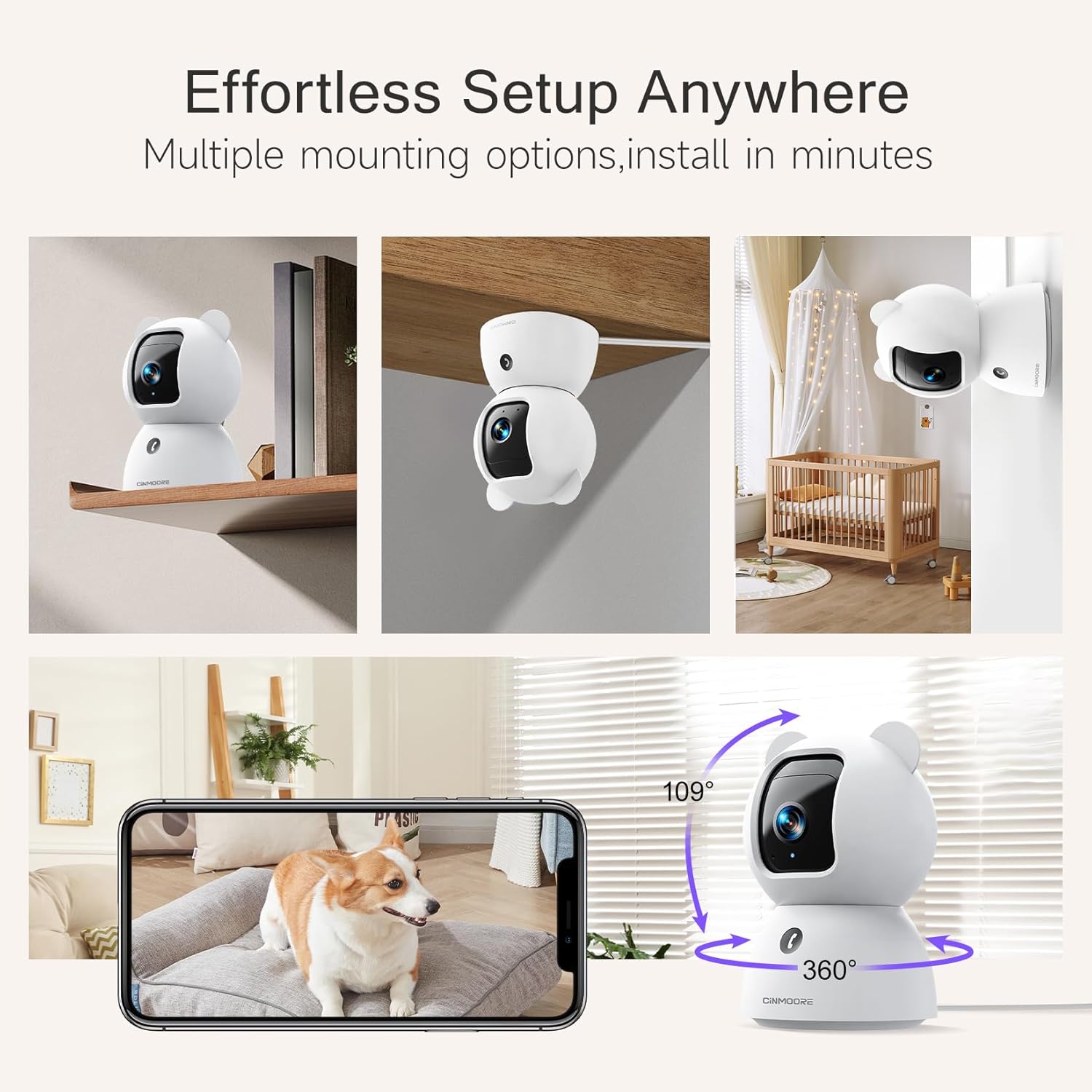
Image: A collage showing the CINMOORE Dummy Camera mounted in various positions: on a shelf, inverted on a ceiling, and on a wall, demonstrating its versatile installation options.
۴.۲ د تنظیم کولو لومړني ګامونه
- پاور آن: Connect the camera to the power adapter using the provided data cable and plug it into a power outlet.
- اپلیکیشن ډاونلوډ کړئ: Download the official CINMOORE app from your smartphone's app store (iOS/Android).
- د حساب ثبتول: اپلیکیشن پرانیزئ او د نوي حساب لپاره راجستر کړئ یا که تاسو دمخه یو حساب لرئ نو ننوتل وکړئ.
- وسیله اضافه کړئ: Follow the in-app instructions to add your new camera. This typically involves scanning a QR code on the camera or connecting to its temporary Wi-Fi hotspot.
- د وای فای اتصال: Connect the camera to your home Wi-Fi network (2.4GHz recommended).
- ځای په ځای کول: Position the camera in your desired location, ensuring it has a clear view د هغه سیمې څخه چې تاسو یې څارنه غواړئ.
4. عملیاتي لارښوونې
4.1 Video Quality and Viewing
The camera captures video in 2.5K resolution, providing clear and detailed images. You can view ژوندۍ فیډ او ثبت شوی footage through the CINMOORE app.

Image: A side-by-side comparison demonstrating the superior clarity of 2.5K resolution (left, showing a baby) versus 2K resolution (right, showing a puppy).
4.2 Pan & Tilt (PTZ) Functionality
The camera features PTZ (Pan, Tilt, Zoom) technology, allowing for 360-degree coverage. You can remotely control the camera's viewing angle through the app to monitor different areas of a room.

Image: The CINMOORE Dummy Camera surrounded by icons representing its features: Ultra HD 2.5K, Sound/Crying Alerts, Smart Night Vision, Encrypted Local Storage (up to 256GB), Secure Cloud Storage, Full Duplex Audio, Human/Pet Tracking, One-Touch Call, and Pan & Tilt, emphasizing its 360-degree protection.
۴.۴ دوه اړخیزه آډیو
Utilize the full-duplex two-way audio feature to communicate with people or pets in the camera's vicinity. This allows for natural, real-time conversations.

Image: A scene depicting a person speaking through a smartphone to a dog via the CINMOORE Dummy Camera, illustrating the two-way audio feature with speech bubbles.
4.4 د شپې لید
The camera is equipped with clear IR night vision, providing 2.5K clarity even in low-light or complete darkness, with a range of up to 33 feet.

انځور: یو کس viewing a black-and-white night vision feed from the CINMOORE Dummy Camera on their smartphone, showing a baby and a dog in a crib, demonstrating clear IR night vision in a dark room.
4.5 AI Alerts and Detection
The camera supports various AI-powered detection features without monthly fees, including:
- د حرکت کشف: Alerts you to general movement.
- د شخص کشف: Specifically identifies human figures.
- د څارویو کشف: د څارویو فعالیت پیژني.
- د ژړا کشف: Notifies you of baby crying sounds.

Image: Two children playing near the CINMOORE Dummy Camera, with icons below representing its AI detection capabilities: Person, Pet, Motion, and Crying, highlighting its no-monthly-fee AI alerts.
۵.۸ د ذخیره کولو اختیارونه
The camera offers flexible and secure storage solutions:
- د ایس ډي کارت ذخیره: Supports local storage via an SD card (not included), expandable up to 512GB. Ensure "SD Card Encryption" is enabled in the app for secure viewing.
- د بادل ذخیره کول: Offers AWS Cloud Storage with a 30-day free trial, providing bank-level encrypted storage for your recordings.

Image: A diagram showing the CINMOORE Dummy Camera with callouts for its storage features: SD card slot (expandable up to 512GB), Reset Button, and AWS Cloud Storage (30-day free trial), emphasizing encrypted and secure flexible storage.
5. ساتنه
To ensure optimal performance and longevity of your CINMOORE Dummy Camera, follow these maintenance guidelines:
- پاکول: د کیمرې لینز او بدن په نرمۍ سره د نرم او وچ ټوکر سره پاک کړئ. د سختو کیمیاوي موادو یا کثافاتو موادو کارولو څخه ډډه وکړئ.
- ځای په ځای کول: ډاډ ترلاسه کړئ چې کیمره په یو باثباته ځای کې ځای پر ځای شوې ده، د مستقیم لمر وړانګو، سختې تودوخې او لوړې رطوبت څخه لرې.
- د فرم ویئر تازه معلومات: د CINMOORE اپلیکیشن له لارې په منظم ډول د فرم ویئر تازه معلومات وګورئ او نصب کړئ ترڅو ډاډ ترلاسه کړئ چې ستاسو کیمره وروستي ځانګړتیاوې او امنیتي پرمختګونه لري.
- د بریښنا رسول: یوازې د کیمرې سره چمتو شوي اصلي بریښنا اډاپټر وکاروئ.
6. ستونزه حل کول
If you encounter issues with your CINMOORE Dummy Camera, refer to the following common troubleshooting steps:
- کیمره آفلاین: Check your Wi-Fi connection and ensure the camera is within range of your router. Restart the camera by unplugging and re-plugging the power adapter.
- د ویډیو خراب کیفیت: Ensure the lens is clean and free from dust. Check your internet speed; a stable connection is crucial for high-resolution streaming.
- غږ نشته: Verify that the microphone and speaker settings are enabled in the app. Ensure there are no obstructions blocking the microphone or speaker on the camera.
- Detection Not Working: Check the detection sensitivity settings in the app. Ensure the camera's view روښانه دی او خنډ نه دی.
- له اپلیکیشن سره وصل نشو: Ensure you have the latest version of the CINMOORE app. Try resetting the camera (using the reset button, if available) and re-adding it to the app.
For further assistance, please contact CINMOORE customer support.
7. مشخصات
| د ماډل نوم | د کور دننه کیم امنیت |
| د توکي ماډل شمیره | د CM-C2LU لپاره تفتیش وسپارئ، موږ به په 24 ساعتونو کې له تاسو سره اړیکه ونیسو. |
| برانډ | CINMOORE |
| د ارتباط ټیکنالوژي | تار لرونکی، وای فای |
| د ویډیو نیول حل | 2.5K |
| د کور دننه / بهر کارول | دننه |
| ځانګړي ځانګړتیاوې | 2 Way Audio, Cry Detection, HD Resolution, PTZ Technology |
| د شپې لید لړۍ | 33 پښه |
| د نصب کولو ډول | د چت غره / د میز ټاپ غره / دیوال غره |
| مواد | اکریلونایتریل بوټاډین سټیرین (ABS) |
| د توکو ابعاد L x W x H | ۲۲.۲ x ۳۰.۵ x ۱۱.۷ سانتي متره |
| د توکي وزن | 340 ګرامه |
| د اوبو د مقاومت کچه | پنروک |
| وړاندیز شوي استعمالونه | Baby Monitoring, Pet Monitoring, Indoor Home Security, Office Surveillance |
8. تضمین او ملاتړ
تضمین: The CINMOORE Dummy Camera comes with a 1-year warranty from the date of purchase. Please retain your proof of purchase for warranty claims.
ملاتړ: For technical support, troubleshooting assistance, or warranty inquiries, please visit the official CINMOORE website or contact their customer service team. Refer to the product packaging or the CINMOORE app for specific contact details.
Ask a question about this manual
Ask about setup, troubleshooting, compatibility, parts, safety, or missing instructions. Manuals+ will review the question and use this page’s manual context to help answer it.