
1. پیژندنه
This manual provides comprehensive instructions for the ZIUTY T21 Wireless Earbuds. These earbuds feature Active Noise Cancellation (ANC) and Environmental Noise Cancellation (ENC) for clear audio, a multi-functional touchscreen charging case, Bluetooth 5.3 connectivity, and an IPX7 waterproof rating. Please read this manual carefully to ensure proper use and optimal performance of your device.
۲. په بکس کې څه دي؟
ډاډ ترلاسه کړئ چې لاندې ټول توکي ستاسو په بسته کې شامل دي:
- T21 بې سیم ایربډونه
- Charging Case with Touch Screen
- د USB-C چارج کیبل
- د غوږونو د څپو (S/M/L اندازه)
- د کارن لارښود

Image: Package contents of the ZIUTY T21 Wireless Earbuds.
3. محصول ختم شوview
3.1 اجزا
The ZIUTY T21 system consists of two wireless earbuds and a portable charging case with an integrated touchscreen.
3.2 کنټرولونه
The earbuds and charging case offer various control options:
Earbud Touch Controls:
- پلی کول / ودرول: په دواړو غوږونو کې یو ځل کلیک وکړئ.
- بله لار: په ښي غوږۍ کې دوه ځله ټپ وکړئ.
- مخکینی لار په چپ غوږۍ کې دوه ځله ټپ وکړئ.
- ځواب / پای کال: په دواړو غوږونو کې یو ځل کلیک وکړئ.
- زنګ رد کړئ: هر یو ایربډ فشار ورکړئ او ونیسئ.
- د غږ همکار فعاله کړئ: په دواړو غوږونو درې ځله ټایپ کړئ.
- د ANC/شفافیت حالت بدل کړئ: په هر غوږ کې د 2 ثانیو لپاره فشار ورکړئ او ونیسئ.
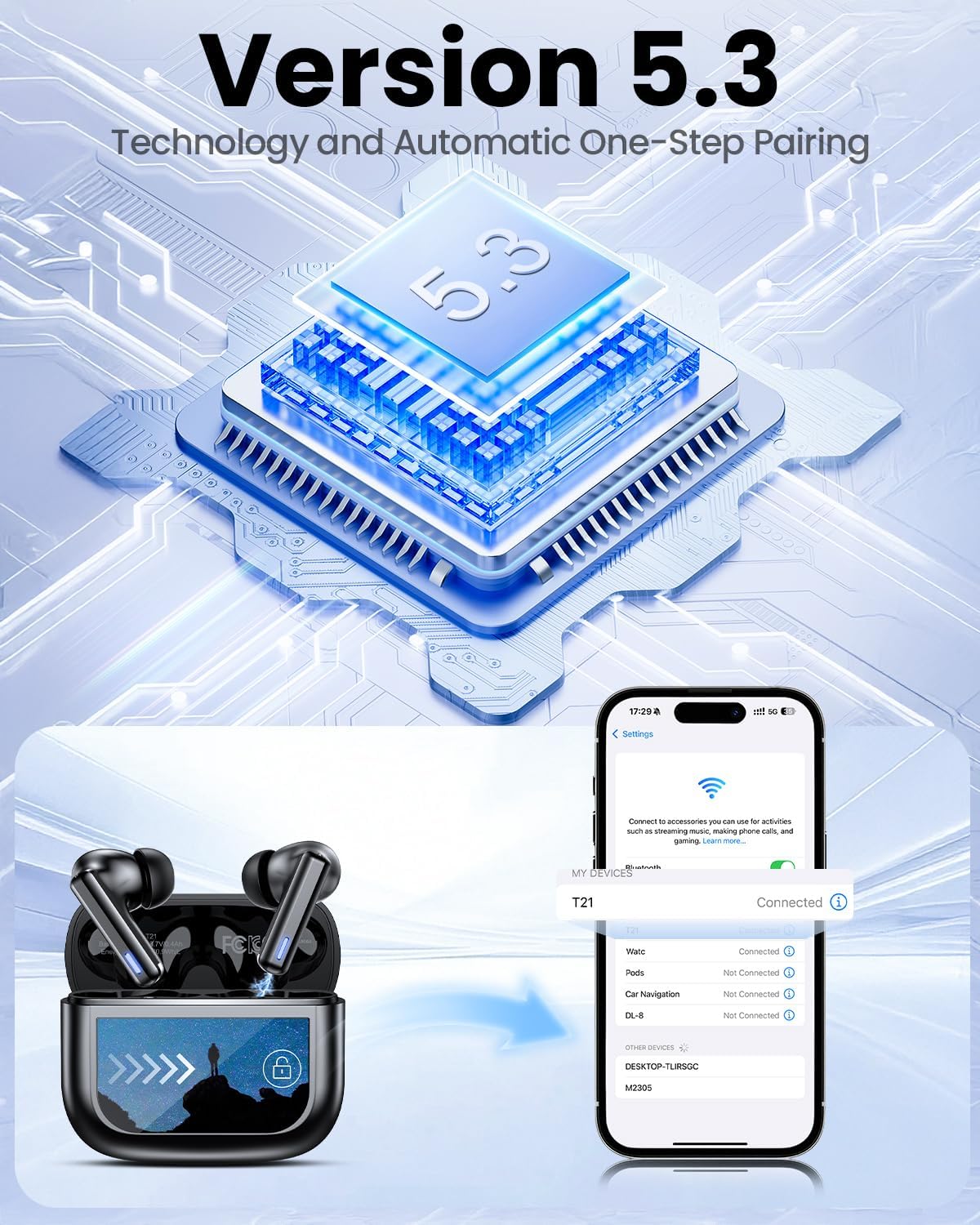
Image: Smart touch controls available on the earbuds.
Charging Case Touch Screen Functions:
- د موسیقۍ غږول: Control play, pause, and track navigation.
- د حجم کنټرول: د آډیو د وتلو کچه تنظیم کړئ.
- د شور کمول: Toggle between ANC, Transparency, and Normal modes.
- برابرونکی (EQ): Select from 5 preset sound profiles.
- د رڼا کچه: د سکرین روښانتیا تنظیم کړئ.
- د ژبې بدلون: د ښودلو ژبه بدله کړئ.
- زما اییرفون ومومئ: بې ځایه شوي غوږوالۍ ومومئ.
- د کیمرې کنټرول: د خپل تلیفون کیمره له لرې څخه چالان کړئ.

Image: Multi-functional LCD touch screen interface on the charging case.
4. ترتیب کول
4.1 ابتدايي چارج کول
- Before first use, remove the protective film from the charging contacts on both earbuds.
- غوږوالۍ د چارج کولو په قضیه کې ځای په ځای کړئ.
- Connect the USB-C charging cable to the case and a power source. The case's touchscreen will display the charging status.
- Fully charge the earbuds and case before initial use. A full charge takes approximately 1.5 hours.
4.2 د بلوتوټ جوړه کول
- د چارج کولو قضیه پرانیزئ. د غوږ بډونه به په اتوماتيک ډول د جوړې کولو حالت ته ننوځي.
- په خپل وسیله (سمارټ فون، ټابلیټ، لپ ټاپ) کې، بلوتوث فعال کړئ.
- لټون شته بلوتوث وسایل او له لیست څخه "T21" غوره کړئ.
- Once connected, the earbuds will indicate successful pairing, and the device will show "Connected".

Image: Bluetooth 5.3 technology and one-step pairing process.
5. عملیاتي لارښوونې
۴.۲ د فعال شور لغوه کول (ANC) او د شفافیت حالت
The earbuds feature Hybrid Active Noise Cancellation (ANC) to reduce ambient noise by up to 40dB, and a Transparency Mode to allow you to hear your surroundings.
- د بدلولو طریقې: Press and hold either earbud for 2 seconds to cycle between ANC, Transparency, and Normal modes. You can also switch modes via the charging case touchscreen.

Image: Active Noise-Cancelling in use.
5.2 Sound Quality and EQ Modes
Equipped with 14.2mm dynamic drivers, the earbuds deliver balanced audio. You can customize your listening experience with 5 Equalizer (EQ) presets:
- نورمال
- ډبره
- کلاسیک
- پاپ
- جاز
Select your preferred EQ mode directly from the charging case touchscreen.

Image: Available 5 EQ Modes for audio customization.
5.3 تلیفونونه کول او ترلاسه کول
The dual-ENC microphones are designed to reduce 98% of background noise, ensuring clear calls even in noisy environments.
- ځواب / پای کال: په دواړو غوږونو کې یو ځل کلیک وکړئ.
- زنګ رد کړئ: هر یو ایربډ فشار ورکړئ او ونیسئ.

Image: Earbud design for superior call clarity with built-in microphones.
5.4 Find My Earbuds Feature
The charging case touchscreen includes a "Find My Earphone" function to help locate misplaced earbuds.
- Access the "Find My Earphone" option on the case's touchscreen. The earbuds will emit a sound to assist in locating them.

Image: Using the 'Find My Earbuds' feature on the charging case.
5.5 د بیټرۍ مدیریت
The earbuds provide up to 8 hours of playtime on a single charge, extended to a total of 40 hours with the charging case. A 10-minute quick charge can provide 2 hours of music playback.
- The charging case touchscreen displays the battery percentage د کیس او انفرادي ایربډونو دواړو لپاره.

Image: Battery life indication for ZIUTY T21 earbuds and charging case.
6. ساتنه
6.1 پاکول
Regular cleaning helps maintain optimal performance and charging efficiency.
- Use an alcohol pad or a soft, dry cloth to clean the charging contacts on both the earbuds and inside the charging case.
- Gently clean the ear tip mesh to remove any dust or earwax that may affect sound quality or volume.

Image: Cleaning instructions for earbuds and charging case contacts.
۲.۷ د اوبو مقاومت
The ZIUTY T21 earbuds have an IPX7 waterproof rating, meaning they can withstand immersion in water up to 1 meter for 30 minutes. This makes them suitable for workouts and light rain exposure.
- د چارج کولو کیس په اوبو کې مه ډوبوئ.
- ډاډ ترلاسه کړئ چې د زیان مخنیوي لپاره د چارج کولو په قضیه کې د بیرته ځای په ځای کولو دمخه د غوږ بډونه وچ دي.

انځور: د ایربډونو IPX7 واټر پروف ځانګړتیا.
6.3 Eartip Selection and Comfort
The package includes S, M, and L size eartips to ensure a comfortable and secure fit for various ear canal sizes. A proper fit is crucial for optimal sound quality and noise cancellation.
- Experiment with different eartip sizes to find the best seal and comfort for your ears.
- To replace eartips, gently pull off the current tip and push on the new one, ensuring it is securely attached.

Image: Eartip sizes for comfortable and stable fit.
7. ستونزه حل کول
If you encounter issues with your ZIUTY T21 Wireless Earbuds, refer to the following common problems and solutions:
- د غوږونو نه جوړېږي:
Ensure earbuds are charged and removed from the case. Turn off and on your device's Bluetooth. Forget "T21" from your device's Bluetooth list and re-pair. - له یوې غوږۍ څخه غږ نشته:
Check if both earbuds are charged. Try placing both earbuds back in the case, closing it, and then reopening to reset the connection. Clean the charging contacts. - د چارج کولو مسلې:
Ensure the USB-C cable is securely connected to both the case and the power source. Clean the charging contacts on the earbuds and inside the case. Try a different charging cable or power adapter. - د غږ خراب کیفیت یا ټیټ غږ:
Ensure eartips provide a good seal. Clean the ear tip mesh to remove any obstructions. Adjust volume on both the earbuds (via touch controls) and your connected device. - د لمس کنټرولونه بې ځوابه دي:
Ensure your fingers are clean and dry. Try resetting the earbuds by placing them in the case and closing it for a few seconds.
8. مشخصات
| فیچر | مشخصات |
|---|---|
| د ماډل نوم | T21 |
| د ارتباط ټیکنالوژي | بېسیم (بلوتوث ۵.۳) |
| د بلوتوټ رینج | 15 متره |
| د شور کنټرول | د فعال شور منسوخ کول (ANC) |
| مایکروفون | Dual-ENC Microphones |
| د آډیو ډرایور اندازه | 14.2 ملی متره |
| د تعدد ځواب | 20 KHz |
| حساسیت | 107 dB |
| خنډ | 32 اوم |
| د بیټرۍ ژوند (ایربډونه) | تر 8 ساعتونو پورې |
| د بیټرۍ ژوند (د قضیې سره) | تر 40 ساعتونو پورې |
| د چارج کولو وخت | نږدې 1.5 ساعته |
| د اوبو د مقاومت کچه | IPX7 |
| د کنټرول ډول | د لمس کنټرول (د غوږونو بډونه)، د لمس سکرین (کیس) |
| ځانګړي ځانګړتیاوې | 5 EQ Presets, Find My Earbuds, Camera Control |
| مواد | اکریلونایتریل بوټاډین سټیرین (ABS) |
| د توکي وزن | 3.17 اونس (90 ګرامه) |
| د محصول ابعاد | 2.23 x 1.01 x 1.94 انچه |
9. تضمین او ملاتړ
For warranty information or technical support, please refer to the contact details provided with your purchase or visit the official ZIUTY webسایټ. د هر ډول تضمین ادعا لپاره د پیرود ثبوت وساتئ.