
پیژندنه
This manual provides detailed instructions for the installation, operation, and maintenance of the ASUS B760M-AYW WiFi D4 II microATX motherboard. Please read this manual thoroughly before installing or using the product to ensure correct setup and optimal performance.
د خوندیتوب معلومات
- تل د داخلي برخو لمس کولو دمخه د دیوال ساکټ څخه د بریښنا کیبل جلا کړئ.
- Wear an anti-static wrist strap or frequently touch a grounded object to prevent electrostatic discharge (ESD) damage to components.
- د حساسو برخو د لمس کولو څخه د مخنیوي لپاره اجزاو ته د هغوی د څنډو له لارې لاس ورکړئ.
- د ډیر تودوخې مخنیوي لپاره د خپل کمپیوټر په کیس کې مناسب هوا ورکول ډاډمن کړئ.
چمتو کول
۴.۱. د CPU نصبول
The motherboard supports Intel LGA 1700 socket processors. Carefully align the CPU with the socket, ensuring the triangular mark on the CPU matches the mark on the socket. Lower the CPU gently into the socket, then close the load plate and secure the retention lever.
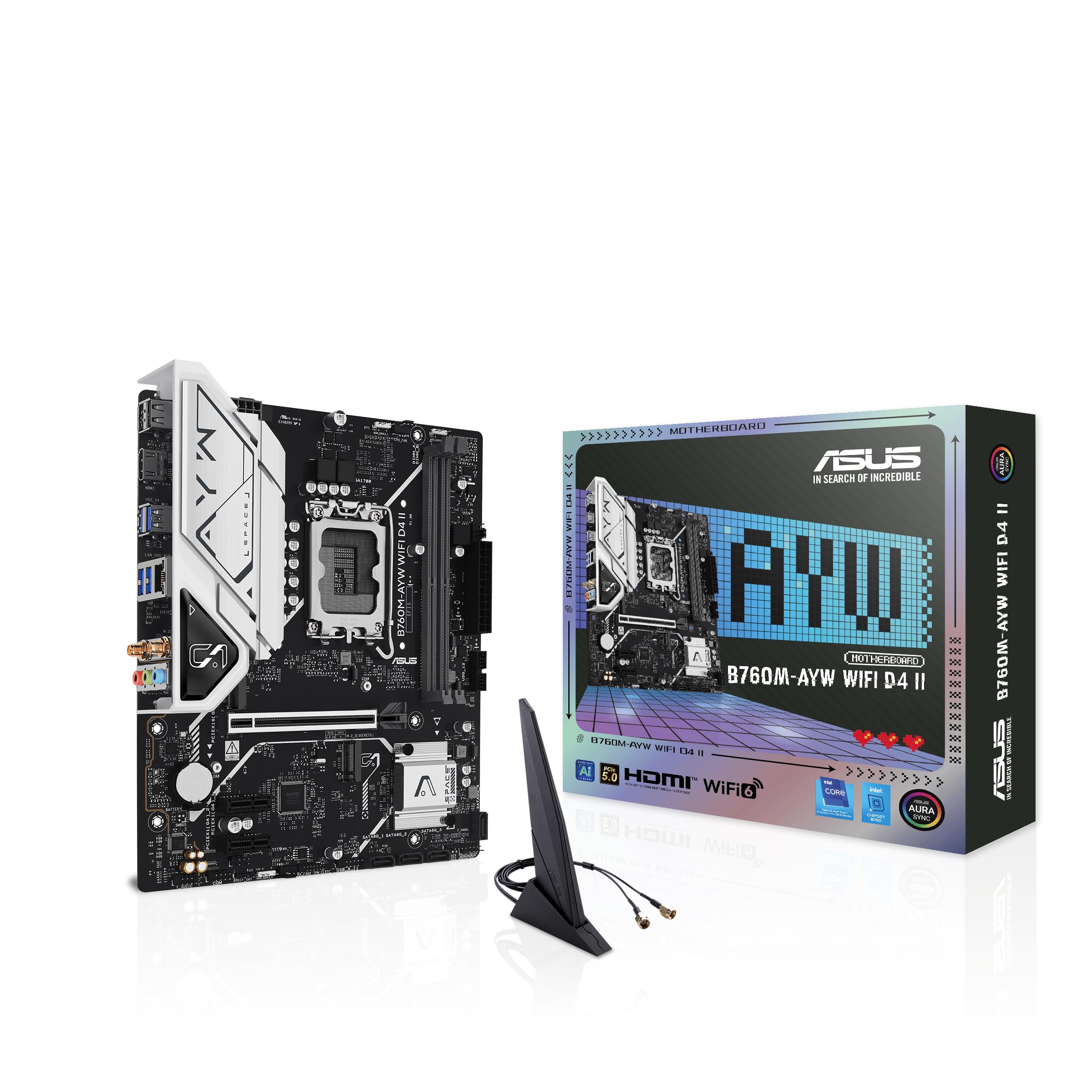
انځور: پورته-ښکته view of the ASUS B760M-AYW WiFi D4 II motherboard, highlighting the LGA 1700 CPU socket.
۳.۴. د حافظې (RAM) نصبول
This motherboard features two DDR4 DIMM slots. For optimal performance, install memory modules in a dual-channel configuration. Open the clips on both ends of the DIMM slot, align the memory module with the slot key, and press down firmly until the clips snap into place.
۲.۴. د ذخیره کولو نصبول (M.2 او SATA)
The motherboard includes two M.2 slots for NVMe SSDs and four SATA 6 Gbps ports for traditional hard drives or SSDs.
- M.2 SSD: Insert the M.2 SSD into the slot at a 30-degree angle, then push it down and secure it with the provided M.2 screw package.
- د SATA ډرایوونه: Connect SATA data cables from your storage drives to the SATA ports on the motherboard. Connect power cables from your power supply to the drives.

Image: The ASUS B760M-AYW WiFi D4 II motherboard shown with its retail box, Wi-Fi antenna, SATA cables, and M.2 screw packages.
۵. د پراختیا کارت نصبول (PCIe)
The motherboard features one PCIe 5.0 x16 slot for graphics cards and additional PCIe 4.0 x1 slots for other expansion cards. Insert the card firmly into the desired slot until it clicks into place and secure it with a case screw.
5. د بریښنا پيوستون
د 24-pin ATX بریښنا نښلونکی او د 8-pin CPU بریښنا نښلونکی د خپل بریښنا رسولو څخه د مدر بورډ اړوندو پورټونو سره وصل کړئ.
۵.۸. د مخکینۍ تختې اړیکې
Connect your PC case's front panel cables (USB 5Gbps, audio, power switch, reset switch, power LED, HDD LED) to the corresponding headers on the motherboard. Refer to the motherboard layout for exact header locations.
7. Rear I/O Connections
Connect your peripherals to the rear I/O ports. These include HDMI, USB 5Gbps Type-A, Realtek 2.5Gb Ethernet, and audio jacks.
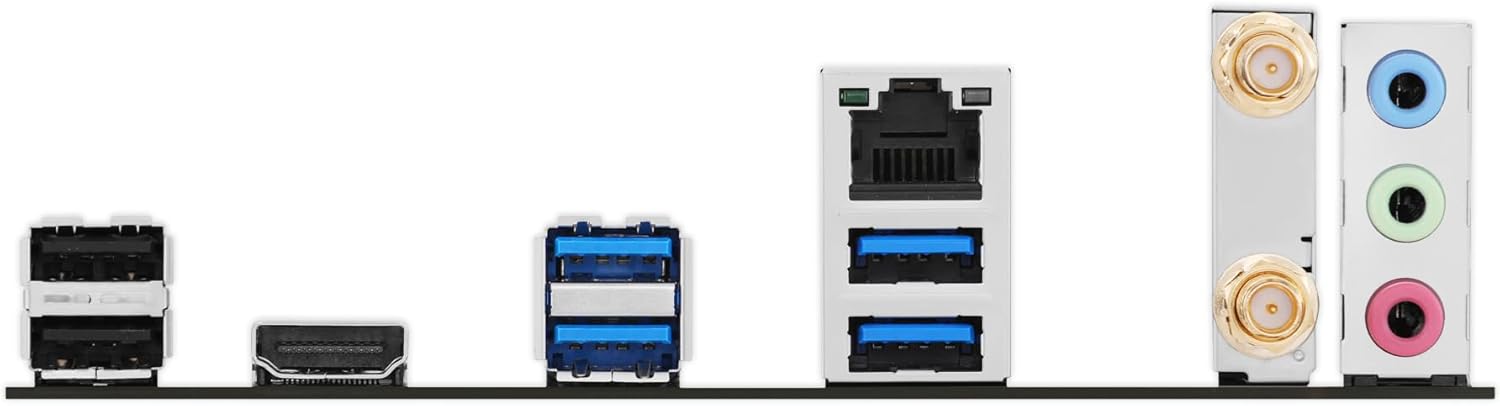
انځور: یو مفصل view of the rear input/output panel of the ASUS B760M-AYW WiFi D4 II motherboard, showing USB ports, Ethernet, and audio jacks.
۹. د وای فای انتن نصبول
Screw the included Wi-Fi antenna onto the two antenna connectors on the rear I/O panel. Position the antenna for optimal signal reception.
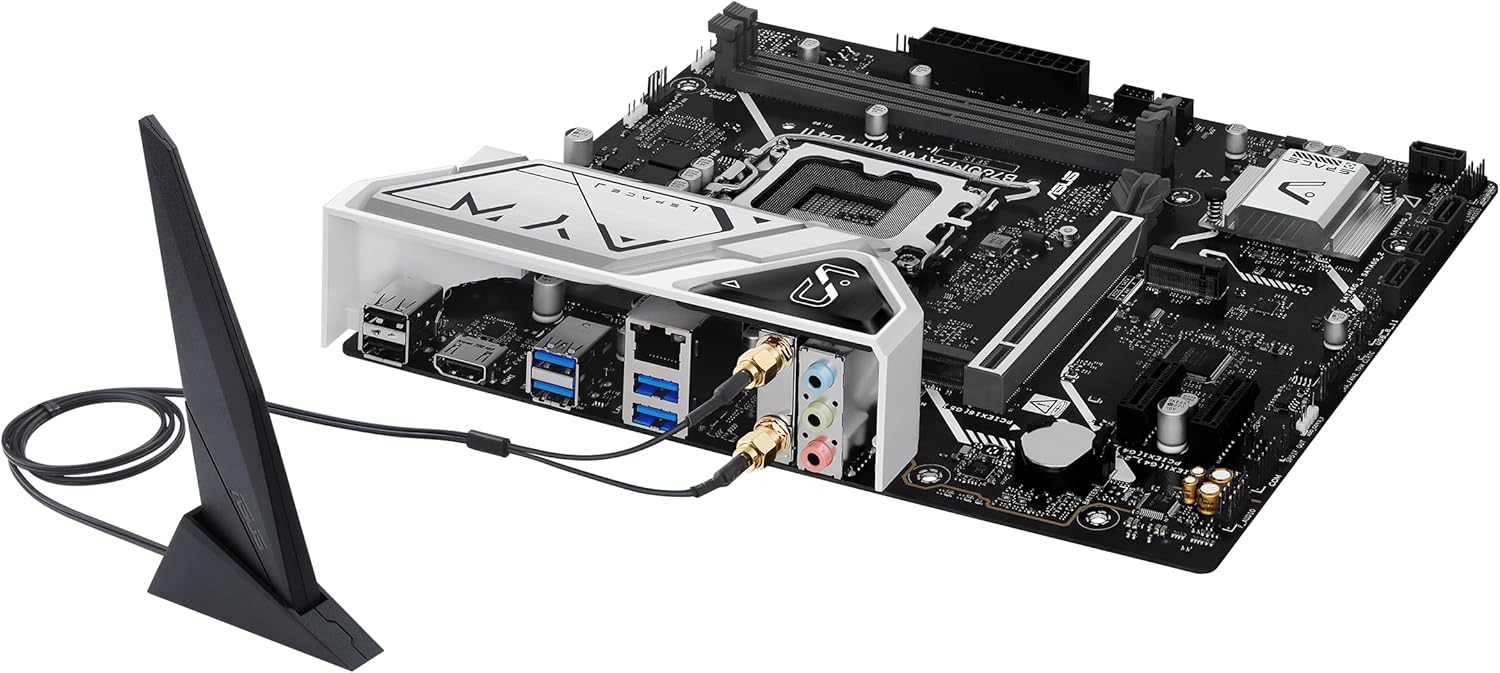
Image: The ASUS B760M-AYW WiFi D4 II motherboard with its external Wi-Fi antenna connected to the rear I/O ports.
عملیات
۳.۱. د BIOS/UEFI ترتیب
د BIOS/UEFI سیټ اپ یوټیلټي ته د لاسرسي لپاره، فشار ورکړئ ړنګول key during the Power-On Self-Test (POST). Here you can configure boot order, enable XMP for memory, adjust fan speeds, and manage other system settings.
2. د ډرایور نصب کول
After installing your operating system, install the necessary drivers for the motherboard's components. These include chipset drivers, LAN drivers, Wi-Fi drivers, and audio drivers. Drivers can be found on the ASUS support webستاسو د ځانګړي مور بورډ ماډل لپاره سایټ.
۴.۳. د سافټویر اسانتیاوې
ASUS provides several utilities to enhance your system experience:
- د اور سنک: For controlling RGB lighting on compatible components.
- Fan Xpert 2+: د پرمختللي فین کنټرول او د سیسټم یخولو اصلاح لپاره.
- د زغره دار صندوق: A centralized software suite for system monitoring, driver updates, and utility management.
ساتنه
۱۲. د BIOS تازه معلومات
په دوره یي ډول د ASUS ملاتړ وګورئ website for BIOS updates. BIOS updates can improve system stability, add support for new hardware, or fix bugs. Use the ASUS EZ Flash utility within the BIOS to perform updates, following the instructions carefully.
۴. د موټر چلوونکي تازه معلومات
Keep your drivers updated to ensure optimal performance and compatibility. Regularly check the ASUS support webستاسو د مور بورډ لپاره د وروستي ډرایورانو لپاره سایټ.
3. پاکول
To maintain optimal performance and longevity, regularly clean dust from your PC case and motherboard components. Use compressed air to remove dust from heatsinks, fans, and slots. Ensure the system is powered off and unplugged before cleaning.
د ستونزو حل کول
1. Q-LED Core Indicators
The motherboard features Q-LED Core indicators that light up to indicate the status of key components during POST. These LEDs can help diagnose issues:
- د CPU LED: د CPU د پیل حالت په ګوته کوي.
- د ډرام LED: Indicates memory detection status.
- د VGA LED: Indicates graphics card detection status.
- د بوټ LED: Indicates boot device detection status.
If an LED remains lit, it suggests an issue with the corresponding component.
۷.۲. عامې ستونزې
- ځواک نشته: ټول بریښنا اتصالونه وګورئ (۲۴ پن ATX، ۸ پن CPU، GPU بریښنا). ډاډ ترلاسه کړئ چې د بریښنا رسولو سویچ فعال دی.
- نه ښودنه: Verify the graphics card is properly seated and connected to power. Ensure the monitor cable is connected to the graphics card, not the motherboard (unless using integrated graphics).
- د سیسټم بې ثباتي: Check memory seating, run memory diagnostic tools, ensure CPU cooler is properly installed, and verify BIOS settings.
- پردی نه دی موندل شوی: Ensure the device is properly connected and its drivers are installed. Try a different port if available.
مشخصات
| فیچر | مشخصات |
|---|---|
| برانډ | ASUS |
| د ماډل نوم | B760M-AYW WIFI D4 II |
| د CPU ساکټ | LGA 1700 |
| مطابقت لرونکي پروسیسرونه | Intel Core 14th, 13th, 12th Gen, Pentium Gold, Celeron Processors |
| د چپسیټ ډول | Intel B760 |
| د RAM حافظې ټیکنالوژي | DDR4 |
| د حافظې سلاټونه شتون لري | 2 |
| د حافظې د ذخیره کولو اعظمي ظرفیت | 96 جي بي |
| د ګرافیک کارت انٹرفیس | PCI ایکسپریس 5.0 x16 |
| Total M.2 Slots | 2 |
| Total SATA Ports | 4 |
| ایترنیټ | ریالټیک ۲.۵ جی بی ایترنیټ |
| وای فای | وای فای ۶ |
| د HDMI بندرونه | 1 |
| د فایبر USB | USB 5Gbps support |
| ریښتنی USB | د USB 5Gbps ډول-A |
| د فارم فکتور | microATX |
| د توکي ابعاد (L x W x H) | ۷۱"لیتر x ۲۳.۶"واټه x ۲۴.۴"هوا |
د تضمین معلومات
The ASUS B760M-AYW WiFi D4 II motherboard comes with a 3-year limited warranty. For detailed terms and conditions, please refer to the warranty card included with your product or visit the official ASUS support webسایټ
ملاتړ
For technical support, driver downloads, BIOS updates, and further product information, please visit the official ASUS support webسایټ:
تاسو کولی شئ د ملاتړ پورټل کې د FAQs او د ستونزو حل کولو لارښوونې هم ومومئ.