
1. پیژندنه
The RockSeed S2 Digital Laser Distance Meter is a precision measuring instrument designed for accurate distance, area, and volume calculations. It features two bubble levels for enhanced precision, multiple measurement modes, and unit switching capabilities. This manual provides detailed instructions for the safe and effective use of your device.

Image: The RockSeed S2 Digital Laser Distance Meter, highlighting its accuracy of ±2mm/±0.08inch and a measurement range of 50m/165ft.
2. د خوندیتوب معلومات
2.1 لیزر خوندیتوب
دا وسیله د دوهم ټولګي لیزر خپروي. لاندې خوندیتوب احتیاطي تدابیر په پام کې ونیسئ:
- مستقیم لیزر بیم ته مه ګورئ.
- د لیزر بیم په خلکو یا څارویو کې مه هدف مه کوئ.
- د لیزر بیم ته د سترګو مستقیم تماس څخه مخنیوی وکړئ.
- Do not disassemble the device; laser radiation exposure may result.
2.2 عمومي خوندیتوب
- وسیله د ماشومانو له لاسرسي لرې وساتئ.
- وسیله په چاودیدونکو چاپیریالونو کې مه کاروئ.
- Protect the device from impact, vibration, and extreme temperatures.
- وسیله په نرمۍ سره پاکه کړئ، دamp ټوکر سخت کیمیاوي توکي مه کاروئ.
3. د بسته محتويات
ډاډ ترلاسه کړئ چې ټول توکي په کڅوړه کې شتون لري:
- RockSeed S2 Red Laser Distance Meter (165Ft)
- د لارښوونې لارښود
- د بسته بندۍ بکس
- د جامو کڅوړه
- AAA 1.5V Batteries (2 included)
- Lanyard / Hand Strap

Image: The complete package contents for the RockSeed S2 Laser Distance Meter, laid out for inspection.
4. Product Features & Controls
The RockSeed S2 Laser Distance Meter is equipped with features designed for efficient and accurate measurements:
- لوړ دقت: Measures distances up to 165 feet (50 meters) with an accuracy of ±1/16 inch (±2mm).
- د بلبل دوه ګونی کچه: Integrated horizontal and vertical bubble levels for precise alignment.
- د بیکلیټ LCD ښودنه: Large display with backlight for visibility in various lighting conditions.
- د اندازه کولو څو طریقې: Includes single distance, continuous, area, volume, and Pythagorean (three points) measurements.
- د واحد بدلول: Easily switch between meters (M), inches (In), and feet (Ft).
- د معلوماتو ذخیره کول: Stores up to 20 groups of measurement data.
- د خاموش فعالیت: Option to turn off the measurement beep for quiet environments.
- دوامدار ډیزاین: IP54 rated for splash and dust resistance, with a hard rubber body for grip and protection.
- د موټرو بندول: د بیټرۍ د خوندي کولو لپاره د ۱۸۰ ثانیو غیر فعال کیدو وروسته په اتوماتيک ډول بندیږي.
۲.۳ د وسیلې ترتیب او تڼۍ
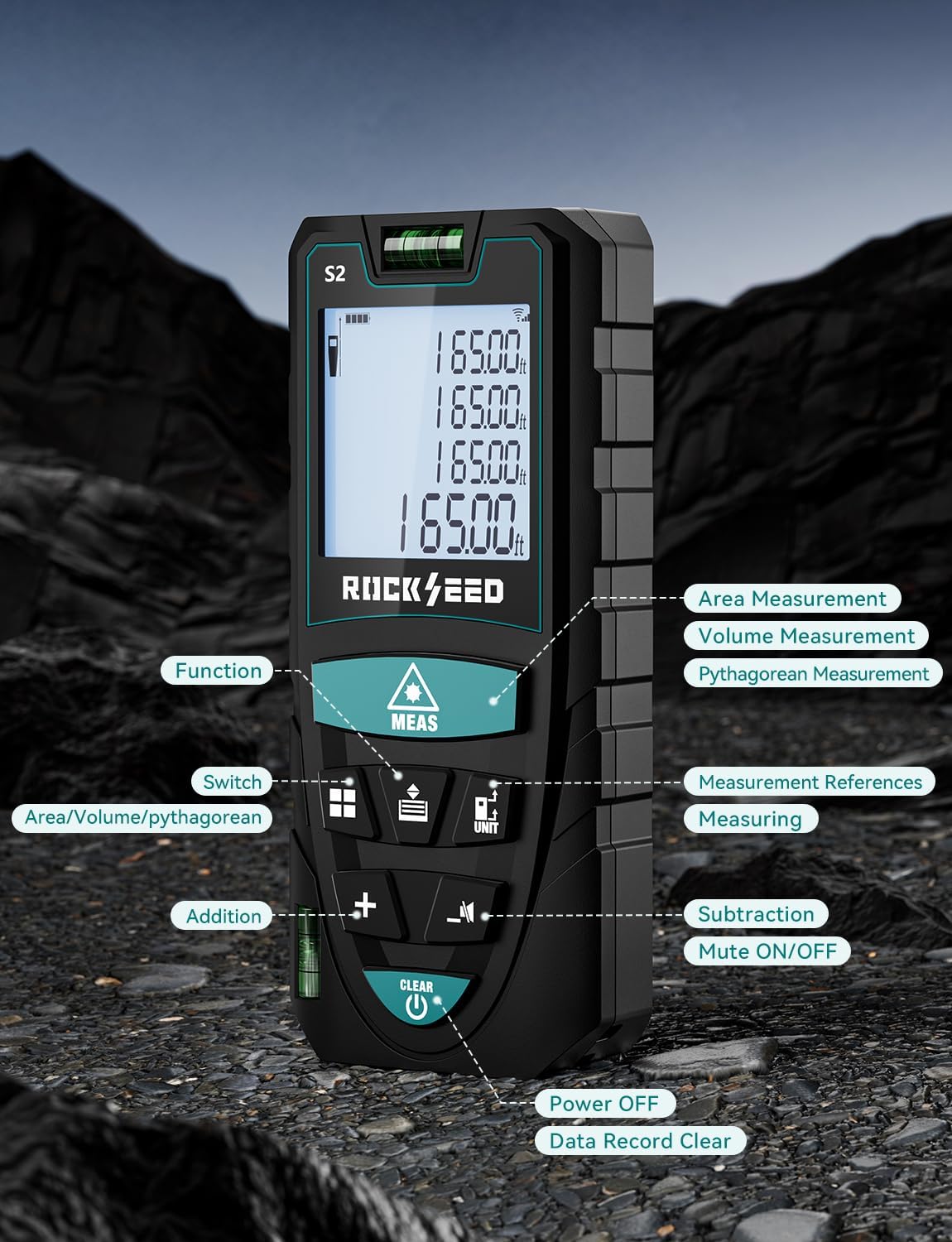
انځور: یو مفصل view of the RockSeed S2 Laser Distance Meter, indicating the location and function of each button, including Function, Switch, Addition, Subtraction, Mute ON/OFF, Measurement References, Measuring, Power Off, and Data Record Clear.
Refer to the image above for the location of each control button:
- د MEAS تڼۍ: Initiates single or continuous measurement.
- د فعالیت تڼۍ: Cycles through measurement modes (Area, Volume, Pythagorean).
- د واحد تڼۍ: Changes measurement units (M/In/Ft).
- Reference Button: Switches between front and back measurement reference points.
- + / - تڼۍ: د اندازه کولو د جمع او تفریق لپاره کارول کیږي.
- تteۍ غږول: Toggles the measurement beep sound on or off.
- CLEAR / OFF Button: Clears current measurement, deletes data, or powers off the device (long press).
5. ترتیب کول
5.1 د بیټرۍ نصب کول
The RockSeed S2 requires two AAA 1.5V batteries (included). To install or replace batteries:
- د وسیلې په شا کې د بیټرۍ د برخې پوښ ومومئ.
- د خونې د خلاصولو لپاره پوښ ښکته خوا ته وغورځوئ.
- دوه AAA بیټرۍ دننه کړئ، د سم قطبیت ډاډ ترلاسه کړئ (+/-).
- د بیټرۍ د برخې پوښ د پورته خوا ته د پورته کولو سره وتړئ تر هغه چې دا په خپل ځای کې کلیک وکړي.
6. عملیاتي لارښوونې
۸ پاور آن/بند
- پاور آن: فشار ورکړئ MEAS button once to turn on the device.
- بندول: اوږد فشار ورکړئ پاک / بند button to turn off the device. The device will also automatically power off after 150 seconds of inactivity.
۵.۲ د واحد بدلول
To change the measurement unit (meters, inches, feet):
- اوږد فشار ورکړئ UNIT button to cycle through M (meters), In (inches), Ft (feet), and Ft+In (feet and fractional inches).

Image: The device display illustrating the four available unit conversions: feet + inches, inches, meters, and feet.
۶.۴ د حوالې نقطې انتخاب
The device can measure from its front or back edge. The default is typically the back edge.
- فشار ورکړئ حواله button to switch between the front and back reference points. An icon on the display will indicate the active reference point.

Image: Illustration demonstrating how to measure from both the front and back reference points of the device.
۵.۲ د واټن واحد اندازه کول
- لیزر د هدف سطحې ته وښایاست.
- فشار ورکړئ MEAS یو ځل تڼۍ. اندازه شوی واټن به په نندارتون کې څرګند شي.
۴.۲ دوامداره اندازه کول (تعقیب)
- فشار ورکړئ MEAS button and hold it for approximately 2 seconds. The device will enter continuous measurement mode.
- Move the device to track distances. The display will update in real-time, showing current, minimum, and maximum values.
- فشار ورکړئ MEAS button again to exit continuous measurement mode.
6.6 د ساحې اندازه کول
- فشار ورکړئ فعالیت button until the area icon (rectangle) appears on the display.
- د فشار په واسطه لومړی اړخ (اوږدوالی) اندازه کړئ MEAS.
- دوهم اړخ (پلورل) د فشار په واسطه اندازه کړئ MEAS بیا
- محاسبه شوې ساحه به ښکاره شي.
6.7 د حجم اندازه کول
- فشار ورکړئ فعالیت button until the volume icon (cube) appears on the display.
- د فشار په واسطه اوږدوالی اندازه کړئ MEAS.
- د فشار په واسطه عرض اندازه کړئ MEAS.
- د فشار په واسطه لوړوالی اندازه کړئ MEAS.
- محاسبه شوی حجم به ښکاره شي.
۵.۷ د فیثاغورث اندازه کول
This mode allows indirect measurement of height or distance using the Pythagorean theorem.
- فشار ورکړئ فعالیت button until a Pythagorean icon appears (there are typically 3 types: 2-point height, 3-point height, 3-point partial height). Select the desired mode.
- د اړتیا وړ اړخونو (هایپوټینوز، بیس، او نور) اندازه کولو لپاره د سکرین پرامپټس تعقیب کړئ. MEAS د هرې برخې لپاره.
- The calculated indirect measurement will be displayed.

انځور: بصري سابقهamples of the various measurement functions: Continuous Measurement, Area Measurement, Volume Measurement, and Pythagorean Measurement.
۵.۶ جمع او تفریق
To add or subtract measurements:
- اندازه کول ترسره کړئ.
- فشار ورکړئ + د اضافه کولو لپاره تڼۍ یا - د منفي کولو تڼۍ.
- Perform the next measurement. The result will be automatically added or subtracted.
- د اړتیا په صورت کې تکرار کړئ.
6.10 ډیټا حافظه
The device stores up to 20 sets of measurement data.
- ته view زیرمه شوي معلومات، فشار ورکړئ حافظه button (often integrated with another function button, refer to device layout).
- To manually delete the current data, press the روښانه تڼۍ
6.11 خاموش فعالیت
To enable or disable the measurement beep sound:
- فشار ورکړئ خاموش button (speaker icon) to toggle the sound on or off.

Image: A visual comparison of the device's display in daylight and with its LCD backlight activated in a dark environment, demonstrating improved visibility.
7. ساتنه
7.1 پاکول
- وسیله په نرمۍ سره مسح کړئ، دamp ټوکر د کثافاتو پاکوونکي یا محلول مه کاروئ.
- د لیزر لینزونه په نرم ټوکر سره په احتیاط سره پاک کړئ، لکه د کیمرې لینزونو پاکولو په څیر.
7.2 ذخیره کول
- Store the device in its protective cloth bag when not in use.
- Keep the device in a dry, cool place, away from direct sunlight and extreme temperatures.
- که چیرې وسیله د اوږدې مودې لپاره د لیکیدو مخنیوي لپاره ونه کارول شي، نو بیټرۍ لرې کړئ.
8. ستونزه حل کول
که تاسو په خپل وسیله کې ستونزې سره مخ شئ، لاندې عامې ستونزې او حل لارې وګورئ:
| ستونزه | احتمالي لامل | د حل لاره |
|---|---|---|
| وسیله فعاله نه ده | ټیټ یا مړه بیټرۍ؛ د بیټرۍ ناسم نصب کول | بیټرۍ بدل کړئ؛ د بیټرۍ قطبیت وګورئ. |
| ناسم اندازه کول | Unstable device; Obstruction in laser path; Target surface too reflective/non-reflective; Environmental factors (strong light) | Ensure device is stable; Clear laser path; Use a target plate for difficult surfaces; Measure in dimmer conditions. |
| لیزر بیم نه لیدل کیږي | روښانه چاپېریالي رڼا؛ د اوږد واټن اندازه کول | Use in dimmer conditions; Use a target plate. |
| په ښودلو کې د تېروتنې پیغام | Measurement out of range; Signal interference | Ensure target is within range; Re-measure, ensuring clear path. |
9. مشخصات
| فیچر | مشخصات |
|---|---|
| د ماډل شمیره | S2-50M |
| د اندازه کولو سلسله | 165 فوټ (50 متره) |
| دقت | ±۱/۱۶ انچه (±۱.۵ ملي متره) |
| د اندازه کولو واحدونه | Meters (M), Inches (In), Feet (Ft), Feet + Fractional Inches (Ft+In) |
| لیزر ټولګي | ټولګي 2 |
| د بیټرۍ ډول | ۲ x AAA ۱.۵V الکلین بیټرۍ |
| اتومات لیزر بند | 30 ثانیې |
| Auto Device Off | 150 ثانیې |
| د معلوماتو ذخیره کول | 20 ډلې |
| د دوړو او سپین پوښ محافظت | IP54 |
| مواد | اکریلونیتریل بوټایډین سټرینه |
| د توکي وزن | 120 ګرامه (4.2 اونس) |
| تصدیقونه | CE, FCC, FDA, ROHS |
10. تضمین او ملاتړ
10.1 د تضمین معلومات
RockSeed products in the United States come with a two-year free repair serviceدا تضمین د عادي استعمال لاندې موادو او کاریګرۍ نیمګړتیاوې پوښي.
10.2 تخنیکي ملاتړ
For technical assistance or after-sales service, please contact RockSeed support:
- تلیفون: 904-900-2136 (Monday to Friday, 9:00 a.m. to 6:00 p.m. Eastern Time)
- بریښنالیک: Replies typically within 24 hours on weekdays.
RockSeed is committed to continuous improvement and customer satisfaction.