
INPHIC B0FQCFSHPQ
INPHIC Tri-Mode Wireless Mouse User Manual
Model: B0FQCFSHPQ
پیژندنه
This manual provides comprehensive instructions for the INPHIC Tri-Mode Wireless Mouse, Model B0FQCFSHPQ. It covers setup, operation, maintenance, and troubleshooting to ensure optimal performance and user experience. Please read this manual thoroughly before using the product.
محصول پای ته ورسیدview
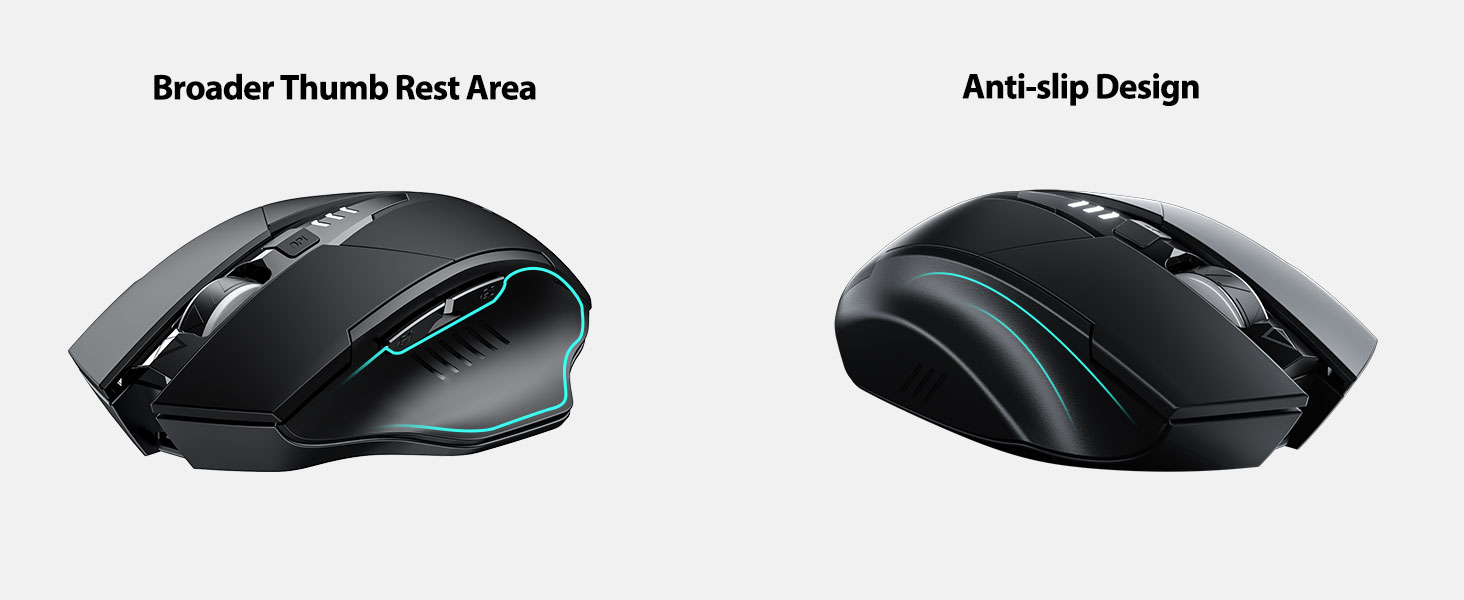
The INPHIC Tri-Mode Wireless Mouse offers versatile connectivity options (Bluetooth 5.0, Bluetooth 4.0, and 2.4G USB) and an ergonomic design for comfortable use. Key features include a visible battery indicator, silent click buttons, and adjustable DPI settings.
د بسته محتويات
- INPHIC Tri-Mode Wireless Mouse
- د USB رسیور (په موږک کې زیرمه شوی)
- د USB-C چارج کیبل
- د کارونکي لارښود (دا لاسوند)
د موږک اجزا

- د کیڼ/ښي کلیک تڼۍ: خاموش عملیات.
- سکرول ویل: د عمودی سکرول کولو لپاره.
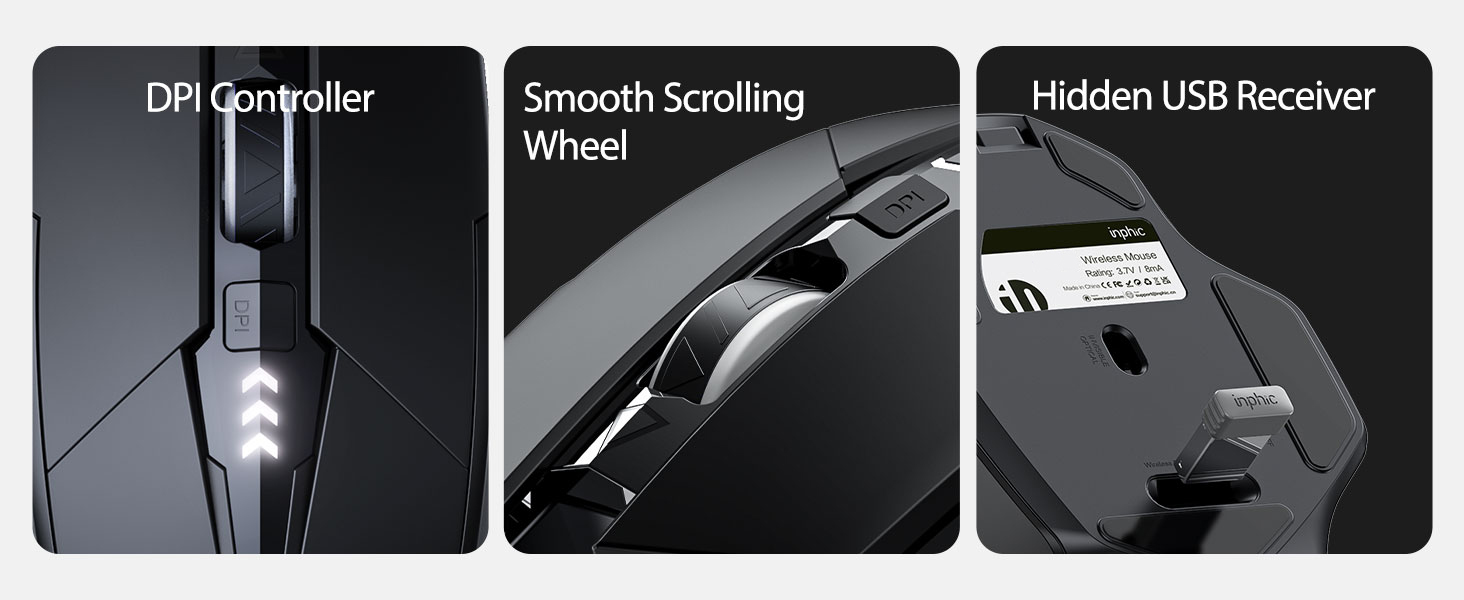
- د DPI تڼۍ: Adjusts cursor speed (800/1200/1600/2000/2400 DPI).
- Forward/Backward Buttons (Side): د نیویګیشن لپاره web براوزرونه یا file سپړونکي
- د بیټرۍ شاخص: LED lights on top display remaining battery level.
- Connection Type Switch (Bottom): Toggles between 2.4G USB, Bluetooth 4.0, and Bluetooth 5.0 modes.
- Power Switch (Bottom): آن/بند سویچ.
- USB Receiver Slot (Bottom): د 2.4G USB ریسیور ذخیره کوي.
- Charging Port (Front): د داخلي بیټرۍ د چارجولو لپاره د USB-C پورټ.
چمتو کول
ابتدايي چارج کول
Before first use, fully charge the mouse for approximately 1 hour. Connect the USB-C charging cable to the mouse's charging port and to a USB power source (e.g., computer USB port, USB wall adapter).

د موږک سره نښلول
The mouse supports three connection modes: 2.4G USB, Bluetooth 4.0, and Bluetooth 5.0. Use the switch on the bottom of the mouse to select your desired mode.
د 2.4G USB اتصال
- Locate the USB receiver stored in the slot on the bottom of the mouse.
- د USB ریسیور په خپل کمپیوټر کې موجود USB پورټ کې ولګوئ.
- Switch the connection mode on the bottom of the mouse to "2.4G".
- Turn on the mouse using the power switch. The mouse should connect automatically.
Bluetooth Connection (BT 4.0 / BT 5.0)
- Switch the connection mode on the bottom of the mouse to "BT 4.0" or "BT 5.0".
- د بریښنا سویچ په کارولو سره موږک چالان کړئ.
- On your device (laptop, tablet, etc.), open Bluetooth settings.
- لټون new Bluetooth devices. The mouse should appear as "INPHIC Mouse" or similar.
- د جوړې کولو لپاره موږک غوره کړئ.
- یوځل چې جوړه شي، موږک د کارولو لپاره چمتو دی.
یادونه: Bluetooth 5.0 is compatible with Windows 8/10 (not Windows 7 or XP), Android, and Mac OS systems. iOS systems (iPad and iPhone) require iOS 14 or later for Bluetooth 5.0 compatibility.
عملیاتي لارښوونې
پاور آن/بند
Use the ON/OFF switch located on the bottom of the mouse to power the device. To conserve battery, turn off the mouse when not in use for extended periods.
د پیوستون حالت بدلول
The mode switch button on the bottom of the mouse allows you to cycle between 2.4G USB, Bluetooth 4.0, and Bluetooth 5.0 connections. This enables seamless switching between multiple paired devices.

د DPI تنظیم کول (د کرسر سرعت)
Press the DPI button located on the top of the mouse, below the scroll wheel, to cycle through 5 adjustable DPI levels: 800, 1200, 1600, 2000, and 2400. This allows you to customize cursor sensitivity to your preference.

د بیټرۍ شاخص
The mouse features a visible battery indicator on its top surface. LED lights illuminate to show the remaining battery power, providing a clear visual cue for when recharging is needed.

د اتوماتیک خوب حالت
To conserve power, the mouse will automatically enter sleep mode after 5 minutes of inactivity. To wake the mouse, simply click any button.
ساتنه
پاکول
Wipe the mouse with a soft, dry cloth. For stubborn dirt, a slightly damp ټوکر کارول کیدی شي، ډاډ ترلاسه شي چې رطوبت داخلي برخو ته ننوځي. د سختو کیمیاوي موادو یا د کثافاتو پاکوونکو څخه ډډه وکړئ.
د بیټرۍ پاملرنه
- Recharge the mouse when the battery indicator shows low power.
- د بیټرۍ د عمر د اوږدولو لپاره د هغې د بار بار بشپړ چارج کولو څخه ډډه وکړئ.
- موږک په یخ او وچ ځای کې وساتئ کله چې د اوږدې مودې لپاره نه کارول کیږي.
د ستونزو حل کول
| ستونزه | احتمالي لامل | د حل لاره |
|---|---|---|
| موږک ځواب نه ورکوي |
|
|
| د کرسر حرکت بې نظمه یا ورو دی |
|
|
| د بلوتوث پیوستون مسلې |
|
|
مشخصات
| فیچر | تفصیل |
|---|---|
| ماډل | B0FQCFSHPQ |
| د ارتباط ټیکنالوژي | Bluetooth 5.0 / Bluetooth 4.0 / 2.4G USB Wireless |
| د DPI کچه | ۸۰۰ / ۱۲۰۰ / ۱۶۰۰ / ۲۰۰۰ / ۴۸۰۰ (د تعدیل وړ) |
| تڼۍ | ۶ (کیڼ، ښي، سکرول ویل، DPI، مخکې، شاته) |
| د بیټرۍ ډول | د چارج وړ (۵،۲۰۰mAh جوړ شوی) |
| د چارج کولو بندر | USB-C |
| عملیاتي فاصله | تر 10 مترو پورې (33 فوټ) |
| د محصول ابعاد | 4.7 x 3.1 x 0.04 انچه |
| د توکي وزن | 3.36 اونس |
| مطابقت | Windows 7/8/10/XP, Vista, Mac OS. Bluetooth 5.0: Windows 8/10, Android, Mac OS, iOS 14+ (iPad/iPhone). 2.4G USB: Any USB-enabled device. |

تضمین او ملاتړ
INPHIC products are designed for reliability and performance. For warranty information and technical support, please refer to the official INPHIC webسایټ ته مراجعه وکړئ یا مستقیم د دوی د پیرودونکو خدماتو سره اړیکه ونیسئ.
- جوړونکی: INPHIC
- پلورونکی: YingFeiTe (on Amazon)
- د راستنیدو پالیسي: Refer to Amazon's current return policy.
- د ملاتړ اړیکه: د مرستې لپاره، لیدنه وکړئ INPHIC Store on Amazon یا د تولیدونکي چارواکي webسایټ
د خوندیتوب مهم معلومات
- موږک د سختې تودوخې یا رطوبت سره مه مخ کوئ.
- د قوي تاثیراتو لپاره موږک د غورځولو یا تابع کولو څخه ډډه وکړئ.
- Do not attempt to disassemble or repair the mouse yourself. This may void the warranty.
- د ماشومانو د لاسرسي څخه لرې وساتئ.
د محصول ویډیو
د ویډیو تفصیل: An official product video from INPHIC demonstrating the features and usage of the INPHIC Bluetooth Mouse. It shows the mouse being unboxed, its various components, connection methods, and ergonomic design in action.