
پیژندنه
The Rapoo M308 is a versatile multi-mode wireless mouse designed for efficiency and comfort. It features an ambidextrous design, allowing comfortable use for both right-handed and left-handed individuals. With its dual connectivity options, Bluetooth 5.0 and 2.4 GHz wireless, you can seamlessly connect to up to three devices and switch between them with ease. The mouse is engineered for long-lasting performance, offering a battery life of up to 12 months.
د بسته محتويات
- Rapoo M308 Multi-mode Wireless Mouse
- د USB رسیدونکی (د موږک دننه زیرمه شوی)
- 2 AA بیټرۍ
- د چټک پیل لارښود (دا لارښود)
محصول پای ته ورسیدview
Familiarize yourself with the components of your Rapoo M308 mouse.
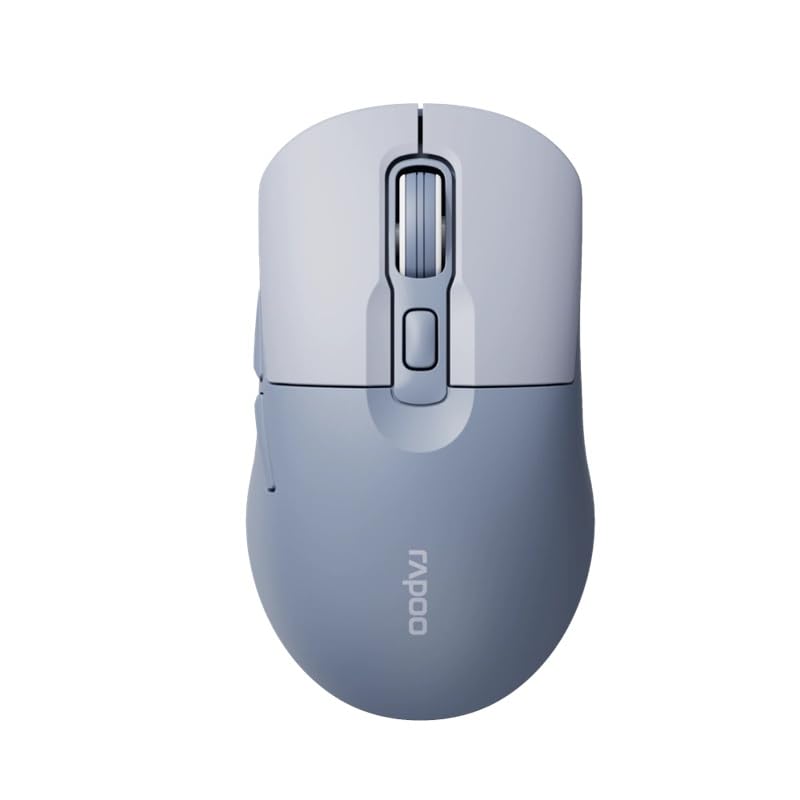
Image: The Rapoo M308 Multi-mode Wireless Mouse in blue, showcasing its ergonomic, ambidextrous design with a scroll wheel and multiple buttons.
- کیڼ تڼۍ: معیاري کیڼ کلیک فعالیت.
- ښي تڼۍ: د ښي کلیک کولو معیاري فعالیت.
- سکرول ویل: د سکرول کولو او منځني کلیک فعالیت لپاره.
- د DPI تڼۍ: د کرسر حساسیت (DPI) تنظیموي.
- Mode Switch Button/Indicator: Switches between connected devices (2.4G, Bluetooth 1, Bluetooth 2) and indicates current mode.
- د غاړې تڼۍ: Forward/Backward navigation (programmable).
- د بیټرۍ کڅوړه: Located on the underside, holds 2 AA batteries.
- د USB ترلاسه کونکي سلاټ: Located inside the battery compartment for storage.
چمتو کول
1. د بیټرۍ نصب کول
- د موږک په لاندې برخه کې د بیټرۍ د برخې پوښ خلاص کړئ.
- دوه AA بیټرۍ دننه کړئ، د سم قطبیت ډاډ ترلاسه کړئ (+/-).
- د بیټرۍ کمپارټ پوښ وتړئ.
2. Connecting via 2.4 GHz Wireless
- Remove the USB receiver from its storage slot inside the battery compartment.
- د USB ریسیور په خپل کمپیوټر کې موجود USB پورټ کې ولګوئ.
- Turn on the mouse. The mouse should automatically connect to your computer. The mode indicator light will show a steady green light for a few seconds.
3. د بلوتوث له لارې نښلول
The M308 mouse supports two Bluetooth connections (BT1 and BT2).
- موږک چالان کړئ.
- Press the mode switch button to select either Bluetooth 1 (blue light flashes slowly) or Bluetooth 2 (blue light flashes slowly).
- Press and hold the mode switch button for 3 seconds until the blue light starts flashing rapidly. This indicates the mouse is in pairing mode.
- په خپل کمپیوټر یا وسیله کې، د بلوتوث ترتیباتو ته لاړ شئ او د نویو وسایلو لټون وکړئ.
- Select "Rapoo M308" from the list of available devices to pair.
- Once paired, the blue light will become steady for a few seconds and then turn off.
عملیاتي لارښوونې
د وسیلو تر مینځ بدلول
The Rapoo M308 allows you to connect to up to three devices (one 2.4G wireless and two Bluetooth devices) and switch between them.
- Briefly press the mode switch button to cycle through the connected devices: 2.4G (green light), Bluetooth 1 (blue light), Bluetooth 2 (blue light).
- The indicator light will briefly illuminate in the corresponding color to confirm the selected mode.
د DPI تعدیل
Press the DPI button (usually located behind the scroll wheel) to cycle through different DPI settings. This changes the cursor speed and sensitivity. The indicator light may flash to show the current DPI level (e.g., one flash for low DPI, two for medium, etc.).
ساتنه
- پاکول: د موږک د پاکولو لپاره نرم، وچ ټوکر وکاروئ. د سختې خاورې لپاره، یو څه damp ټوکر کارول کیدی شي، مګر ډاډ ترلاسه کړئ چې رطوبت وسیله ته ننوځي.
- د بیټرۍ بدلول: When the mouse performance degrades or the indicator light signals low battery, replace the two AA batteries following the installation steps.
- ذخیره کول: کله چې د اوږدې مودې لپاره نه کارول کیږي، د بیټرۍ ژوند خوندي کولو لپاره موږک بند کړئ. د ضایع کیدو مخنیوي لپاره د USB ریسیور په موږک کې وساتئ.
د ستونزو حل کول
- موږک ځواب نه ورکوي:
- وګورئ چې موږک چالان دی که نه.
- ډاډ ترلاسه کړئ چې بیټرۍ په سمه توګه نصب شوي او خالي شوي نه دي. که اړتیا وي نو بدل یې کړئ.
- For 2.4G connection, ensure the USB receiver is securely plugged into a working USB port. Try a different USB port.
- For Bluetooth connection, ensure the mouse is in the correct Bluetooth mode (BT1 or BT2) and successfully paired with your device. Re-pair if needed.
- د کرسر حرکت بې نظمه یا ورو دی:
- د موږک په لاندې برخه کې نظري سینسر پاک کړئ.
- ډاډ ترلاسه کړئ چې تاسو موږک په مناسب سطحه کاروئ (غیر انعکاسي، غیر شفاف).
- د DPI تڼۍ په کارولو سره د DPI ترتیب تنظیم کړئ.
- د وسیلو ترمنځ نشي بدلیدلی:
- Ensure all devices are properly connected (2.4G receiver plugged in, Bluetooth devices paired).
- Briefly press the mode switch button to cycle through modes. A long press will initiate Bluetooth pairing mode.
مشخصات
| د برانډ نوم | راپو |
| ماډل | M308 |
| د ارتباط ټیکنالوژي | بلوتوث ۵.۰، ۲.۴ GHz راډیو فریکونسی |
| ځانګړي ځانګړتیاوې | د رڼا وزن |
| د حرکت کشف | نظري |
| د تڼۍ مقدار | 4 |
| د لاس لارښوونه | متضاد |
| وړاندیز شوي استعمالونه | دفتر |
| مطابقت لرونکې وسیلې | شخصي کمپیوټر، لیپ ټاپ |
| د توکي وزن | 50 ګرامه |
| عملیاتي سیسټم | لینکس، ماک، وینډوز |
| د بیټرۍ ژوند | 12 میاشتې |
| د بیټرۍ شمیر | 2 AA (شامل) |
| د بریښنا سرچینه | د بیټرۍ چلول |
| لږترلږه OS ته اړتیا ده | Mac OS 14 Sonoma, Windows 11 |
| مواد | پلاستیک |
| د اصلي هیواد | چین |
| شاملې برخې | موږک |
تضمین او ملاتړ
The Rapoo M308 Multi-mode Wireless Mouse comes with a 2 کلن تضمین د پیرود نیټې څخه. دا تضمین د عادي استعمال لاندې د تولید نیمګړتیاوې او نیمګړتیاوې پوښي.
For technical support, warranty claims, or further assistance, please refer to the contact information provided on the Rapoo official website or your local distributor's support channels. Please retain your proof of purchase for warranty validation.