
پیژندنه
This manual provides detailed instructions for the installation, operation, and maintenance of your Reobiux 2K Outdoor WiFi Surveillance Camera, Model K6Q-1P. Please read this manual thoroughly before using the product to ensure proper functionality and safety.
د بسته محتويات
ډاډ ترلاسه کړئ چې لاندې ټول توکي ستاسو په کڅوړه کې شامل دي. که کوم توکي ورک یا زیانمن شوي وي، مهرباني وکړئ د پیرودونکو ملاتړ سره اړیکه ونیسئ.
- 1 x Surveillance Camera
- 1 x د بریښنا اډاپټر
- 1 x د نصب کولو پیچونو سیټ
- 1 x Waterproof Cover Kit
- 1 x د کارونکي لارښود
محصول پای ته ورسیدview
The Reobiux 2K Outdoor WiFi Surveillance Camera (Model K6Q-1P) is an advanced security solution featuring a dual-lens design for comprehensive monitoring. It offers 2K resolution, color night vision, motion detection, two-way audio, and compatibility with Amazon Alexa.
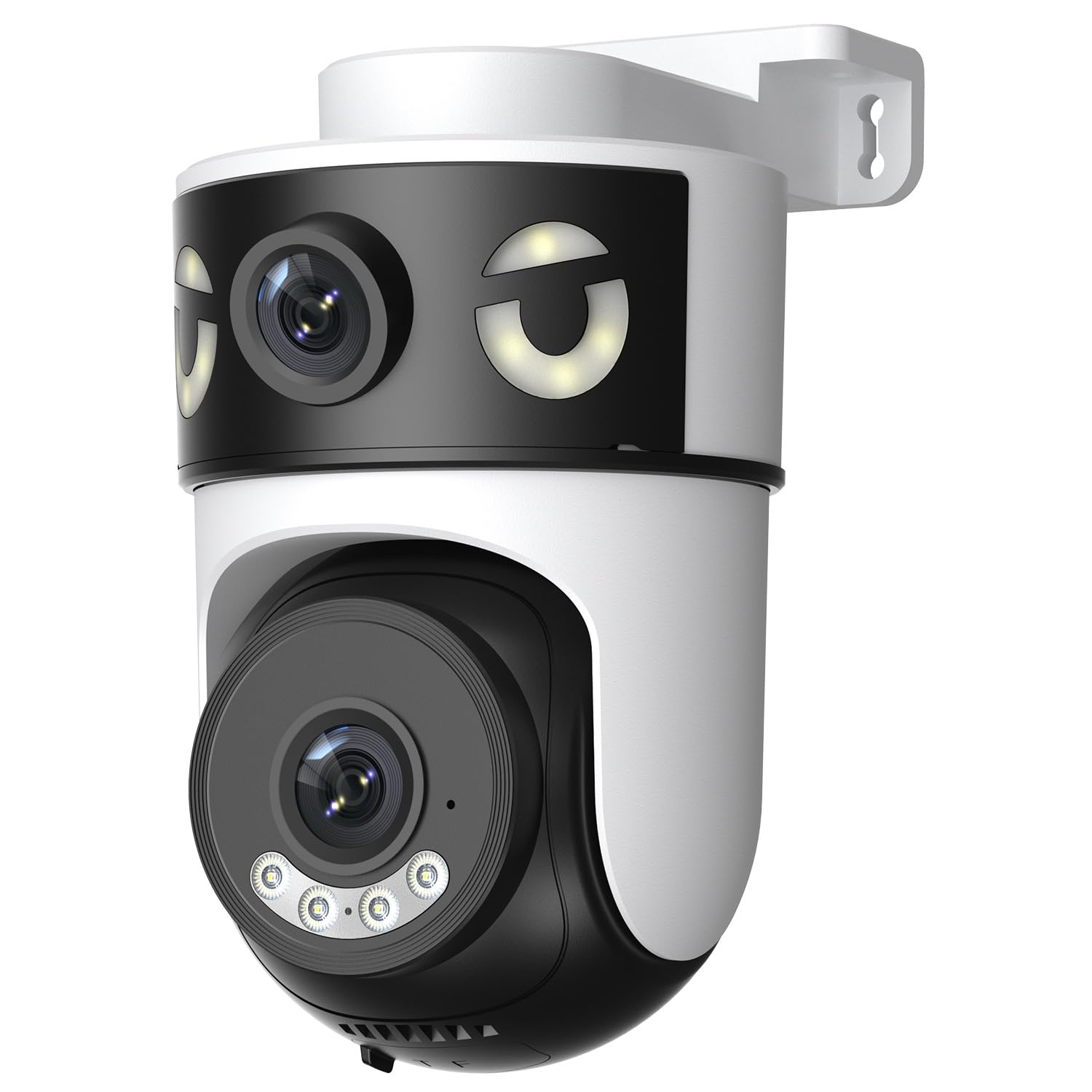
Image: Reobiux 2K Outdoor WiFi Surveillance Camera, Model K6Q-1P. This image shows the camera unit with its dual lenses, two external antennas, and a wall-mount bracket.
کلیدي ځانګړتیاوې
- Dual Lens & 355° View: Unique 2-in-1 design supporting fixed area surveillance and mobile full-view monitoring. Features two high-resolution lenses; one fixed and one rotatable for wide panoramic views.
- 2K Resolution & Color Night Vision: Delivers clear and detailed images and videos. Offers three night vision modes: Infrared, Color, and Smart Night Vision for reliable 24-hour surveillance.
- Motion Detection & Alarm Siren: Advanced motion detection sends real-time alarm notifications to your mobile device upon detecting movement.
- Two-Way Audio & Multi-User Access: Built-in microphone and speaker allow for remote communication. Supports sharing camera access with multiple users.
- SD Card/Cloud Storage & Alexa Compatibility: Supports 24-hour continuous recording to a Micro SD card (max 128GB) or cloud server. Compatible with Amazon Alexa for voice control.
د تنظیم کولو لارښود
1. د کیمرې نصب کول
The camera is designed for wall mounting. Choose a suitable location that provides the desired surveillance coverage and is within range of your Wi-Fi network and a power outlet.
- Mark the drilling points on the wall using the camera's base as a template.
- سوري وکړئ او که اړتیا وي نو دیوال پلګونه دننه کړئ.
- Secure the camera to the wall using the provided mounting screws.
- Ensure the camera is firmly attached and the waterproof cover kit is properly installed to protect connections.
2. په بریښنا چالانول
Connect the provided power adapter to the camera's power input and then plug it into a standard electrical outlet. The camera will power on and initiate its startup sequence.
۲. د شبکې اتصال (وای فای)
The camera connects via 2.4GHz Wi-Fi. Follow these steps to connect your camera to your home network:
- ډاونلوډ کړئ O-kam Pro application from the App Store (iOS) or Google Play Store (Android) on your smartphone or tablet.
- د نوي حساب لپاره راجستر کړئ یا که تاسو دمخه یو حساب لرئ نو ننوتل وکړئ.
- د خپلې نوې کیمرې د اضافه کولو لپاره د اپلیکیشن دننه لارښوونې تعقیب کړئ. پدې کې معمولا په کیمرې کې د QR کوډ سکین کول یا په لاسي ډول د هغې ID داخلول شامل دي.
- خپل 2.4GHz وای فای شبکه غوره کړئ او کله چې غوښتنه وشي نو پټنوم دننه کړئ.
- Wait for the camera to connect to the network. A voice prompt or indicator light will confirm a successful connection.

Image: Reobiux camera with a smartphone displaying the O-kam Pro app interface, demonstrating remote control and live view وړتیاوې
عملیاتي لارښوونې
ژوندی View او د پان/ټيلټ کنټرول
Once connected, open the O-kam Pro app to access the live feed from your camera. The dual-lens system provides both a fixed wide view and a movable PTZ (Pan-Tilt-Zoom) view.
- په اپلیکیشن کې په کیمره باندې کلیک وکړئ ترڅو view ژوندی جریان.
- Use the on-screen controls to pan (horizontal rotation up to 355°) and tilt (vertical movement) the movable lens to adjust the viewزاویه.
- Switch between the fixed and movable lens views within the app interface.
د شپې لید طریقې
کیمره د شپې لید درې طریقې وړاندې کوي:
- انفراریډ د شپې لید: Provides black and white images in low-light conditions using infrared LEDs.
- د شپې لید رنګ: Utilizes built-in spotlights to provide full-color images at night.
- سمارټ نایټ ویژن: د کشف شوي حرکت یا رڼا شرایطو پراساس په اتوماتيک ډول د انفراریډ او رنګ شپې لید ترمنځ بدلیږي.
- You can select your preferred night vision mode in the O-kam Pro app settings.
د حرکت کشف او خبرتیاوې
Configure motion detection settings and receive alerts on your mobile device:
- Navigate to the camera settings in the O-kam Pro app.
- د حرکت کشف فعال کړئ او د اړتیا سره سم د حساسیت کچه تنظیم کړئ.
- Set up alert notifications to be sent to your smartphone.
- You can also enable the alarm siren to deter intruders.
دوه طرفه آډیو
Use the two-way audio feature to communicate through the camera:
- په ژوندۍ بڼه view interface of the O-kam Pro app, tap the microphone icon to speak. Your voice will be transmitted through the camera's speaker.
- د کیمرې له شاوخوا څخه د آډیو اوریدو لپاره د سپیکر آیکون باندې کلیک وکړئ.
د ویډیو ثبت او ذخیره کول
The camera supports continuous 24-hour recording. You have two storage options:
- د مایکرو SD کارت: Insert a Micro SD card (up to 128GB, not included) into the designated slot on the camera. The camera will automatically begin recording to the card.
- د بادل ذخیره کول: Subscribe to a cloud storage plan through the O-kam Pro app for secure off-site video storage.
- ثبت شوي foo ته لاسرسیtage via the O-kam Pro app.
د ایمیزون الیکسا ادغام
Integrate your Reobiux camera with Amazon Alexa for voice control:
- په خپل ګرځنده وسیله کې د ایمیزون الیکسا ایپ خلاص کړئ.
- Go to "Skills & Games" and search for the "O-kam Pro" skill.
- Enable the skill and link your O-kam Pro account.
- Discover devices. You can now use voice commands like "Alexa, show me the front door camera" to view the live feed on compatible Alexa devices.
ساتنه
- پاکول: په منظم ډول د کیمرې لینز او بدن د نرم، ډ سره پاک کړئamp ټوکر د دوړو او خاورې لرې کولو لپاره. سخت کیمیاوي توکي یا د کثافاتو پاکوونکي مه کاروئ.
- د هوا ساتنه: The camera is waterproof, but ensure all connections are sealed properly, especially the power cable and any SD card slots, to maintain its weather resistance.
- د فرم ویئر تازه معلومات: Check the O-kam Pro app periodically for firmware updates to ensure optimal performance and security.
د ستونزو حل کول
- کیمره فعاله نه ده:
- Ensure the power adapter is securely connected to both the camera and a working electrical outlet. Verify the outlet has power.
- د وای فای سره وصل نشو:
- Ensure your Wi-Fi network is 2.4GHz. Check your Wi-Fi password for accuracy. Move the camera closer to your Wi-Fi router to improve signal strength. Restart your router and the camera.
- نه ژوندی view or recording:
- Check your internet connection. Ensure the camera is connected to Wi-Fi. Verify that the Micro SD card is inserted correctly and not full, or that your cloud storage subscription is active.
- د حرکت کشف خبرتیاوې نه دي ترلاسه شوي:
- Check app notification settings on your phone and within the O-kam Pro app. Ensure motion detection is enabled and sensitivity is set appropriately. Verify your phone has an active internet connection.
- دوه اړخیزه غږ کار نه کوي:
- Ensure your phone's microphone and speaker are enabled for the O-kam Pro app. Check the volume settings on your phone and within the app. Ensure there are no obstructions blocking the camera's microphone or speaker.
مشخصات
| فیچر | مشخصات |
|---|---|
| برانډ | Reobiux |
| د ماډل نوم | K6Q-1P |
| د ماډل شمیره | REO-K6Q-1P |
| د نصب کولو ډول | دیوال غر |
| د ویډیو ثبتولو حل | 2K |
| د توکو شمیر | 1 |
| د بې سیمه مخابراتو ټیکنالوژي | وای فای (2.4GHz) |
| Viewزاویه | ۳۵۵ درجې (پین) |
| د لګولو ډول | په سکرو کې |
| مواد | پلاستیک |
| والیtage | 5 ولټه (DC) |
| ځواک | 5 واټ |
| د اوبو د مقاومت کچه | پنروک |
| ځانګړي ځانګړتیاوې | Two-Way Audio, Local Recording, HD Resolution, PTZ Technology |
| وړاندیز شوی کارول | بهرنی امنیت |
| مطابقت لرونکې وسیلې | لپ ټاپ، سمارټ فون، ټابلیټ، تلویزیون |
| د بریښنا سرچینه | برقی کیبل |
| د ارتباط پروتوکول | RTSP |
| د کنټرولر ډول | O-kam Pro App |
تضمین او ملاتړ
For warranty information and technical support, please refer to the official Reobiux website or contact Reobiux customer service directly. Keep your purchase receipt as proof of purchase for warranty claims.
Manufacturer: Reobiux