
1. پیژندنه
This manual provides detailed instructions for the safe and effective use of your Moukey MPS5 Portable Karaoke Machine. Please read this manual thoroughly before operating the device and retain it for future reference. The MPS5 is a versatile portable speaker system designed for various audio playback needs, including karaoke, music streaming, and public address, featuring wireless microphones and multiple connectivity options.
۲. په بکس کې څه دي؟
ټول توکي په احتیاط سره له بکس څخه خلاص کړئ. ډاډ ترلاسه کړئ چې لاندې لیست شوي ټول اجزا شتون لري او په ښه حالت کې دي.
- Moukey MPS5 Portable Karaoke Machine (1 unit)
- بېسیم مایکروفونونه (۲ واحدونه)
- د USB چارج کیبل (1 واحد)
- 3.5mm AUX Cable (1 unit)
- Shoulder Strap (1 unit)
- د کارونکي لارښود (1 واحد)
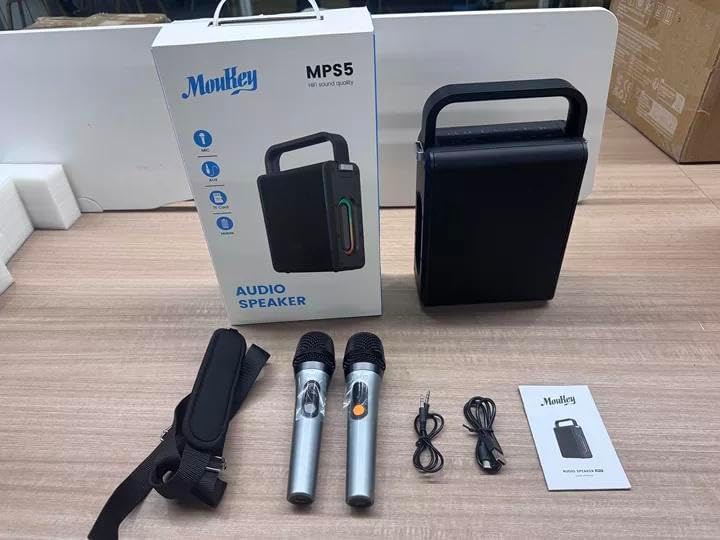
Image: All components included in the Moukey MPS5 package.
3. محصول ختم شوview
The Moukey MPS5 is a compact yet powerful portable karaoke machine. It features a robust design with integrated LED lighting on the sides, enhancing the user experience. A sturdy handle and an included shoulder strap provide convenient portability.
انځور: مخکینۍ برخه view of the Moukey MPS5 speaker.

انځور: اړخ view of the Moukey MPS5, showing the LED lighting.
4. کلیدي ځانګړتیاوې
- Excellent Sound Output: The MPS5 delivers 200W peak power (RMS 60W) through a 4-inch woofer and two 2-inch tweeters, providing full-range stereo sound with enhanced bass.
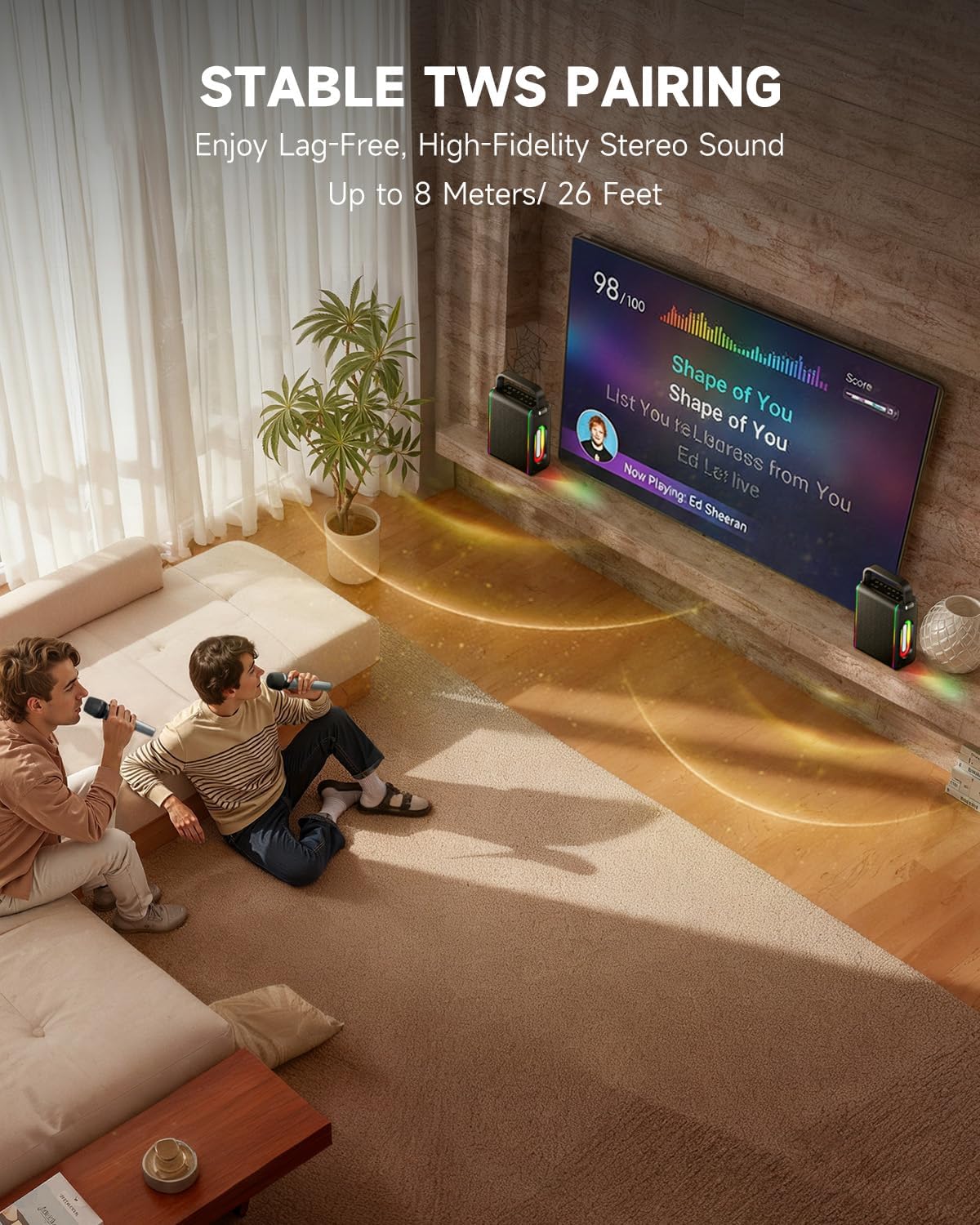
- ځواکمن فعالیت: Supports Bluetooth 5.3 for wireless connection to various devices. Also includes Micro TF card, Flash USB, MP3, and AUX IN playback options. Features stable TWS (True Wireless Stereo) pairing for connecting two MPS5 units for a wider stereo soundstage.
- د بیټرۍ خورا اوږد ژوند: The rechargeable battery provides up to 8 hours of continuous music playback on a 2-hour charge, suitable for extended use indoors or outdoors.
- سپک او د انتقال وړ ډیزاین: Weighing only 2kg, the MPS5 is designed for easy transport. It can be carried by hand using the integrated handle or with the included shoulder strap.
- دوه ګونی بې سیم مایکروفون: Includes two 2.4Ghz rechargeable microphones with a connection range of up to 60 feet and up to 8 hours of use time per charge (2-3 hours charging time). Features one-tap connectivity for effortless pairing.

Image: Internal speaker components of the MPS5.

Image: MPS5 connected to multiple devices via Bluetooth.

Image: Battery life and charging details for the MPS5.

Image: Demonstrating the portability of the MPS5 with hand and shoulder strap options.

Image: The two wireless microphones for the MPS5.
5. ترتیب کول
5.1 Charging the Speaker and Microphones
Before first use, fully charge the MPS5 speaker and both wireless microphones.
- سپیکر: Connect the provided USB Type-C cable to the charging port on the speaker and to a compatible USB power adapter (not included). The charging indicator light will show charging status. A full charge takes approximately 2 hours.
- مایکروفونونه: Each microphone has a charging port. Connect them to a USB power source using the provided USB cable. Charging time for microphones is 2-3 hours.
۸ پاور آن/بند
- د سپیکر د فعالولو لپاره، د بریښنا تڼۍ فشار ورکړئ او ونیسئ (U) on the top panel for 2 seconds.
- د بریښنا بندولو لپاره، د بریښنا تڼۍ فشار ورکړئ او ونیسئ (U) بیا د 2 ثانیو لپاره.
5.3 د بلوتوټ جوړه کول
- Ensure the MPS5 speaker is powered on and in Bluetooth mode (indicated by a blue LED). If not, press the 'M' (Mode) button to switch to Bluetooth mode.
- په خپل ګرځنده وسیله (سمارټ فون، ټابلیټ، او نور) کې، بلوتوټ فعال کړئ او د شته وسایلو لټون وکړئ.
- Select 'Moukey MPS5' from the list of devices to pair. A voice prompt will confirm successful connection.
۳.۴ TWS (ریښتینی بې سیم سټیریو) جوړه کول
To achieve stereo sound, you can pair two Moukey MPS5 speakers together.
- Ensure both MPS5 speakers are powered on and in Bluetooth mode, but not connected to any other device.
- On one of the speakers, double-press the 'M' (Mode) button. The speaker will enter TWS pairing mode.
- The two speakers will automatically connect to each other. A voice prompt will confirm successful TWS pairing.
- Once TWS is established, connect your mobile device to one of the MPS5 speakers via Bluetooth as described in section 5.3. Both speakers will then play audio in stereo.
ویډیو: یو چټک اوورview of the MPS5 Karaoke Machine, demonstrating TWS pairing and other features.
6. عملیاتي لارښوونې
6.1 د کنټرول اوورview
The top panel of the MPS5 speaker features several buttons for controlling playback, volume, and microphone settings.
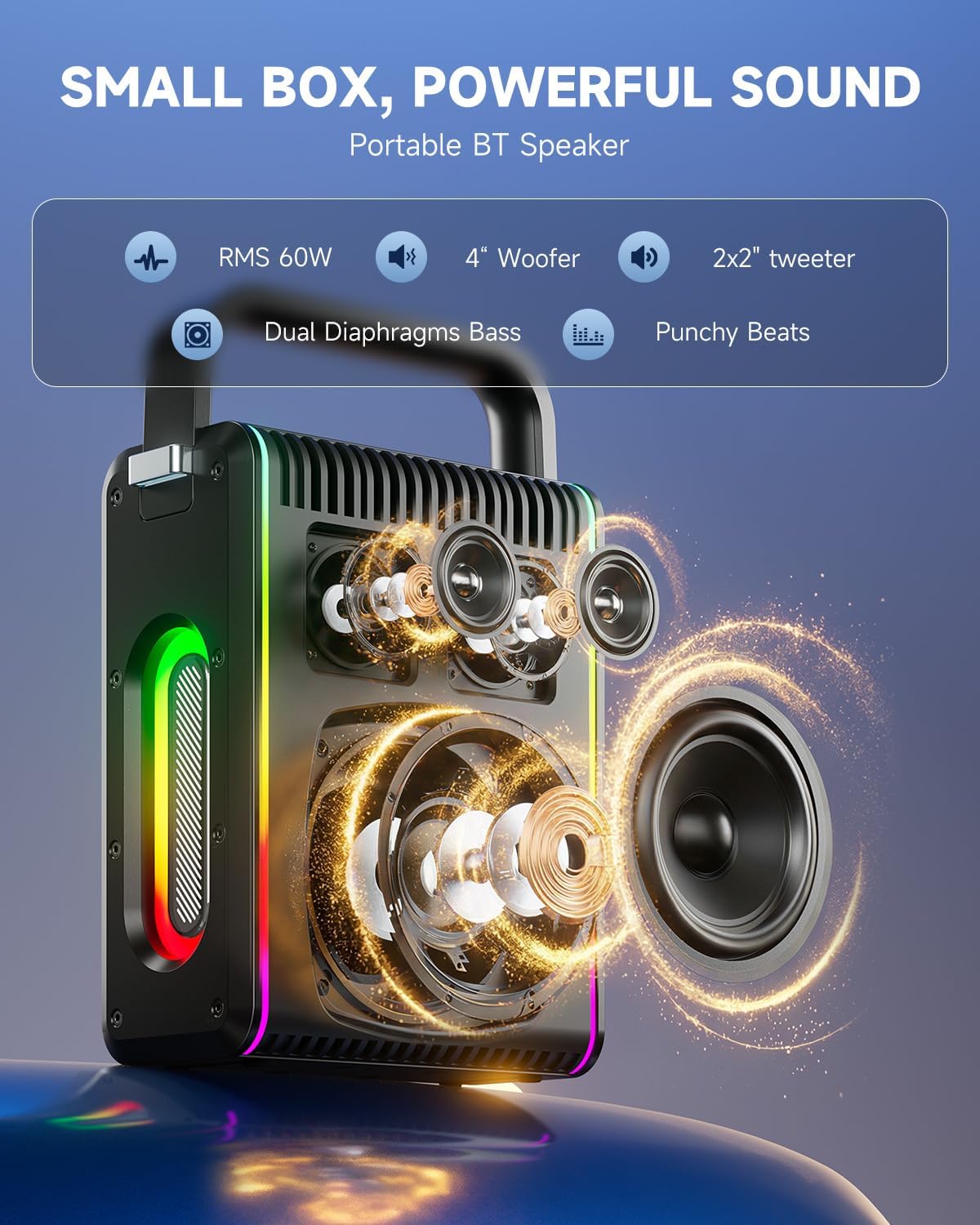
Image: Top control panel of the MPS5.
- د چالانېدو تڼۍ (U): د بریښنا فعال / بندولو لپاره د 2 ثانیو لپاره فشار ورکړئ او ونیسئ.
- د حالت تڼۍ (M): Short press to cycle through input modes (Bluetooth, AUX, USB, TF Card). Double-press to initiate TWS pairing.
- Microphone Volume (Mic - / Mic +): د وصل شوي مایکروفونونو حجم تنظیموي.
- Echo Adjustment (R- / R+): د مایکروفونونو لپاره د ایکو اغیز تنظیموي.
- پلی/ودرول (▶): اوسنی ټریک پلی کوي یا بندوي.
- غږ کم کړئ (-): Decreases the main speaker volume.
- غږ لوړ کړئ (+): Increases the main speaker volume.
- EQ A/E: Short press to switch between EQ modes. Long press to toggle between original sound and accompaniment elimination.
۶.۴ د مایکروفون کارول
The MPS5 comes with two wireless microphones for karaoke and vocal performances.
- پاور آن/بند: Press and hold the power button on the microphone to turn it on or off.
- جوړه کول: The microphones are pre-paired with the speaker. If re-pairing is needed, ensure the speaker is on, then power on the microphone. They should connect automatically.
- Microphone Disconnect/Reconnect: Press the dedicated microphone button on the speaker's control panel to quickly disconnect or reconnect the microphones.
۶.۱ د آډیو ان پټ حالتونه
In addition to Bluetooth, the MPS5 supports several wired and local storage input options.

Image: Input ports on the MPS5 speaker.
- AUX داخلول: Connect an external audio device using the 3.5mm AUX cable. Select AUX mode using the 'M' button.
- USB پلیباک: یو USB فلش ډرایو دننه کړئ چې MP3 آډیو لري fileد USB پورټ ته. سپیکر به په اتوماتيک ډول USB حالت ته لاړ شي او پلې بیک به پیل کړي.
- د TF کارت پلے بیک: Insert a Micro TF card containing MP3 audio fileد TF کارت سلاټ ته. سپیکر به په اتوماتيک ډول د TF کارت حالت ته لاړ شي او پلې بیک به پیل کړي.
6.4 د LED رڼا
The MPS5 features dynamic LED lighting on its sides. Use the dedicated LED button (if available, or refer to the 'M' button for light control if combined) to cycle through different light modes or turn them off.
7. ساتنه
- پاکول: د سپیکر بهرنۍ برخه پاکولو لپاره نرم، وچ ټوکر وکاروئ. مایع پاکوونکي یا د کثافاتو مواد مه کاروئ.
- ذخیره کول: وسیله په یخ او وچ ځای کې د مستقیم لمر وړانګو او سختې تودوخې څخه لرې وساتئ.
- د بیټرۍ پاملرنه: د بیټرۍ د ژوند اوږدولو لپاره، د بیټرۍ په مکرر ډول د بشپړ چارج کولو څخه ډډه وکړئ. وسیله په منظم ډول چارج کړئ، حتی که د اوږدې مودې لپاره نه کارول کیږي.
8. ستونزه حل کول
If you encounter issues with your Moukey MPS5, refer to the following common problems and solutions:
| ستونزه | احتمالي لامل | د حل لاره |
|---|---|---|
| هیڅ ځواک نشته | بیټرۍ ختمه شوې. | د ورکړل شوي USB ډول-سي کیبل په کارولو سره سپیکر چارج کړئ. |
| د سپیکر څخه هیڅ غږ نشته | Volume is too low or muted. Incorrect input mode selected. | Increase volume using the '+' button. Press 'M' to cycle through input modes. |
| بلوتوث جوړه ناکامه شوه | Speaker is not in pairing mode. Device is too far. | Ensure speaker is in Bluetooth mode. Move device closer to speaker. Try restarting both devices. |
| مایکروفون کار نه کوي | Microphone is off or uncharged. Microphone is disconnected. | Ensure microphone is charged and powered on. Press the microphone button on the speaker to reconnect. |
| د TWS جوړه ناکامه شوه | Speakers are already connected to another device. | Ensure both speakers are not connected to any other Bluetooth device before initiating TWS pairing. |
9. مشخصات
- نښه: موکی
- د ماډل شمیره: MPS5
- د واټ محصولtage: 200 واټ (چټک)
- د ارتباط ټیکنالوژي: بلوتوث 5.3
- آډیو داخلول: Bluetooth, TF card, USB, MP3, AUX, Wired microphones
- د چینلونو شمیر: 2
- د بریښنا سرچینه: د بیټرۍ چلول
- د نښلونکي ډول: د USB ډول C
- د توکي ابعاد (L x W x H): 2.36 x 6.3 x 12.2 انچه
- د توکي وزن: تقریبا 2 کیلوګرامه
- مطابقت لرونکي وسایل: Smartphone, Tablet, Laptop, MP3 Player, Microphone
- رنګ: تور د سپینو زرو نښو سره
10. تضمین او ملاتړ
The Moukey MPS5 Portable Karaoke Machine comes with a ۱-کلن تضمین د پیرود نیټې څخه. دا تضمین د عادي استعمال لاندې د تولید نیمګړتیاوې او کاریګري پوښي. مهرباني وکړئ د تضمین ادعاوو لپاره د پیرود ثبوت وساتئ.
For technical support, troubleshooting assistance, or warranty inquiries, please contact Moukey customer service through the retailer where the product was purchased or visit the official Moukey webد اړیکو معلوماتو لپاره سایټ.