
1. پیژندنه او وروستهview
Thank you for choosing the EWEADN V102 Wired Keyboard. This 98-key compact keyboard is designed for both gaming and productivity, offering a blend of functionality, comfort, and dynamic aesthetics. It features a dedicated media knob, an integrated display screen, and customizable RGB backlighting. This manual provides essential information for setting up, operating, maintaining, and troubleshooting your new keyboard.
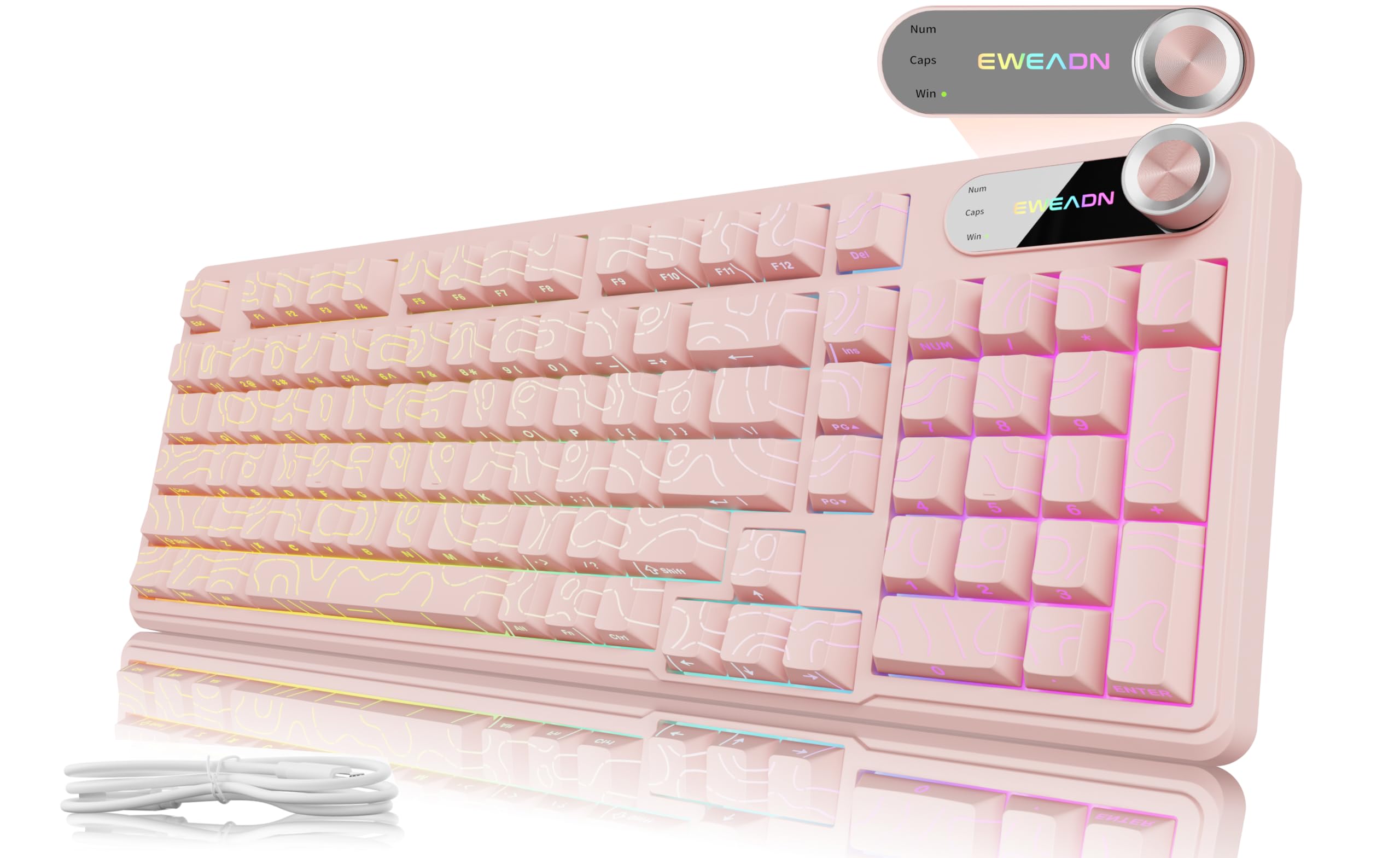
Figure 1: EWEADN V102 Wired Keyboard, Light Pink variant.
۲. په بکس کې څه دي؟
مهرباني وکړئ د بسته بندۍ محتويات وګورئ ترڅو ډاډ ترلاسه کړئ چې ټول توکي شتون لري:
- EWEADN V102 Keyboard x 1
- د USB ډول-C کیبل x 1
- د لارښوونې لارښود x 1

Figure 2: Included USB Type-C cable for keyboard connection.
۴. د تنظیم لارښوونې
- کیبورډ وصل کړئ: Plug the USB Type-C cable into the port on the keyboard and the other end into an available USB port on your computer or device. The keyboard is plug-and-play, requiring no additional drivers for basic functionality.
- د ټایپ کولو زاویه تنظیم کړئ: کیبورډ د 2-s ځانګړتیاوې لريtage adjustable feet on the underside. Flip them out to achieve your preferred typing angle for enhanced comfort.
- د سیسټم مطابقت: The EWEADN V102 is compatible with Windows, Mac, Android, iOS, Xbox, PS4, and PS5. For Mac users, switch to Mac layout by pressing FN + S. For Windows, press FN + A.

Figure 3: Dual-System Connection for Windows and Mac layouts.

Figure 4: Adjustable typing angles for ergonomic comfort.
4. عملیاتي لارښوونې
4.1. Dedicated Knob & Display Screen
The smart rotary knob and built-in display screen provide intuitive control and real-time status updates:
- Backlight Mode Control: Press the knob once to cycle through 12 different RGB backlight modes.
- د روښانتیا سمون: Rotate the knob to adjust the backlight brightness (5 levels).
- ملټي میډیا حالت: نیول ایف این + غوټۍ to switch to multimedia mode. In this mode, rotating the knob controls volume, and pressing it mutes/unmutes audio.
- د ښودلو سکرین: The screen shows the EWEADN logo and indicators for Caps Lock, Num Lock, and Win Lock status.

Figure 5: Smart Screen Display showing keyboard status.

Figure 6: Multi-Function Control Knob for lighting and multimedia.
4.2. Dynamic RGB Backlighting
Customize your keyboard's lighting with these shortcuts:
- د شاته رڼا بدلول: مطبوعاتي FN+Backspace to turn the backlight ON/OFF.
- Change Lighting Effects: مطبوعاتي FN + INS to cycle through 12 stunning RGB lighting effects.
- روښانتیا تنظیم کړئ: مطبوعاتي FN + PGUP د روښانتیا زیاتولو لپاره، FN + PGDN د روښانتیا کمولو لپاره (۵ کچې).
- د رڼا سرعت تنظیم کړئ: مطبوعاتي FN + "-" د سرعت کمولو لپاره، FN + "+" د سرعت زیاتولو لپاره (۵ کچې).

Figure 7: RGB Backlight controls and effects.
4.3. 98-Key Compact Layout
The 98% layout provides a full-featured experience, including a numeric keypad, while maintaining a compact footprint to save desk space.

Figure 8: Compact 98-key layout for efficiency.
5. ساتنه
5.1. Spill Resistant Design
The EWEADN V102 keyboard features a spill-resistant design to protect against accidental liquid spills. In case of a spill, gently wipe the liquid off the surface and allow the keyboard to air dry completely before continued use. Avoid submerging the keyboard in water.

شکل ۵: د زیات دوامدارۍ لپاره د توییدو په وړاندې مقاومت لرونکی ډیزاین.
6. ستونزه حل کول
If you encounter any issues with your EWEADN V102 keyboard, please refer to the following common troubleshooting steps:
- کیبورډ ځواب نه ورکوي: Ensure the USB Type-C cable is securely connected to both the keyboard and your device. Try plugging it into a different USB port.
- شاته څراغ کار نه کوي: Check if the backlight is turned off using FN+Backspace. روښانتیا د سره تنظیم کړئ ایف این + پی جی یو پی/پی جی ډی این.
- Incorrect Key Layout (Mac/Windows): Verify that the correct system layout is selected (FN + A د وینډوز لپاره، FN + S for Mac).
- د غوټۍ فعالیت: If the knob is not controlling lighting or multimedia as expected, ensure you are in the correct mode (press or hold ایف این + غوټۍ to switch).
- موقتي اړیکه: Ensure the cable is not damaged and try connecting directly to your device without any hubs or adapters.
If the problem persists after trying these steps, please contact EWEADN customer support for further assistance.
7. مشخصات
| برانډ | EWEADN |
| ماډل | V102 |
| ترتیب | ۸۶-کیلي تړون |
| ارتباط | وائرډ (USB ډول-C) |
| شاته رڼا کول | Dynamic RGB (12 effects, 5 brightness levels, 5 speed levels) |
| ځانګړي ځانګړتیاوې | Dedicated Media Knob, Display Screen (Caps/Num/Win Lock), Spill Resistant, Adjustable Typing Angles |
| مطابقت لرونکې وسیلې | Laptop, PC (Windows, Mac, Android, iOS, Xbox, PS4, PS5) |
| د توکي وزن | ۲.۴۵ پونډه |
| د کڅوړې ابعاد | 17.56 x 6.97 x 2.36 انچه |
| مواد | پلاستیک |
8. تضمین او ملاتړ
Your EWEADN V102 keyboard is covered by a return policy allowing returns or replacements within 30 days of purchase. For any product inquiries, technical support, or warranty claims, please contact EWEADN customer service.
- د بریښنالیک ملاتړ: eweadnkeyboard@outlook.com
- آنلاین ملاتړ: Visit the EWEADN Store on Amazon and click 'Ask a question'.
Figure 10: EWEADN Customer Support Information.