
پیژندنه
The TizzyToy MT11-GPS Drone is a versatile and user-friendly quadcopter designed for beginners, adults, and kids. Weighing less than 249g, it does not require FAA registration or Remote ID, making it convenient for travel and immediate use. This manual provides essential information for setting up, operating, and maintaining your drone to ensure a safe and enjoyable flight experience.
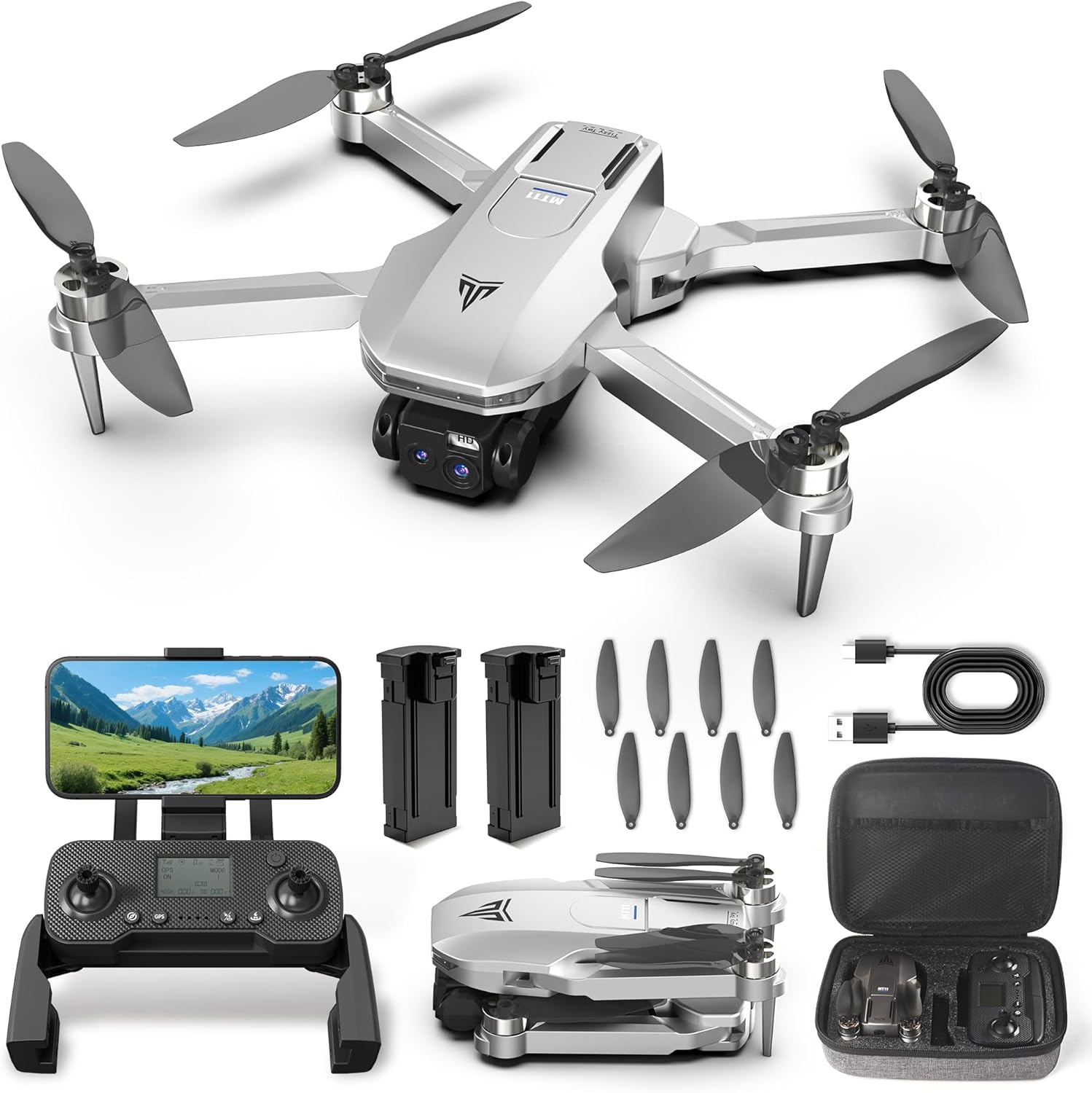
Figure 1: TizzyToy MT11-GPS Drone and included accessories.
د خوندیتوب لارښوونې
- No FAA Registration Needed: The drone weighs less than 249g, eliminating the need for FAA registration or Remote ID in most regions. Always check local regulations before flying.
- جیو فینسنګ: Utilize the geo-fencing feature to maintain safe flight boundaries, especially when flying in new or restricted areas.
- د الوتنې دمخه معاینه: Always ensure all components are correctly assembled and batteries are fully charged before each flight.
- د چاپیریال پوهاوی: Avoid flying in strong winds (rated for Level 4 wind resistance, up to 17mph) or adverse weather conditions. Maintain visual line of sight with the drone.
د بسته محتويات

Figure 2: All items included in the TizzyToy MT11-GPS Drone package.
- TizzyToy MT11-GPS Drone
- ریموټ کنټرولر (1)
- Spare Propellers (12)
- د چارج وړ بیټرۍ (2)
- Type C Charging Cables (2)
- سکرو او سکرو ډرایور
- د کارن لارښود
- کیری کیسی
چمتو کول
۳.۳. د ډرون اسمبلۍ
The MT11-GPS drone features a foldable design for portability. Gently unfold the drone arms until they lock into place. Ensure all propellers are securely attached. If replacing propellers, use the provided screwdriver and spare propellers, matching the A and B labels.
۱. د بیټرۍ نصب او چارج کول
Insert a fully charged battery into the drone's battery compartment until it clicks. The drone comes with two rechargeable batteries, each providing up to 20 minutes of flight time (40 minutes total). Use the provided Type C charging cables to charge the batteries. The smart auto power-off feature protects battery life by stopping charging once full.
3. د ریموټ کنټرول تنظیم کول
Unfold the phone holder on the remote control and securely place your smartphone. The remote control is also rechargeable via a Type C cable.
4. App Connection & Calibration
Download the dedicated drone application to your smartphone. Turn on both the drone and the remote control. Connect your smartphone to the drone's Wi-Fi network. Follow the in-app instructions for initial calibration (compass and gyroscope) before your first flight or in a new environment.
عملیاتي لارښوونې
1. بنسټیز پرواز
- الوتنه: Use the one-key takeoff function or manually push the joysticks to initiate flight.
- ځړول: The drone's altitude hold feature ensures stable hovering, making it easy to control.
- لیندینګ: Use the one-key landing function or manually descend the drone.
- بې سرې حالت: Simplifies flight control by eliminating the need to adjust the drone's orientation relative to the pilot.
2. Smart Flight Modes

Figure 3: Smart flight modes for enhanced aerial photography and videography.
- ما تعقیب کړئ: The drone automatically follows your movements, capturing hands-free footage.
- Orbit Flight: Perform cinematic 360° shots around a subject with the touch of a button.
- د الوتنې لارې نقطه: Draw a flight path on the app, and the drone will automatically follow the designated route.
- د اشارې کنټرول: Use specific hand gestures to command the drone for photos or videos.
3. د کیمرې عملیات

Figure 4: Dual 2K QHD cameras with 90° adjustable lens for versatile shots.
- Dual 2K QHD Cameras: Capture sharp aerial photos and videos with the dual 2K cameras.
- 90° Adjustable Lens: The shock-absorbing lens can be adjusted by 90° to capture various angles, from wide landscapes to detailed close-ups.
- 5G WiFi FPV Transmission: Enjoy real-time, smooth, and lag-free video streaming directly to your smartphone.
4. Flight Range and Altitude

Figure 5: Extended flight capabilities of the MT11-GPS Drone.
The drone offers a stable 5G transmission range of up to 1640 feet and can reach an altitude of 394 feet, allowing for extensive exploration and capturing distant scenes.
5. Auto Return-to-Home (RTH)

Figure 6: GPS Auto Return-to-Home features for safe drone retrieval.
The built-in GPS ensures stable navigation. The drone will automatically return to its takeoff point in the event of low battery or signal loss, providing a worry-free flying experience.
ساتنه
- د بیټرۍ پاملرنه: Always ensure batteries are fully charged before use. The smart auto power-off feature helps protect battery life during charging.
- پروپیلر بدلول: In case of damage, use the provided spare propellers and screwdriver to replace them. Ensure correct propeller (A or B) is installed on the corresponding motor.
- عمومي پاکول: Keep the drone clean from dust and debris to ensure optimal performance.
د ستونزو حل کول
If you encounter any issues, please refer to the detailed user manual included in the package. Common issues can often be resolved by:
- Ensuring batteries are fully charged for both drone and remote.
- Re-calibrating the drone via the app.
- Checking for any obstructions to propellers or cameras.
- Verifying a stable Wi-Fi connection between the drone and your smartphone.
مشخصات
| فیچر | تفصیل |
|---|---|
| برانډ | TizzyToy |
| د ماډل نوم | MT11-GPS |
| د توکي وزن | 1.39 pounds (under 249g) |
| د ویډیو نیول حل | 2.7K (QHD Dual Cameras) |
| د ارتباط ټیکنالوژي | Wi-Fi (5G Transmission) |
| د کنټرول ډول | د اپلیکیشن کنټرول |
| اعظمي حد | 1640 پښه |
| د بیټرۍ حجرو جوړښت | لیتیم ایون |
| بیټرۍ پکې شاملې دي | Yes (2 Lithium Ion batteries) |
| د نظری سینسر ټیکنالوژي | نظري جریان |
د رسمي محصول ویډیوګانې
GPS Drone with Dual 2K QHD Cameras for Beginners
Video demonstrating the TizzyToy MT11-GPS drone's features, including its dual 2K QHD cameras and ease of use for beginners.
Brushless Motor with WiFi FPV
ویډیو خپرونهasing the drone's brushless motor for quiet and efficient flight, along with its WiFi FPV capabilities.
Drone review and demo
یوه جامع بیا کتنهview and demonstration of the TizzyToy MT11-GPS drone's features and flight performance.