
1. پیژندنه
Thank you for choosing the Angrox Backlit Universal Remote Control for LG Smart TVs. This remote is designed to provide a seamless and enhanced television viewing experience, especially in low-light conditions. It serves as a direct replacement for your original LG TV remote, offering broad compatibility and ease of use without requiring complex setup procedures. This manual provides detailed instructions for setting up, operating, maintaining, and troubleshooting your new remote control.
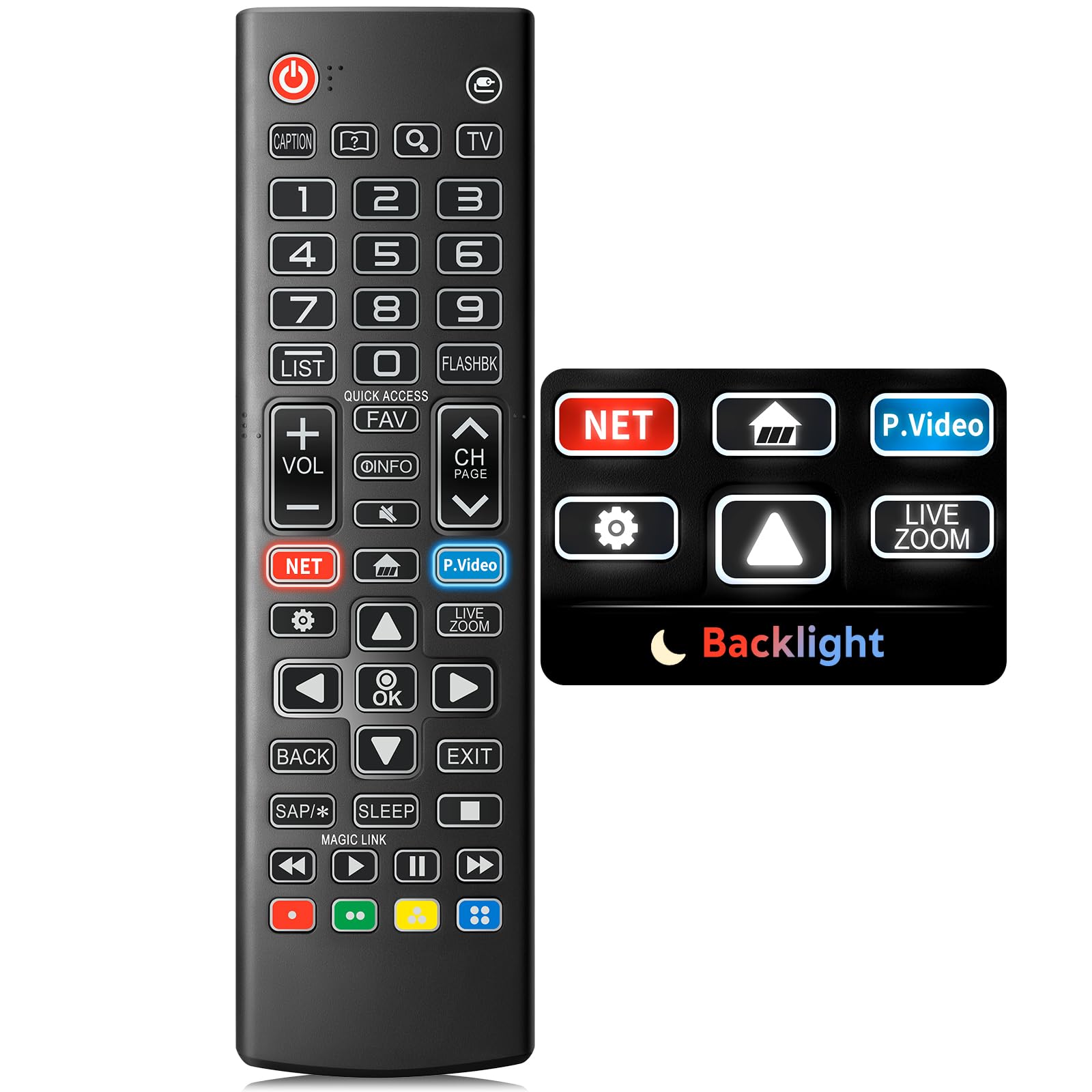
Image: The Angrox Backlit Universal Remote Control, a sleek black remote with clearly labeled buttons.
2. کلیدي ځانګړتیاوې
- Easy Nighttime Operation: Features soft glow buttons that illuminate, allowing for clear visibility and use in dark environments without causing glare. The backlight activates with any button press and automatically turns off after 10 seconds of inactivity.
- نړیوال مطابقت: Designed as a direct replacement for LG TV remotes, compatible with all LG TV models. No programming or complex pairing is required; it works immediately out of the box.
- High-Quality Performance: Equipped with sensitive buttons and stable signal transmission for smooth and responsive operation.
- ارګونومیک ډیزاین: Shaped to fit comfortably in the hand, reducing fatigue during extended use. The button layout is intuitive for users of all ages.
- دوامدار او د اعتماد وړ: Constructed from high-quality, sturdy materials to withstand daily use and accidental drops, ensuring a long lifespan.

Image: A comparison showing the remote control with its backlight off and then with its buttons illuminated, highlighting the easy nighttime operation feature.

Image: The remote control displayed alongside various LG TV models (OLED, UHD, QNED, NanoCell), illustrating its broad compatibility.
۴. د تنظیم لارښوونې
3.1 د بیټرۍ نصب کول
- د ریموټ کنټرول شاته د بیټرۍ کمپارټ پوښ ومومئ.
- پوښ ښکته خوا ته وغورځوئ یا د خونې د خلاصولو لپاره لیچ فشار ورکړئ.
- دوه (2) AAA بیټرۍ دننه کړئ، ډاډ ترلاسه کړئ چې مثبت (+) او منفي (-) ټرمینلونه د کمپارټمنټ دننه شاخصونو سره په سمه توګه سمون لري.
- د بیټرۍ د برخې پوښ بیرته خپل ځای ته د سلایډ کولو سره بدل کړئ تر هغه چې په خوندي ډول کلیک وکړي.
یادونه: Batteries are not included with the remote control. Please use new AAA alkaline batteries for optimal performance.

Image: A visual guide demonstrating the correct insertion of two AAA batteries into the remote control's battery compartment.
3.2 Initial Use (No Pairing Required)
The Angrox Backlit Universal Remote Control is designed for immediate use with LG Smart TVs. No pairing or programming steps are necessary. Once batteries are installed, the remote is ready to control your LG television.
4. عملیاتي لارښوونې
This section details the functions of the buttons on your Angrox remote control.

Image: A comprehensive layout of the remote control, with labels pointing to each button and describing its primary function.
4.1 اساسي دندې
- ځواک (
 ): تلویزیون چالان یا بند کړئ.
 - داخلول (): Changes the input source (e.g., HDMI 1, HDMI 2).
- حجم پورته / ښکته (VOL +/-): د حجم کچه تنظیموي.
- چینل پورته / ښکته (CH Page): د تلویزون چینل بدلوي.
- خاموش (): د تلویزیون آډیو خاموش یا غیر خاموش کوي.
- د شمېرې تڼۍ (0-9): په مستقیم ډول د چینل شمیرې یا نور عددي آخذې داخلوي.
- د نیویګیشن تڼۍ (پورته/ښکته/کیڼ/ښي): د مینو او انتخابونو له لارې سکرول کولو لپاره کارول کیږي.
- د OK تtonۍ: Selects menu items or confirms your input.
۵.۲ د ځانګړي فعالیت تڼۍ
- د Netflix تڼۍ: د Netflix اپلیکیشن مستقیم پیل کوي.
- د ایمیزون پرائم ویډیو تڼۍ: د ایمیزون پرائم ویډیو اپلیکیشن مستقیم پیل کوي.
- چټک لاسرسی: A feature that allows you to enter a specified app or Live TV directly by pressing and holding the number buttons.
- لیست: د خوندي شوي برنامو لیست ته لاسرسی.
- Flashback: مخکینۍ ته بیرته راګرځي viewed channel or input.
- معلومات: Displays information on the current program.
- خوښه: خپل د خوښې چینل لیست ته لاسرسی ومومئ.
- ترتیبات (): Accesses the Quick Settings menu.
- شاته: پر پرده ښودنه پاکوي او تلویزیون ته راستنیږي viewing.
- وتل: له اوسني مینو څخه وځي.
- خوب: Accesses the sleep timer.
- د رسنیو د کنټرول تڼۍ (پلی کول، وقفه کول، ودرول، چټک مخ ته وړل، بیرته راګرځول): Controls media content playback.
۷.۶ د شاته رڼا فعالیت
The remote control features a soft backlight for easy use in the dark. Simply press any button, and the backlight will turn on. It will automatically turn off after 10 seconds of inactivity to conserve battery life.
Video: A demonstration of the Angrox Backlit Remote for LG Smart TV, showcasing its easy nighttime use and responsive buttons. This video highlights the convenience of the backlit feature in dark environments.
5. مشخصات
| برانډ | انګروکس |
| د ماډل نوم | AKB75095307 |
| د ماډل شمیره | AKB75095307 |
| ځانګړي ځانګړتیاوې | Backlit, Ergonomic, Lightweight, No Programming Required, Universal |
| مطابقت لرونکې وسیلې | Television (All LG TV models) |
| د ملاتړ شوي وسایلو اعظمي شمیر | 1 |
| د ارتباط ټیکنالوژي | انفراریډ |
| د تڼۍ مقدار | 30 |
| د کنټرولر ډول | د تڼۍ کنټرول |
| اعظمي حد | ۱۰ متره (تقریبا ۳۳ فوټه) |
| د اړتیا وړ بیټرۍ شمیر | 2 AAA بیټرۍ |
| د بیټرۍ ډول | الکلین |
| د توکي ابعاد (L x W x H) | ۷۱"لیتر x ۲۳.۶"واټه x ۲۴.۴"هوا |
6. ستونزه حل کول
که تاسو د خپل ریموټ کنټرول سره ستونزې سره مخ شئ، مهرباني وکړئ لاندې عام حلونو ته مراجعه وکړئ:
- ریموټ ځواب نه ورکوي:
- ډاډ ترلاسه کړئ چې بیټرۍ په سمه توګه د سم قطبي (+/-) سره داخل شوي دي.
- زړې بیټرۍ د نوي AAA الکلین بیټریو سره بدل کړئ.
- د ریموټ کنټرول او د تلویزیون انفراریډ ریسیور ترمنځ کوم خنډونه وګورئ.
- Ensure you are within the maximum operating range (10 meters) of the TV.
- د شا څراغ کار نه کوي:
- Verify battery power. Low batteries may affect backlight functionality.
- The backlight is designed to turn off after 10 seconds of inactivity. Press any button to reactivate it.
- Specific buttons not working (e.g., Netflix, Amazon Prime):
- Ensure your LG Smart TV is connected to the internet and the respective applications are installed and updated.
- Some smart TV features or app shortcuts may vary slightly depending on your TV's model and region.
- Remote feels sluggish or unresponsive:
- بیټرۍ د تازه سره بدل کړئ.
- Clean the remote's infrared emitter (at the top) and the TV's IR receiver with a soft, dry cloth to ensure a clear signal path.
7. ساتنه
To ensure the longevity and optimal performance of your Angrox remote control, follow these maintenance guidelines:
- پاکول: Use a soft, dry cloth to clean the remote's surface. Avoid using liquid cleaners, aerosols, or harsh chemicals, as they may damage the remote.
- د بیټرۍ بدلول: Replace batteries promptly when the remote's performance declines or if the backlight becomes dim. Remove batteries if the remote will not be used for an extended period to prevent leakage.
- ذخیره کول: ریموټ په یخ او وچ ځای کې د مستقیم لمر وړانګو، سختې تودوخې او لوړې رطوبت څخه لرې وساتئ.
- له څاڅکو ډډه وکړئ: While durable, repeated drops can damage internal components. Handle the remote with care.
8. تضمین او ملاتړ
8.1 د تضمین معلومات
The Angrox Backlit Universal Remote Control (Model AKB75095307) is covered by a د 90 ورځو تضمین from the date of purchase. This warranty covers manufacturing defects and ensures the product functions as described under normal use. It does not cover damage caused by misuse, accidents, unauthorized modifications, or normal wear and tear.
8.2 د پیرودونکي ملاتړ
For any questions, technical assistance, or warranty claims, please contact Angrox customer support through the retailer where you purchased the product or visit the official Angrox store online. Please have your purchase receipt and product model number available when contacting support.