
1. پیژندنه
The ZTE U60 Pro MU5250 is a portable 5G Wi-Fi 7 router designed to provide high-speed internet connectivity on the go. It features an ultra-high-speed 5G-A network, the flagship Snapdragon X75 chip platform, and advanced Wi-Fi 7 technology. This device is equipped with a 10,000 mAh high-capacity battery, offering extended usage and the ability to function as a power bank for other electronic devices. Its 3.5-inch HD touchscreen allows for easy network management and traffic monitoring. The U60 Pro supports up to 64 simultaneous device connections and offers convenient NFC one-touch connectivity, intelligent AI scenes, and AI voice management for a fast, stable, and efficient internet experience.

انځور 1.1: مخکی view of the ZTE U60 Pro MU5250, showing its 3.5-inch display with network information.
2. ترتیب کول
2.1 د بسته محتويات
د پیل کولو دمخه، ډاډ ترلاسه کړئ چې ټولې برخې شتون لري:
- ZTE U60 Pro MU5250 5G Pocket Wi-Fi 7 Router
- AC اډاپټر
- د کارونکي لارښود (دا لاسوند)
2.2 د سیم کارت نصب کول
To enable 5G connectivity, a compatible SIM card must be installed.
- د وسیلې په اړخ کې د سیم کارت سلاټ ومومئ.
- Using the provided SIM ejector tool (if applicable) or a small pin, gently press into the small hole next to the SIM tray to eject it.
- Place your 5G-enabled Nano-SIM card into the tray, ensuring proper orientation.
- د سیم ټرې په احتیاط سره بیا وسیله ته دننه کړئ تر هغه چې دا په خپل ځای کې راشي.
2.3 بریښنا کول / بندول
To power on the device, press and hold the power button located on the side until the screen illuminates. To power off, press and hold the power button until the power-off options appear on the screen, then select 'Power Off'.
۴.۳ د وای فای لومړنی اتصال
After powering on, the device will automatically search for a 5G network. You can connect to the Wi-Fi network using one of the following methods:
- لاسي اړیکه: On your device (phone, laptop, etc.), search for available Wi-Fi networks. Select the network name (SSID) displayed on the U60 Pro's screen and enter the password (also displayed on the screen).
- د NFC یو ټچ اتصال: For Android phones with NFC enabled, tap your phone against the NFC area on the U60 Pro. Your phone will automatically connect to the Wi-Fi network without requiring a password.

Image 2.1: Illustrates the NFC one-touch connection process for quick Wi-Fi access.
3. عملیاتي لارښوونې
۴.۱ د ټچ سکرین انٹرفیس
The 3.5-inch HD touchscreen provides a minimalist user interface for managing the device. You can view network status, data usage, signal strength, battery level, and adjust basic settings directly from the screen. Swipe and tap gestures are used for navigation.
۳.۳ د څو وسیلو سره نښلول
The ZTE U60 Pro supports simultaneous connections for up to 64 devices, allowing multiple users to share the 5G network. Connect devices using the standard Wi-Fi connection method as described in Section 2.4.
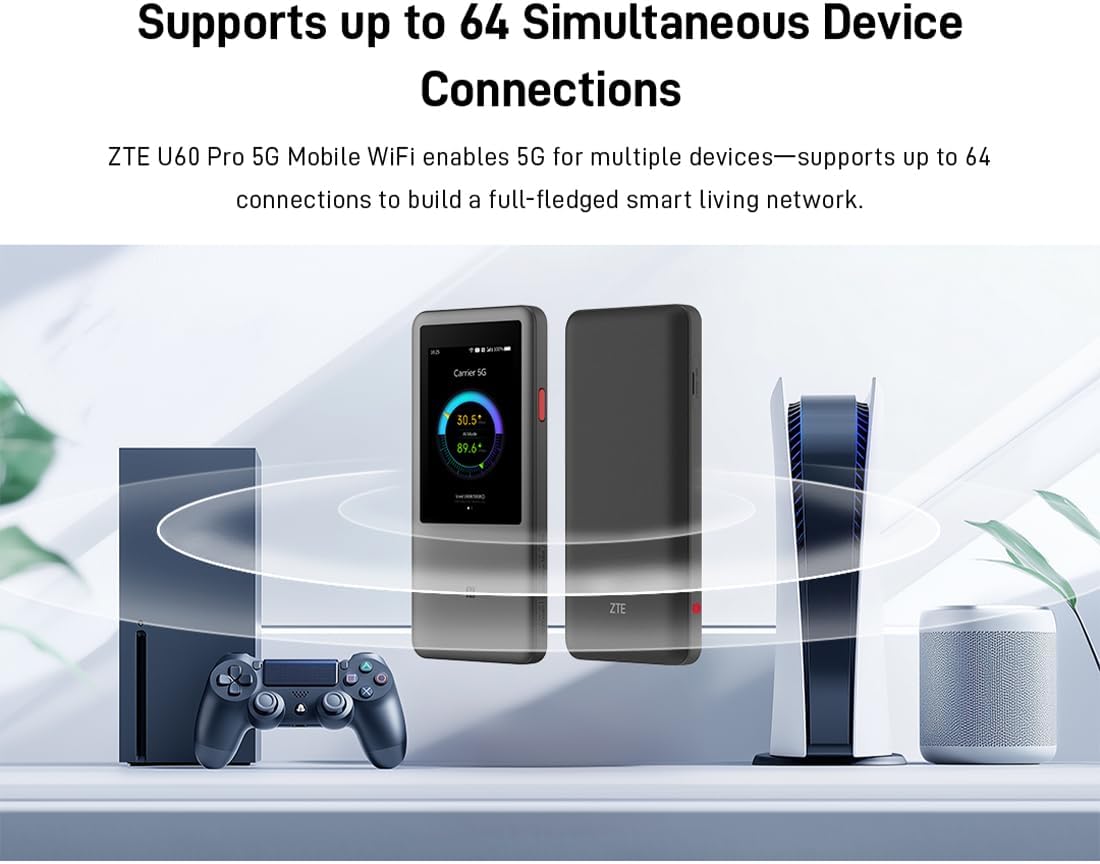
Image 3.1: The ZTE U60 Pro providing 5G Wi-Fi connectivity to various electronic devices.
3.3 AI Smart Scene Modes
The device features intelligent AI Scene technology with dynamic bandwidth allocation. It adjusts bandwidth and priority for applications based on user usage patterns to ensure smooth operation. Available modes include:
- Anchor Mode: Optimized for live streaming.
- د کنفرانس حالت: Prioritizes video conferencing applications.
- د ویډیو حالت: Enhances video playback and streaming.
- د سرعت حالت: Maximizes overall network speed.
- د لوبې حالت: Reduces latency for online gaming.
3.4 AI Voice Management (via ZTE Smart Life APP)
The ZTE Smart Life APP enables effortless device management, including AI voice control. This feature allows for intelligent management of the router through voice commands. Download the ZTE Smart Life APP from your device's app store.

Image 3.2: The ZTE Smart Life APP interface demonstrating AI voice management capabilities.
۵.۳ د پاور بانک فعالیت
The U60 Pro can also serve as a power bank. With its 10,000 mAh battery and 18W reverse fast charging, you can charge other electronic devices by connecting them to the router's appropriate port (e.g., USB-C).
4. ساتنه
4.1 د بیټرۍ پاملرنه
The device is equipped with a 10,000 mAh battery. To maximize battery life:
- د سخت تودوخې څخه ډډه وکړئ.
- د غوره چارج کولو لپاره چمتو شوي ۱۸ واټ چټک چارجر وکاروئ.
- د اوږدې مودې ذخیره کولو لپاره، بیټرۍ نږدې 50٪ ته چارج کړئ او په یخ او وچ ځای کې یې وساتئ.
۵.۲ د وسایلو عمومي پاملرنه
To ensure the longevity and optimal performance of your ZTE U60 Pro:
- وسیله پاکه او له دوړو څخه پاکه وساتئ. د پاکولو لپاره نرم، وچ ټوکر وکاروئ.
- وسیله د اوبو یا ډیر رطوبت سره مخ کیدو څخه ډډه وکړئ.
- وسیله د قوي تاثیراتو سره مه پریږدئ یا موضوع مه کوئ.
- د ډیر تودوخې مخنیوي لپاره د کارولو په وخت کې د هوا مناسبه هوا ورکول ډاډمن کړئ.
5. ستونزه حل کول
If you encounter issues with your ZTE U60 Pro, refer to the following common solutions:
۸.۳ د شبکې اړیکه نشته
- سیم کارت چیک کړئ: Ensure the SIM card is correctly inserted and activated with a 5G data plan.
- د سیګنال ځواک: Verify the signal strength indicator on the device's screen. Move to an area with better 5G coverage if the signal is weak.
- وسیله بیا پیل کړئ: Power off and then power on the U60 Pro.
- د شبکې ترتیبات: Check network settings via the touchscreen or ZTE Smart Life APP to ensure APN settings are correct (usually automatic).
۴.۲ د وای فای اتصال مسلې
- ناسم پټنوم: Double-check the Wi-Fi password displayed on the U60 Pro's screen.
- د وسیلې حد: Ensure you have not exceeded the maximum of 64 connected devices.
- Restart Connected Device: Restart the device attempting to connect to the Wi-Fi.
- د روټر بیا پیل کول: Restart the ZTE U60 Pro.
۷.۲ د انټرنیټ ورو سرعت
- د سیګنال ځواک: د 5G کمزوری سیګنال به د سرعت د ورو کیدو لامل شي.
- د معلوماتو محدودیت: Check if your data plan has a fair usage policy or if you have exceeded a data cap, which might throttle speeds.
- AI Scene Mode: Ensure the appropriate AI Scene mode (e.g., Speed Mode) is selected for your activity.
- لاسوهنه: وسیله د نورو بریښنایی وسیلو څخه لرې کړئ چې ممکن د مداخلې لامل شي.
6. مشخصات
The following table details the technical specifications of the ZTE U60 Pro MU5250:

Image 6.1: The Snapdragon X75 Flagship Chip-set Platform, central to the router's performance.
| فیچر | تفصیل |
|---|---|
| برانډ | ZTE |
| د ماډل نوم | موکسومکس |
| د توکي ماډل شمیره | موکسومکس |
| جوړونکی | ZTE |
| ځانګړی ځانګړنه | 5G Connection, Wi-Fi 7, AI Scenes, Voice Control, Power Bank |
| د ارتباط ټیکنالوژي | 5G، وای فای |
| د وای فای نسل | وای فای ۶ |
| د بې سیمه مواصلاتو معیار | ۸۰۲.۱۱a، ۸۰۲.۱۱ac، ۸۰۲.۱۱b، ۸۰۲.۱۱ ګرامه، ۸۰۲.۱۱ ن |
| د فریکونسی بانډ ټولګی | دوه ګونی بند |
| فریکونسی | 5 GHz |
| د معلوماتو د لیږد کچه | 4.29 Gigabits per second (Download) |
| د معلوماتو د لیږد اعظمي کچه د اپسټریم څخه پورته | 3600 Megabits per second (Wi-Fi 7 Peak Throughput) |
| د انتن شمیره | 9 (Omnidirectional 5G Array) |
| پوښښ | Wide and complete (360° full-band coverage) |
| د کنټرول طریقه | لمس |
| عملیاتي سیسټم | زاین او ایس |
| امنیت پروټوکول | WPA3 |
| Router Firewall Security Level | بنسټیز |
| بیټرۍ (ګانې) | 1 AAA - included (Note: Product description mentions 10,000 mAh, likely internal) |
| د توکي وزن | 435 ګرامه |
| شاملې برخې | AC اډاپټر |
| مطابقت لرونکې وسیلې | Game Console, various Wi-Fi enabled devices |
| د محصول لپاره وړاندیز شوي کارول | Streaming, Gaming, Outdoor/Travel, Small Office |
| د انټرنیټ اتصال | هو |
| Modem Compatible | No (Functions as a standalone 5G router) |
| د سمارټ کور مطابقت | Not Smart Home Compatible |
| د پرزو شتون | معلومات شتون نلري |
| د سافټویر تازه معلومات تر هغه وخته پورې تضمین شوي دي | معلومات نشته |

Image 6.2: Highlighting the 5G ultra-high-speed network of the ZTE U60 Pro MU5250.

Image 6.3: Illustration of the 9 omnidirectional 5G antennas providing 360° full-band coverage.
7. ملاتړ او تضمین
7.1 د پیرودونکي ملاتړ
For further assistance, technical support, or inquiries not covered in this manual, please refer to the official ZTE support channels or contact your retailer.
7.2 د تضمین معلومات
Warranty terms and conditions may vary by region and retailer. Please refer to the warranty card included with your product or consult your point of purchase for detailed warranty information.