
1. پهview
The Xiaomi Redmi Note 15 Pro 5G is a high-performance smartphone designed for robust daily use. It features a massive 6580 mAh battery, IP66/IP68 dust and water resistance, a 200 MP camera, and a 6.83-inch 1.5K AMOLED display. This manual provides essential information for setting up, operating, and maintaining your device.

انځور: څو views of the Xiaomi Redmi Note 15 Pro 5G smartphone, showcasinد هغې ډیزاین او د کیمرې ماډل.
۲. په بکس کې څه دي؟
کله چې تاسو خپل Xiaomi Redmi Note 15 Pro 5G خلاص کړئ، تاسو باید لاندې توکي ومومئ:
- د Xiaomi Redmi Note 15 Pro 5G سمارټ فون
- د USB کیبل (USB ډول-سي)
- د سیم د ایستلو وسیله
- محافظتي قضیه
- Holding Ring (Keyring)
Note: A power adapter is not included with this device.
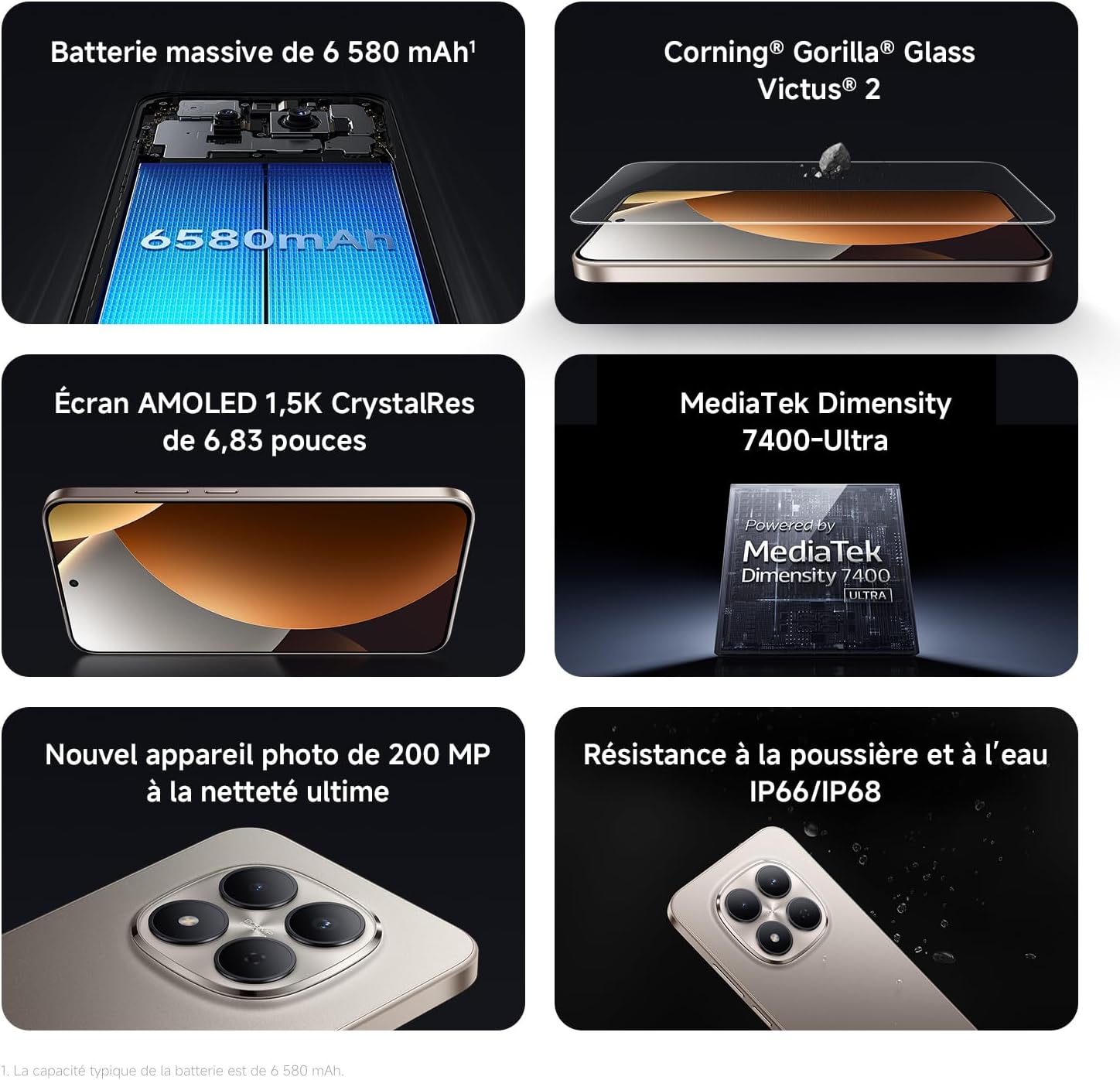
Image: Contents of the Xiaomi Redmi Note 15 Pro 5G box, showing the smartphone, USB-C cable, SIM ejection tool, protective case, and holding ring.
3. کلیدي ځانګړتیاوې
- Massive 6580 mAh Battery with 45W Turbo Charging: Equipped with an ultra-large silicon-carbon battery for extended usage while maintaining a slim and light design. Supports 45W turbo charging and up to 22.5W reverse charging.
- IP66 / IP68 Dust and Water Resistance: The device has successfully passed 2-meter water resistance tests for 24 hours. It is designed to withstand daily splashes, accidental immersion, or drops in water without affecting performance.
- New 200 MP Ultra-Clear Camera System: Features a 4th generation 200 MP main sensor combined with a large 1/1.4-inch sensor, offering unprecedented image detail.
- Immersive 6.83-inch 1.5K Eye-Care AMOLED Display: Utilizes flagship-level luminous materials for reduced power consumption and a peak brightness of 3200 nits, ensuring clear visibility even in bright sunlight.
- د مصنوعي ذهانت مرستیال: Intelligent optimization with a single gesture, enhancing imaging capabilities and creative efficiency.
- Corning Gorilla Glass Victus 2: Reinforced front glass for enhanced shock and scratch resistance, ensuring long-term durability.
- MediaTek Dimensity 7400-Ultra Processor: Built on a 4nm TSMC process with an octa-core architecture up to 2.6 GHz, providing powerful multitasking, smooth gaming, and stable performance.
- Xiaomi HyperOS 2: Offers a faster, smarter, and smoother user experience with 6 years of security updates.

Image: Diagram illustrating the 6580 mAh battery capacity of the Redmi Note 15 Pro 5G.

Image: The Redmi Note 15 Pro 5G with water droplets, demonstrating its IP66/IP68 dust and water resistance.

انځور: نږدې انځور view of the 200 MP camera module on the Redmi Note 15 Pro 5G.

Image: The 6.83-inch 1.5K AMOLED display of the Redmi Note 15 Pro 5G with its specifications.

Image: Before and after images demonstrating AI photo optimization on the Redmi Note 15 Pro 5G.

Image: Illustration of Corning Gorilla Glass Victus 2 durability on the Redmi Note 15 Pro 5G.

Image: Technical image showing RAM chips, indicating up to 24GB RAM with memory extension on the Redmi Note 15 Pro 5G.

Image: Screenshot of the Xiaomi HyperOS 2 interface on the Redmi Note 15 Pro 5G.
4. ترتیب کول
4.1. د سیم کارت داخلول
- د خپل وسیلې په اړخ کې د سیم کارت ټری ومومئ.
- Insert the SIM ejection tool into the small hole next to the tray and press firmly until the tray pops out.
- خپل نانو سیم کارتونه په ټری کې د سرو زرو اړیکو سره ښکته کړئ. ډاډ ترلاسه کړئ چې دوی په سمه توګه سره سمون لري.
- Carefully push the SIM card tray back into the device until it clicks into place.
۳.۲. د بریښنا لومړنی فعالول او تنظیم کول
- د پاور تڼۍ (معمولا په ښي خوا کې) فشار ورکړئ او ونیسئ تر هغه چې د Xiaomi لوګو څرګند شي.
- د خپلې ژبې، سیمې د غوره کولو او د وای فای شبکې سره د وصل کیدو لپاره په سکرین کې لارښوونې تعقیب کړئ.
- د ګوګل خدماتو او پلی سټور ته د لاسرسي لپاره د خپل ګوګل حساب سره لاسلیک وکړئ یا یو نوی حساب جوړ کړئ.
- Set up your screen lock (PIN, pattern, password, fingerprint, or face unlock) for security.
- Review او د تنظیم پروسې بشپړولو لپاره شرایط او مقررات ومنئ.
5. عملیاتي لارښوونې
5.1. بنسټیز نیویګیشن
- کور سکرین: د کور سکرینونو ترمنځ د تګ راتګ لپاره کیڼ یا ښیې سوائپ کړئ.
- د اپلیکیشن دراز: د ټولو نصب شویو غوښتنلیکونو ته د لاسرسي لپاره د سکرین له ښکته څخه پورته سوائپ کړئ.
- خبرتیاوې او چټک ترتیبات: د سکرین له پورتنۍ برخې څخه ښکته ته سوائپ کړئ view خبرتیاوې او د چټکو ترتیباتو لاسرسي ټګلونه.
- وروستي اطلاقات: Swipe up from the bottom and hold, or tap the square navigation button (if enabled) to see recently used applications.
5.2. د کیمرې کارول
The 200 MP camera system offers various modes for capturing photos and videos.
- د خپل کور سکرین یا د اپلیکیشن دراز څخه د کیمرې ایپ خلاص کړئ.
- Swipe left or right on the screen to switch between modes like Photo, Video, Portrait, Pro, and more.
- د عکس اخیستلو لپاره د شټر تڼۍ یا د ویډیو ثبت پیل/بندولو لپاره د ریکارډ تڼۍ ټایپ کړئ.
- Use the zoom options (e.g., 0.6x, 1x, 2x) or pinch to zoom for different perspectives.
- Access settings (gear icon) for advanced options like resolution, aspect ratio, and AI enhancements.

Image: A hand holding the Redmi Note 15 Pro 5G, displaying the camera interface with various modes and controls.
5.3. د ښودلو ترتیبات
Customize your display for optimal viewing او راحت.
- ورتګ ترتیبات> ښودنه.
- Adjust brightness, enable Adaptive brightness, or activate Reading mode for eye comfort.
- Change the Refresh rate (up to 120Hz) for smoother scrolling and animations.
- Select Color scheme and adjust color temperature to your preference.
5.4. د بیټرۍ مدیریت
Optimize your battery life and utilize charging features.
- لاسرسی ترتیبات> بیټرۍ ته view usage statistics and enable Battery Saver modes.
- Use the provided USB Type-C cable with a compatible 45W charger for turbo charging.
- To use reverse charging, connect a compatible device to your smartphone via a USB-C to USB-C cable.
۶. د رسنیو ادغام
6.1. محصول ختم شوview ویډیو
ویډیو: د پلورونکي لخوا چمتو شویview of the Redmi Note 15 Pro, showcasing its design, interface, and camera features. This video highlights the device's smooth operation and aesthetic appeal.
7. ساتنه
۱. خپل وسیله پاکول
- Use a soft, lint-free cloth to clean the screen and body of your phone.
- د سختو کیمیاوي موادو یا خړوبولو موادو کارولو څخه ډډه وکړئ.
- For speaker and port cleaning, the device features a function to expel water and dust. Access this feature through the settings or a dedicated app.

Image: Screenshot of the Redmi Note 15 Pro 5G showing a speaker cleaning function on the screen, which uses high-frequency vibration to expel residual water and dust.
7.2. د سافټویر تازه معلومات
د غوره فعالیت، امنیت، او نویو ځانګړتیاو ته د لاسرسي ډاډ ترلاسه کولو لپاره په منظم ډول د سافټویر تازه معلومات وګورئ او نصب کړئ.
- ورتګ ترتیبات > د تلیفون په اړه > د MIUI نسخه (یا د هایپر او ایس نسخه) د تازه معلوماتو د چک کولو لپاره.
8. ستونزه حل کول
۵.۲. وسیله ځواب نه ورکوي
- د بریښنا تڼۍ د شاوخوا ۱۰-۱۵ ثانیو لپاره فشار ورکړئ او ونیسئ ترڅو بیا پیل کړئ.
- If the issue persists, ensure the device is charged. Connect it to a charger and wait a few minutes before attempting to power it on again.
۲. د شبکې د اتصال مسلې
- Toggle Airplane mode on and off from Quick Settings.
- خپل وسیله بیا پیل کړئ.
- وګورئ چې ستاسو سیم کارت په سمه توګه داخل شوی دی.
- ورتګ ترتیبات > سیم کارتونه او ګرځنده شبکې to ensure your mobile data is enabled and the correct network type is selected.
۳. د اپلیکیشنونو کریش یا کنګل کیدل
- د ستونزې لرونکي اپلیکیشن کیش او ډیټا پاک کړئ (ترتیبات > ایپسونه > ایپسونه اداره کړئ > [د اپلیکیشن نوم] > ډاټا پاک کړئ).
- اپلیکیشن غیر نصب او بیا نصب کړئ.
- ډاډ ترلاسه کړئ چې ستاسو د وسیلې سافټویر تازه دی.
8.4. د فابریکې ری سیٹ
که تاسو دوامداره ستونزو سره مخ شئ، نو د فابریکې بیا تنظیم کول ممکن اړین وي. خبرداری: دا به ستاسو په وسیله کې ټول معلومات له منځه یوسي. د پرمخ تللو دمخه مهم معلومات بیک اپ کړئ.
- ورتګ ترتیبات> د تلیفون په اړه> د فابریکې ری سیٹ.
- د بیا تنظیم کولو تایید لپاره په سکرین کې لارښوونې تعقیب کړئ.
9. مشخصات
| فیچر | تفصیل |
|---|---|
| برانډ | XIAOMI |
| د ماډل نوم | د ریډمي نوټ 15 پرو 5G |
| عملیاتي سیسټم | هایپر او ایس |
| RAM | 12 جي بي |
| د ذخیره کولو ظرفیت | 512 جي بي |
| د CPU ماډل | میډیاټیک ډیمینسټي ۸۳۰۰ |
| د سکرین اندازه | ۷۸۷ انچه |
| د ښودلو ریزولوشن | 1560 x 720 |
| د تازه کولو نرخ | 120 Hz |
| د ښودلو ډول | AMOLED |
| بې سیم کیریر | خلاص شوی |
| رنګ | تور |
| د سیم کارت سلاټونه | دوه ګونی سیم |
| ننوتۍ برسیر | د USB ډول C |
| د اوبو د مقاومت کچه | Waterproof (IP66/IP68) |
| د مخکینۍ کیمرې ریزولوشن | 20 MP |
| د شا کیمرې ریزولوشن | ۲ میګاپکسله |
| د بیټرۍ ظرفیت | 6580 mAh |
| سیلولر ټیکنالوژي | 5G |
| د ارتباط ټیکنالوژي | بلوتوث، NFC، USB، وای فای |
| د ماډل کال | 2026 |

Image: Technical specifications and feature legends for the Redmi Note 15 Pro 5G.
10. تضمین او ملاتړ
Your Xiaomi Redmi Note 15 Pro 5G comes with a د جوړونکي دوه کلن تضمیندا تضمین د عادي استعمال لاندې موادو او کاریګرۍ نیمګړتیاوې پوښي.
For warranty claims, technical support, or service inquiries, please contact Xiaomi customer service or visit the official Xiaomi support webسایټ. د تضمین تصدیق لپاره د پیرود ثبوت وساتئ.


