
پیژندنه
Thank you for choosing the Jedel WD154 Wireless Mouse. This manual provides essential information for setting up, operating, and maintaining your new mouse. Please read these instructions carefully before use to ensure optimal performance and longevity of your device.
د بسته محتويات
- Jedel WD154 Wireless Mouse
- د USB-C چارج کیبل
- 2.4GHz USB ترلاسه کوونکی
- د کارن لارښود

Image: The retail packaging for the Jedel WD154 Wireless Mouse, displaying the mouse, its features, and technical specifications on the box.
محصول پای ته ورسیدview
The Jedel WD154 features a transparent 6D design with RGB lighting and a digital LED battery display. It offers dual-mode connectivity for versatile use.
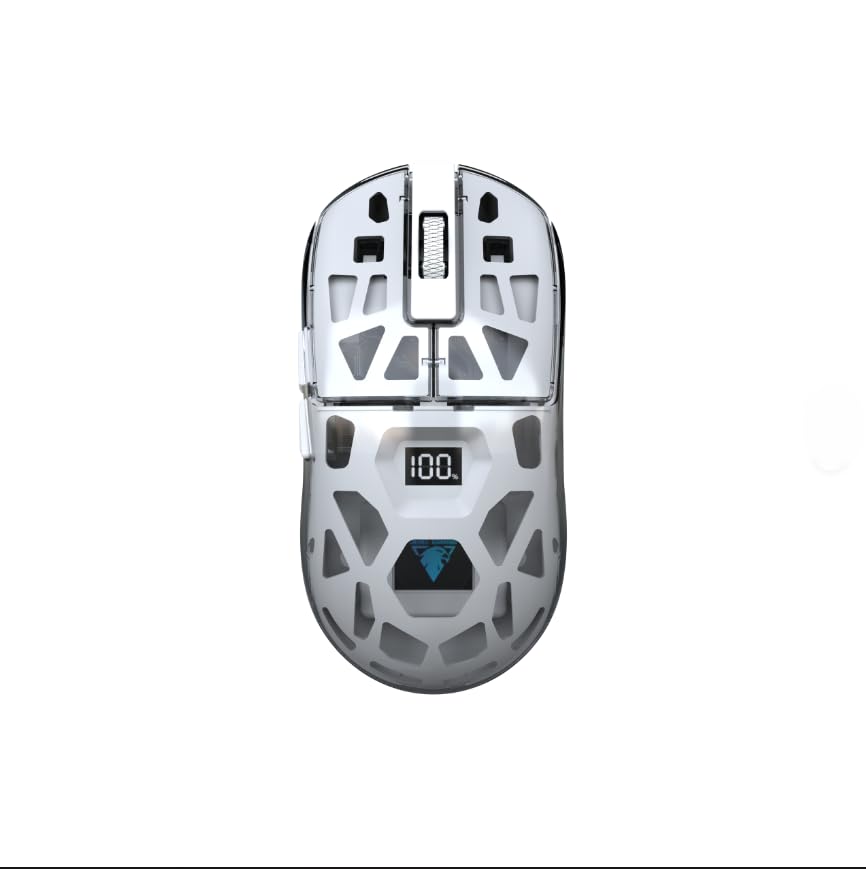
انځور: یوه نږدې اړخ view of the Jedel WD154 Wireless Mouse, showcasing its unique transparent shell and the integrated digital LED display indicating a 100% battery charge.
د تڼۍ دندې:
- د کیڼ کلیک تڼۍ: معیاري کیڼ کلیک فعالیت.
- د ښي کلیک تڼۍ: د ښي کلیک کولو معیاري فعالیت.
- سکرول ویل: پورته/ښکته سکرول کړئ، منځنی کلیک وکړئ.
- د DPI تڼۍ: د موږک حساسیت (DPI) تنظیموي.
- د وړاندې کولو تڼۍ: مخ په وړاندې ځي web براوزرونه/غوښتنلیکونه.
- شاته تڼۍ: شاته نیویګیټ کوي web براوزرونه/غوښتنلیکونه.
- Mode Switch Button (underneath): Toggles between 2.4GHz and Bluetooth modes.
چمتو کول
1. د موږک چارج کول
Before first use, fully charge the mouse using the provided USB-C cable.
- Connect the USB-C end of the cable to the mouse's charging port.
- د USB-A پای د بریښنا سرچینې سره وصل کړئ (د مثال په توګه، د کمپیوټر USB پورټ، د USB دیوال اډاپټر).
- The digital LED display will show the charging progress. A full charge is indicated by '100'.

انځور: یو مفصل view of the front of the Jedel WD154 Wireless Mouse, illustrating the USB-C charging port with the charging cable securely connected.
۲.۴. د ۲.۴GHz بېسیم له لارې نښلول
- د 2.4GHz USB ریسیور ومومئ، چې معمولا د موږک په لاندې برخه کې په یوه کمپارټمینټ کې ساتل کیږي.
- د USB ریسیور په خپل کمپیوټر یا وسیله کې موجود USB پورټ کې ولګوئ.
- د لاندې برخې د بریښنا سویچ په کارولو سره موږک چالان کړئ.
- Press the Mode Switch button (if present) until the mouse is in 2.4GHz mode (often indicated by a specific LED color or pattern).
- موږک باید په اتوماتيک ډول وصل شي.
۳.۴. د بلوتوث ۵.۰ له لارې نښلول
- د لاندې برخې د بریښنا سویچ په کارولو سره موږک چالان کړئ.
- Press the Mode Switch button (if present) until the mouse is in Bluetooth mode. The LED indicator will typically flash, indicating it's in pairing mode.
- On your device (PC, Mac, tablet, smartphone), go to Bluetooth settings.
- لټون new devices and select "Jedel WD154" (or similar name) from the list.
- د جوړه کولو پروسې بشپړولو لپاره هر ډول د پردې پرامپټس تعقیب کړئ.
عملیاتي لارښوونې
د DPI تعدیل
The mouse features adjustable DPI settings (800/1200/1600) to control cursor sensitivity.
- فشار ورکړئ د DPI تڼۍ (usually located behind the scroll wheel) to cycle through the available DPI settings.
- Each press will change the sensitivity, allowing you to find your preferred speed for different tasks or games.
د RGB رingا کنټرول
موږک د متحرک RGB رڼا لري.
- The RGB lighting typically activates automatically when the mouse is powered on.
- Specific button combinations (e.g., DPI button + a side button) might cycle through different lighting modes or turn the RGB on/off. Refer to the quick start guide for specific controls if available.

Image: A compilation of images demonstrating the Jedel WD154 Wireless Mouse with its RGB lighting set to various colors, showcasing the customizable aesthetic.
د بریښنا مدیریت
- The digital LED display shows the current battery percentage (1-100٪).
- When the battery is low, recharge the mouse using the USB-C cable.
- The mouse may enter an automatic sleep mode after a period of inactivity to conserve battery. Move the mouse or click a button to wake it up.
ساتنه
- پاکول: د موږک د پاکولو لپاره نرم، وچ ټوکر وکاروئ. د سختې خاورې لپاره، یو څه damp ټوکر کارول کیدی شي، مګر ډاډ ترلاسه کړئ چې رطوبت وسیله ته ننوځي.
- ذخیره کول: موږک په یخ او وچ ځای کې د مستقیم لمر وړانګو او سختې تودوخې څخه لرې وساتئ.
- د بیټرۍ پاملرنه: Avoid fully discharging the battery frequently. Charge it regularly to maintain battery health.
- له څاڅکو ډډه وکړئ: Protect the mouse from drops and impacts, which can damage internal components or the transparent casing.
د ستونزو حل کول
| ستونزه | احتمالي حل |
|---|---|
| موږک ځواب نه ورکوي |
|
| د کرسر حرکت بې نظمه یا ورو دی |
|
| د RGB څراغ کار نه کوي |
|
| د بلوتوث له لارې نشي نښلول کیدی |
|
مشخصات
- ماډل: WD154
- د ارتباط ټیکنالوژي: Bluetooth 5.1 + 2.4GHz (Dual Mode)
- د DPI ترتیبات: ۱۰۰۰ / ۱۴۰۰ / ۱۶۰۰ (د تعدیل وړ)
- د تڼیو شمیر: 6
- د حرکت کشف: نظري
- ځانګړي ځانګړتیاوې: Transparent Design, RGB Lighting, Digital Battery Percentage ښودل
- د بریښنا سرچینه: د چارج وړ بیټرۍ (USB-C)
- مطابقت لرونکي وسایل: کمپیوټر، لیپ ټاپ، ټابلیټ، سمارټ فون
- مناسب عملیاتي سیسټمونه: وینډوز، ماک OS
- د توکي وزن: 96 ګرامه
- د محصول ابعاد (L x W): 12.7 cm x 6.4 cm
تضمین او ملاتړ
د تضمین معلومات
دا محصول د الف سره راځي د 14 ورځو تضمین د پیرود نیټې څخه. دا تضمین د عادي استعمال لاندې د تولید نیمګړتیاوې پوښي. دا د ناوړه ګټې اخیستنې، پیښو، غیر مجاز تعدیلاتو، یا عادي اغوستلو او اوښکو له امله رامینځته شوي زیانونه نه پوښي.
د پیرودونکي ملاتړ
For technical assistance, troubleshooting, or warranty claims, please contact your retailer or the point of purchase. Please have your proof of purchase and product model number (WD154) ready when contacting support.