
1. پیژندنه
This manual provides essential information for setting up, operating, maintaining, and troubleshooting your Lenovo ThinkPad E16 Business Laptop. Please read this manual thoroughly to ensure proper usage and to maximize the performance and longevity of your device.

Figure 1.1: Lenovo ThinkPad E16 Business Laptop
2. ترتیب کول
۲.۱ د بسته بندۍ خلاصول او لومړنۍ تفتیش
Carefully remove all components from the packaging. Verify that all items listed in the 'What's in the Box' section are present and undamaged. If any items are missing or damaged, contact your vendor immediately.
2.2 د بریښنا سره وصل کول
- د بریښنا اډاپټر د لپ ټاپ د USB-C بریښنا پورټ سره وصل کړئ.
- د بریښنا اډاپټر په ځمکني بریښنایی پلورنځی کې ولګوه.
- بیټرۍ ته اجازه ورکړئ چې لږترلږه د 30 دقیقو لپاره د لومړني کارونې دمخه چارج شي، یا تر هغه چې د بیټرۍ شاخص کافي چارج وښيي.
2.3 Initial Boot-Up and Windows 11 Pro Setup
Press the power button to turn on your laptop. Follow the on-screen instructions to complete the Windows 11 Pro setup, including language selection, network connection, and user account creation.
2.4 د پردیو سره نښلول
ستاسو د ThinkPad E16 د بهرنیو وسیلو سره د نښلولو لپاره مختلف پورټونه وړاندې کوي:
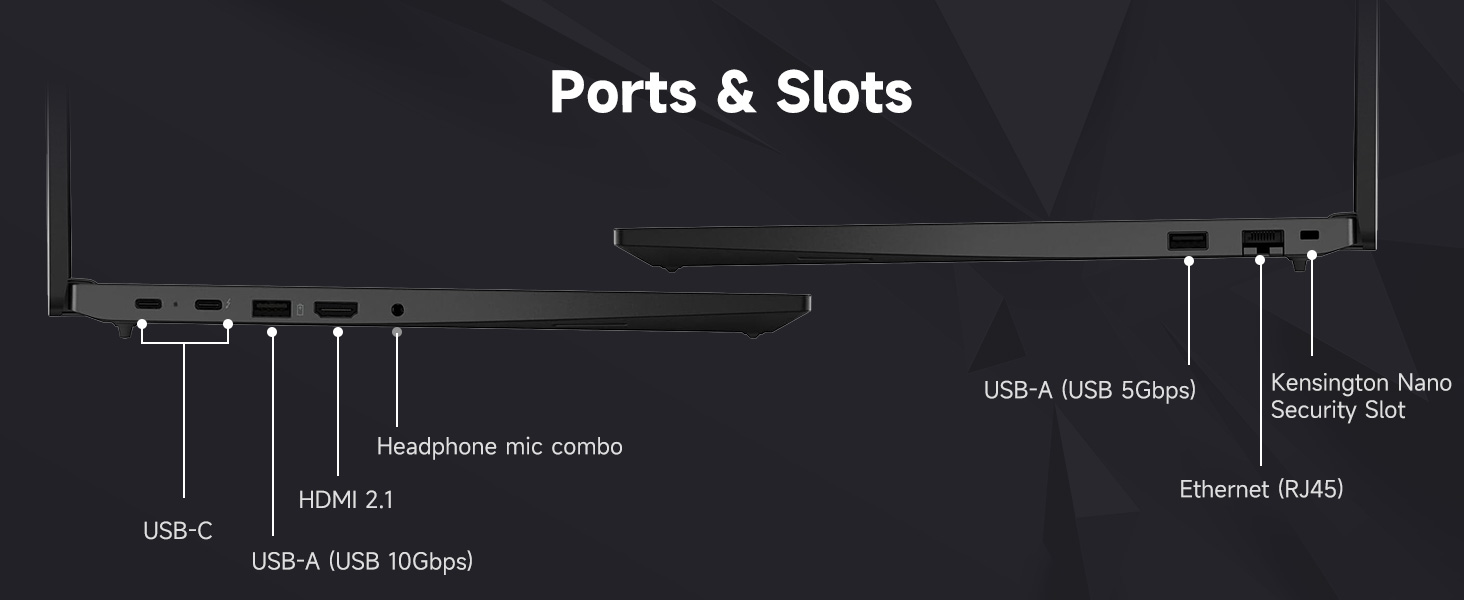
Figure 2.1: Laptop Ports and Slots
- USB-A (USB 5Gbps, USB 10Gbps): Connect USB devices such as the bundled wireless mouse receiver, external hard drives, or printers.
- USB-C (USB 5Gbps, PD / DP 1.4, USB 10Gbps, PD / DP 1.4): د بریښنا رسولو، معلوماتو لیږد، او د ښودلو محصول لپاره.
- ایترنیټ (RJ45): د تار لرونکي شبکې اتصال لپاره.
- HDMI2.1: د بهرني مانیټر یا تلویزیون سره وصل شئ.
- Headphone / mic combo (3.5mm): د آډیو ان پټ/آؤټ پټ لپاره.
- د کینسنګټن نانو امنیتي سلاټ: د فزیکي امنیت تالاشۍ لپاره.
۶.۴.۱ د وای فای ۶ اتصال
During Windows setup, you will be prompted to connect to a Wi-Fi network. Select your network and enter the password. Your laptop supports Wi-Fi 6 for fast and reliable wireless connectivity.
۴.۲ د ګوتو نښې لوستونکي تنظیم کول
To enhance security, set up the integrated fingerprint reader through Windows Hello in your system settings. This allows for quick and secure login.
۲.۵ بنډل شوي لوازمات
Your laptop includes an A-DATA UC310 64GB USB Flash Drive and a Thunderobot ML101 Wireless Mouse. The USB drive provides additional storage and data transfer capabilities. The wireless mouse connects via a USB nano receiver for convenient navigation.

Figure 2.2: A-DATA UC310 64GB USB Flash Drive
۳. ستاسو د لپ ټاپ چلول
۳.۱ کیبورډ او ان پټ وسایل
The ThinkPad E16 features a backlit keyboard for comfortable typing in various lighting conditions. Utilize the TrackPoint Quick Menu and Tap-to-Select features for efficient navigation. The larger touchpad also enhances user interaction.

Figure 3.1: Keyboard and Touchpad Features
3.2 ځانګړتیاوې ښکاره کول
The 16-inch FHD+ (1920x1200) IPS anti-glare touchscreen display offers clear visuals. Its 16:10 aspect ratio provides more vertical screen space, beneficial for productivity. The 300-nit brightness and TÜV Low Blue Light certification contribute to reduced eye strain during extended use.

شکل ۳.۱: د ښودلو مشخصات
3.3 Audio and Visuals
Experience Harman- and Dolby-optimized audio for enhanced sound quality. The AI-based noise cancellation feature improves clarity during video conferences and multimedia consumption.

Figure 3.3: Audiovisual Experience
3.4 فعالیت
Powered by the AMD Ryzen 7 7735U processor with 8 cores and 16 threads, the laptop delivers responsive performance for everyday productivity, multitasking, and business workflows. The 32GB DDR5 RAM ensures smooth operation across multiple applications, and the 1TB PCIe NVMe M.2 Solid State Drive provides fast boot-up times and quick data access.

Figure 3.4: AMD Ryzen 7 Processor
4. ساتنه
۴.۱ د خپل لپ ټاپ پاکول
- د نرم، لینټ پاک ټوکر څخه کار واخلئampد ښودنې پاکولو لپاره د اوبو یا سکرین کلینر سره مینځل.
- کیبورډ او چیسس د لږ څه d سره پاک کړئamp ټوکر. د ډیر رطوبت څخه ډډه وکړئ.
- سخت کیمیاوي مواد، محلولونه، یا د کثافاتو پاکوونکي مه کاروئ.
4.2 د سافټویر تازه معلومات
په منظم ډول د عملیاتي سیسټم تازه معلومات (وینډوز تازه معلومات) او د ډرایور تازه معلومات (لینوو وان) وګورئ او نصب کړئ.tagد e یا لینوو ملاتړ webسایټ) ترڅو غوره فعالیت او امنیت ډاډمن شي.
4.3 د بیټرۍ پاملرنه
- د بیټرۍ په مکرر ډول د بشپړ چارج کولو څخه ډډه وکړئ.
- کله چې د اوږدې مودې لپاره نه کارول کېږي، لیپ ټاپ په یخ او وچ ځای کې وساتئ.
- For optimal battery health, avoid continuous charging at 100% for long durations.
4.4 امنیت ب Featuresې
The ThinkPad E16 incorporates several security features to protect your data:
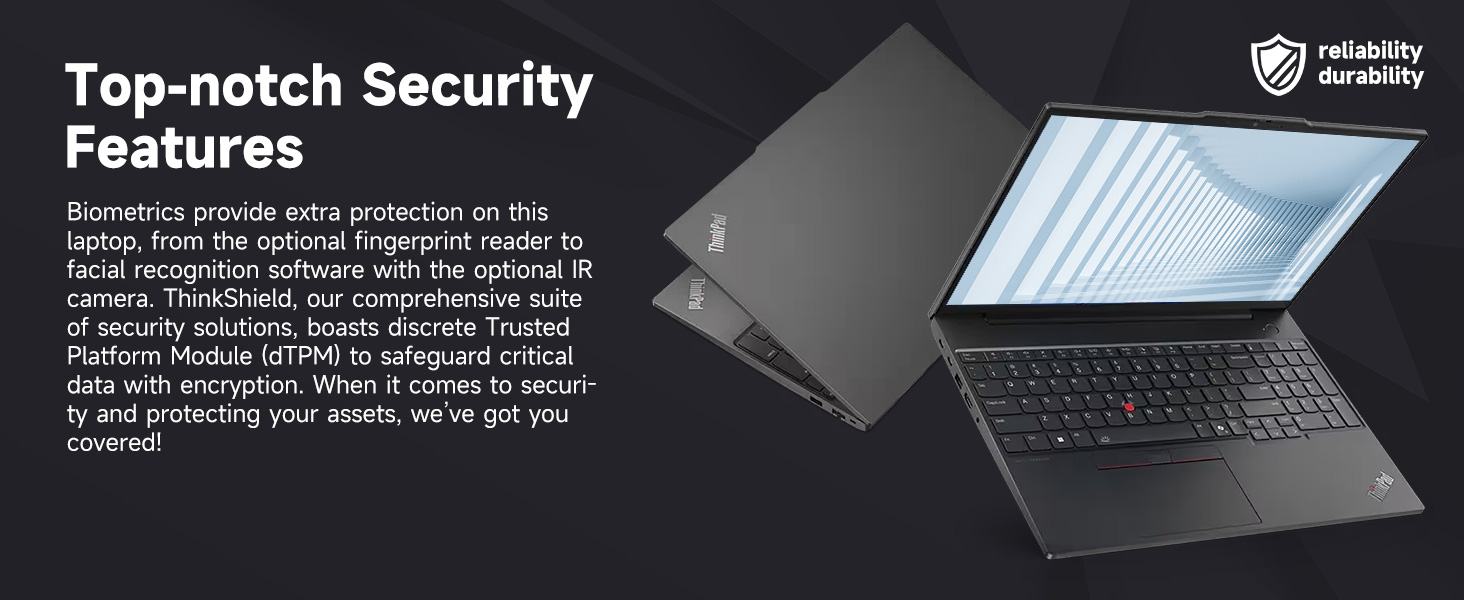
Figure 4.1: Top-notch Security Features
- ThinkShield Security Suite: A comprehensive suite of security solutions.
- د ګوتو نښان لوستونکی: د بایومیټریک تصدیق لپاره.
- dTPM (Discrete Trusted Platform Module): Safeguards critical data with encryption.
- Webد کیم محرمیت شټر: Physically blocks the webد محرمیت لپاره کیمره.
5. ستونزه حل کول
This section addresses common issues you might encounter with your ThinkPad E16. For more detailed troubleshooting, refer to the Lenovo support webسایټ
۵.۱ د برېښنا ستونزې
- لیپ ټاپ نه چالانیږي: Ensure the power adapter is securely connected and the outlet is functional. Check the battery charge level.
- بیټرۍ چارج نه کوي: Verify the power adapter is working. Try a different outlet.
5.2 د ښودلو مسلې
- No display or blank screen: یو بهرنی مانیټر وصل کړئ ترڅو وګورئ چې ایا ستونزه د لیپ ټاپ په ښودنه کې ده. د روښانتیا ترتیبات تنظیم کړئ.
- ځلیدونکی سکرین: د ګرافیک ډرایورونه تازه کړئ. که تاسو بهرني مانیټر کاروئ نو د ښودنې کیبل اتصالونه وګورئ.
۵.۳ د اتصال مسلې
- وای فای نه وصل کیږي: Ensure Wi-Fi is enabled. Restart your router and laptop. Re-enter Wi-Fi password.
- د USB وسایل نه پیژندل کیږي: یو بل USB پورټ هڅه وکړئ. د USB ډرایورونه تازه کړئ.
۶.۲ د فعالیت مسلې
- ورو فعالیت: غیر ضروري غوښتنلیکونه بند کړئ. د شالید پروسو لپاره وګورئ. د کافي وړیا ذخیره کولو ځای ډاډمن کړئ.
- ډیر ګرمول: ډاډ ترلاسه کړئ چې د هوا د بهېدو لارې پاکې دي. لپ ټاپ په یوه سخته او پلنه سطحه وکاروئ.
6. مشخصات
| فیچر | مشخصات |
|---|---|
| برانډ | Lenovo |
| د ماډل نوم | د ThinkPad E16 |
| پروسیسر | AMD Ryzen 7 7735U (8 کورونه، 16 تارونه، تر 4.75 GHz پورې) |
| ګرافیک | د AMD Radeon ګرافیک (مدغم) |
| RAM | ۱۶ جي بي ډي ډي آر ۴ رام (۳۲۰۰ ميګاهيرتزه) |
| ذخیره کول | ۲ ټې بي PCIe NVMe M.1 SSD |
| ښودل | 16-inch FHD+ (1920x1200) IPS Touchscreen, Anti-glare, 16:10 aspect ratio, 300nit, TÜV Low Blue Light certified, 60 Hz Refresh Rate |
| عملیاتي سیسټم | وینډوز 11 پرو |
| ارتباط | Wi-Fi 6 (802.11ax), Ethernet (RJ45) |
| بندرونه | 2x USB-A (5Gbps, 10Gbps), 2x USB-C (5Gbps, 10Gbps, PD/DP 1.4), 1x HDMI 2.1, 1x Headphone/Mic Combo, 1x Kensington Nano Security Slot |
| ځانګړي ځانګړتیاوې | Backlit Keyboard, Fingerprint Reader, Numeric Keypad, HD 720p RGB Webکیمره د محرمیت شټر سره |
| رنګ | تور |
| Dimensions (L x W x Thickness) | ۸۳.۸" x ۵۵.۷" x ۴۴.۱" |
7. تضمین او ملاتړ
7.1 د تضمین معلومات
Your Lenovo ThinkPad E16 comes with a 1-year manufacturer's warranty. Additionally, for upgraded RAM/SSD components, a 1-year warranty is provided by PCOnline US. Please retain your proof of purchase for warranty claims.
7.2 تخنیکي ملاتړ
د تخنیکي مرستې، د ډرایور ډاونلوډونو، یا نورو ستونزو حل کولو لپاره، مهرباني وکړئ د لینوو رسمي ملاتړ ته مراجعه وکړئ. website or contact their customer service. For issues related to the upgraded components, contact PCOnline US support.