
1. پیژندنه او وروستهview
The EPOS Impact 500 ANC Wireless Headset is engineered for professionals requiring clear communication and focus in diverse work environments. This on-ear Bluetooth headset integrates hybrid Active Noise Cancellation (ANC) to minimize distractions and features EPOS AI™ microphones for natural voice clarity during conversations. It offers versatile connectivity via dual USB-C and USB-A options, ensuring compatibility with various devices. Certified for Microsoft Teams Open Office and other UC platforms, it provides a seamless experience for remote and office collaboration. Key benefits include extended battery life, talk-through mode for quick interactions, and EPOS BrainAdapt™ technology designed to reduce listening fatigue.
۲. په بکس کې څه دي؟
Upon unboxing your EPOS Impact 500 ANC Wireless Headset, you will find the following components:
- EPOS Impact 500 ANC Wireless Headset
- USB-C ته USB-C چارج کیبل (1.2m)
- BTD 900c USB-C Dongle
- USB-C ته USB-A اډاپټر
- Sustainable Carry Pouch
- د خوندیتوب لارښود
- د موافقت پاڼه
- ګړندي لارښود

Image: All items included in the EPOS Impact 500 ANC Wireless Headset package.
3. ترتیب کول
۶.۲ د هیډسیټ چارج کول
Before initial use, fully charge your headset. Connect the provided USB-C to USB-C charging cable to the charging port on the headset and to a compatible USB-C power source. If your device only has USB-A ports, use the included USB-C to USB-A adapter with the charging cable. The LED indicator on the headset will show charging status.
۲.۳ ستاسو د وسیلې سره وصل کیدل
The headset offers flexible connectivity options:
- بلوتوث Power on the headset. Activate Bluetooth on your device (laptop, tablet, smartphone). Put the headset into pairing mode (refer to the Quick Guide for specific button presses). Select "EPOS Impact 500" from your device's Bluetooth list.
- USB-C Dongle (BTD 900c): Insert the BTD 900c USB-C dongle directly into a USB-C port on your computer. The headset will automatically connect to the dongle. If your computer only has USB-A ports, attach the USB-C to USB-A adapter to the dongle before inserting it.
۵.۱ د هیډسیټ تنظیم کول
Adjust the headband for a comfortable fit. The earcups are designed to rest gently on your ears. Position the boom microphone approximately 2-3 cm from the corner of your mouth for optimal voice pickup. The boom mic can be rotated up or down.

Image: The EPOS Impact 500 headset with its adjustable boom microphone.
4. عملیاتي لارښوونې
4.1 بنسټیز کنټرولونه
- پاور آن/بند: Use the dedicated power switch located on one of the earcups.
- د حجم سمون: Use the volume up and down buttons on the earcup to control audio levels.
- د تلیفون مدیریت: A multi-function button is available for answering/ending calls.
- د مایکروفون خاموش/غیر غږول: Lift the boom microphone up to mute and lower it down to unmute.
4.2 د فعال شور لغوه کول (ANC)
The hybrid ANC feature can be activated to reduce background noise, allowing for greater focus during calls and work. Refer to the Quick Guide for specific button controls to toggle ANC on or off.
4.3 Talk-Through Mode
For quick conversations with colleagues without removing the headset, activate Talk-Through mode. This feature allows ambient sounds to pass through, enabling effortless interaction. Consult the Quick Guide for activation instructions.
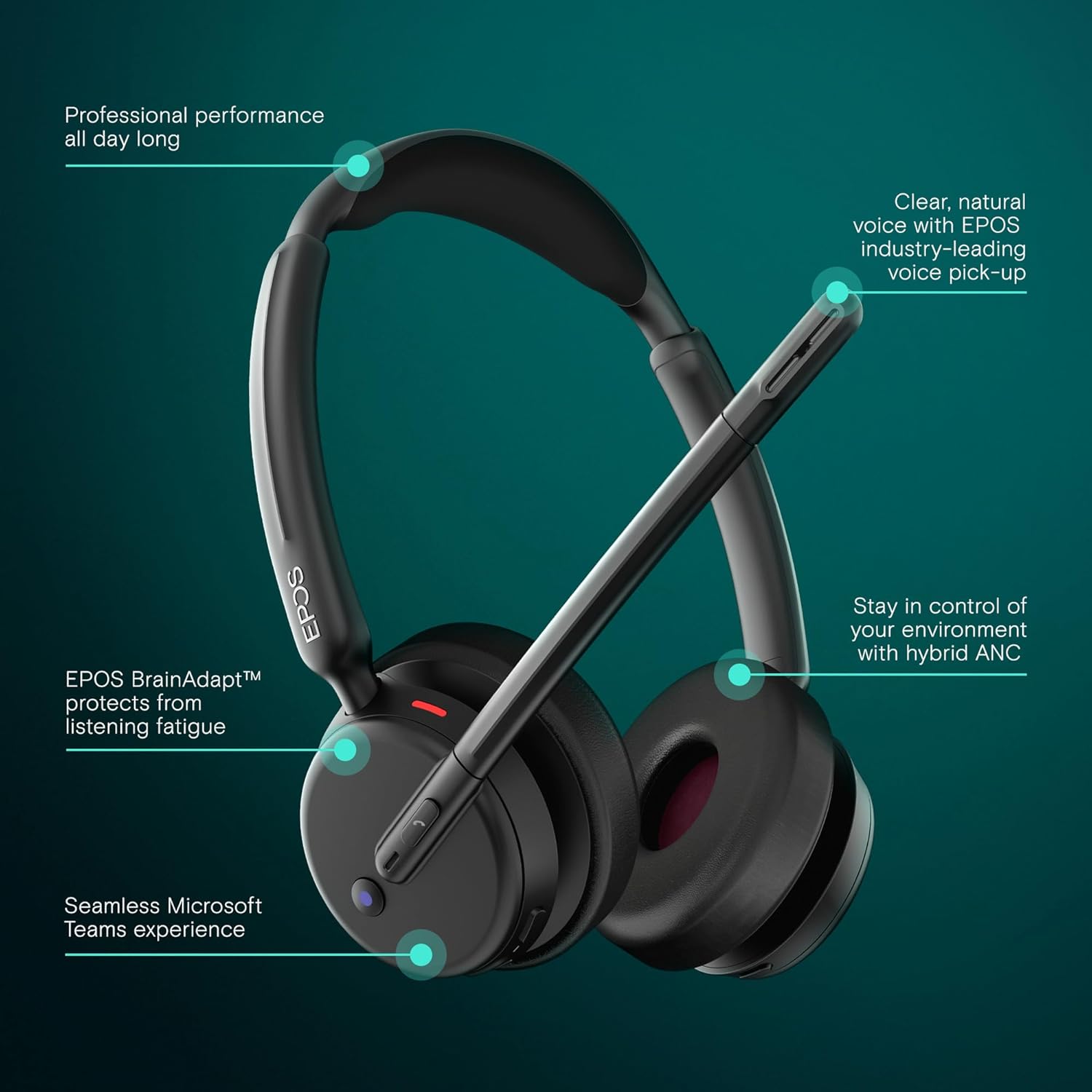
Image: Visual representation of the headset's main operational features.
5. کلیدي ځانګړتیاوې
- د هایبرډ فعال شور لغوه کول: Adaptively reduces background noise for crystal-clear calls and enhanced focus.
- EPOS AI™ Voice Technology: Advanced microphones isolate your voice from surrounding noise, ensuring natural and professional-sounding calls.
- EPOS BrainAdapt™ Technology: Designed to protect your brain from fatigue caused by poor audio and noise, boosting focus and productivity during long calls.
- Microsoft Teams Certified & UC Compatible: Optimized for Microsoft Teams and compatible with leading Unified Communications platforms like Zoom and Google Meet for effortless collaboration.
- Seamless Dual Connectivity: Includes both USB-C and USB-A options with the BTD 900c dongle and adapter for instant plug-and-play connection to various devices.
- د بیټرۍ اوږد ژوند: Offers up to 35 hours of talk time, supporting long hybrid workdays without frequent recharging.
- Lightweight On-Ear Design: Provides all-day comfort with soft leatherette cushions, minimizing listening fatigue.
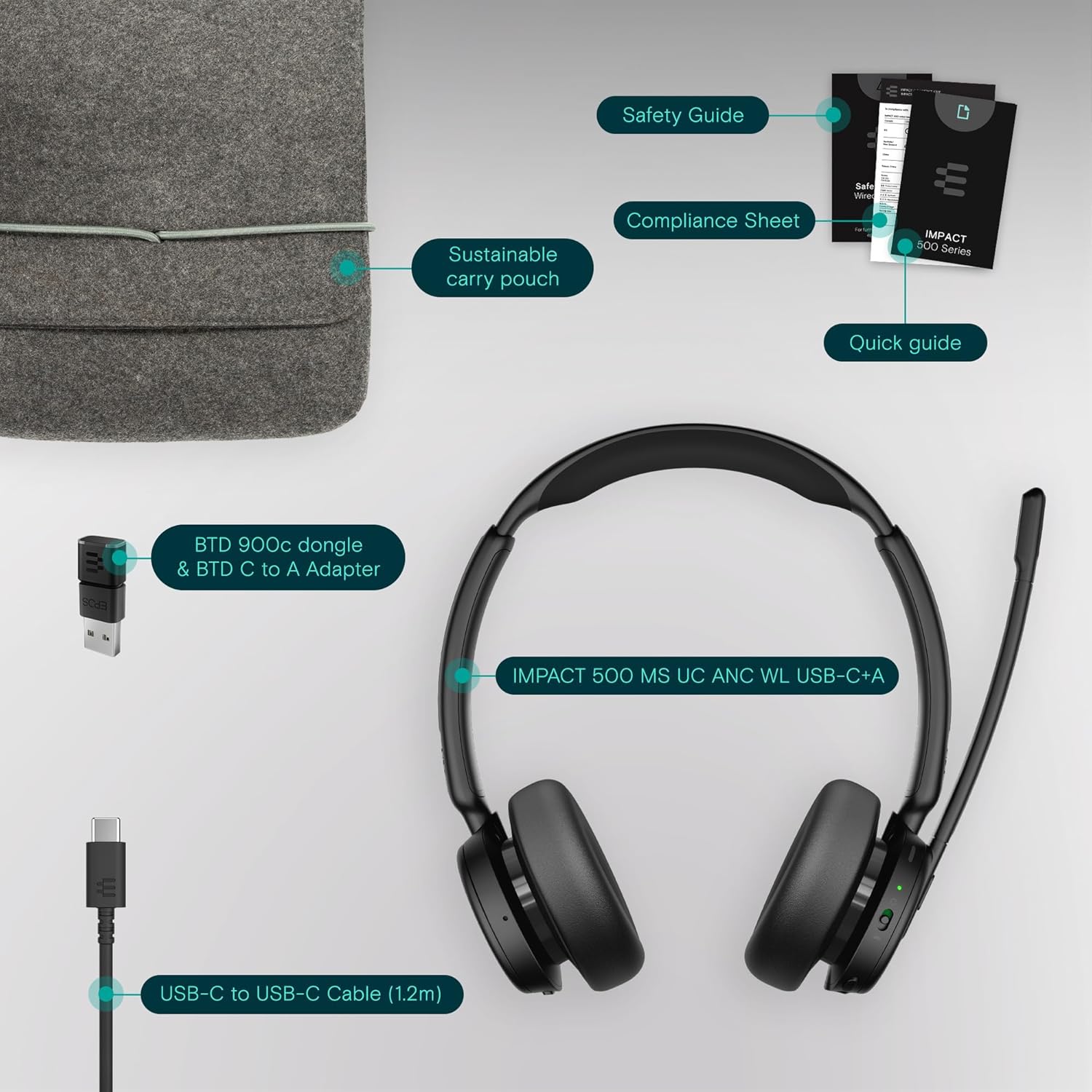
Image: User wearing the headset in a professional setting, highlighting comfort and clarity.
6. ساتنه
To ensure the longevity and optimal performance of your EPOS Impact 500 ANC Wireless Headset, follow these maintenance guidelines:
- پاکول: د هیډسیټ پاکولو لپاره نرم، وچ ټوکر وکاروئ. د غوږ کپونو لپاره، په نرمۍ سره د لږ څه ډډ سره مسح کړئamp cloth if necessary, avoiding excessive moisture. Do not use harsh chemicals or abrasive materials.
- ذخیره کول: When not in use, store the headset in the provided sustainable carry pouch to protect it from dust, scratches, and impacts.
- دحرارت درجه: Avoid exposing the headset to extreme temperatures (hot or cold) or direct sunlight for extended periods.
- رطوبت: هیډسیټ د اوبو او لوړې رطوبت څخه لرې وساتئ.
7. ستونزه حل کول
که تاسو د خپل هیډسیټ سره ستونزې سره مخ شئ، نو لاندې د ستونزو حل کولو مرحلې هڅه وکړئ:
- ځواک نشته: Ensure the headset is fully charged using the provided USB-C cable and a reliable power source.
- هیڅ آډیو/مایکروفون کار نه کوي:
- Check if the headset is properly paired with your device via Bluetooth or connected via the USB dongle.
- Verify that the headset is selected as the default audio input/output device in your computer's sound settings or communication application (e.g., Microsoft Teams, Zoom).
- ډاډ ترلاسه کړئ چې د مایکروفون بوم ټیټ شوی او خاموش نه دی.
- خپل وسیله او هیډسیټ بیا پیل کړئ.
- ضعیف آډیو کیفیت:
- Move closer to your connected device to ensure a strong Bluetooth signal.
- د نورو بې سیم وسیلو څخه د مداخلې لپاره وګورئ.
- Ensure the microphone is correctly positioned near your mouth.
- ANC Not Functioning: Ensure the ANC feature is activated. Refer to the Quick Guide for specific controls.
- Connectivity Issues with Dongle: Try inserting the USB dongle into a different USB port on your computer. Ensure the dongle is fully inserted.
For further assistance, consult the comprehensive user manual available on the EPOS website or contact EPOS customer support.
8. مشخصات
| فیچر | تفصیل |
|---|---|
| برانډ | EPOS |
| د ماډل نوم | 500 اغیزه |
| د ماډل شمیره | 1001490 |
| رنګ | تور |
| د غوږ ځای پرځای کول | په غوږ کې |
| د شور کنټرول | د هایبرډ شور لغوه کول |
| د ارتباط ټیکنالوژي | بې سیم (بلوتوث) |
| بلوتوث نسخه | 5.0 |
| د کنټرول طریقه | لمس |
| د بیټرۍ اوسط ژوند | 35 ساعته |
| د توکي وزن | 391 ګرامه |
| د تړلو موادو | غلط چرم |
| د فریکونسی رینج | ۲۰ هرټز - ۲۰،۰۰۰ هرټز |
| اضافي ځانګړتیاوې | Noise Cancellation, AI Voice Technology, BrainAdapt Technology |
| مطابقت لرونکې وسیلې | لپټاپونه، ډیسټاپونه، ټابلیټونه، ټیلیفونونه، سمارټ سپیکرونه، تلویزیونونه، ګرځنده تلیفونونه |
9. تضمین او ملاتړ
The EPOS Impact 500 ANC Wireless Headset comes with a د جوړونکي 2 کلن تضمین. For warranty claims, technical support, or additional product information, please visit the official EPOS webسایټ ته مراجعه وکړئ یا د دوی د پیرودونکو خدماتو څانګې سره اړیکه ونیسئ. د تضمین تصدیق لپاره د پیرود ثبوت وساتئ.