
1. پیژندنه
The Wyze Smart Scale X is an advanced digital bathroom scale designed to provide a comprehensive overview of your body composition. It measures various metrics beyond just weight, helping you track your health and fitness journey effectively. This manual will guide you through the setup, operation, and maintenance of your Wyze Smart Scale X.

Image: A user interacting with the Wyze Smart Scale X and its companion app, showing body composition trends over time.
۲. په بکس کې څه دي؟
- Wyze Smart Scale X (1)
- 1.5V AAA Batteries (4)
- د چټک پیل لارښود (1)
3. ترتیب کول
- بیټرۍ نصب کړئ: د پیمانې په لاندې برخه کې د بیټرۍ کڅوړه پرانیزئ او څلور AAA بیټرۍ دننه کړئ، ترڅو سم قطبي والی ډاډمن شي.
- د وایز اپلیکیشن ډاونلوډ کړئ: لټون "Wyze" in your smartphone's app store (Apple App Store or Google Play Store) and download the official Wyze app.
- Create/Log In to Wyze Account: Open the app and either create a new account or log in with your existing Wyze credentials.
- وسیله اضافه کړئ: In the Wyze app, tap the "+" icon to add a new device. Select "Lifestyle" then "Wyze Scale Series" and choose "Wyze Scale X".
- جوړه کول: Follow the on-screen instructions in the app to pair your scale via Bluetooth. Ensure your phone's Bluetooth is enabled and keep it near the scale during pairing.
- شخصي معلومات: Enter your personal details (year of birth, height, gender) in the app. This information is crucial for accurate body composition measurements.
- Initial Measurement: Step onto the scale barefoot on a hard, flat surface to activate it and perform your first measurement.

Image: A user preparing to place the Wyze Smart Scale X on the floor for setup.
4. عملیاتي لارښوونې
اندازه کول
- پیمانه په یوه سخته او فلیټ سطحه کېږدئ. د قالینو یا نا مساوي فرش څخه ډډه وکړئ.
- ډاډ ترلاسه کړئ چې ستاسو پښې پاکې او وچې دي.
- Step onto the scale barefoot, centering your feet on the ITO electrode areas.
- Stand still until your weight is displayed on the scale's LED screen.
- Keep the Wyze app open and near the scale for automatic data synchronization via Bluetooth.
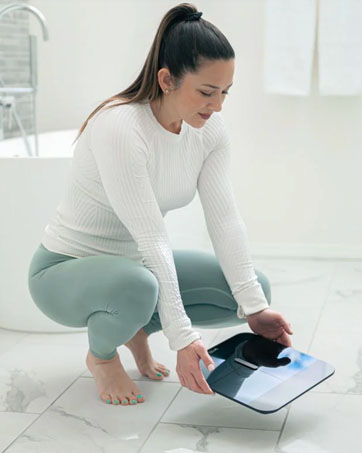
Image: A close-up of bare feet positioned on the Wyze Smart Scale X for a measurement.
ستاسو د میټریکونو پوهیدل
The Wyze Smart Scale X measures 13 essential body composition metrics:
- وزن
- د بدن غوړ فیصدهtage
- د بدن ډله ایز شاخص (BMI)
- د عضلاتو ډله
- د هډوکو ماس
- د بدن د اوبو فیصدهtage
- د بدن کموالی
- Protein Level
- د ویسریل غوړ
- د بیسال میټابولیک نرخ (BMR)
- میټابولیک عمر
- Heart Rate (measured via Wyze App)

Image: The Wyze Smart Scale X showing its display and a visual representation of the 13 essential body metrics it tracks.
۴.۵. ځانګړي حالتونه
The Wyze Smart Scale X offers specialized modes for various users and situations:
- د ماشوم حالت: Allows you to weigh an infant by first weighing yourself, then stepping on the scale while holding the baby. The scale calculates the baby's weight by subtracting your weight.
- د څارویو حالت: Similar to Baby Mode, this allows you to weigh your pet.
- Luggage Mode: For weighing luggage or other items.
- Pregnancy Mode: Provides weight tracking for pregnant users.
- د ورزشکارۍ حالت: Recommended for individuals who work out more than 10 hours a week, as it adjusts body composition algorithms for athletic body types.
For added safety, you can turn off all electrical currents used to measure body composition in these modes, ensuring only weight is measured.

Image: A father weighing his children using a special mode on the Wyze Smart Scale X, demonstrating its versatility for family use.
6. App Integration & Data Tracking
The Wyze Smart Scale X seamlessly integrates with the Wyze app and popular third-party health applications:
- Wyze App: All your body composition data is stored and displayed in the Wyze app, allowing you to view trends over time, set goals, and track your progress.
- د دریمې ډلې ایپسونه: Sync your data with Apple Health, Health Connect, and Fitbit to consolidate your health information in one place.
The scale supports up to 8 users, automatically recognizing each individual and syncing their data to their respective profileپه اپلیکیشن کې.

Image: The Wyze Smart Scale X highlighting its compatibility with popular health apps like Fitbit, Apple Health, and Health Connect.
Video: An official introduction to the Wyze Scale X, showcasing its design, features, and app integration.
7. Heart Rate Measurement
The Wyze app provides a convenient way to measure your heart rate directly through your smartphone's camera, without needing the scale:
- Open the Wyze app and navigate to the Heart Rate measurement section.
- Grant camera access to the app when prompted.
- Gently place your finger on the main camera lens (not the flash) and hold it still.
- Use your other hand to cup the back of your phone so the light reflects towards the finger covering the camera lens.
- Hold still until the measurement is complete (typically less than a minute). The app will display and record your heart rate.
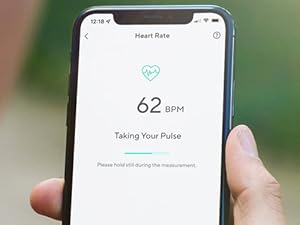
Image: A smartphone screen showing the Wyze app's heart rate measurement feature in progress.
8. ساتنه
- پاکول: The scale features a durable tempered glass surface, making it easy to clean. Use a soft, damp د سطحې د پاکولو لپاره ټوکر. د کثافاتو پاکوونکو یا سختو کیمیاوي موادو څخه ډډه وکړئ.
- ذخیره کول: Store the scale in a dry place away from direct sunlight and extreme temperatures. Its thin design allows for easy storage, such as in a drawer.
- د بیټرۍ بدلول: When the battery indicator appears on the display or in the app, replace all four AAA batteries with new ones.

Image: A user demonstrating how the slim design of the Wyze Smart Scale X allows for convenient storage in a drawer.
9. ستونزه حل کول
- ناسم لوستل: Ensure the scale is placed on a hard, flat surface. Stand still with bare feet centered on the electrodes. Body composition data can be affected by surface levelness, standing posture, and foot contact.
- پیمانه نه فعالیږي: وګورئ چې بیټرۍ په سمه توګه نصب شوي او خالي شوي نه دي. که اړتیا وي نو بیټرۍ بدل کړئ.
- اپلیکیشن نه همغږي کیږي: Verify that Bluetooth is enabled on your smartphone and the Wyze app has permission to access Bluetooth. Keep your phone close to the scale during measurements.
- Body Composition Data Not Displaying: Ensure you are standing barefoot on the scale. The ITO electrodes require direct skin contact to measure body composition.
10. مشخصات
| برانډ | WYZE |
| ماډل | WSCALX |
| رنګ | تور |
| د وزن ظرفیت اعظمي | 400 پونډه |
| د لوستلو دقت | +/- 0.2 pounds |
| د ښودلو ډول | ډیجیټل LED |
| د موادو ډول | ITO coated glass |
| د توکي وزن | 4 پونډه |
| د بریښنا سرچینه | ۲ x ۱.۵V AAA بیټرۍ (شامل دي) |
| ارتباط | بلوتوث |

انځور: یو مفصل view of the Wyze Smart Scale X highlighting its tempered glass surface and ITO electrode coating for accurate measurements.
11. تضمین او ملاتړ
The Wyze Smart Scale X comes with a د تولید کونکي دوه کلن تضمین. For technical support, warranty claims, or additional information, please visit the official Wyze support webسایټ یا د دوی پیرودونکي خدمت سره اړیکه ونیسئ.
جوړونکی: Wyze Labs, Inc.
۱.۱. د خوندیتوب مهم معلومات
The Wyze Smart Scale X uses Bio-electrical Impedance Analysis (BIA) technology. While generally safe, please note the following:
- Body composition data is for long-term trend tracking and should not be used for single medical comparisons or diagnoses. Consult a healthcare professional for medical advice.
- Measure barefoot on a hard, flat surface for the best consistency and accuracy of body composition data.
- Results may be affected by surface levelness, standing posture, and foot contact.
- If you have a pacemaker or other internal medical device, consult your doctor before using the scale, as the electrical currents used for BIA may interfere with these devices.
- Keep the scale dry to prevent electrical hazards.