
1. پیژندنه
The Generic CM300 is a versatile 9-function digital multimeter designed for accurate electrical measurements in various environments. It features a 6000-count backlit LCD for clear readings, Non-Contact Voltage (NCV) detection for safety, and a CAT III 600V safety rating. This manual provides instructions for safe and effective use of your CM300 multimeter.
2. د خوندیتوب معلومات
خبرداری: Always adhere to safety precautions when using electrical testing equipment. Failure to do so may result in injury or damage to the meter.
- The CM300 is rated for CAT III 600V. Do not exceed these voltage حدود.
- تل د کارولو دمخه د زیان لپاره د ازموینې لیډونه معاینه کړئ. که چیرې موصلیت زیانمن شوی وي نو بدل کړئ.
- ډاډ ترلاسه کړئ چې د فعالیت سویچ د اندازه کولو لپاره په سم موقعیت کې دی.
- د حجم اندازه کولو هڅه مه کوئtage or current on circuits exceeding the meter's maximum ratings.
- د ژوندیو سرکټونو سره د کار کولو پر مهال احتیاط وکړئ. د لوڅو تارونو یا ټرمینلونو سره د تماس څخه ډډه وکړئ.
- Keep fingers behind the finger guards on the test probes.
- کله چې د بیټرۍ ټیټ شاخص څرګند شي نو ژر تر ژره بیټرۍ بدل کړئ ترڅو دقیق لوستل ډاډمن شي.
3. محصول ختم شوview
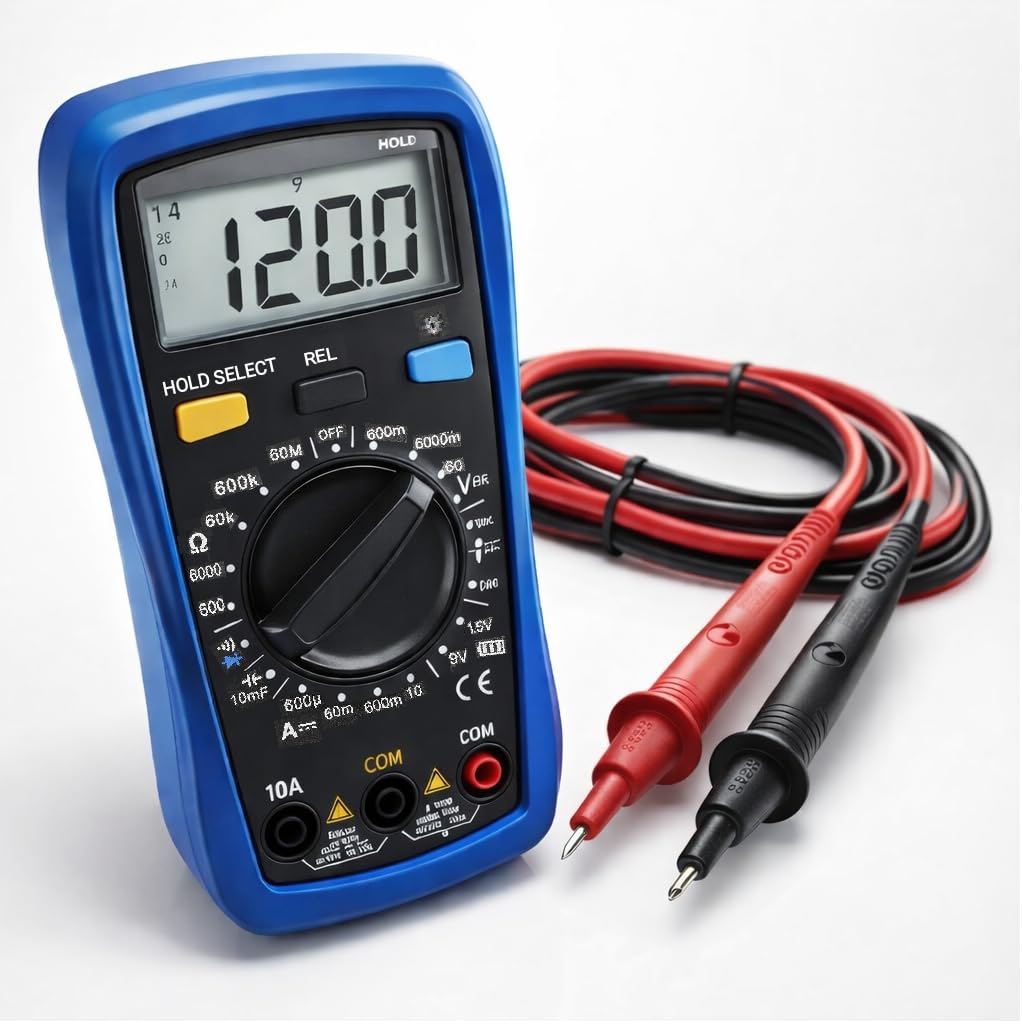
The CM300 Digital Multimeter includes the main unit and two 42-inch test probes (one red, one black).

Figure 3.1: CM300 Multimeter Rotary Dial and Display
دا انځور یو مفصل انځور ښیي view of the CM300 multimeter's central rotary dial, which is used to select different measurement functions. The backlit LCD display is visible above the dial, and various input jacks are located at the bottom of the device.
3.1 اجزا
- د LCD نندارې: 6000-count backlit display for clear readings.
- د روټري سویچ فعالیت: Selects measurement modes.
- داخله جیکونه: For connecting test probes (COM, VΩmA, 10A).
- د ازموینې پلټنې: Red (positive) and Black (common/negative).
- د NCV سینسر: د غیر تماس حجم لپاره د میټر په سر کې موقعیت لريtage کشف.
- تڼۍ: HOLD/SELECT, REL, BACKLIGHT.
4. ترتیب کول
4.1 د بیټرۍ نصب کول
- ډاډ ترلاسه کړئ چې ملټي میټر بند دی.
- د میټر په شا کې د بیټرۍ کڅوړه ومومئ.
- د بیټرۍ کمپارټ پوښ خلاصولو لپاره سکرو ډرایور وکاروئ.
- Insert two AAA batteries, observing correct polarity (+/-).
- د بیټرۍ کمپارټ پوښ بدل کړئ او د سکرو سره یې خوندي کړئ.
۳.۳ د نښلولو ازموینې پروبونه
- تور ټیسټ لیډ د "COM" (عام) جیک کې دننه کړئ.
- د ډیری اندازه کولو لپاره (حجمtage, resistance, continuity, capacitance, diode, battery test), insert the red test lead into the "VΩmA" jack.
- For current measurements (up to 10A), insert the red test lead into the "10A" jack.
5. عملیاتي لارښوونې
Before each measurement, ensure the test leads are correctly connected and the function switch is set to the appropriate range.
شکل ۵: د AC حجم اندازه کولtage with CM300
This image illustrates the CM300 multimeter in use, displaying a voltage reading. A person is holding the blue multimeter while the red and black test probes are inserted into a standard wall outlet, demonstrating an AC voltage اندازه کول.
۸ پاور آن/بند
Rotate the function switch from "OFF" to any desired measurement function to power on the meter. Rotate it back to "OFF" to power off.
5.2 AC/DC Voltage Measurement (V~ / V--)
- Set the function switch to the "V~" (AC Voltage) or "V--" (DC Voltage) موقف.
- د ازموینې پروبونه د هغه سرکټ یا برخې سره موازي وصل کړئ چې اندازه کیږي.
- ټوک ولولئtagد LCD نندارې ارزښت.
5.3 DC Current Measurement (A--)
- خبرداری: Ensure the red test lead is in the "10A" jack for current measurements up to 10A, or "VΩmA" for lower current ranges.
- Set the function switch to the "A--" position.
- هغه سرکټ پرانیزئ چیرې چې جریان اندازه کیږي او میټر په لړۍ سره وصل کړئ.
- په LCD نندارې کې اوسنی ارزښت ولولئ.
۵.۲ د مقاومت اندازه کول (Ω)
- Set the function switch to the "Ω" position.
- د مقاومت اندازه کولو دمخه ډاډ ترلاسه کړئ چې سرکټ غیر انرژي شوی دی.
- د ازموینې پروبونه د اندازه کولو لپاره د برخې په اوږدو کې وصل کړئ.
- په LCD ډسپلې کې د مقاومت ارزښت ولولئ.
5.5 Diode Test (->|-)
- Set the function switch to the "->|-" (Diode) position.
- سور پروب د انود سره او تور پروب د ډایډ کیتوډ سره وصل کړئ.
- یو مخکینۍ برخهtage drop will be displayed. Reverse the probes; an open circuit (OL) should be displayed for a good diode.
5.6 Capacitance Measurement (10mF)
- Set the function switch to the "10mF" (Capacitance) position.
- خبرداری: Discharge capacitors before testing to prevent electric shock or damage to the meter.
- د ازموینې پروبونه د کپیسیټر ترمینلونو په اوږدو کې وصل کړئ.
- په LCD نندارې کې د ظرفیت ارزښت ولولئ.
5.7 Audible Continuity ()))
- Set the function switch to the ")))" (Continuity) position.
- ډاډ ترلاسه کړئ چې سرکټ غیر انرژي شوی دی.
- د ازموینې پروبونه د سرکټ یا برخې په اوږدو کې وصل کړئ.
- If resistance is below approximately 50Ω, the buzzer will sound, indicating continuity.
۶.۵ د بیټرۍ ازموینه (۱.۵V / ۹V)
- Set the function switch to the "1.5V" or "9V" battery test position.
- سور پروب د مثبت ټرمینل سره او تور پروب د بیټرۍ منفي ټرمینل سره وصل کړئ.
- ښودنه به د بیټرۍ حجم وښیېtage.
5.9 غیر اړیکه والیومtage (NCV)
- Set the function switch to the "NCV" position.
- د میټر پورتنۍ برخه د ژوندي کنډکټر سره نږدې حرکت وکړئ.
- The meter will beep and the NCV indicator will light up when AC voltage کشف شوی دی.
۵.۶ د معلوماتو ساتل (HOLD)
Press the "HOLD" button to freeze the current reading on the display. Press it again to release and resume live readings.
5.11 Relative Mode (REL)
Press the "REL" button to store the current reading as a reference value. Subsequent measurements will be displayed as the difference from this reference. Press again to exit relative mode.
5.12 شالید
Press the "BACKLIGHT" button to turn on the display backlight for better visibility in dim conditions. Press again to turn it off.
6. ساتنه
6.1 پاکول
میټر د اعلان سره پاک کړئamp ټوکر او نرم صابون. د کثافاتو یا محلولونو څخه کار مه اخلئ. ډاډ ترلاسه کړئ چې میټر د کارولو دمخه وچ دی.
6.2 د بیټرۍ بدلول
د بیټرۍ نصبولو لارښوونو لپاره 4.1 برخې ته مراجعه وکړئ. کله چې د ټیټ بیټرۍ شاخص په ډسپلې کې څرګند شي نو بیټرۍ بدل کړئ.
6.3 د فیوز بدلول
If the current measurement function stops working, the fuse may need replacement. This procedure should only be performed by qualified personnel. Contact support for assistance.
7. ستونزه حل کول
| ستونزه | احتمالي لامل | د حل لاره |
|---|---|---|
| میټر نه چالانېږي. | مړه یا په غلط ډول نصب شوي بیټرۍ. | د بیټرۍ قطبیت وګورئ؛ بیټرۍ بدل کړئ. |
| "OL" (اوورلوډ) ښودل شوی. | Input value exceeds selected range or meter's maximum. | Select a higher range or ensure input is within meter's limits. |
| ناسم لوستل. | Low battery, incorrect function selected, or damaged test leads. | Replace batteries, verify function switch, inspect and replace test leads if damaged. |
| د دوام غږ نشته. | Circuit resistance too high, or open circuit. | Check the circuit for breaks; ensure resistance is below 50Ω. |
8. مشخصات
| فیچر | مشخصات |
|---|---|
| ماډل | CM300 |
| ښودل | 6000-Count Backlit LCD |
| AC/DC حجمtage حد | 1mV - 600V |
| د DC اوسنی سلسله | تر 10A پورې |
| د مقاومت سلسله | تر 60MΩ پورې |
| د ظرفیت اندازه | تر ۱۰۰۰۰ µF پورې |
| د خوندیتوب درجه | CAT III 600V, ETL Certified |
| د بریښنا سرچینه | 2 x AAA بیټرۍ |
| شاملې برخې | CM300 Digital Multimeter, two 42 in. test probes |
| ابعاد | 8 x 4 x 2.5 انچه |
| وزن | 4 پونډه |
| ځانګړي ځانګړتیاوې | NCV, Data Hold, Relative Mode, Backlight, Audible Continuity, Diode Test, Battery Test |
9. تضمین او ملاتړ
The Generic CM300 Digital Multimeter comes with a 30-day return policy. For technical support or warranty inquiries, please contact your retailer or the manufacturer.