
1. پیژندنه
This manual provides essential information for setting up, operating, and maintaining your XIAOMI Redmi Note 15 Pro+ Plus 5G Ai smartphone. This device features a 6500mAh battery with 100W HyperCharge, a 200MP ultimate-clarity camera, and is powered by the Snapdragon® 7s Gen 4 processor. It boasts a 6.83" 1.5K CrystalRes AMOLED display with Corning® Gorilla® Glass Victus® 2 for enhanced durability. The phone is designed with IP66/IP68/IP69/IP69K dust and water resistance, ensuring reliability in various environments. Please read this manual thoroughly to ensure proper usage and to maximize your device's potential.
۲. په بکس کې څه دي؟
ډاډ ترلاسه کړئ چې ټول توکي ستاسو د محصول په کڅوړه کې شتون لري:
- XIAOMI Redmi Note 15 Pro+ Plus 5G Ai Smartphone
- د سیم ټری Ejector
- USB کیبل
- دیوال اډاپټر ۱۲۰ واټ
3. ترتیب کول
3.1 د سیم کارت نصب کول
The device supports Dual SIM (nano SIM + nano SIM or nano SIM + eSIM). Ensure your SIM card is already activated by your carrier. This device is compatible with T-Mobile, Mint, Tello, and other carriers under the T-Mobile network in the USA. For international use, it works with any GSM carrier SIM.

Image: Compatibility chart for network carriers.
- د خپل وسیلې په اړخ کې د سیم ټرې ومومئ.
- د سیم ټرې ایجیکټر وسیله د ټرې تر څنګ په کوچني سوري کې دننه کړئ.
- په نرمۍ سره فشار ورکړئ تر هغه چې ټری بهر راشي.
- Place your nano SIM card(s) or activate your eSIM as per carrier instructions.
- د سیم ټرې په احتیاط سره بیا وسیله ته دننه کړئ.
3.2 ابتدايي پاور آن
- د پاور تڼۍ فشار ورکړئ او ونیسئ تر هغه چې د Xiaomi لوګو څرګند شي.
- د لومړني تنظیم بشپړولو لپاره په سکرین کې لارښوونې تعقیب کړئ، پشمول د ژبې انتخاب، د وای فای اتصال، او د ګوګل حساب تنظیم کول.
4. کلیدي ځانګړتیاوې
- ښکاره کول: 6.83" 1.5K CrystalRes AMOLED display with up to 120Hz refresh rate, 3200 nits peak brightness, and Corning Gorilla Glass Victus 2 protection.
- پروسیسر: Snapdragon® 7s Gen 4 (4nm manufacturing process, Octa-core up to 2.7GHz, Adreno GPU).
- د کیمرې سیسټم: New 200MP ultimate-clarity main camera with OIS, 1/1.4" sensor size, 8MP ultra-wide camera, and 32MP front camera.
- بیټرۍ او چارج کول: 6500mAh battery with 100W HyperCharge and up to 22.5W reverse charging.
- پایښت: Ultra-durable smartphone with 2.5-meter certified drop resistance and IP66/IP68/IP69/IP69K dust and water resistance.
- د مصنوعي ذهانت ځانګړتیاوې: Includes Circle to Search with Google, Google Gemini, AI Interpreter, AI Notes, AI Recorder, AI Subtitles, AI Film, and AI image editing.
- امنیت: In-screen fingerprint sensor and AI face unlock.
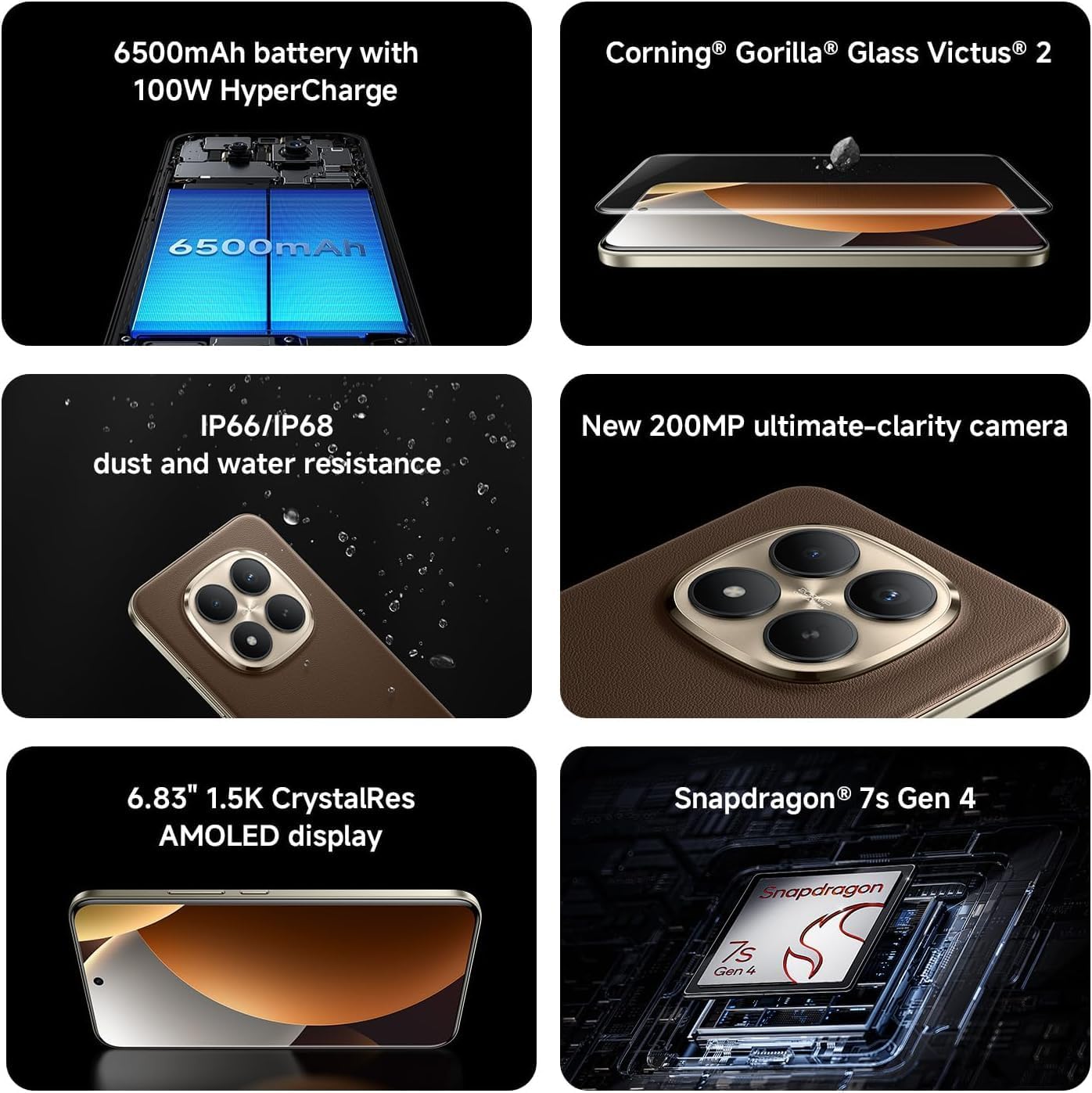
Image: Key features of the Redmi Note 15 Pro+ Plus 5G Ai.
5. عملیاتي لارښوونې
5.1 HyperOS (Based on Android 14)
Your device runs on HyperOS, based on Android 14, offering a feature-rich and customizable user experience. Explore various settings for personalization, security, and productivity. While some third-party applications may be pre-installed, most can be uninstalled if not desired.
۴.۴ د کیمرې کارول
The 200MP main camera system allows for capturing highly detailed photos and videos. The 32MP front camera is ideal for high-resolution selfies and video calls.
- د عکس طریقې: Utilize Ultra HD for 200MP images, Photo mode for standard shots, Portrait mode for bokeh effects, and Pro mode for manual control over imaging parameters.
- ویډیو ثبتول: Record 4K videos at 30 fps or 1080p videos at 30/60 fps with the rear camera. The front camera supports 1080p at 30/60 fps.
- اضافي ځانګړتیاوې: Explore Documents, Slow Motion, Time-lapse, and Panorama modes for creative content creation.
5.3 بیټرۍ او چارج کول
The 6500mAh battery supports 100W HyperCharge for rapid charging and 22.5W reverse charging to power other devices. Optimize battery life using features like:
- د بیټرۍ ساتنه: Extend battery lifespan by setting the device to stop charging at 80% or charge fully only when scheduled.
- سمارټ چارج کول: The system learns your charging habits to optimize battery health.
- Cold Endurance Mode: Limits device performance in cold environments to extend battery life.
6. مشخصات
| فیچر | تفصیل |
|---|---|
| د ماډل شمیره | 2510ERA8BG |
| د ښودلو اندازه | ۷۸۷ انچه |
| د ښودلو ریزولوشن | ۲۷۱۲ x ۱۲۲۰ (۱.۵ کیلو بایټ کریسټال ریس امولیډ) |
| د تازه کولو نرخ | تر 120Hz پورې |
| پروسیسر | سنیپډریګون® ۷ ایس جنریشن ۲ |
| RAM | 12 GB (expandable with Memory Extension) |
| ذخیره کول | 512 جي بي |
| شاته کیمره | 200MP Main (OIS) + 8MP Ultra-wide |
| مخکینۍ کیمره | 32MP |
| د بیټرۍ ظرفیت | 6500 mAh |
| د بریښنا چارجول | ۱۲۰ واټ هایپر چارج |
| عملیاتي سیسټم | HyperOS Based on Android 14 |
| د اوبو او دوړو مقاومت | IP66/IP68/IP69/IP69K |
| ارتباط | 5G, 4G, Wi-Fi 6/6E, Bluetooth 5.4, NFC |
| ابعاد | ۷.۱۳ x ۳.۷ x ۲.۰۵ انچه (پیکج) |
| د توکي وزن | 14 اونس |
7. ساتنه او پاملرنه
- پاکول: د سکرین او بدن پاکولو لپاره له نرم، لینټ څخه پاک ټوکر څخه کار واخلئ. د کثافاتو موادو یا سخت کیمیاوي موادو څخه ډډه وکړئ.
- دحرارت درجه: وسیله د سپارښت شوي تودوخې په حدودو کې وکاروئ. د ډیرې تودوخې یا سړې هوا څخه ډډه وکړئ.
- د سافټویر تازه معلومات: د غوره فعالیت، امنیت، او نویو ځانګړتیاو ته د لاسرسي ډاډ ترلاسه کولو لپاره په منظم ډول د سیسټم تازه معلومات وګورئ او نصب کړئ.
- د اوبو مقاومت: While the device is water-resistant, avoid intentional submersion or exposure to high-pressure water. Ensure all ports are dry before charging.
8. ستونزه حل کول
- وسیله نه چلیږي: Ensure the battery is charged. Connect to the 100W wall adapter and try again.
- اپلیکیشن کریش/کنګل کیږي: اپلیکیشن بند کړئ او بیا یې پرانیزئ. که ستونزه دوام وکړي، وسیله بیا پیل کړئ.
- د شبکې د اتصال ستونزې: Check your SIM card installation. Toggle Airplane Mode on/off. Restart the device.
- ورو فعالیت: Clear cache of apps, uninstall unused applications, or perform a factory reset (back up data first).
9. تضمین او ملاتړ
For warranty information and customer support, please refer to the warranty card included in your product package or visit the official XIAOMI webسایټ. د تضمین ادعاوو لپاره د پیرود ثبوت وساتئ.