
1. محصول ختم شوview
The Edifier W280NB Pro are neckband wireless headphones designed for immersive audio experiences with advanced features. They offer hybrid active noise cancellation, Hi-Res Audio support with LDAC, and a durable, comfortable design suitable for various activities.

Image: Edifier W280NB Pro headphones with key features highlighted.
کلیدي ځانګړتیاوې:
- Deep Hybrid Active Noise Cancellation: Up to -45dB noise reduction with 4 selectable modes (High ANC, Medium ANC, Ambient Aware, Wind Reduction).
- Studio-Quality Hi-Res Audio: 10mm dynamic drivers with titanium-coated composite diaphragms, supporting LDAC codec and Hi-Res Audio Wireless certification (20Hz-40KHz frequency response).
- اوږدمهاله بیټرۍ او چټک چارج: Up to 23 hours of playback (ANC off), 14 hours (ANC on). 15 minutes of charging provides 5 hours of playtime. Full charge in 1.5 hours.
- د بلوتوث ۵.۱ مستحکم اتصال: Ensures stable transmission, low power consumption, and multipoint connection for seamless device switching.
- All-Day Comfort & Secure Fit: Lightweight, flexible neckband with skin-friendly material and multiple sizes of ear wings for a secure fit. Magnetic earbuds for tangle-free storage.
- Durable & Clear Calls: IP55 dust and water resistance. Built-in AI noise-canceling microphones for clear communication in noisy environments.
2. د تنظیم کولو لارښود
2.1 د بسته محتويات
Before use, please ensure all items are present in the package:
- Edifier W280NB Pro Neckband Wireless Headphones
- د USB-C چارج کیبل
- Multiple sizes of ear tips and ear wings
- د کارونکي لارښود (دا لاسوند)
۳.۱ د هیډفونونو چارج کول
Charge the headphones fully before first use to ensure optimal battery performance.
- Connect the provided USB-C charging cable to the charging port on the neckband.
- د کیبل بل پای د USB بریښنا اډاپټر (شامل نه دی) یا د کمپیوټر USB پورټ سره وصل کړئ.
- The indicator light will show charging status (refer to the LED indicator section for details).
- A full charge takes approximately 1.5 hours. A 15-minute quick charge provides approximately 5 hours of playback.

Image: Visual representation of battery life (23 hours ANC off, 14 hours ANC on) and fast charging (15 mins = 5 hours).
2.3 Fitting the Headphones
Proper fit is crucial for comfort, sound quality, and effective noise cancellation.
- Select the ear tips and ear wings that best fit your ears. Experiment with different sizes for the most secure and comfortable seal.
- Place the neckband around your neck.
- Insert the earbuds into your ear canals and adjust the ear wings to sit snugly in your outer ear for stability.

Image: Diagram showing various ear tip and ear wing sizes for a secure and comfortable fit.
2.4 د بلوتوټ جوړه کول
Pair your Edifier W280NB Pro headphones with your device via Bluetooth.
- ډاډ ترلاسه کړئ چې هیډفونونه چارج شوي او بند شوي دي.
- Press and hold the multi-function button (usually the power button) until the indicator light flashes rapidly (e.g., blue and red alternately), indicating pairing mode.
- په خپل وسیله (سمارټ فون، ټابلیټ، لیپ ټاپ) کې، بلوتوث فعال کړئ او د شته وسایلو لټون وکړئ.
- Select "Edifier W280NB Pro" from the list of found devices.
- یوځل چې وصل شي، د شاخص رڼا به معمولا یو ثابت نیلي رڼا یا ورو ورو فلش ښکاره کړي.
څو نقطه پیوستون:
The W280NB Pro supports multipoint connection, allowing you to connect to two Bluetooth devices simultaneously.
- لکه څنګه چې پورته تشریح شوي، هیډفونونه د لومړي وسیلې سره یوځای کړئ.
- په لومړي وسیله کې بلوتوث غیر فعال کړئ.
- هیډفونونه بیرته د جوړه کولو حالت ته واچوئ او د دوهم وسیلې سره جوړه کړئ.
- Re-enable Bluetooth on the first device. The headphones should now be connected to both devices, allowing seamless switching.

Image: Illustration of Bluetooth 5.4 technology for stable transmission and multipoint connection.
3. عملیاتي لارښوونې
۸ پاور آن/بند
- پاور آن: Press and hold the multi-function button for approximately 3 seconds until the indicator light illuminates.
- بندول: Press and hold the multi-function button for approximately 5 seconds until the indicator light turns off.
3.2 تڼۍ کنټرولونه
The Edifier W280NB Pro features intuitive button controls on the neckband for easy management of music, calls, and noise cancellation modes.

Image: Diagram illustrating the functions of each button on the neckband for calls, music playback, and mode switching.
| عمل | فعالیت |
|---|---|
| څو-فعاله تڼۍ (بریښنا) | Press and hold 3s: Power On Press and hold 5s: Power Off Press and hold (pairing mode): Enter Bluetooth pairing Single press (during call): Answer/End Call Double press (during call): Reject Call |
| حجم پورته کول (+) | Single press: Increase Volume Press and hold: Next Track |
| حجم کم (-) | Single press: Decrease Volume Press and hold: Previous Track |
| د پلی/پاز تڼۍ | Single press: Play/Pause Music |
| د ANC حالت تtonۍ | Single press: Cycle through ANC modes (High ANC, Medium ANC, Ambient Aware, Wind Reduction, ANC Off) |
۵.۲ د فعال شور لغوه کولو (ANC) طریقې
The W280NB Pro offers four distinct noise cancellation modes to adapt to your environment.

Image: Visual guide to the four ANC modes and their typical use cases.
- لوړ ANC: Provides maximum noise reduction, ideal for very noisy environments like airplanes or subways.
- منځنۍ ANC: Offers a balanced level of noise cancellation, suitable for offices or cafes.
- د چاپیریال خبرتیا: Allows you to hear your surroundings while still enjoying your audio, useful for urban environments or when needing to be aware of announcements.
- د باد کمښت: په ځانګړي ډول د بیروني فعالیتونو پرمهال د باد شور کمولو لپاره ډیزاین شوی.
3.4 تلیفونونه کول او ترلاسه کول
The headphones feature AI noise-canceling microphones for clear call quality.
- زنګ ووهئ: د څو فعالیت تڼۍ یو ځل فشار ورکړئ.
- ټلیفون پای: د څو فعالیت تڼۍ یو ځل فشار ورکړئ.
- زنګ رد کړئ: د څو فعالیت تڼۍ دوه ځله فشار ورکړئ.

Image: A person using the headphones for a call, highlighting the AI-enhanced clear call feature.
۵.۳ د اډیفایر کنیکټ اپلیکیشن
For advanced settings and customization, download the Edifier Connect app from your device's app store. The app allows you to:
- خپل وسیله نوم بدل کړئ.
- Personalize ANC levels.
- Fine-tune audio with preset EQs or custom EQs.
- ورک شوي هیډفونونه ومومئ.
4. ساتنه
4.1 پاکول
The W280NB Pro headphones are IP55 rated for dust and water resistance, but proper cleaning helps maintain their condition.
- Wipe the neckband and earbuds with a soft, dry, lint-free cloth.
- For ear tips, gently remove them and clean with a damp که اړتیا وي، ټوکر او نرم صابون ومینځئ. ډاډ ترلاسه کړئ چې دوی په بشپړه توګه وچ دي مخکې لدې چې بیا وصل کړئ.
- Avoid using harsh chemicals, abrasive materials, or submerging the headphones in water.
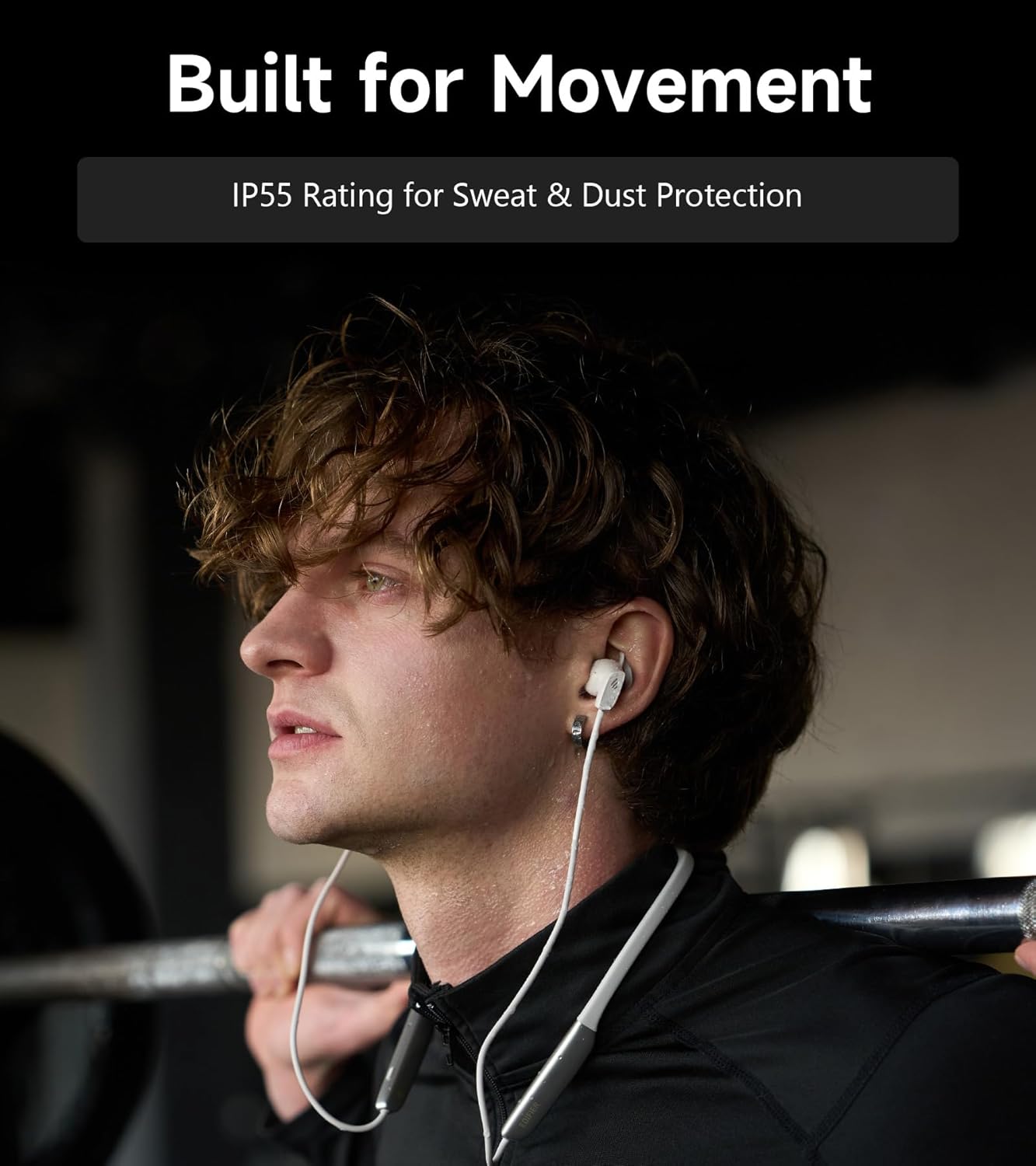
Image: A person wearing the headphones during a workout, illustrating the IP55 sweat and dust protection.
4.2 ذخیره کول
When not in use, store your headphones properly to prevent damage.
- The earbuds are magnetic, allowing them to snap together for tangle-free storage around your neck or in a bag.
- په یخ او وچ ځای کې د مستقیم لمر وړانګو او خورا تودوخې څخه لرې وساتئ.
4.3 د بیټرۍ پاملرنه
- د بیټرۍ په مکرر ډول د بشپړ چارج کولو څخه ډډه وکړئ.
- هیډفونونه په منظم ډول چارج کړئ، حتی که د اوږدې مودې لپاره نه کارول کیږي، د بیټرۍ روغتیا ساتلو لپاره.
5. ستونزه حل کول
If you encounter issues with your Edifier W280NB Pro headphones, refer to the following common problems and solutions.
| ستونزه | احتمالي لامل | د حل لاره |
|---|---|---|
| هیډفونونه نه چالانیږي. | ټیټ بیټرۍ. | هیډفونونه په بشپړ ډول چارج کړئ. |
| د وسیلې سره جوړه نشي کیدی. | هیډفونونه د جوړې کولو حالت کې ندي. Bluetooth disabled on device. وسیله د هیډفونونو څخه ډیره لرې ده. | Ensure headphones are in pairing mode (flashing indicator). په خپل وسیله بلوتوټ فعال کړئ. Move device closer to headphones (within 10 meters). Try resetting the headphones (refer to manual for specific reset procedure if available, or power cycle). |
| غږ نشته یا ټیټ غږ. | په هیډفونونو یا وسیلو کې غږ ډیر ټیټ دی. Headphones not connected. په آلې کې غلط آډیو آوټ پټ غوره شوی. | Increase volume on both headphones and device. ډاډ ترلاسه کړئ چې هیډفونونه په بریالیتوب سره جوړه شوي او وصل شوي دي. Check your device's audio settings to ensure output is set to Edifier W280NB Pro. |
| د غږ ټیټ کیفیت. | ضعیف بلوتوث پیوستون. Improper ear tip fit. د آډیو سرچینې کیفیت. | Move closer to the connected device. ډاډ ترلاسه کړئ چې د غوږونو څوکې خوندي مهر چمتو کوي. د آډیو بله سرچینه هڅه وکړئ یا file. |
| د فعال شور لغوه کول اغیزمن ندي. | Improper ear tip fit. Incorrect ANC mode selected. Extreme noise conditions. | ډاډ ترلاسه کړئ چې د غوږونو څوکې خوندي مهر چمتو کوي. Cycle through ANC modes to select the most appropriate one. ANC works best for low-frequency, constant noise. |
| د زنګ وهلو پر مهال مایکروفون کار نه کوي. | Headphones not selected as input device. په آلې کې مایکروفون خاموش شوی دی. | Check your device's call settings to ensure Edifier W280NB Pro is selected for microphone input. Ensure microphone is not muted on your device. |
6. مشخصات
Detailed technical specifications for the Edifier W280NB Pro Neckband Wireless Headphones.
| فیچر | تفصیل |
|---|---|
| برانډ | ایډیفیر |
| د ماډل نوم | د W280NB پرو |
| رنګ | تور |
| د غوږ ځای پرځای کول | په غوږ کې |
| د فارم فکتور | غاړه بنده |
| خنډ | 24 اوهم |
| د شور کنټرول | د فعال شور لغوه کول |
| د فریکونسی رینج | 20Hz-40KHz |
| د آډیو ډرایور ډول | Dynamic Driver (10mm with Titanium-Coated Diaphragm) |
| د ارتباط ټیکنالوژي | بې سیم (بلوتوث) |
| بلوتوث نسخه | 5.4 |
| د بلوتوټ رینج | 10 متره (33 فټ) |
| Battery Average Life (Playback) | ۶۰ ساعته (ANC بند)، ۴۰ ساعته (ANC فعال) |
| د بیټرۍ چارج وخت | 1.5 ساعته |
| د اوبو د مقاومت کچه | IP55 (Dust & Waterproof) |
| مطابقت لرونکې وسیلې | سمارټ فونونه، ټابلیټونه، لپټاپونه، سمارټ سپیکرونه |
| مواد | Silicone (Enclosure) |
| UPC | 628430220005 |
7. د تضمین معلومات
The Edifier W280NB Pro Neckband Wireless Headphones come with a د تولید کونکي دوه کلن تضمین.
This warranty covers defects in materials and workmanship under normal use. It does not cover damage caused by misuse, accidents, unauthorized modifications, or normal wear and tear. Please retain your proof of purchase for warranty claims.
8. د پیرودونکي ملاتړ
For further assistance, technical support, or warranty inquiries, please contact Edifier customer service.
- Webسایټ: Visit the official Edifier webد FAQs، ملاتړ سرچینو، او د اړیکو معلوماتو لپاره سایټ.
- برېښنالیک/تلیفون: Refer to the Edifier website or your product packaging for specific contact details in your region.