
پیژندنه
This manual provides essential instructions for setting up, operating, and maintaining your XINDADA H12 2025 4G Smartwatch. Please read this manual thoroughly before using the device to ensure proper function and to maximize your user experience.
د بسته محتويات
ډاډ ترلاسه کړئ چې ټول توکي ستاسو د محصول په کڅوړه کې شتون لري:
- 1 x XINDADA H12 2025 Smartwatch
- ۱ x د څار پټه
- 1 x د چارج کولو کیبل
- 1 x د محصول لارښود
محصول پای ته ورسیدview
The XINDADA H12 2025 is a 4G Android 9.0 OS smartwatch featuring a 1.51-inch AMOLED display, a 500W HD camera, GPS, Wi-Fi, and comprehensive health monitoring capabilities. It supports app downloads from the Google Play Store.
کلیدي ځانګړتیاوې:
- Full 4G Netcom: Supports 4G connectivity (EU/UK countries only).
- High-Performance CPU: SL8541E quad-core processor for smooth operation.
- د انډرایډ ۹.۰ عملیاتي سیسټم: Enhanced performance and security.
- Large AMOLED Display: 1.51-inch screen with 466x466 resolution, wide color gamut, and 178° viewزاویه.
- 500W HD Camera: Rotatable front/rear camera.
- 800mAh بیټرۍ: د بیټرۍ اوږد ژوند.
- روغتیا څارنه: Heart rate, blood oxygen, sleep detection, sedentary reminders, step counting.
- د سپورت طریقې: Running, walking, hiking, mountaineering, rope skipping.
- د اپلیکیشن ملاتړ: Download apps like WhatsApp, YouTube, Facebook, Instagram, TikTok from Google Play Store.
- Intelligent Crown: Rotating crown for menu navigation.

Image: The smartwatch features a 1.51-inch AMOLED display with 466x466 resolution, offering a wide color gamut (98% Adobe RGB) and a 178-degree ultra-wide viewد روښانه لیدونو لپاره زاویه کول.
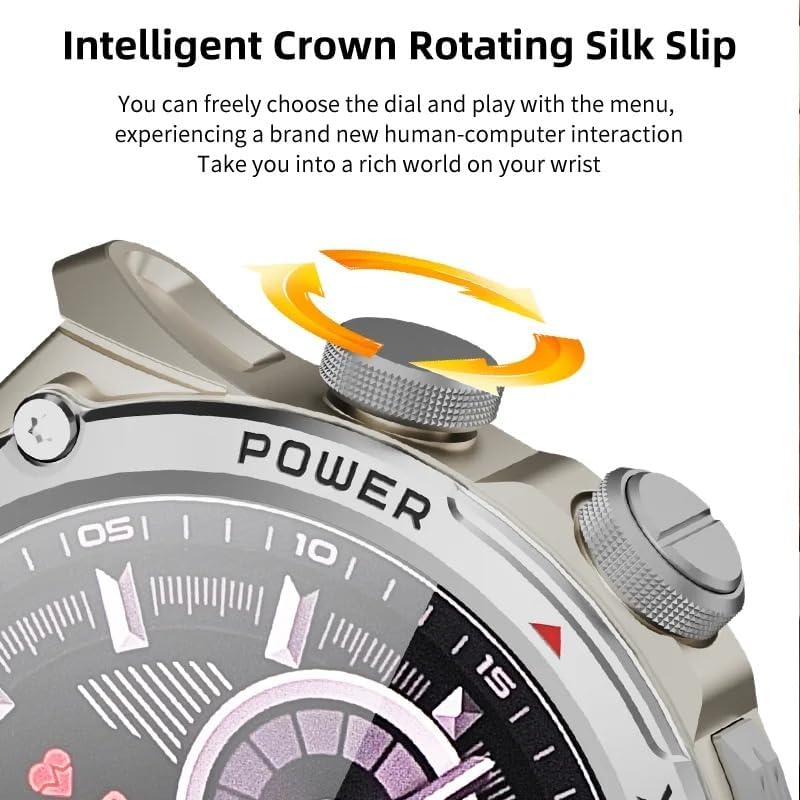
Image: Close-up of the smartwatch's intelligent rotating crown, which allows for intuitive navigation through menus and watch faces.

Image: The smartwatch is equipped with a 500W HD camera that can rotate 180 degrees, functioning as both a front and rear camera.
چمتو کول
1. د وسیلې چارج کول
Before first use, fully charge your smartwatch. Connect the provided charging cable to the charging port on the watch and to a standard USB power adapter (not included). The watch display will indicate charging status.
2. SIM Card Installation (for 4G connectivity)
The smartwatch supports 4G Netcom. Ensure your SIM card is compatible with the supported network bands (2G: B3+B5+B8; 3G: B1+B5+B8; 4G_FDD: B1+B3+B5+B7+B8+B20; 4G_TDD: B34+B38+B39+B40+B41). This feature is primarily for EU/UK countries. Refer to the watch's manual for specific SIM card tray access and insertion instructions.
۴. لومړنی بریښنا فعالول
Press and hold the Power button (usually located on the side of the watch) until the XINDADA logo appears. Follow the on-screen prompts to select your language and initial settings.
4. Connecting to the HiSportPro App
To synchronize data and receive notifications from your mobile phone, download and connect to the HiSportPro application.
- لومړی ګام: Enable Bluetooth on both your smartwatch and your mobile phone.
- لومړی ګام: On your smartwatch, access the app market and download the "Bluetooth Assistant" application.
- لومړی ګام: On your mobile phone, download the "HiSportPro" app from your phone's app store (Google Play Store for Android, Apple App Store for iOS).
- لومړی ګام: Open the Bluetooth Assistant on your smartwatch and enable Bluetooth service.
- لومړی ګام: In the HiSportPro app on your phone, use the scan function to scan the QR code displayed on your smartwatch to establish the connection.
- لومړی ګام: Once connected, you can configure notification push settings within the HiSportPro app to receive mobile phone information on your watch.

Image: The smartwatch on a wrist, displaying a message, illustrating its capability for 4G calls and real-time message viewing.
عملیاتي لارښوونې
بنسټیز نیویګیشن
- ټچ سکرین: Tap to select, swipe to navigate through menus and screens.
- څرخیدونکی تاج: د لیستونو له لارې سکرول کولو یا ترتیباتو تنظیم کولو لپاره تاج وګرځوئ. د کور سکرین ته د بیرته راستنیدو یا انتخابونو تایید لپاره تاج فشار ورکړئ.
- د بریښنا تڼۍ: Press to wake/sleep the screen. Long press to power on/off or restart.
- د بیدارۍ لپاره پورته کول: The screen can be activated by raising your wrist.
د مخابراتو ځانګړتیاوې
- تلیفون زنګونه: With a SIM card installed, you can make and receive calls directly from the watch. Access the "Phone" application.
- پیغام رسول: View and reply to messages (SMS, WhatsApp, etc.) directly on the watch.
- اړیکې: Access your synchronized contacts.
د کیمرې کارول
The smartwatch features a 500W HD camera. Open the "Camera" application. The camera can rotate 180 degrees to function as both a front-facing and rear-facing camera. Tap the screen to take photos or start video recording.
د روغتیا او فټنس څارنه
- د زړه ضربان څارنه: Access the "Heart Rate" app to measure your heart rate.
- د وینې اکسیجن څارنه: Use the "Blood Oxygen" app to check your SpO2 levels.
- د خوب کشف: The watch automatically monitors your sleep patterns when worn during sleep. View data in the "Sleep Detection" app or HiSportPro.
- بې ځایه یادونه: Enable this feature in settings to receive alerts when you have been inactive for too long.
- د مرحلې شمیرل: The watch automatically tracks your daily steps.
د سپورت طریقې
The smartwatch supports various sports modes to track your exercise data.

Image: Icons representing various sports modes available on the smartwatch, including running, walking, cycling, mountaineering, and rope skipping.
د تمرین پیل کولو لپاره:
- Navigate to the "Sports" application.
- Select your desired activity (e.g., Running, Walking, Mountaineering, Rope Skipping).
- Tap to start the activity. The watch will begin tracking relevant metrics like duration, distance, and calories burned.
- Tap to pause or end the activity. Your exercise data will be saved and can be viewed on the watch or in the HiSportPro app.
Other Applications and Features
- د ګوګل پلی پلورنځي: Download and install additional applications such as WhatsApp, YouTube, Facebook, Instagram, and TikTok directly from the Play Store on your watch.
- هوا: View د هوا اوسني شرایط.
- د موسیقي غږوونکی: Play music stored on the watch or control music on your phone.
- براوزر: Access the internet using the built-in browser.
- Calendar, Calculator, Alarm: Standard utility applications.
- OTA Online Update: The watch supports Over-The-Air software updates. Check for updates periodically in the settings menu to ensure optimal performance and access to new features.
ساتنه
- پاکول: Regularly clean your smartwatch and strap with a soft, dry cloth. Avoid using harsh chemicals or abrasive materials.
- د اوبو مقاومت: While the watch may have some water resistance, avoid prolonged exposure to water, swimming, or showering with the watch unless explicitly stated otherwise in the product specifications.
- د بیټرۍ پاملرنه: د بیټرۍ د ژوند اوږدولو لپاره، د بیټرۍ په بشپړ ډول د بار بار چارج کولو څخه ډډه وکړئ. کله چې د بیټرۍ کچه ټیټه وي ساعت چارج کړئ. کله چې د اوږدې مودې لپاره نه کارول کیږي نو ساعت په یخ او وچ ځای کې وساتئ.
- د سافټویر تازه معلومات: Keep your watch's software updated to ensure optimal performance and security.
د ستونزو حل کول
| ستونزه | احتمالي حل |
|---|---|
| ساعت نه چالانېږي. | Ensure the watch is fully charged. Connect it to the charger for at least 30 minutes. If it still doesn't turn on, try a long press (10-15 seconds) of the power button. |
| Cannot connect to HiSportPro app. |
|
| 4G network not working. |
|
| سکرین غیر ځواب ورکوونکی دی. | Restart the watch by long-pressing the power button. If the issue persists, ensure the screen is clean and dry. |
| د روغتیا په اړه ناسم معلومات. | ډاډ ترلاسه کړئ چې ساعت ستاسو په لاس کې په کلکه اغوستل شوی وي، نه ډیر تنګ او نه ډیر خلاص. د ساعت په شا سینسرونه پاک کړئ. د اندازه کولو پرمهال له ډیر حرکت څخه ډډه وکړئ. |
مشخصات
| فیچر | تفصیل |
|---|---|
| برانډ | ژینډاډا |
| ماډل | H12 2025 |
| عملیاتي سیسټم | Android 9.0 |
| CPU | SL8541E Quad-core |
| ښودل | ۱.۴۳ انچه AMOLED، ۴۶۶x۴۶۶ ریزولوشن |
| کیمره | 500W HD, 180° rotation |
| د بیټرۍ ظرفیت | 800 mAh |
| ارتباط | 4G (EU/UK bands), Wi-Fi, Bluetooth |
| د شبکې بانډونه | 2G: B3+B5+B8; 3G: B1+B5+B8; 4G_FDD: B1+B3+B5+B7+B8+B20; 4G_TDD: B34+B38+B39+B40+B41 |
| د اپلیکیشن مطابقت | HiSportPro (for phone sync), Google Play Store apps |
| د محصول وزن | 100 ګرامه |
| د کڅوړې ابعاد | 5 x 5 x 5 سانتي متره |
تضمین او ملاتړ
For warranty information and customer support, please refer to the documentation provided with your purchase or contact the retailer/manufacturer directly. Keep your proof of purchase for warranty claims.
Manufacturer: XINDADA