
پیژندنه
This manual provides essential information for the assembly, operation, and maintenance of your OKD 70-inch Mid Century Modern Fluted TV Stand. Please read these instructions carefully before beginning assembly or use to ensure safe and proper functionality of the product.
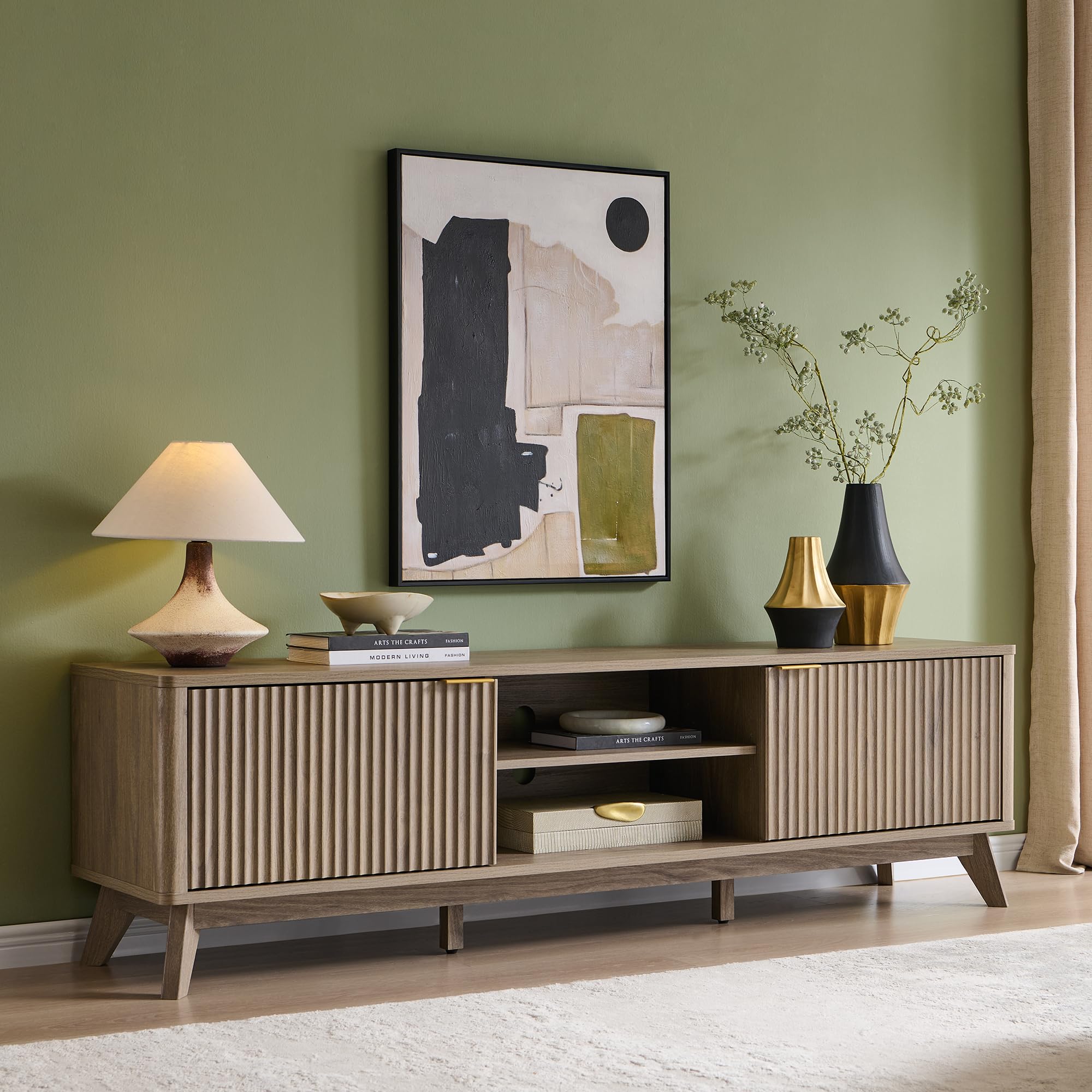
Image 1: The OKD 70-inch Mid Century Modern Fluted TV Stand in Alder Grey.
د خوندیتوب معلومات
WARNING: Failure to follow these safety instructions may result in injury or product damage.
- Always assemble with at least two people. This product is heavy and requires careful handling.
- Secure the stand to the wall using appropriate anti-tip hardware (not included) to prevent tip-over, especially in households with children or pets.
- د راټولولو او کارولو پرمهال د تیزو څنډو څخه محتاط اوسئ.
- Keep away from children and pets during assembly to prevent access to small parts.
- Do not exceed the maximum weight capacity for the top surface (150 lbs) and internal shelves (30 lbs).
د بسته محتويات
د اسمبلۍ پیل کولو دمخه ډاډ ترلاسه کړئ چې ټولې برخې شتون لري. که کومه برخه ورکه یا زیانمنه وي، د پیرودونکي ملاتړ سره اړیکه ونیسئ.
- Main body panels (top, bottom, side panels)
- Fluted cabinet doors
- د تنظیم وړ المارۍ
- Legs and support beams
- Hardware pack (screws, dowels, cam locks, hinges, handles, shelf pins)
- د راټولولو وسایل (د مثال په توګه، د ایلن رنچ، که اړتیا وي)
تنظیم او مجلس
Basic assembly is required for this TV stand. While detailed instructions are not provided in this document, general steps are outlined below. Refer to the included manufacturer's assembly guide for specific diagrams and part identification.
- ساحه چمتو کړئ: Clear a spacious, clean, and level area for assembly. Lay down a blanket or cardboard to protect the product and your floor.
- د برخو پیژندنه: Unpack all components and identify them using the parts list in the manufacturer's guide.
- چوکاټ راټول کړئ: Connect the main body panels (sides, top, bottom, and central dividers) using the provided hardware. Ensure all connections are secure.
- پښې وصل کړئ: Securely attach the tapered legs to the base of the TV stand.
- المارۍ نصب کړئ: Insert the shelf pins into the desired height adjustment holes within the open compartments and cabinets. Place the adjustable shelves onto the pins.
- دروازې وصل کړئ: Mount the fluted cabinet doors using the soft-close hinges. Adjust the hinges as needed to ensure proper door alignment and smooth operation.
- لاستیونه نصب کړئ: Attach the gold-finish handles to the cabinet doors.
- وروستۍ ځای پر ځای کول: Carefully move the assembled TV stand to its final location. Ensure it is level and stable.
- د دیوال لنگر کول: For safety, it is highly recommended to anchor the TV stand to a wall to prevent tipping. Use appropriate wall anchoring hardware for your wall type (not included).

Image 2: The open shelf and customizable storage compartments, highlighting adjustable shelving and soft-close doors.

انځور ۸: یو مفصل view of the stand's tapered legs, fluted texture, and curved edges.
عملیاتي لارښوونې
The OKD TV Stand is designed for versatile use and storage.
- د تنظیم وړ المارۍ: The internal shelves in both the open compartments and closed cabinets can be adjusted to different heights. To adjust, remove the shelf, reposition the metal shelf pins into the desired holes, and then place the shelf back on the pins.
- Soft-Close Doors: The cabinet doors feature soft-close hinges, which prevent slamming and ensure quiet operation. To open, gently pull the handle. To close, push the door until the soft-close mechanism engages.
- د کیبل مدیریت: The open central compartments include cable access holes at the back to help organize and route electronic device cables.
ویډیو ۳.۱: یو اوورview of the OKD 70-inch Mid Century Modern Fluted TV Stand, demonstrating its features including the large display surface, closed cabinets, adjustable shelving, flexible storage, soft-close doors, and solid base.
ساتنه او پالنه
- پاکول: سطحونه په نرمۍ سره مسح کړئ، دamp ټوکر. د سختو کیمیاوي موادو یا خړوبونکو پاکوونکو څخه ډډه وکړئ، کوم چې کولی شي پای ته زیان ورسوي.
- خړوبول: د راټولیدو مخنیوي لپاره په منظم ډول د وچ، نرم ټوکر سره خاورې کړئ.
- څاڅکي: توی شوي مواد سمدلاسه د وچ ټوکر سره پاک کړئ ترڅو د داغ یا اوبو زیان مخه ونیول شي.
- د لمر ښکاره کول: د پای د تیاره کیدو یا رنګ بدلیدو مخنیوي لپاره د مستقیم لمر وړانګو سره د اوږدې مودې تماس څخه ډډه وکړئ.
- تودوخه او رطوبت: Keep the TV stand away from excessive heat sources and high humidity.
د ستونزو حل کول
- په څپېړه ولاړ: Ensure all screws and connections are tightened. Check that the stand is on a level surface. Adjust leg levelers if present.
- دروازې چې سره نه وي: The soft-close hinges are adjustable. Use a screwdriver to make small adjustments to the hinge screws to align the doors properly. Refer to the hinge manufacturer's instructions for specific adjustment points.
- د دروازو پرانیستل/تړل ستونزمن دي: د هر ډول خنډونو لپاره وګورئ. ډاډ ترلاسه کړئ چې قبضې په سمه توګه نصب شوي او که اړتیا وي نو غوړ شوي دي.
مشخصات
| د ماډل شمیره | FPSC70LOTC-BWA |
| مواد | انجنیري لرګي |
| د محصول ابعاد (L x W x H) | 70 x 15.75 x 20 انچه |
| د توکي وزن | ۲.۴۵ پونډه |
| رنګ | Alder Grey |
| د الماریو شمیر | 3 (د تعدیل وړ) |
| ځانګړی ځانګړنه | Adjustable Shelf, Soft-Close Doors, Cable Management |
| Maximum TV Size Accommodated | تر 75 انچو پورې |

Image 4: Dimensional diagram of the TV stand, including width, depth, height, and shelf capacities.
تضمین او ملاتړ
For warranty information, replacement parts, or customer support, please refer to the contact details provided with your purchase or visit the official OKD webسایټ د تضمین ادعاګانو لپاره خپل د پیرود رسید وساتئ.