
1. پیژندنه
This manual provides essential information for setting up, operating, maintaining, and troubleshooting your Lenovo IdeaCentre AIO 3 23.8" FHD All-in-One Desktop. Please read this manual thoroughly before using your device to ensure proper functionality and to prevent damage.
The Lenovo IdeaCentre AIO 3 is designed for everyday computing tasks, office productivity, and light creative projects, offering a streamlined experience with its integrated display and components.
۲. په بکس کې څه دي؟
ډاډ ترلاسه کړئ چې ټول توکي په بسته بندۍ کې شتون لري:
- Lenovo IdeaCentre AIO 3 All-in-One Desktop
- بې سیم کیبورډ
- بې سیم موږک
- د بریښنا اډاپټر
- د 7-in-1 ډاکینګ سټیشن د 1TB ذخیره کولو سره
- ۳۲ جي بي مایکرو ایس ډي کارت د اډاپټر سره
- د ډول-C ډیټا کیبل
- د 3-in-1 چارج کیبل
- د سابر پاکولو ټوکر
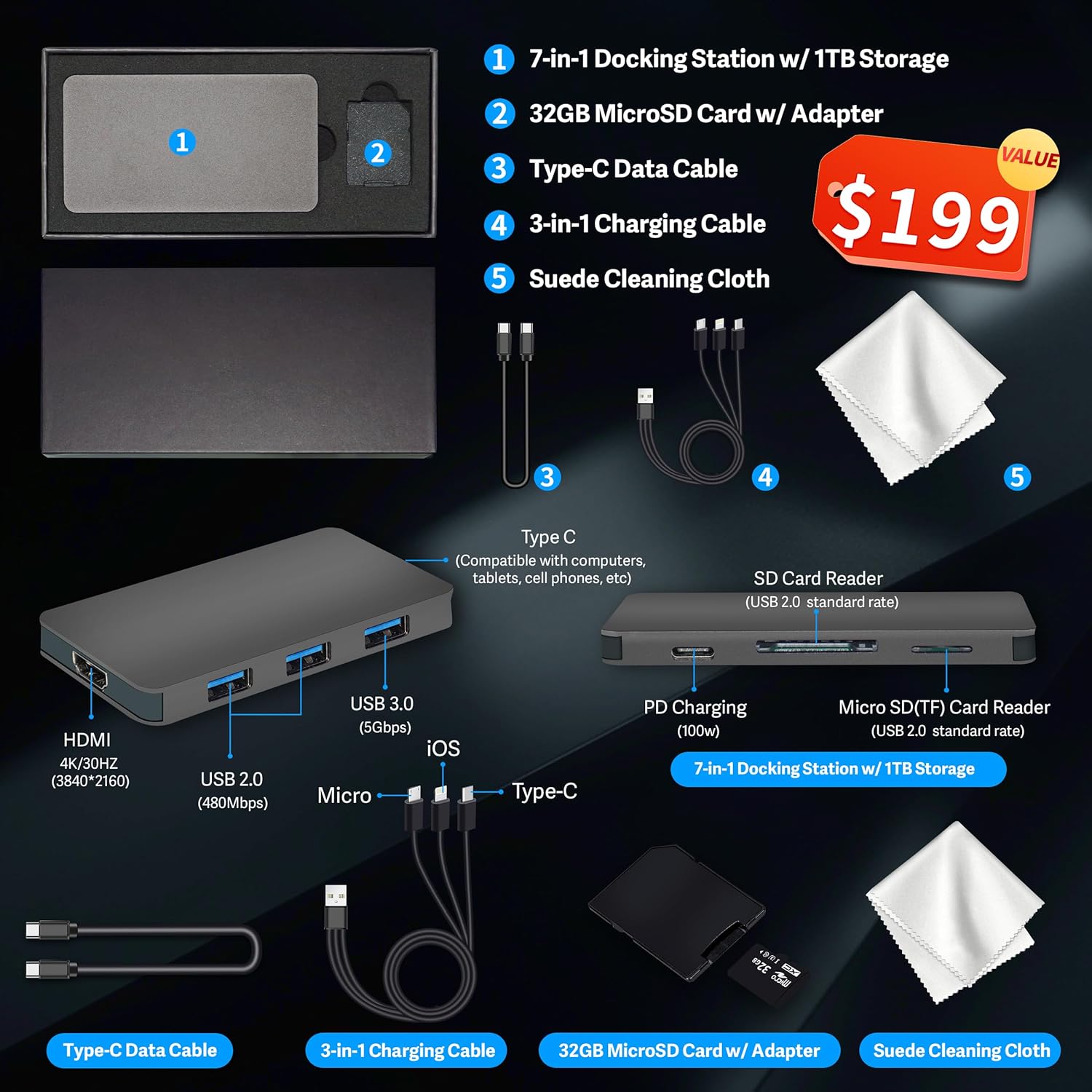
شکل 2.1: Included accessories, featuring the 7-in-1 docking station, cables, MicroSD card, and cleaning cloth.
۴. د تنظیم لارښوونې
3.1 پاکول او ځای پرځای کول
- Carefully remove the All-in-One desktop and all accessories from the packaging.
- Place the desktop on a stable, flat surface, ensuring adequate ventilation around the unit.
3.2 د نښلولو بریښنا
- Connect the power adapter cable to the DC-in port on the rear of the All-in-One desktop.
- د بریښنا اډاپټر په ځمکني بریښنایی پلورنځی کې ولګوه.
3.3 د پردیو سره نښلول
Connect the wireless keyboard and mouse. Typically, a single USB receiver is used for both. Insert the USB receiver into an available USB port on the desktop.
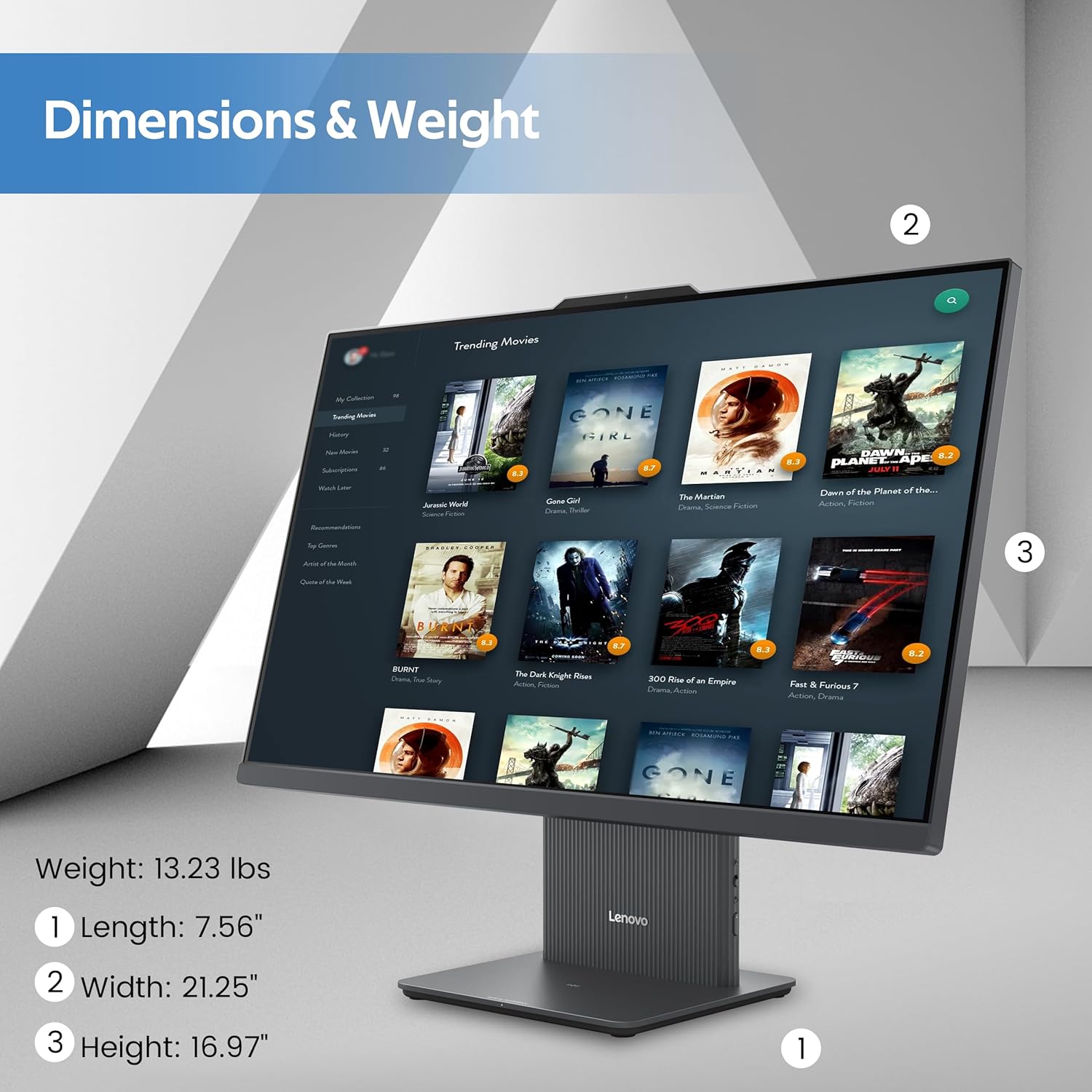
شکل 3.1: اوورview of the rear and left-side ports, including USB, HDMI, RJ-45, and audio connections.
۱.۳ د وینډوز ۱۱ لومړنی بوټ اپ او تنظیم کول
- Press the power button located on the rear of the desktop.
- د وینډوز 11 لومړني تنظیم بشپړولو لپاره په سکرین کې لارښوونې تعقیب کړئ، پشمول د ژبې انتخاب، د شبکې اتصال، او د کارونکي حساب جوړول.
4. عملیاتي لارښوونې
4.1 ځانګړتیاوې ښکاره کول
The IdeaCentre AIO 3 features a 23.8-inch Full HD (1920x1080) IPS display with a 100Hz refresh rate. It includes an anti-glare coating for comfortable viewing and covers 99% sRGB for accurate color reproduction.

شکل 4.1: The 23.8-inch Full HD display provides clear and vibrant visuals.
4.2 د سیسټم فعالیت
Your AIO desktop is equipped with an AMD Ryzen 5 7535HS processor, 16GB DDR5 RAM, and AMD Radeon 660M Graphics. This configuration supports smooth multitasking and efficient handling of daily computing tasks.
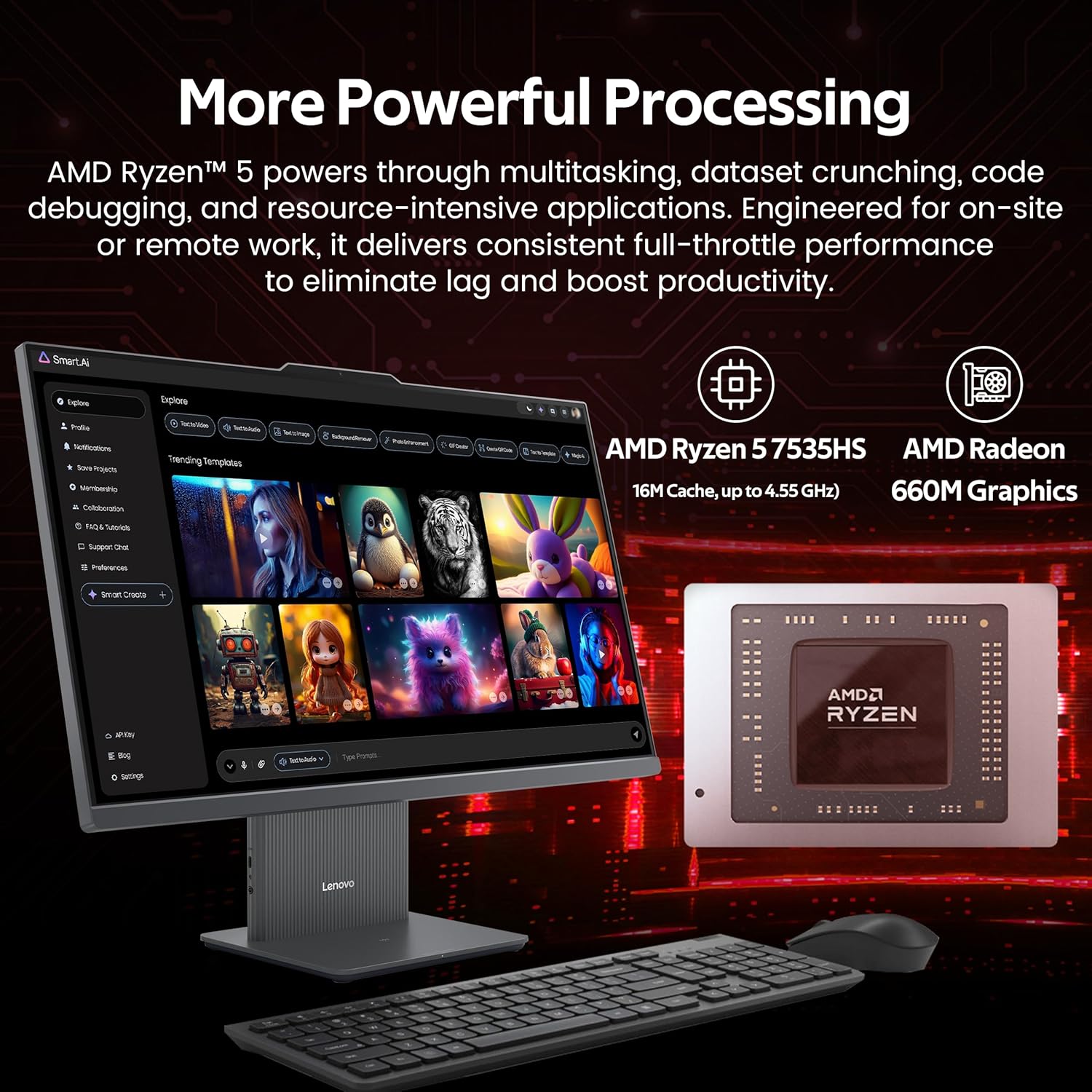
شکل 4.2: Illustration of the AMD Ryzen 5 7535HS processor and AMD Radeon 660M Graphics for powerful processing.
4.3 ذخیره کول
The system includes a 512GB SSD for fast operating system and application loading, complemented by a 1TB docking station for additional storage capacity, totaling 1.5TB.

شکل 4.3: The All-in-One desktop highlighting its 16GB RAM and 1.5TB storage capabilities.
4.4 نښلول
The IdeaCentre AIO 3 supports Wi-Fi 6 for high-speed wireless internet and Bluetooth 5.3 for connecting wireless peripherals. It also features an RJ-45 Ethernet port for wired network connections.

شکل 4.4: Features such as wireless charging, Wi-Fi 6, Bluetooth 5.2, and integrated stereo speakers.
۳.۶ بندرونه او انٹرفیسونه
The desktop includes various ports for connectivity:
- شاته بندرونه: 1x USB-A (USB 10Gbps / USB 3.2 Gen 2), 2x USB-A (Hi-Speed USB / USB 2.0), 1x HDMI-in 1.4, 1x HDMI-out 2.1 TMDS, 1x RJ-45 (Ethernet), 1x Power Connector.
- د چپ اړخ بندرونه: 1x USB-C, 1x Headphone / Microphone Combo Jack.
۵.۵ څو دندې ترسره کول
The system is designed to handle multiple applications and browser tabs simultaneously, providing a smooth user experience for various tasks.

شکل 4.5: A user demonstrating the ability to manage multiple applications and tasks on the desktop.
5. ساتنه
5.1 د وسیلې پاکول
- تل د پاکولو دمخه بریښنا بنده کړئ او وسیله خلاصه کړئ.
- Use a soft, lint-free cloth (such as the provided suede cleaning cloth) to gently wipe the screen and exterior surfaces.
- په مستقیم ډول په وسیله کې د سختو کیمیاوي موادو، خړوبونکو پاکوونکو، یا ایروسول سپرې کارولو څخه ډډه وکړئ.
- د هوا د فشار له لارې د هوا د لارې او د هوا د لارې د دوړو د لرې کولو لپاره وخت په وخت فشار ورکړئ.
5.2 د سافټویر تازه معلومات
په منظم ډول د عملیاتي سیسټم تازه معلومات (وینډوز تازه معلومات) او د ډرایور تازه معلومات (لینوو وان) وګورئ او نصب کړئ.tagد e یا لینوو ملاتړ webسایټ) ترڅو غوره فعالیت او امنیت ډاډمن شي.
5.3 د معلوماتو بیک اپ
د معلوماتو د ضایع کیدو مخنیوي لپاره په دوره یي ډول خپل مهم معلومات په بهرني ډرایو یا کلاوډ ذخیره کې بیک اپ کړئ.
6. ستونزه حل کول
۱ برېښنا نشته
- ډاډ ترلاسه کړئ چې د بریښنا کیبل په خوندي ډول د ډیسټاپ او بریښنایی آوټ لیټ دواړو سره وصل دی.
- د بل وسیلې په لګولو سره د بریښنایی آوټ لیټ فعال دی تصدیق کړئ.
- د هر ډول لیدل شوي زیان لپاره د بریښنا اډاپټر وګورئ.
6.2 د ښودلو مسلې
- که سکرین خالي وي، ډاډ ترلاسه کړئ چې وسیله فعاله ده او د خوب حالت کې نه ده.
- د ښودنې روښانتیا تنظیمات تنظیم کړئ.
- که چیرې یو بهرنی مانیټر وصل وي، ډاډ ترلاسه کړئ چې د وینډوز ترتیباتو کې د ښودلو سم محصول غوره شوی.
۷.۳ د بېسیم اتصال ستونزې
- وای فای: Check if Wi-Fi is enabled in Windows settings. Restart your router and the desktop. Ensure you are connecting to the correct network and entering the password correctly.
- بلوتوث: Ensure Bluetooth is enabled. Re-pair your Bluetooth devices. Check device batteries.
۸.۳ کیبورډ یا موږک ځواب نه ورکوي
- ډاډ ترلاسه کړئ چې د USB ریسیور په سمه توګه په USB پورټ کې داخل شوی دی.
- Check the batteries in the wireless keyboard and mouse and replace if necessary.
- Try inserting the USB receiver into a different USB port.
7. مشخصات
| فیچر | مشخصات |
|---|---|
| برانډ | Lenovo |
| د ماډل نوم | د IdeaCentre AIO 3 |
| عملیاتي سیسټم | وینډوز ۱۱ |
| د CPU ماډل | د AMD Ryzen 5 7535HS |
| د CPU سرعت | 3.3 GHz (up to 4.55 GHz boost) |
| د RAM حافظه نصب شوه | ۳۲ جي بي ډي ډي آر ۵ (۸۴۰۰ ميګاهيرتزه) |
| ذخیره کول | 512 GB SSD + 1 TB Docking Station (Total 1.5 TB) |
| د ګرافیک کاپروسیسر | د AMD Radeon 660M ګرافیکونه |
| د سکرین اندازه | ۷۸۷ انچه |
| د ښودلو ریزولوشن اعظمي | ۱۹۲۰x۱۰۸۰ پکسلز (FHD) |
| د ارتباط ټیکنالوژي | Ethernet, HDMI, USB, Wi-Fi 6, Bluetooth 5.3 |
| بندرونه | 1x USB-A (3.2 Gen 2), 2x USB-A (2.0), 1x USB-C, 1x HDMI-in 1.4, 1x HDMI-out 2.1 TMDS, 1x RJ-45, 1x Headphone/Mic Combo, 1x Power Connector |
| د توکي ابعاد (L x W x H) | 26 x 21.5 x 9 انچه (تقریبا) |
| د توکي وزن | ۵۰.۳ پونډه (تقریبا) |
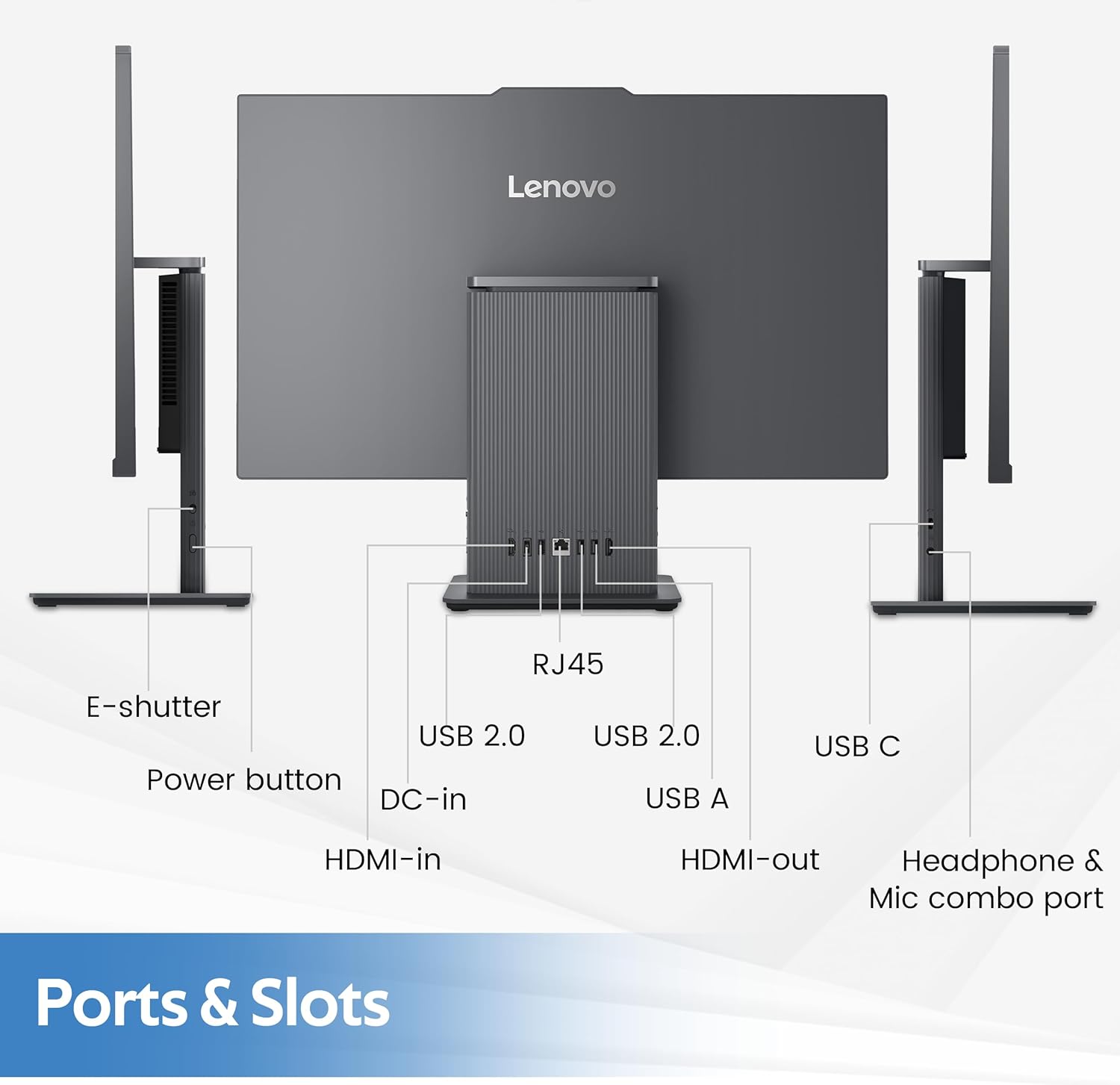
شکل 7.1: Physical dimensions and weight of the Lenovo IdeaCentre AIO 3 desktop.
8. تضمین او ملاتړ
8.1 د تضمین معلومات
Your Lenovo IdeaCentre AIO 3 desktop comes with a standard manufacturer's warranty. Please refer to the warranty card included with your product for specific terms, conditions, and duration. Keep your proof of purchase for warranty claims.
8.2 تخنیکي ملاتړ
د تخنیکي مرستې، د ډرایور ډاونلوډونو، یا نورو ملاتړ لپاره، مهرباني وکړئ د لینوو رسمي ملاتړ ته مراجعه وکړئ. website or contact Lenovo customer service. You can find contact information and support resources at ملاتړ.lenovo.com.