
پیژندنه
This manual provides detailed instructions for the Boytond Wireless Earpiece with Mic, Model YYK-520-2-C. Please read this manual carefully before using the product to ensure proper operation and to maximize its performance. Keep this manual for future reference.
د بسته محتويات
ډاډ ترلاسه کړئ چې ټول توکي ستاسو په کڅوړه کې شتون لري:
- Boytond Wireless Earpiece
- Charging Case (500 mAh)
- د USB-C چارج کیبل
- Replaceable Ear Tips (S, M, L)
- د کارن لارښود

The image displays the Boytond Wireless Earpiece, its charging case, a USB-C charging cable, and various sizes of ear tips, illustrating all items included in the product package.
محصول پای ته ورسیدview
The Boytond Wireless Earpiece is designed for clear communication and comfortable wear, featuring CVC8.0 noise cancellation and Bluetooth 6.1 technology. It includes a portable charging case for extended use.

یو مفصل view of the Boytond Wireless Earpiece, showcasing its ergonomic design and integrated microphone.
چمتو کول
1. Charging the Earpiece and Case
Before first use, fully charge the earpiece and its charging case.
- د USB-C چارج کولو کیبل د کیس د چارج کولو پورټ او د بریښنا سرچینې سره وصل کړئ.
- The LED display on the charging case will indicate the battery level.
- Place the earpiece into the charging case. The earpiece will begin charging automatically.
- A full charge provides approximately 10-12 hours of talk time for the single headset, and up to 100 hours with the fully charged case.

The earpiece and its charging case are shown, with the case's LED display indicating a 100% charge, demonstrating the charging process and battery status.
2. د وسیلې سره جوړه کول
- Ensure the earpiece is charged.
- Turn on the earpiece. It will automatically enter pairing mode (indicated by a flashing LED).
- په خپل سمارټ فون یا بلوتوث فعال شوي وسیله کې، د بلوتوث ترتیباتو ته لاړ شئ او بلوتوث فعال کړئ.
- لټون available devices and select "Boytond YYK-520-2-C" (or similar name) from the list.
- Once connected, the earpiece LED will stop flashing.
The earpiece is shown next to a smartphone, demonstrating its operating range and compatibility with mobile devices for calls and media.
۳. د دوه ګوني وسیلو اتصال
The earpiece supports connecting to two devices simultaneously.
- Pair the earpiece with the first device as described above.
- Disconnect the earpiece from the first device (e.g., turn off Bluetooth on the first device or manually disconnect).
- Pair the earpiece with the second device.
- Reconnect the earpiece to the first device. The earpiece should now be connected to both devices.

A visual guide illustrating the steps to connect the earpiece to two separate devices, enabling dual-device functionality.
عملیاتي لارښوونې
د تڼۍ دندې

This diagram labels the buttons on the earpiece and explains their functions for call management, volume control, and music playback.
| عمل | تڼۍ پریس |
|---|---|
| پاور آن/بند | Press and hold the Multi-function Button |
| ځواب / پای کال | Single press the Multi-function Button |
| زنګ رد کړئ | Press and hold the Multi-function Button |
| وروستنۍ شمیره بیا ولیکئ | د ملټي فنکشن تڼۍ دوه ځله فشار ورکړئ |
| میوزیک پلی کړئ / بند کړئ | Single press the Multi-function Button |
| حجم پورته | Short press '+' button |
| حجم ښکته | Short press '-' button |
| بله لار | Long press '+' button |
| مخکینی ټریک | Long press '-' button |
| د مایکروفون غږول / غږیزول | Single press the Mute Button during a call |
| د غږ معاون فعال کړئ | Triple press the Multi-function Button |
د خاموش فعالیت
During a call, you can mute your microphone to ensure privacy. Simply press the dedicated mute button on the earpiece. Press it again to unmute.

A user is shown pressing the mute button on the earpiece during a call, with an icon indicating the microphone is muted, highlighting the privacy feature.
د غوږ پیس اغوستل
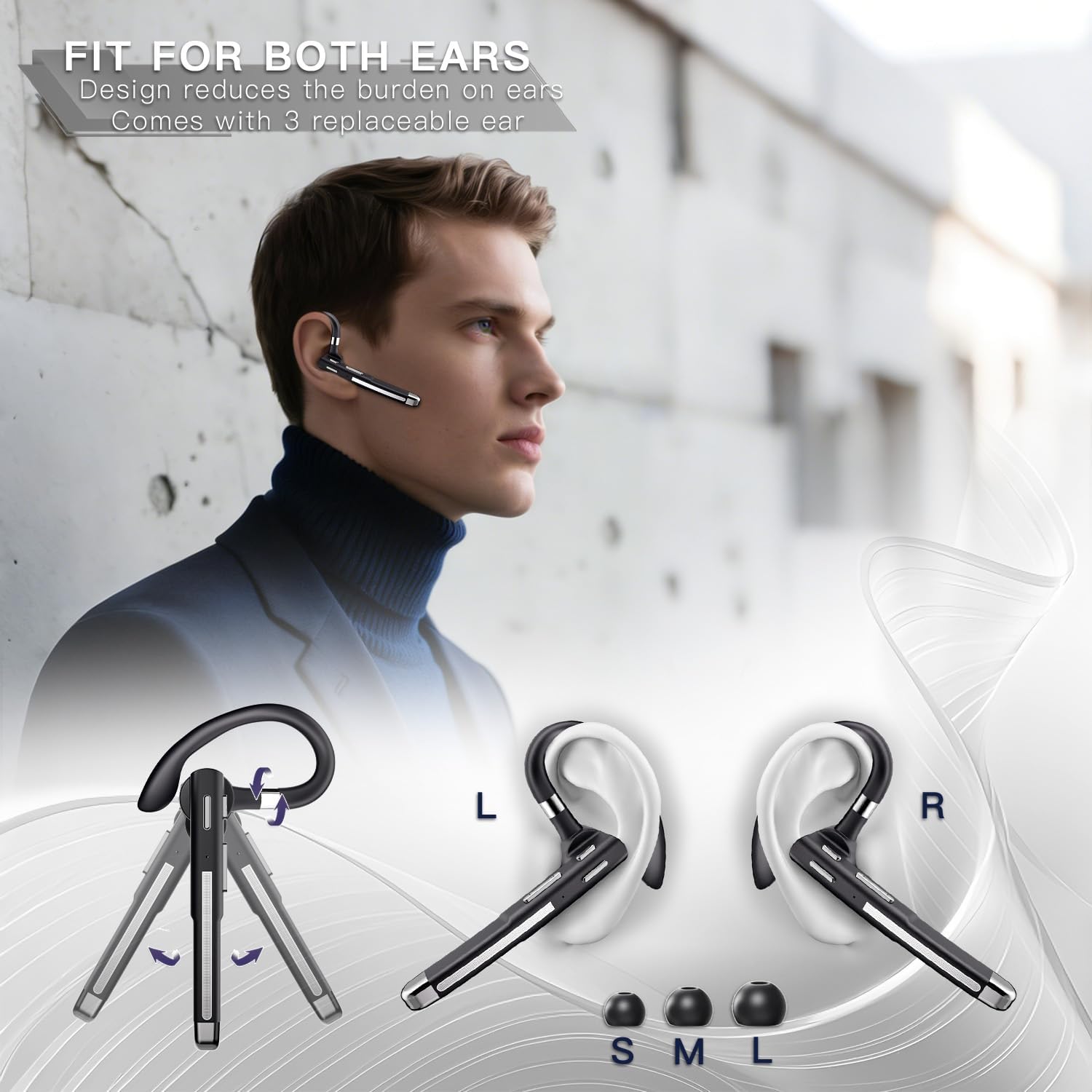
The earpiece features an ergonomic design with a rotatable ear hook and comes with three sizes of ear tips (S, M, L) to ensure a secure and comfortable fit for either ear.
- Choose the ear tip size that best fits your ear canal for optimal sound quality and comfort.
- Adjust the ear hook to fit over your ear. The hook can be rotated 180 degrees to switch between left and right ear use, and the earpiece itself can rotate 270 degrees for fine-tuning the angle.
- Gently insert the earpiece into your ear, ensuring a snug fit.

This image demonstrates the earpiece's 180-degree rotatable ear hook and 270-degree earpiece rotation, allowing for comfortable and secure wear on either the left or right ear.
مشخصات
| فیچر | تفصیل |
|---|---|
| د ماډل شمیره | YYK-520-2-C |
| برانډ | بویټونډ |
| د ارتباط ټیکنالوژي | بېسیم (بلوتوث ۵.۳) |
| د بلوتوټ رینج | Up to 10 meters (33 feet) without obstacles |
| د شور لغوه کول | CVC8.0 Noise Cancelling |
| Battery Life (Earpiece) | 10-12 hours talk time |
| د بیټرۍ ژوند (د چارج کولو کیس سره) | تر 100 ساعتونو پورې د خبرو وخت |
| د چارج کولو قضیه ظرفیت | 500 mAh |
| د چارج کولو بندر | USB-C |
| د فریکونسی رینج | 20Hz - 20,000Hz |
| د آډیو ډرایور ډول | متحرک چلوونکی |
| رنګ | تور |
د ستونزو حل کول
- Earpiece not turning on: Ensure the earpiece is fully charged. Place it in the charging case to confirm charging.
- د وسیلې سره جوړه نشي کیدی:
- Ensure the earpiece is in pairing mode (flashing LED).
- په خپل وسیله کې بلوتوث بند او فعال کړئ.
- د خپل وسیلې د بلوتوث لیست څخه پخوانۍ جوړې حذف کړئ او بیا جوړه کولو هڅه وکړئ.
- Ensure the earpiece is within 10 meters of your device.
- بې غږه یا ټیټ غږ:
- Adjust the volume on both the earpiece and your connected device.
- Ensure the earpiece is properly connected to your device.
- Check if the earpiece battery is low.
- Call quality issues (e.g., static, drops):
- د مداخلې کمولو لپاره خپل وصل شوي وسیلې ته نږدې شئ.
- Ensure there are no major obstacles between the earpiece and your device.
- Check for other active Bluetooth devices that might be causing interference.
- مایکروفون کار نه کوي:
- ډاډ ترلاسه کړئ چې مایکروفون خاموش نه دی.
- په خپل وصل شوي وسیله کې د مایکروفون تنظیمات وګورئ.
ساتنه
- پاکول: Use a soft, dry cloth to clean the earpiece and charging case. Do not use harsh chemicals or abrasive materials.
- ذخیره کول: Store the earpiece in its charging case when not in use to protect it from dust and damage. Store in a cool, dry place.
- د بیټرۍ پاملرنه: د بیټرۍ د ژوند اوږدولو لپاره، د بیټرۍ په مکرر ډول د بشپړ چارج کولو څخه ډډه وکړئ. وسیله په منظم ډول چارج کړئ، حتی که په فعاله توګه نه وي.
- د سختو شرایطو څخه ډډه وکړئ: Do not expose the earpiece to extreme temperatures, humidity, or direct sunlight.
تضمین او ملاتړ
Boytond offers comprehensive customer support for its products.
24-Hour Online Customer Service
For any product-related inquiries, issues, or suggestions, please contact the Boytond After-sales Service Team directly. This includes problems with delivery, product satisfaction, usage issues, or if Amazon Customer Service cannot resolve your issue.

An icon representing 24-hour online customer service, emphasizing continuous support.
365-Day Positive Service
If you encounter missing parts, product malfunction, damage, or other problems within 365 days of purchase, Boytond guarantees a 100% satisfactory solution. If the product has quality defects, it will be replaced or a full refund will be offered.

An icon representing 365-day service, highlighting the extended warranty and support period.