
پیژندنه
This manual provides essential information for the safe and efficient use of your Xiaomi 55-inch 4K UHD Smart Quantum MagiQ S Mini LED Google TV. Please read these instructions thoroughly before operating the device and retain them for future reference.
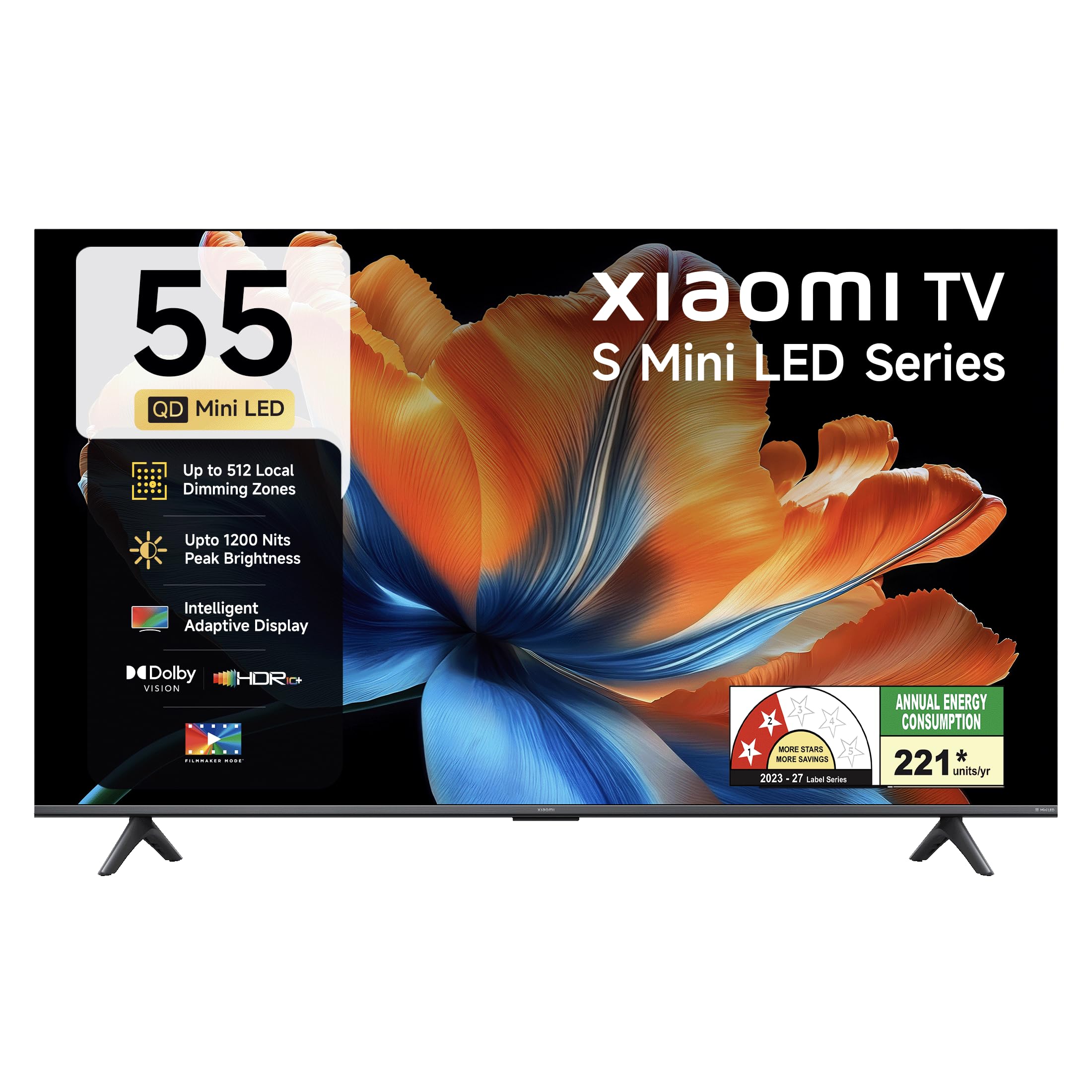
انځور: مخکینۍ برخه view of the Xiaomi 55-inch 4K UHD Smart Quantum MagiQ S Mini LED Google TV, showcasinد هغې پتلی بیزل ډیزاین.
د تنظیم کولو لارښود
۳.۱. د بسته بندۍ او شاملو برخو خلاصول
Carefully remove all items from the packaging. Ensure all components listed below are present and undamaged.

Image: Contents of the product box, including the TV unit, remote control, user manual, two stand units, four screws, two AAA batteries, and a power cord.
- ۱ د LED تلویزیون واحد
- 1 ریموٹ کنټرول
- ۱ د کارونکي لارښود (دا سند)
- 2 Stand Units
- 4 Screws for stand installation
- دوه AAA بیټرۍ (د ریموټ کنټرول لپاره)
- 1 د بریښنا تار
۲. د سټینډ نصب کول یا دیوال نصب کول
Your television supports both table-top stand installation and wall mounting. Choose the method suitable for your environment.
- د سټینډ نصبولو لپاره: Attach the two provided stand units to the bottom of the TV using the four screws. Ensure they are securely fastened.
- د دیوال نصبولو لپاره: Use a compatible VESA wall mount (sold separately). Follow the instructions provided with your wall mount kit. Ensure the wall can support the TV's weight.
3. د بهرنیو وسایلو نښلول
Connect your external devices such as set-top boxes, gaming consoles, or audio systems to the TV's ports.

انځور: شاته view of the TV highlighting connectivity ports: Optical, Earphone, AV In, 3 HDMI ports (one with eARC), 2 USB 2.0 ports, Antenna, and Ethernet.
- د HDMI پورټونه (x3): Connect gaming consoles, Blu-ray players, or set-top boxes. One port supports eARC for enhanced audio return channel functionality.
- د USB پورټونه (x2): د میډیا پلې بیک لپاره د USB ذخیره کولو وسایل وصل کړئ.
- ایترنیټ پورټ: د تار لرونکي انټرنیټ اتصال لپاره.
- نظری محصول: د بهرني آډیو سیسټمونو سره د نښلولو لپاره.
- په AV کې: د زړو وسیلو سره د نښلولو لپاره د جامع ویډیو او سټیریو آډیو په کارولو سره.
- انتن: د ځمکې یا کیبل انتن د نښلولو لپاره.
۳.۲. د بریښنا لومړنی فعالول او تنظیم کول
After connecting all necessary cables, plug the power cord into an electrical outlet. Press the power button on the remote control or the TV to turn it on. Follow the on-screen instructions for initial setup, which typically includes:
- د ژبې انتخاب
- د شبکې اتصال (وای فای یا ایترنیټ)
- د ګوګل حساب ننوتل
- د چینل سکینګ
Operating Your Xiaomi Smart TV
1. د ریموټ کنټرول افعالونه
شامل ریموټ کنټرول د تلویزیون ټولو دندو ته لاسرسی چمتو کوي. دوه AAA بیټرۍ په ریموټ کنټرول کې دننه کړئ، د سم قطبیت ډاډ ترلاسه کول.

Image: Xiaomi remote control, featuring dedicated quick access buttons for popular streaming services and Google Assistant voice control.
- د بریښنا تڼۍ: تلویزیون چالان یا بند کړئ.
- د ګوګل مرستیال تڼۍ: Activates voice control for searching content, controlling smart home devices, and more.
- د نیویګیشن پیډ: د مینو نیویګیټ کولو او توکو غوره کولو لپاره کارول کیږي.
- حجم پورته / ښکته: د آډیو حجم تنظیموي.
- چینل پورته / ښکته: د تلویزیون چینلونه بدلوي.
- د چټک لاسرسي تڼۍ: Dedicated buttons for Netflix, Prime Video, YouTube, Disney+ Hotstar, SonyLIV, and Live TV.
- تteۍ غږول: د تلویزیون غږ خاموشوي.
2. Google TV Interface and Applications
Your TV runs on the Android 14 OS with Google TV, offering a personalized content experience. Access a wide range of applications from the Google Play Store.

Image: The PatchWall interface, providing customized content recommendations and curation from various streaming platforms.
- د منځپانګې لومړی UI: ستاسو د ټولو سټریمینګ خدماتو مینځپانګې په یو ځای کې تنظیموي.
- شخصي پروfiles: انفرادي پرو جوړ کړئfileد شخصي سپارښتنو لپاره.
- ملاتړ شوي اطلاقات: Pre-installed and downloadable apps include Netflix, Prime Video, YouTube, Zee5, JioCinema, SonyLiv, and more.
- د ګوګل معاون: Use voice commands for navigation, search, and smart home control.
۳. د انځور او غږ ترتیبات
خپل اصلاح کړئ viewد مختلفو انځورونو او غږ طریقو له لارې د ثبت او اوریدلو تجربه.
د انځور ترتیبات:
- د فلم جوړونکي حالت: Disables post-processing effects to display content as intended by the director.
- دولبي ویژن: Enhances HDR content with dynamic metadata for optimized image quality frame by frame.
- HDR10+: Uses dynamic data to enhance every frame, providing an immersive viewتجربه
- د سترګو د آرامۍ حالت: Reduces blue light and flicker for a more comfortable viewتجربه
- MEMC Engine: د حرکت اټکل، د ګړندۍ صحنو کې د اسانه حرکت لپاره د حرکت جبران ټیکنالوژي.
- AI Picture Optimization Engine: Advanced AI algorithms analyze content in real-time to enhance clarity, contrast, and color reproduction.

Image: Filmmaker Mode, designed to preserve original colors, contrast, and motion for an authentic cinematic experience.

Image: Dolby Vision technology, optimizing image quality with deeper blacks and brighter highlights.

Image: HDR10+ dynamic frame-by-frame tuning, ensuring consistent detail across dark and bright scenes.

Image: Eye Care Mode, providing flicker-free visuals with DC Dimming and reduced blue light for comfortable viewing.
د آډیو ترتیبات:
- ۲۳۰ واټ تولید: Powerful built-in box speakers.
- دولبي آډیو: بډایه، روښانه او ځواکمن غږ وړاندې کوي.
- DTS-X او DTS مجازی:X: ډوبونکی، څو اړخیزه غږ چمتو کوي.
- Xiaomi Sound: Preset audio configurations developed for optimal sound quality.

Image: Xiaomi Sound, offering tailored audio experiences through expert-developed configurations.
4. Connectivity and Streaming
Your TV offers versatile connectivity options for seamless streaming and device integration.
- دوه ګونی بانډ وای فای: Connects to 2.4GHz and 5GHz wireless networks.
- بلوتوث: Connect wireless headphones, speakers, or other Bluetooth accessories.
- Google Cast Built-in: Stream content directly from compatible apps on your smartphone or tablet.
- د ایپل ایر پلی ۲: د ایپل وسیلو څخه مینځپانګې جریان کړئ.
- میرکاسټ: Mirror your Android device's screen wirelessly.

Image: Stream content from your phone using Google Cast or Apple AirPlay 2.
پاملرنه او ساتنه
سمه پاملرنه ستاسو د تلویزیون اوږد عمر او غوره فعالیت تضمینوي.
- د سکرین پاکول: سکرین په نرمۍ سره د نرم، لینټ نه پاک ټوکر سره پاک کړئ. د سختو نښو لپاره، د سکرین ځانګړي پاکولو محلول وکاروئ چې په ټوکر باندې تطبیق شي، نه په مستقیم ډول په سکرین باندې.
- د بدن پاکوالی: Wipe the TV's frame and back panel with a soft, dry cloth. Avoid abrasive cleaners or solvents.
- وینټیلیشن: د تلویزیون شاوخوا د هوا مناسب جریان ډاډمن کړئ. د هوا د جریان لارې مه بندوئ.
- بندول: تل تلویزیون بند کړئ او د پاکولو دمخه یې د بریښنا له سایټ څخه خلاص کړئ یا که دا د اوږدې مودې لپاره نه کارول کیږي.
- د سافټویر تازه معلومات: Periodically check for and install software updates to ensure optimal performance and security.
د عامو ستونزو حل کول
Refer to this section for solutions to common operational problems.
| ستونزه | د حل لاره |
|---|---|
| تلویزیون نه چالانیږي | Ensure the power cord is securely plugged into both the TV and a working electrical outlet. Check if the power outlet is active. Try pressing the power button on the TV itself. |
| انځور نشته، خو غږ شته | Check the input source. Ensure the connected device (e.g., set-top box) is turned on and functioning. Try a different HDMI cable or port. |
| غږ نشته، خو انځور شته | Check the volume level and ensure the TV is not muted. Verify audio output settings (e.g., internal speakers, external sound system). Check audio cables for external devices. |
| ریموټ کنټرول ځواب نه ورکوي | Replace the AAA batteries in the remote control. Ensure there are no obstructions between the remote and the TV. Re-pair the Bluetooth remote if necessary (refer to TV settings). |
| د وائی فای سره وصل نشو | Ensure your Wi-Fi router is on and working. Re-enter the Wi-Fi password. Try restarting both the TV and the router. Check if other devices can connect to the Wi-Fi network. |
تخنیکي مشخصات
Detailed specifications for the Xiaomi 55-inch 4K UHD Smart Quantum MagiQ S Mini LED Google TV (Model L55MC-IN).

Image: Physical dimensions and weight of the Xiaomi 55-inch TV, both with and without the stand.
| فیچر | مشخصات |
|---|---|
| د ماډل شمیره | L55MC-IN |
| د سکرین اندازه | 55 انچونه (138 سانتي متره) |
| ټیکنالوژي ښکاره کول | مینی LED |
| قرارداد | 4K الټرا ایچ ډي (3840 x 2160) |
| د تازه کولو نرخ | 60 Hz (DLG 120 Hz) |
| لوړ روښانتیا | تر ۶۰۰ نټونو پورې |
| عملیاتي سیسټم | Android 14 OS with Google TV |
| RAM | 2GB |
| ROM (داخلي ذخیره) | 32 جي بي |
| د غږ محصول | 34 واټ |
| آډیو ټیکنالوژي | ډولبي آډیو، ډي ټي ایس-ایکس، ډي ټي ایس مجازی:ایکس |
| ارتباط | Dual Band Wi-Fi, Bluetooth, 3 HDMI (1 eARC), 2 USB, Optical, Ethernet, AV In |
| د سکرین عکس العمل | Google Cast, Apple AirPlay 2, Miracast |
| ځانګړي ځانګړتیاوې | Filmmaker Mode, MEMC, Eye Comfort Mode, AI Picture Optimization Engine |
| د محصول ابعاد (د x څلویښتم x څلویښتم) | 31.2D x 31.2W x 76.9H Centimeters (with stand) |
| Item Weight Without Stand | 11.6 کیلوګرامه |
| د بریښنا مصرف | 230 واټ |
| د اصلي هیواد | هند |
د تضمین معلومات
Your Xiaomi TV comes with a comprehensive warranty provided by the brand from the date of purchase.
- معیاري تضمین: 3-year comprehensive warranty for non-prebook customers (purchases between April 22nd - May 31st).
- Pre-book Customer Warranty: 4-year comprehensive warranty for pre-book customers (purchases between April 22nd - April 30th).
Warranty claims can be made using your Amazon invoice as proof of purchase. For detailed terms and conditions, please refer to the official Xiaomi warranty policy or contact customer support.
د پیرودونکي ملاتړ
For any assistance, service requests, or queries regarding your Xiaomi TV, please contact Xiaomi customer support.

انځور: اوورview of Xiaomi's customer support commitments, including quick installation, prompt call-backs, and swift doorstep solutions.
- د نصبولو خدمتونه: New TV installations are typically completed within 3 hours of your appointment.
- Service Requests: د هرې خدماتو غوښتنې لپاره د ملاتړ ټیم څخه د 60 دقیقو دننه د زنګ وهلو تمه وکړئ.
- په ساحه کې ملاتړ: Experts aim to arrive at your home within 24 hours of your service request.
Please visit the official Xiaomi India webسایټ ته مراجعه وکړئ یا د خپل محصول په بسته بندۍ کې چمتو شوي د اړیکو معلوماتو ته مراجعه وکړئ ترڅو د ملاتړ خورا تازه توضیحات ترلاسه کړئ.