1. پیژندنه
د پیرودلو لپاره مننهasing the AIWA BBTC-550 Portable Radio Cassette Player. This versatile device combines classic audio formats with modern connectivity, allowing you to enjoy your music from various sources. Please read this manual carefully before using the unit to ensure proper operation and to maximize your listening experience. Keep this manual for future reference.
کلیدي ځانګړتیاوې:
- Portable Radio Cassette with CD reader, USB, and Bluetooth 5.0 connection.
- Cassette player and recorder with Auto-Stop function.
- USB port for MP3 music playback.
- AUX IN input (3.5mm) for connecting external audio devices.
- Headphone socket (3.5mm).
- Compatible with CD/CD-R/MP3 discs with 20 programmable memories.
- FM PLL Radio with 40 programmable station presets.
- Digital clock with 24-hour display.
- High-frequency range dynamic speakers with super bass and amplified treble.
- Panoramic LCD screen with soft tonality backlight.
2. محصول ختم شوview
The AIWA BBTC-550 is designed for ease of use and portability. Below are images illustrating the device's main components and features.

شکل 2.1: مخکی view of the AIWA BBTC-550, showing the display, control buttons, and speakers.

شکل ۱: پورته څخه ښکته view of the AIWA BBTC-550 with the CD compartment lid open.

شکل 2.3: اړخ view of the AIWA BBTC-550 with the cassette compartment door open and the telescopic antenna extended.

Figure 2.4: Close-up of the side panel showing the 3.5mm headphone jack, 3.5mm AUX IN port, and USB/MP3 port.
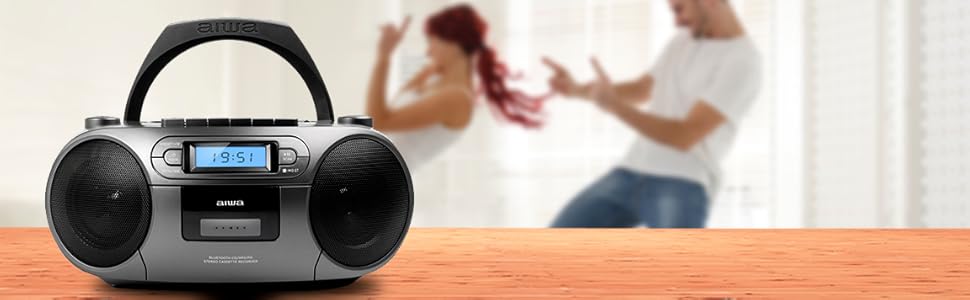
Figure 2.5: Promotional image highlighting the multi-functionality of the AIWA BBTC-550.
3. ترتیب کول
3.1 د بریښنا رسول
The AIWA BBTC-550 can be powered by either AC mains electricity or batteries for portable use.
- د AC بریښنا: Connect the provided AC power cord to the AC IN socket on the unit and then to a standard 230V/50Hz wall outlet.
- د بیټرۍ ځواک: For portable use, insert 6 x 1.5V LR14/UM2/C batteries into the battery compartment located on the bottom of the unit. Ensure correct polarity (+/-) when inserting batteries.
۵.۲ د انتن تنظیم کول
For optimal FM radio reception, fully extend the telescopic antenna. Adjust its position and angle to achieve the clearest signal.
4. عملیاتي لارښوونې
۶.۱ عمومي کنټرولونه
- د چالانېدو تڼۍ: د واحد د فعال یا بندولو لپاره فشار ورکړئ.
- د موډ تڼۍ: Press to switch between CD, USB, Bluetooth, Radio, and Cassette modes.
- د غوږ نالی: د غږ کچه تنظیمولو لپاره وګرځوئ.
- د LCD نندارې: Shows current mode, track number, frequency, and time.
4.2 CD پلے بیک
- فشار ورکړئ موډ د CD حالت غوره کولو لپاره ت buttonۍ.
- Open the CD compartment lid and place a CD (CD/CD-R/MP3 compatible) with the label side facing up. Close the lid securely.
- The unit will read the disc, and the total number of tracks will appear on the display.
- فشار ورکړئ PLAY/PAUSE (►/❚❚) د بيا غږولو پيلولو لپاره ت buttonۍ.
- مطبوعاتي PLAY/PAUSE (►/❚❚) again to pause, and press once more to resume.
- فشار ورکړئ SKIP (►►| / |◄◄) بل یا پخوانۍ لار ته د وتلو لپاره تڼۍ.
- فشار ورکړئ ودروئ (■) د بيا غږولو د بندولو لپاره ت buttonۍ.
- د پروګرام لوبه: پداسې حال کې چې د تمځای حالت کې وي، فشار ورکړئ پروګ/ وخت تڼۍ د کارولو SKIP buttons to select a track, then press پروګ/ وخت again to add it to the program list. Repeat for up to 20 tracks. Press لوبه وکړئ د پروګرام شوي پلې بیک پیل کولو لپاره.
۶.۳ د کیسیټ عملیات
- فشار ورکړئ موډ د کیسټ حالت غوره کولو لپاره تڼۍ.
- د کیسیټ خونې دروازه پرانیزئ او د کیسیټ ټیپ دننه کړئ. دروازه وتړئ.
- پلې بیک: فشار ورکړئ لوبه (►) د ټیپ غږول پیل کولو لپاره تڼۍ.
- ګړندی مخکی / بیرته راګرځول: فشار ورکړئ ایف ایف (►►) or ریو (◄◄) تڼۍ مطبوعاتي ودروئ (■) to stop winding.
- درېدل: فشار ورکړئ ودروئ (■) button to stop playback or winding. The unit features an Auto-Stop function at the end of the tape.
- ثبتول: Insert a blank cassette. Select the desired audio source (CD, USB, Bluetooth, Radio, or AUX IN). Press the ریکارډ (●) button on the cassette deck. The unit will start recording from the selected source. Press ودروئ (■) ثبت کول پای ته رسولو لپاره.
۱۴ USB پلے بیک
- فشار ورکړئ موډ د USB حالت غوره کولو لپاره تڼۍ.
- یو USB فلش ډرایو دننه کړئ چې MP3 آډیو لري fileد USB پورټ ته ننوځي.
- The unit will automatically detect and start playing the MP3 files.
- د کارولو PLAY/PAUSE (►/❚❚) او SKIP (►►| / |◄◄) buttons for control, similar to CD playback.
4.5 د بلوتوث اتصال
- فشار ورکړئ موډ button to select Bluetooth mode. The display will show 'BT' and start flashing, indicating it's in pairing mode.
- په خپل بلوتوث فعال شوي وسیله (سمارټ فون، ټابلیټ، او نور) کې، بلوتوث فعال کړئ او د شته وسایلو لټون وکړئ.
- Select 'AIWA BBTC-550' from the list of devices.
- Once paired, the unit will emit a confirmation sound, and 'BT' on the display will stop flashing.
- You can now play audio from your connected device through the AIWA BBTC-550. Use your device or the unit's controls for playback.
4.6 ایف ایم راډیو
- فشار ورکړئ موډ د FM راډیو حالت غوره کولو لپاره تڼۍ.
- د ښه استقبال لپاره ټیلسکوپیک انتن پراخ کړئ.
- اتومات سکین: فشار ورکړئ او ونیسئ سکین button to automatically scan and save available FM stations. The unit can store up to 40 presets.
- لاسي لارښود: په لنډه توګه فشار ورکړئ سکین button to manually tune up or down the frequency.
- پری سیټونه غوره کړئ: د کارولو PRESET (+10) د خوندي شوي سټیشنونو له لارې د سایکل کولو لپاره تڼۍ.
4.7 AUX IN
- فشار ورکړئ موډ د AUX IN حالت غوره کولو لپاره تڼۍ.
- Connect an external audio device (e.g., MP3 player, smartphone) to the 3.5mm AUX IN port using a 3.5mm audio cable (not included).
- Play audio from your external device. The sound will be output through the AIWA BBTC-550 speakers.
- Adjust the volume using the unit's VOLUME knob and/or your external device's volume control.
۶.۳ د هیډفون کارول
To listen privately, plug 3.5mm stereo headphones into the HEADPHONES socket. The speakers will automatically mute when headphones are connected.
4.9 د ساعت تنظیم کول
The unit features a digital clock with a 24-hour display.
- په سټنډرډ حالت کې، فشار ورکړئ او ونیسئ پروګ/ وخت تڼۍ
- د کارولو SKIP (►►| / |◄◄) د ساعت تنظیمولو لپاره تڼۍ. فشار ورکړئ پروګ/ وخت تصدیق کول.
- د کارولو SKIP (►►| / |◄◄) د دقیقې تنظیمولو لپاره تڼۍ. فشار ورکړئ پروګ/ وخت to confirm and exit clock setting mode.
5. مشخصات
| فیچر | مشخصات |
|---|---|
| د برانډ نوم | AIWA |
| د ماډل شمیره | د BBTC-550 لپاره تفتیش وسپارئ، موږ به په XNUMX ساعتونو کې له تاسو سره اړیکه ونیسو. |
| ډول | AM / FM Radio Cassette Player |
| سټایل | ټابلیټ / پورټ ایبل |
| د بدن مواد | پلاستیک |
| ابعاد (WxHxD) | 38 x 38 x 26 سانتي متره |
| وزن (محصول) | نږدې 2.04 کیلو ګرامه |
| بلوتوث | هو (نسخه 5.0) |
| WIFI | نه |
| سکرین | Yes (Panoramic LCD with backlight) |
| د CD مطابقت | CD/CD-R/MP3 |
| د USB پلی بیک | MP3 files |
| اکس ان | 3.5mm جیک |
| د هیډفون محصول | 3.5mm جیک |
| د راډیو پریزیټ | 40 (FM PLL) |
| د برېښنا رسونه (AC) | 230V/50Hz |
| د برېښنا رسونه (ډي سي) | 6 x 1.5V LR14/UM2/C batteries |
| تصدیق | CE، RoHS |
| اصل | چین |
| د کڅوړې ابعاد | 36.7 x 29 x 17.7 سانتي متره |
| د بسته وزن | 2.5 کیلو ګرامه |
6. ساتنه
6.1 د واحد پاکول
- د پاکولو دمخه تل د بریښنا سرچینې څخه واحد قطع کړئ.
- د بهرنۍ سطحې پاکولو لپاره نرم، وچ ټوکر وکاروئ.
- د سختو نښو لپاره، په نرمۍ سرهampټوکر د اوبو او یو نرم صابون سره ومینځئ، بیا سمدلاسه وچ کړئ.
- د کثافاتو پاکوونکي، موم یا محلول مه کاروئ ځکه چې دوی ممکن پای ته زیان ورسوي.
۷.۲ د سي ډي لینز پاملرنه
- Never touch the CD lens.
- If the CD lens gets dirty, use a commercially available CD lens cleaner to clean it.
۴.۳ د کیسیټ ډیک پاملرنه
- Regularly clean the tape heads, capstan, and pinch roller with a cotton swab lightly moistened with tape head cleaner or isopropyl alcohol.
- Demagnetize the tape heads periodically to prevent sound degradation.
6.4 د بیټرۍ بدلول
- When the unit's performance diminishes or the display dims, it's time to replace the batteries.
- Open the battery compartment, remove old batteries, and insert new ones, ensuring correct polarity.
- زاړه بیټرۍ د ځایی مقرراتو سره سم په مسؤلیت سره تصفیه کړئ.
- که چیرې واحد د اوږدې مودې لپاره د لیکیدو مخنیوي لپاره ونه کارول شي نو بیټرۍ لرې کړئ.
7. ستونزه حل کول
If you encounter any issues with your AIWA BBTC-550, please refer to the following common problems and solutions:
| ستونزه | احتمالي لامل | د حل لاره |
|---|---|---|
| هیڅ ځواک نشته | AC cord not properly connected; Batteries depleted or incorrectly inserted. | Check AC cord connection; Replace batteries, ensuring correct polarity. |
| غږ نشته | غږ ډېر ټیټ دی؛ هیډفونونه وصل دي؛ ناسم حالت غوره شوی دی. | Increase volume; Disconnect headphones; Select the correct mode (CD, USB, BT, Radio, AUX). |
| سي ډي پرېښودل یا نه غږول | CD is dirty or scratched; CD inserted incorrectly; Lens is dirty. | Clean or replace CD; Insert CD with label side up; Clean CD lens. |
| کیسیټ نه غږیږي/ثبت کیږي | Tape heads/capstan dirty; Cassette damaged; Incorrect mode. | Clean tape heads/capstan; Try a different cassette; Ensure Cassette mode is selected. |
| بلوتوث نه نښلي | Unit not in pairing mode; Bluetooth disabled on external device; Device too far. | Ensure unit is in Bluetooth pairing mode; Enable Bluetooth on your device; Move device closer (within 10m). |
| د ایف ایم راډیو ضعیف استقبال | انتن نه دی غځول شوی/تنظیم شوی؛ کمزوری سیګنال ساحه. | د ټیلسکوپیک انتن په بشپړه توګه پراخ او تنظیم کړئ؛ هڅه وکړئ چې واحد بل ځای ته ولیږدوئ. |
| USB نه پیژندل شوی | USB drive formatted incorrectly; Files not MP3; USB drive damaged. | Ensure USB is FAT32 format; Check files MP3 دي؛ یو بل USB ډرایو هڅه وکړئ. |
8. تضمین او ملاتړ
The AIWA BBTC-550 comes with a standard manufacturer's warranty. Please refer to the warranty card included in your product packaging for specific terms and conditions, including the warranty period and coverage details.
د پیرودونکي ملاتړ:
If you experience any problems with your unit that are not covered in the troubleshooting section, or if you require further assistance, please contact your retailer or the AIWA customer support service in your region. Keep your purchase receipt as proof of purchase for warranty claims.
For the latest information and support, you may also visit the official AIWA webسایټ


