پیژندنه
This manual provides instructions for the setup, operation, and maintenance of your Logitech Wingman Force Joystick, model 963155-0403. This device is designed to enhance your PC gaming experience with force feedback technology and programmable controls.
د بسته محتويات
ډاډ ترلاسه کړئ چې ستاسو کڅوړه لاندې توکي لري:
- Logitech Wingman Force Joystick
- د بریښنا اډاپټر
- USB Cable (integrated or separate)
- Software CD (if applicable, for WingMan Software)
- د کارونکي لارښود (دا لاسوند)
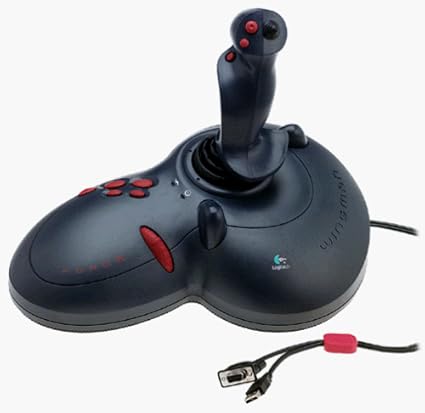
Figure 1: The Logitech Wingman Force Joystick packaging, showing the joystick and its features.
چمتو کول
- بریښنا وصل کړئ: Plug the power adapter into the joystick and then into a standard electrical outlet.
- د کمپیوټر سره وصل کړئ: Connect the joystick's USB cable to an available USB port on your computer. The joystick also supports serial interfaces.
- سافټویر نصب کړئ: Insert the WingMan Software CD (if provided) into your computer's CD-ROM drive and follow the on-screen instructions to install the drivers and WingMan Software. If no CD is provided, drivers may be automatically installed by your operating system or available for download from the Logitech support webسایټ
- د سیسټم اړتیاوې: Ensure your computer runs a compatible Windows operating system.
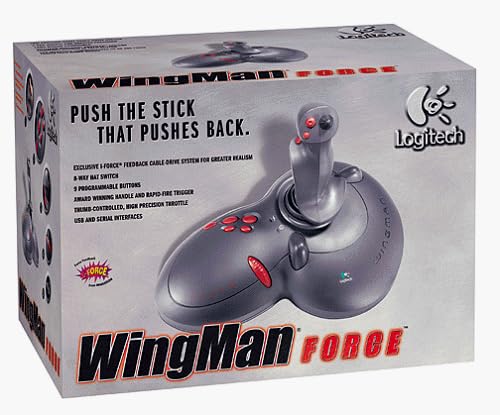
Figure 2: The Logitech Wingman Force Joystick, illustrating its ergonomic design and button layout.
عملیاتي لارښوونې
کنترول ختم شوview
- Joystick Handle: Provides precise control for in-game movement.
- 9 د پروګرام وړ بټنونه: Customize these buttons using the WingMan Software for various in-game actions.
- 8-Way Hat Switch: Located on top of the joystick, this switch allows for quick camera views or directional commands.
- Thumb-Controlled Throttle: Adjust speed or thrust with the integrated throttle control.
Force Feedback Technology
The Wingman Force Joystick utilizes Logitech's exclusive I-Force force feedback technology with a cable-drive system. This system provides realistic tactile feedback, such as vibrations from impacts, recoil from weapons, and resistance during maneuvers, enhancing immersion in compatible games.
Using WingMan Software
The WingMan Software allows you to:
- Program the 9 buttons for specific game functions.
- ګڼ شمېر پرو جوړ او خوندي کړئfileد مختلفو لوبو لپاره.
- Adjust force feedback intensity settings.
- Calibrate the joystick for optimal performance.
Refer to the WingMan Software's help documentation for detailed instructions on customization and profile مدیریت
ساتنه
To ensure the longevity and optimal performance of your joystick:
- پاکول: Use a soft, dry cloth to wipe the surface of the joystick. Avoid using abrasive cleaners or solvents.
- ذخیره کول: Store the joystick in a clean, dry environment away from extreme temperatures and direct sunlight.
- د کیبل پاملرنه: Avoid bending or crimping the cables excessively.
د ستونزو حل کول
- Problem: Joystick not recognized by computer.
- حل لاره:
- Ensure the USB cable is securely connected to both the joystick and the computer.
- د یو بل USB پورټ سره وصل کولو هڅه وکړئ.
- Verify that the power adapter is properly connected and the joystick is receiving power.
- Reinstall the WingMan Software drivers.
- Problem: Inconsistent or absent force feedback.
- حل لاره:
- Check the force feedback settings within the WingMan Software and ensure they are set to an appropriate level.
- Ensure the game you are playing supports force feedback and that it is enabled in the game's settings.
- Restart your computer and the game.
- ډاډ ترلاسه کړئ چې ټولې اړیکې خوندي دي.
- Problem: Buttons or controls are unresponsive.
- حل لاره:
- Calibrate the joystick using the WingMan Software.
- Ensure the joystick drivers are up to date.
- Test the joystick in a different game or application to determine if the issue is game-specific.
مشخصات
| فیچر | تفصیل |
|---|---|
| د ماډل شمیره | 963155-0403 |
| برانډ | Logitech |
| د کنټرولر ډول | جویسټک |
| د ارتباط ټیکنالوژي | USB، سریال |
| مطابقت لرونکې وسیلې | د وینډوز کمپیوټرونه |
| د محصول ابعاد | 13.5 x 9.63 x 9.25 انچه |
| د توکي وزن | ۲.۴۵ پونډه |
| جبري فیډبیک | I-Force feedback cable-drive system |
| تڼۍ | 9 د پروګرام وړ بټن |
| د خولۍ سویچ | 8-طريقه خولۍ سویچ |
| تروتل | Thumb-controlled, high precision throttle |
تضمین او ملاتړ
For warranty information and technical support, please refer to the documentation included with your product or visit the official Logitech support webسایټ. تاسو معمولا هلته د موټر چلوونکي، FAQs، او د پیرودونکو خدماتو لپاره د اړیکو معلومات موندلی شئ.
د Logitech ملاتړ Webسایټ: www.logitech.com/support


