پیژندنه
This manual provides instructions for the proper setup, operation, maintenance, and troubleshooting of your Casio HR-8L Handheld Printing Calculator. Please read this manual thoroughly before using the calculator to ensure optimal performance and longevity.
The Casio HR-8L is a portable printing calculator designed for quick and accurate computations, suitable for various environments including office and personal use. It features a 10-digit display and a printing mechanism for transaction records.
محصول پای ته ورسیدview
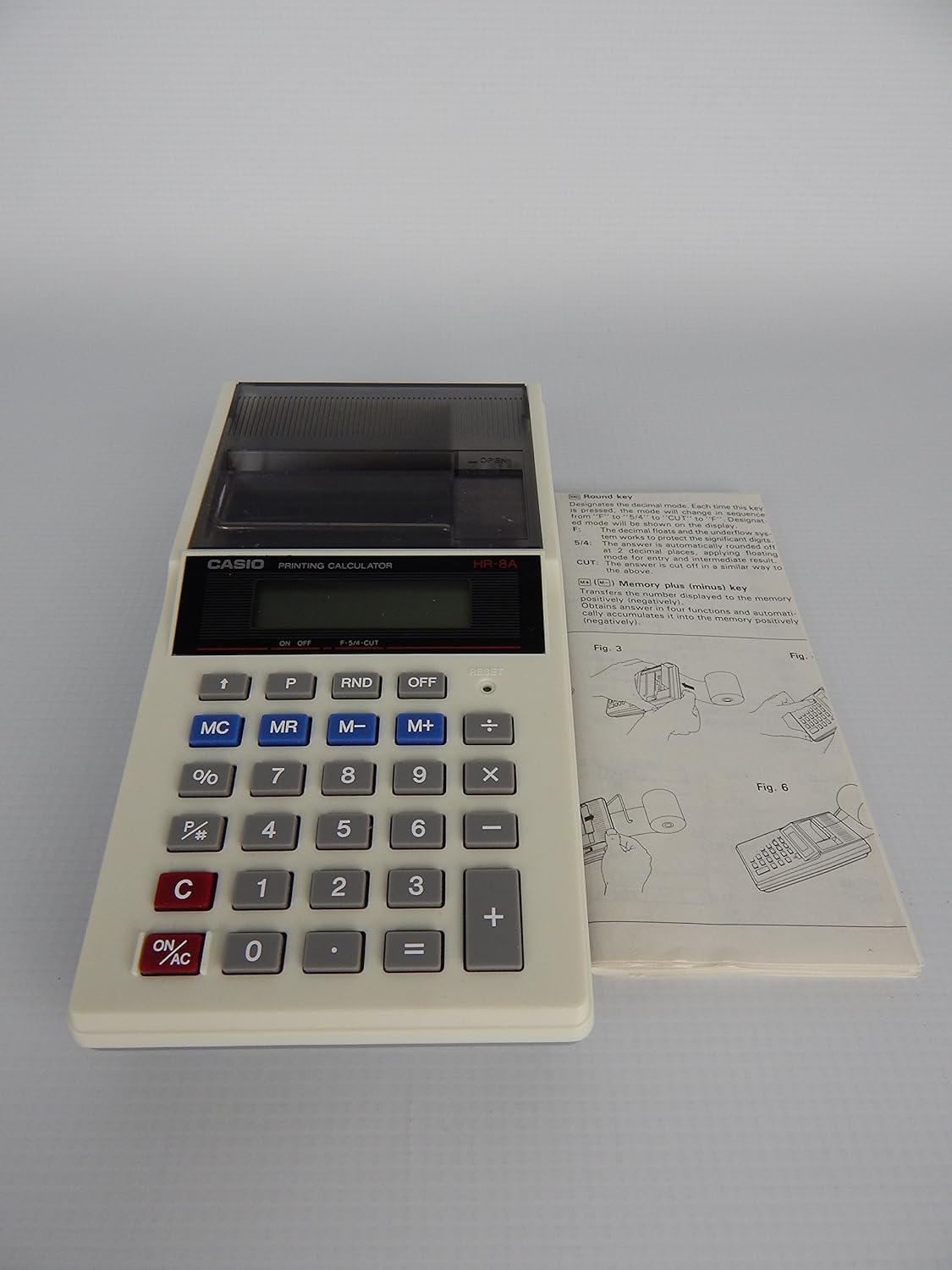
شکل 1: Casio HR-8L Handheld Printing Calculator shown with its accompanying instruction manual. This image provides a general view of the calculator's design and its compact size, highlighting the key layout and the paper roll compartment.

شکل 2: A top-down perspective of the Casio HR-8L Handheld Printing Calculator, emphasizing the display screen, key arrangement, and the integrated paper roll cover. This view helps in identifying the various functional buttons.

شکل 3: The Casio HR-8L Handheld Printing Calculator in operation, demonstrating the paper roll extending from the top. This image illustrates the printing capability and the visibility of the printed calculations on the paper tape.
چمتو کول
1. د بریښنا سرچینه
The Casio HR-8L operates on four (4) AA batteries. Ensure fresh batteries are installed correctly according to the polarity markings in the battery compartment. The unit can also be powered by an optional power supply (not included).
2. Installing the Paper Roll
- Open the paper roll compartment cover.
- Place a new 2.25-inch width paper roll into the compartment, ensuring the paper feeds from the bottom of the roll.
- د کاغذ مخکینۍ څنډه د پرنټر سلاټ له لارې تیر کړئ تر هغه چې له پورته څخه راڅرګند شي.
- Close the paper roll compartment cover.
- فشار ورکړئ آټو فیډ button to advance the paper roll if needed.
عملیاتي لارښوونې
بنسټیز عملیات
- بریښنا فعال/بند: فشار ورکړئ آن/AC button to turn the calculator on and clear all entries. Press the بند د دې بندولو لپاره ت buttonۍ.
- د شمېرې داخلول: د شمېرو د داخلولو لپاره د عددي کیپډ (0-9) څخه کار واخلئ.
- ریاضی عملیات: د کارولو +, -, ×, ÷ keys for addition, subtraction, multiplication, and division.
- مساوي: فشار ورکړئ = key to display the result of a calculation.
- پاکه ننوتنه: فشار ورکړئ C key to clear the last entered number or operation.
- لسیزې سیسټم: The calculator supports a full decimal system, including options for floating, fixed (0 to 3) with round-off, and cut-off modes. Refer to the original manual for specific key combinations for these settings.
د حافظې دندې
- Memory Clear (MC): د حافظې محتوا پاکوي.
- Memory Recall (MR): Recalls the memory content to the display.
- د حافظې منفي (M-): Subtracts the displayed value from the memory content.
- د حافظې پلس (M+): Adds the displayed value to the memory content.
ځانګړې دندې
- پرسینtage (٪): سلنه محاسبه کويtages.
- Markup/Markdown: Use the dedicated key for markup/markdown calculations.
- د وخت محاسبه: The calculator supports time-related calculations.
- Function Command Sign: A function command sign appears in the display to indicate the current operation.
ساتنه
پاکول
To clean the calculator, wipe the exterior with a soft, dry cloth. For stubborn dirt, a slightly damp ټوکر کارول کیدی شي، مګر ډاډ ترلاسه کړئ چې رطوبت وسیله ته ننوځي. د کثافاتو پاکوونکي یا محلولونه مه کاروئ.
د بیټرۍ بدلول
When the display dims or printing becomes faint, it is time to replace the batteries. Turn off the calculator, open the battery compartment, remove the old batteries, and insert new AA batteries, observing correct polarity. Dispose of old batteries responsibly.
د کاغذ رول بدلول
Replace the paper roll when it runs out, following the instructions in the "Setup" section. Use only 2.25-inch width paper rolls designed for printing calculators.
د ستونزو حل کول
| ستونزه | احتمالي لامل | د حل لاره |
|---|---|---|
| کیلکولیټر نه چالانیږي. | مړه یا په غلط ډول نصب شوي بیټرۍ. | Replace batteries with new ones, ensuring correct polarity. Check if an optional power supply is connected and functioning. |
| ښودنه تیاره یا خالي ده. | د بیټرۍ ټیټ ځواک. | بیټرۍ بدل کړئ. |
| Printer is not printing or print is faint. | No paper, paper jammed, or low battery. | Check paper roll and ensure it is installed correctly. Clear any paper jams. Replace batteries. |
| د ناسمې محاسبې پایلې. | Incorrect input or decimal settings. | Review your input sequence. Check decimal settings (floating, fixed, round-off, cut-off). Press آن/AC to clear and restart. |
مشخصات
- ماډل: HR-8L
- ښکاره کول: 10 عددي LCD
- د چاپ سرعت: په هره ثانیه کې 1.6 لاینونه
- Paper Roll Width: 2.25 inches (dual paper roll system)
- د بریښنا سرچینه: 4 x AA batteries or optional AC adapter
- ابعاد (تقریبا): 1.5 x 3.6 x 7.5 انچه (H x W x D)
- وزن (نږدې): 10.5 اونس (پرته له بیټرۍ)
- دندې: Basic arithmetic, percentage, memory (MC, MR, M-, M+), markup/markdown, time calculations, full decimal system (floating, fixed 0-3 with round-off/cut-off).
د تضمین معلومات
Casio products typically come with a limited manufacturer's warranty. For specific warranty terms and conditions, including duration and coverage, please refer to the warranty card included with your product packaging or visit the official Casio webسایټ. د تضمین ادعاوو لپاره د پیرود ثبوت وساتئ.
د پیرودونکي ملاتړ
For further assistance, technical support, or inquiries regarding your Casio HR-8L calculator, please visit the official Casio support website or contact their customer service department. Contact information can typically be found on the Casio webسایټ یا د محصول بسته بندي کې.
You can visit the Casio Store for more information: Casio Calculators Store


