پیژندنه
This manual provides comprehensive instructions for the operation and maintenance of your Casio HR-100TEPlus Printing Calculator. Designed for efficiency, this calculator features a 12-digit display, two-color printing at 1.3 lines per second, and specialized functions for tax and currency exchange. Please read this manual thoroughly to ensure proper use and to maximize the lifespan of your device.
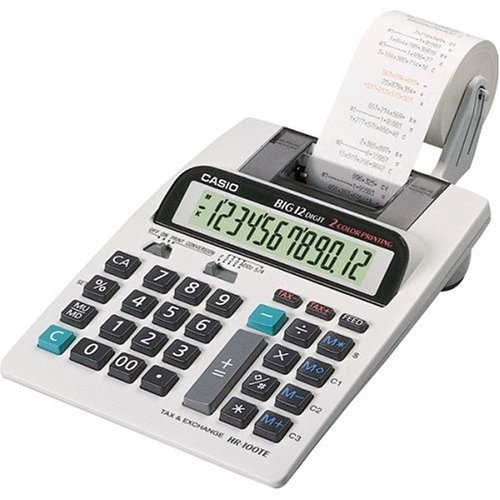
Image: The Casio HR-100TEPlus Printing Calculator, showcasing its full keypad, 12-digit LCD display, and integrated paper roll for printing calculations. The device is white with black and teal buttons.
چمتو کول
1. د بریښنا رسول
- AC اډیپټر: Connect the included AC adapter to the calculator's power input jack and then to a standard electrical outlet.
- د بیټرۍ ځواک (اختیاري): For portable use, insert four AA batteries into the battery compartment located on the underside of the calculator. Ensure correct polarity (+/-).
۵.۲. د کاغذ رول نصبول
- Open the printer cover by gently lifting it.
- Place a new paper roll onto the paper roll holder, ensuring the paper feeds from the bottom of the roll.
- Feed the leading edge of the paper into the printer slot until it emerges from the top.
- د چاپګر پوښ په خوندي توګه وتړئ.
- فشار ورکړئ فیډ button to advance the paper and ensure it is properly loaded.
3. Ink Roller/Ribbon Installation (If applicable)
The HR-100TEPlus uses a two-color printing system, which typically involves an ink roller or ribbon. Refer to the diagram inside the printer compartment for specific instructions on replacing the ink roller/ribbon. Ensure the ink roller is correctly seated for clear, two-color printing.
عملیاتي لارښوونې
بنسټیز عملیات
- پاور آن/بند: د کارولو آن/بند switch (if present) or press AC (All Clear) to turn on. The calculator may automatically power off after a period of inactivity.
- د شمېرې داخلول: د عددي کیپډ په کارولو سره شمیرې دننه کړئ.
- ریاضی عملیات: کارول +, -, x, ÷ د اضافه کولو، کمولو، ضرب کولو او ویش لپاره. فشار ورکړئ = د پایلې ترلاسه کولو لپاره.
- Clear Entry (C): Clears the last entered number or operation.
- All Clear (CA): Clears all entries and calculations, resetting the calculator.
- لسیزه انتخاب کونکی: Adjust the decimal point setting (floating or fixed 0-3 places) using the slide switch.
- Rounding Selector: Set rounding up, down, or off using the slide switch.
د حافظې دندې
- Memory Plus (M+): ښودل شوی ارزښت حافظې ته اضافه کوي.
- Memory Minus (M-): ښودل شوی ارزښت له حافظې څخه کموي.
- Memory Recall (MR): په حافظه کې زیرمه شوی ارزښت نندارې ته یادوي.
- Memory Clear (MC): د حافظې محتوا پاکوي.
تخصصي دندې
- Markup/Markdown (MU/MD): Used for calculating selling prices based on cost and desired profit margin, or for markdown calculations.
- Tax Calculation (TAX+/مالیه-): Allows for easy addition or subtraction of a pre-set tax rate. To set the tax rate, refer to the full instruction manual or manufacturer's webسایټ
- Currency Exchange: The calculator includes a currency exchange function. To use this, you will need to set the exchange rate. Consult the full manual for detailed steps on setting and using exchange rates.
- Percent (%): د فیصدو لپاره کارول کیږيtage محاسبه.
ساتنه
پاکول
To clean the calculator, wipe the exterior with a soft, dry cloth. For stubborn dirt, a slightly damp د نرم صابون سره ټوکر کارول کیدی شي، ډاډ ترلاسه شي چې مایع وسیله ته ننوځي. د کثافاتو پاکونکي یا محلول مه کاروئ.
د کاغذ رول بدلول
When the paper roll runs out or the print becomes faint, replace it following the steps outlined in the "Paper Roll Installation" section under Setup. Use thermal paper rolls compatible with the Casio HR-100TEPlus.
Ink Roller/Ribbon Replacement
If the two-color printing becomes faded or inconsistent, the ink roller/ribbon may need replacement. Specific replacement instructions are usually found within the printer compartment or in the detailed manual provided by Casio. Ensure you use genuine Casio replacement parts for optimal performance.
د ستونزو حل کول
| ستونزه | احتمالي لامل | د حل لاره |
|---|---|---|
| No display or calculator does not turn on. | No power, low batteries, or AC adapter not connected. | Check AC adapter connection. Replace batteries if using battery power. Ensure batteries are inserted with correct polarity. |
| چاپګر نه چاپوي یا چاپ کمزوری دی. | Paper roll empty, paper not loaded correctly, or ink roller/ribbon needs replacement. | Replace paper roll. Re-load paper correctly. Replace ink roller/ribbon. |
| د ناسمې محاسبې پایلې. | Incorrect decimal or rounding settings, or previous calculation not cleared. | Check decimal and rounding slide switches. Press CA to clear all previous operations. |
| د کاغذ بندښت. | Paper not inserted straight, or wrong paper size/type. | Remove jammed paper carefully. Ensure paper is inserted straight and is the correct size for the printer. |
مشخصات
- د موډل نوم: Casio HR-100TEPlus
- د توکي ماډل شمېره: HR100TEPLUS
- نښه: کاسیو
- د محاسبې ډول: چاپول
- د ښودلو ډول: LCD, 12-digit
- د چاپ سرعت: په هره ثانیه کې 1.3 لاینونه
- د چاپولو رنګ: Two-color
- د بریښنا سرچینه: AC Adapter (included), 4 x AA Batteries (optional)
- د توکي وزن: 1 پونډه
- د محصول ابعاد: 12.3 x 7.5 x 2.6 انچه
- ASIN: B00006IF9X
- د لومړي شتون نیټه: د ۲۰۲۳ کال د جون ۱۹
تضمین او ملاتړ
For warranty information and technical support, please refer to the official Casio webسایټ یا د تضمین کارت چې ستاسو محصول سره شامل دی. تاسو کولی شئ د په ایمیزون کې د کاسیو پلورنځی د اضافي سرچینو او محصول معلوماتو لپاره.


