1. پیژندنه
The QSC RMX5050 Power Amplifier is designed for professional audio applications, delivering high levels of sustained power and audio performance. It features a three-tier, Class H design for efficiency and reliability, making it suitable for touring, live sound, and mobile entertainment setups.

شکل 1.1: مخکی view of the QSC RMX5050 Power Amplifier. This image shows the amplifier's front panel with the QSC logo, power switch, gain controls for Channel 1 and Channel 2, and various LED indicators.
2. د خوندیتوب معلومات
Please read and understand all safety instructions before operating the QSC RMX5050 Power Ampژوندی کوونکی دا لارښود د راتلونکي حوالې لپاره وساتئ.
- د بریښنا سرچینه: سره وصل کړئ ampیوازې ټاکل شوي حجم ته لایفیرtage and frequency as indicated on the rear panel.
- وینټیلیشن: د شاوخوا شاوخوا د هوا مناسب جریان ډاډمن کړئ ampژغورونکی. د هوا د بهېدو لارې مه بندوئ.
- رطوبت: افشا مه کوئ amplifier to rain or moisture. Do not place objects filled with liquids on the ampلايف
- خدمت کول: ټول خدمات وړ خدماتو پرسونل ته راجع کړئ. د دې واحد د خدمت کولو هڅه مه کوئ.
- ځمکني کول: تل ډاډ ترلاسه کړئ amplifier is properly grounded to prevent electric shock.
3. ترتیب کول
3.1 پیک کول
په دقت سره لرې کړئ amplifier from its packaging. Inspect the unit for any signs of damage that may have occurred during transit. Retain the original packaging for future shipping or storage.
3.2 ځای په ځای کول او نصب کول
The RMX5050 is designed for standard 19-inch rack mounting and occupies 3U of rack space. Ensure the rack provides sufficient ventilation and structural support for the amplifier's weight (approximately 75 pounds).
3.3 اړیکې
د هر ډول اړیکو جوړولو دمخه، ډاډ ترلاسه کړئ چې amplifier is powered off and disconnected from the AC mains.
3.3.1 ان پټ اتصال
The RMX5050 features balanced 1/4" TRS, XLR, and barrier strip inputs for flexible connectivity. Connect your audio source (mixer, preamplifier, etc.) to the appropriate input connectors for Channel 1 and Channel 2.
3.3.2 د محصول نښلول
خپل لاوډ سپیکرونه سره وصل کړئ amplifier's outputs using either binding posts or Neutrik Speakon connectors. Ensure correct polarity and impedance matching for optimal performance and to prevent damage to speakers or the ampلايف

Figure 3.1: Rear panel of the QSC RMX5050 Power Amplifier. This image highlights the various input options (XLR, TRS, barrier strip), output connectors (Speakon, binding posts), DIP switches for configuration, and the AC power inlet.
3.3.3 د بریښنا نښلول
ورکړل شوی AC بریښنا تار سره وصل کړئ amplifier's power inlet and then to a grounded AC outlet. Verify that the power source matches the ampد لایفیر حجمtage اړتیاوې.
۵.۱ لومړنی پاور اپ
- ډاډ ترلاسه کړئ چې ټولې آډیو اړیکې خوندي دي.
- Set the front panel gain controls to their minimum (fully counter-clockwise) position.
- Power on your audio source equipment first.
- Flip the power switch on the RMX5050 to the "ON" position. The power indicator LED should illuminate.
- Slowly increase the gain controls to the desired level.
۲. د چلولو Ampلايف
4.1 د فرنټ پینل کنټرولونه او شاخصونه
- د بریښنا سویچ: ټوګلونه ampلایفیر آن/بند.
- د بریښنا LED: شنه رڼا روښانه کوي کله چې ampلایفیر فعال دی.
- Gain Controls (Channel 1 & 2): Rotary knobs to adjust the input sensitivity for each channel.
- سیګنال LED: Illuminates green when an audio signal is present at the input.
- کلیپ LED: Illuminates red when the output signal is clipping (distorting). Reduce input level or gain if this LED frequently illuminates.
- د LED ساتنه: Illuminates red if the amplifier enters protection mode due to overheating, short circuit, or other fault conditions.

Figure 4.1: Front panel of the QSC RMX5050 Power Amplifier with the power indicator illuminated. This view clearly shows the power switch, gain knobs, and the Signal, Clip, and Protect LEDs for both channels.
4.2 Rear Panel DIP Switches
The rear panel features DIP switches that allow configuration of various operating parameters. Always power off the amplifier before changing DIP switch settings.
- Clip Limiter: Engages a circuit that prevents severe clipping and protects speakers.
- Low-Frequency Filters: High-pass filters (e.g., 30 Hz, 50 Hz) to remove unwanted low-frequency content, protecting speakers and improving clarity.
- عملیاتي حالت: Selects between Stereo, Parallel, or Bridged Mono operation.
4.3 عملیاتي طریقې
4.3.1 سټیریو حالت
In stereo mode, each channel operates independently, amplifying its respective input signal and sending it to its dedicated output. This is the standard mode for two-channel sound reinforcement.
4.3.2 موازي حالت
In parallel mode, a single input signal is fed to both amplifier channels, which then drive separate speaker loads. This is useful for driving multiple speakers with the same mono signal.
4.3.3 Bridged Mono Mode
برج مونو موډ د دواړو ځواک سره یوځای کوي amplifier channels into a single, higher-power output. This mode is typically used to drive a single, high-power loudspeaker or subwoofer. Consult the manual for specific wiring instructions for bridged mono operation.
5. ساتنه
5.1 پاکول
Periodically clean the exterior of the amplifier with a soft, dry cloth. Do not use abrasive cleaners or solvents. Ensure ventilation grilles are free from dust and debris.
5.2 وینټیلیشن
The RMX5050 relies on internal fans for cooling. Regularly check that the air intake and exhaust vents are not obstructed. Operating the amplifier in poorly ventilated spaces can lead to overheating and activation of protection circuits.
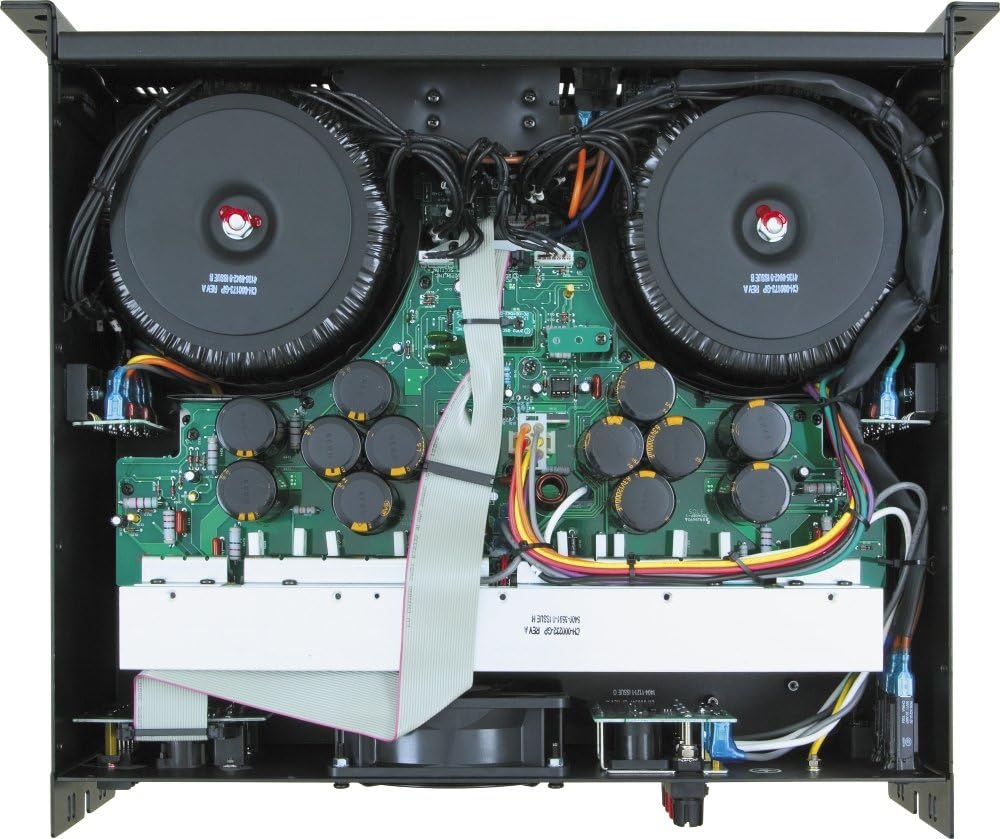
شکل 5.1: داخلي view of the QSC RMX5050 Power Amplifier. This image shows the large toroidal transformers, circuit boards, capacitors, and the central cooling fan, emphasizing the robust internal design and the importance of clear airflow.
5.3 ذخیره کول
که ذخیره کول amplifier for an extended period, ensure it is kept in a dry, temperature-controlled environment, away from direct sunlight and extreme temperatures. It is recommended to use the original packaging for protection.
6. ستونزه حل کول
This section provides solutions to common issues you might encounter. If the problem persists, contact QSC customer support or a qualified service technician.
| ستونزه | احتمالي لامل | د حل لاره |
|---|---|---|
| هیڅ ځواک نشته | Power cord disconnected, AC outlet faulty, internal fuse blown. | Check power cord connection. Test AC outlet. If fuse is suspected, contact service. |
| د غږ محصول نشته | Input cables disconnected, speaker cables disconnected, gain controls at minimum, ampلایفیر په محافظت حالت کې. | Verify all cable connections. Increase gain. Check Protect LED; if illuminated, refer to manual for fault conditions. |
| Distorted Sound (Clip LED on) | Input signal too high, gain set too high, speaker impedance too low. | Reduce input signal level from source. Decrease amplifier gain. Verify speaker impedance matches ampد ژوند کولو وړتیاوې. |
| Amplifier Overheating (Protect LED on) | Insufficient ventilation, blocked vents, excessive load. | Ensure proper airflow. Clear any obstructions from vents. Reduce load or operating time. Allow ampد یخولو لپاره لیفیر. |
7. مشخصات
Key technical specifications for the QSC RMX5050 Power Ampژوندی:
- د توکي وزن: ۲.۴۵ پونډه
- د ماډل شمیره: RMX 5050, 120V
- مطابقت لرونکي وسایل: Monitor (general audio monitoring)
- د نښلونکي ډول: Speakon, binding post (outputs); 1/4" TRS, XLR, barrier strip (inputs)
- د واټ محصولtage: 2000 Watts (specific configurations may vary, refer to full power ratings)
- واټtage (RMS): 1600 watts (typical rating, specific configurations may vary)
- نښه: QSC
- د فورم فکتور: ATX (This seems like a miscategorization from the source data, typically refers to computer motherboards. For amplifiers, it's usually rack-mount or chassis type. The RMX5050 is a 3U rack-mount ampژوندی.)
- د یخولو طریقه: Air (Fan-cooled)
- د نښلونکو شمېر: 5 (This is likely a count of specific types, not total)
- د مینه والو شمېر: 1 (Main cooling fan)
8. تضمین او ملاتړ
For detailed warranty information and technical support, please refer to the official QSC website or contact QSC customer service directly. Keep your purchase receipt as proof of purchase for warranty claims.
You can visit the official QSC Store for more information: QSC Official Store


