پیژندنه
This manual provides essential information for the safe and efficient operation of your NEC VT37 1500-Lumen Portable Projector. Please read these instructions thoroughly before using the projector and retain them for future reference.
د بسته محتويات
ډاډ ترلاسه کړئ چې لاندې ټول توکي ستاسو په بسته کې شامل دي:
- NEC VT37 Projector
- د لینس کیپ
- د نرم ساتلو قضیه
- د بریښنا کیبل
- RGB Cable (VGA)
- ریموټ کنټرول
- د AAA بیټرۍ (x2)
- د چټک تنظیم کولو لارښود
- CD-ROM (User Manual)
- د تضمین کارت
د خوندیتوب معلومات
WARNING: To prevent electric shock, do not open the top cover. No user-serviceable parts are inside. Refer all servicing to qualified service personnel.
خبرداری: د اور یا برقی شاک د خطر کمولو لپاره، دا وسیله باران یا رطوبت ته مه ښکاره کوئ.
CAUTION HOT: The lamp and surrounding areas become extremely hot during operation. Allow the projector to cool down for at least 60 minutes after turning off before attempting any maintenance, especially lamp بدیل
CAUTION: Replace with same type number lamp (LAMP TYPE: VT70LP).
Always ensure proper ventilation around the projector. Do not block ventilation openings.

چمتو کول
1. ځای پرځای کول
Place the projector on a stable, level surface. Ensure there is adequate space around the projector for ventilation. The versatile projection distance ranges from approximately 2 feet to 24 feet.
2. د نښلولو بریښنا
- Connect the power cable to the 'AC IN' port on the rear of the projector.
- د بریښنا کیبل بله پای په یوه ځمکني بریښنایی پلورنځي کې ولګوئ.
۳. د ننوتلو سرچینو سره نښلول
The NEC VT37 offers multiple input options. Connect your source device (computer, DVD player, etc.) to the appropriate port on the projector's rear panel.

- COMPUTER IN (VGA): Connect a computer using the supplied RGB (VGA) cable.
- په ویډیو کې: Connect devices with S-Video output.
- په ویډیو کې: Connect devices with composite video output.
- په آډیو کې: Connect audio cables from your source device to the corresponding audio input jacks.
د پروجکټور چلول
1. بریښنا کول/بندول
- فشار ورکړئ پاور button on the projector's control panel or remote control to turn on the projector. The power indicator will illuminate.
- د بندولو لپاره پاور button again. The projector will enter a cool-down cycle before fully shutting down.
۶.۱. اساسي کنټرولونه
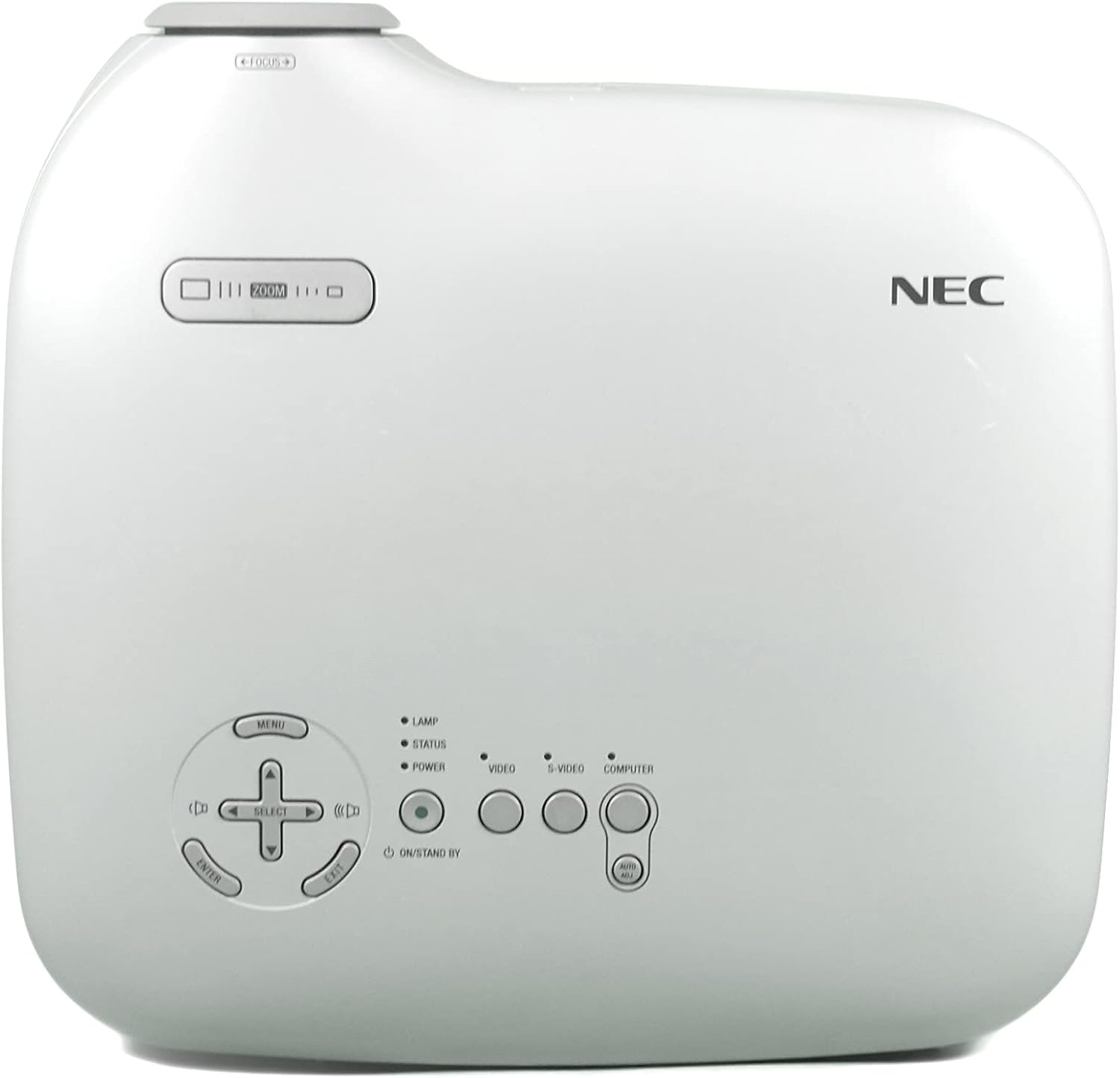
- مینو: د پردې پرده ښودنې (OSD) مینو ته لاسرسی لري.
- SELECT / Arrow Buttons: د مینو اختیارونو له لارې حرکت وکړئ.
- ننوتل: انتخابونه تاییدوي.
- زوم: د عکس اندازه تنظیموي.
- فوکس: انځور تیزوي.
- VIDEO / S-VIDEO / COMPUTER: د ننوتلو سرچینه غوره کوي.
3. د انځور سمون
- تمرکز: د تمرکز حلقه په لینز باندې وګرځوئ تر هغه چې انځور تیز شي.
- زوم: Use the zoom lever near the lens to adjust the image size.
- د کیسټون سمون: The projector features Square Shot Keystone Correction to instantly project a square image, even when the projector is set up at a steep offset angle to the screen. Access this function via the OSD menu.

ساتنه
1. ایلamp بدلول
دamp has an estimated life of 4,000 hours in eco-mode or 3,000 hours in normal mode. When the lamp life is nearing its end, a warning message may appear, or the lamp indicator may illuminate.
- Turn off the projector and unplug the power cable.
- پروجیکټر ته اجازه ورکړئ چې لږ تر لږه د 60 دقیقو لپاره سړه شي.amp compartment becomes extremely hot.
- Refer to the detailed instructions in the full user manual (on CD-ROM) for specific steps on how to open the lamp cover and replace the lamp.
- Always use a genuine NEC replacement lamp (Type: VT70LP).
2. د هوا فلټر پاکول
Regular cleaning of the air filter is crucial for maintaining optimal performance and preventing overheating. The bottom label provides a reminder to clean the air filter.
- Turn off the projector and unplug the power cable.
- Locate the air filter cover, typically on the side or bottom of the projector.
- Remove the filter and gently clean it with a vacuum cleaner or soft brush. Do not wash the filter with water or any liquid.
- Reinsert the clean filter and close the cover securely.
3. د لینز پاکول
د نظري لینزونو لپاره په ځانګړي ډول ډیزاین شوي نرم، لینټ نه پاک ټوکر وکاروئ. د کثافاتو پاکونکي یا محلولونه مه کاروئ.
د ستونزو حل کول
که تاسو د خپل پروجیکټر سره ستونزې سره مخ شئ، لاندې عام حلونو ته مراجعه وکړئ:
- ځواک نشته: Ensure the power cable is securely connected to both the projector and a working electrical outlet. Check the power indicator light.
- نه انځور:
- Verify the input source is correctly selected (e.g., COMPUTER, VIDEO).
- Check the connection cable between the source device and the projector.
- ډاډ ترلاسه کړئ چې د سرچینې وسیله فعاله ده او سیګنال تولیدوي.
- انځور تیاره دی: په لینز کې د تمرکز حلقه تنظیم کړئ.
- Image is Distorted (not square): Use the keystone correction feature in the OSD menu.
- د ډیر تودوخې خبرداری: Ensure the air filter is clean and ventilation openings are not blocked. Allow the projector to cool down.
For more detailed troubleshooting, consult the full user manual provided on the CD-ROM.
مشخصات
| فیچر | مشخصات |
|---|---|
| د ماډل شمیره | VT37 |
| روښانتیا | 1500 د ANSI Lumens |
| د تناسب تناسب | 400:1 |
| د ښودلو ریزولوشن | 1920 x 1080 (Native, likely supports lower resolutions like SVGA) |
| Lamp ژوند | 3,000 hours (Normal Mode), 4,000 hours (Eco-Mode) |
| د پروجیکشن فاصله | Approx. 2 to 24 feet |
| Projection Angles | 14-14.6 درجې |
| د رنګ تکثیر | 16.7 million simultaneous colors |
| آډیو | Built-in Monaural Speaker |
| د شور کچه | تر ۲۰ ډیسیبل پورې ټیټ |
| د ارتباط ټیکنالوژي | HDMI, VGA (Note: HDMI is listed in specifications, but not explicitly on the rear panel image. Please verify actual unit.) |
| د توکي وزن | 11 pounds (Package Weight) |
| د کڅوړې ابعاد | 15 x 14.6 x 11.3 انچه |
تضمین او ملاتړ
د تضمین معلومات
The manufacturer provides a two-year warranty covering parts and labor for the projector. A separate three-month warranty is provided for the lamp.
د پیرودونکي ملاتړ
For technical assistance, warranty claims, or inquiries about accessories, please refer to the contact information provided on your warranty card or the official NEC webسایټ


