1. پیژندنه
This manual provides instructions for the setup, operation, and maintenance of your Polycom SoundPoint IP 430 phone. The SoundPoint IP 430 is a two-line desktop IP phone designed for clear voice communication, featuring a full-duplex speakerphone with Polycom Acoustic Clarity Technology.
2. ترتیب کول
2.1 پیک کول
په احتیاط سره د بسته بندۍ څخه ټولې برخې لرې کړئ. ډاډ ترلاسه کړئ چې لاندې توکي شتون لري:
- Polycom SoundPoint IP 430 Phone Unit
- دستګاه
- د هډسیټ کارډ
- ایترنیټ کیبل
- د تلیفون سټینډ
- (Note: Power supply is not included with this specific product offering and must be acquired separately if Power over Ethernet (PoE) is not available.)
۲.۲ د تلیفون سره وصل کول
- د تلیفون سټینډ وصل کړئ: سټینډ د تلیفون واحد په شا کې د سلاټونو سره سم کړئ او په خپل ځای کې یې واچوئ.
- هینډسیټ وصل کړئ: Plug one end of the coiled handset cord into the handset and the other end into the handset port on the phone unit (typically marked with a handset icon).
- شبکې سره وصل شئ: Plug one end of the Ethernet cable into the LAN port on the phone (marked with a network icon) and the other end into an active network port (e.g., a wall jack or network switch).
- بریښنا وصل کړئ (که چیرې PoE نه کاروئ): If your network does not provide Power over Ethernet (PoE), connect an appropriate external power adapter (not included) to the power port on the phone unit and then to a power outlet.
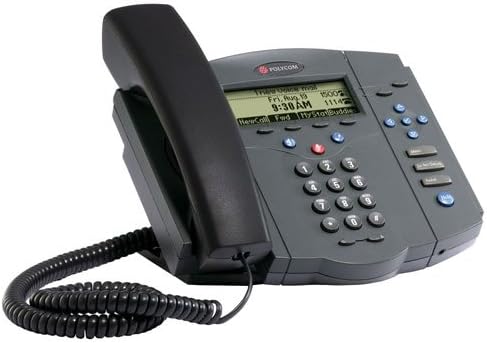
Figure 1: Polycom SoundPoint IP 430 Phone. This image displays the complete phone unit, including the main body, handset, and coiled handset cord. The phone features a monochrome LCD display, a numeric keypad, and various function buttons for call management.
Once connected, the phone will power on and begin its boot-up sequence. This may take a few moments as it connects to the network and registers with your VoIP system.
3. عملیاتي لارښوونې
۳.۱ د زنګ وهلو اساسي دندې
- تلیفون کول:
- Pick up the handset, press the Speaker button, or press a Line button.
- د کیپډ په کارولو سره مطلوب شمیره ډایل کړئ.
- Press the "Dial" soft key or wait for the call to connect automatically.
- د زنګ په ځواب کې:
- Pick up the handset, press the Speaker button, or press the flashing Line button.
- د زنګ وهلو پای:
- Hang up the handset, press the Speaker button again, or press the "End Call" soft key.
3.2 Speakerphone and Mute
- د سپیکر فون کارول: فشار ورکړئ سپیکر د سپیکر فون حالت فعال یا بندولو لپاره تڼۍ.
- د مایکروفون خاموش کول: د زنګ وهلو پرمهال خاموش button to mute your microphone. The button will illuminate when active. Press again to unmute.
3.3 د حجم کنټرول
د کارولو حجم buttons (located below the display) to adjust the volume of the handset, speakerphone, or ringer, depending on the phone's current state.
3.4 Hold and Transfer
- Placing a Call on Hold: د فعال تلیفون پرمهال ، فشار ورکړئ نیول soft key. To resume the call, press the flashing Line button or the "Resume" soft key.
- د تلیفون لیږد:
- د فعال تلیفون پرمهال ، فشار ورکړئ لیږد soft key. The current call will be placed on hold.
- Dial the number of the party you wish to transfer the call to.
- Once the second party answers, you can announce the call (consulted transfer) or press the لیږد soft key again to complete the transfer (blind transfer).
3.5 Voicemail Access
فشار ورکړئ پیغامونه button (envelope icon) to access your voicemail. Follow the audio prompts to retrieve your messages.
4. ساتنه
۴.۱ د تلیفون پاکول
- یو نرم، لږ څه استعمال کړئamp, lint-free cloth to clean the phone's exterior.
- د کثافاتو پاکوونکي، موم، یا محلول مه کاروئ.
- په تلیفون باندې مستقیم مایعات مه سپری کوئ.
- Ensure the phone is disconnected from power before cleaning.
4.2 عمومي پاملرنه
- تلیفون د ډیر تودوخې سرچینو، مستقیم لمر وړانګو او رطوبت څخه لرې وساتئ.
- د تلیفون له غورځولو یا د قوي ټکانونو سره مخ کیدو څخه ډډه وکړئ.
5. ستونزه حل کول
This section addresses common issues you might encounter with your Polycom SoundPoint IP 430 phone.
| ستونزه | احتمالي لامل | د حل لاره |
|---|---|---|
| تلیفون نه چالانیږي. | د برېښنا رسولو نشتوالی یا خرابه اړیکه. |
|
| د ډایل ټون نشته. | Network connectivity issue or phone not registered. |
|
| زنګ وهونکی نه اوري / زنګ وهونکی ما نه اوري. | Volume settings, mute active, or faulty handset/speaker. |
|
6. مشخصات
Key technical specifications for the Polycom SoundPoint IP 430 phone:
| فیچر | تفصیل |
|---|---|
| د محصول ابعاد | 14 x 12.5 x 6 انچه |
| د توکي وزن | ۲.۴۵ پونډه |
| د ماډل شمیره | IP 430 |
| برانډ | پولی کام |
| رنګ | خړ |
| د تلیفون ډول | کوډ شوی |
| د بریښنا سرچینه | Corded Electric (PoE compatible, external adapter not included) |
| د ډایلر ډول | واحد کیپډ |
| د ځواب ورکولو سیسټم ډول | ډیجیټل |
| د کنفرانس زنګ وړتیا | ۳۲-لاره |
| جوړونکی | Polycom Inc. |
7. تضمین او ملاتړ
7.1 د تضمین معلومات
For specific warranty details regarding your Polycom SoundPoint IP 430 phone, please refer to the warranty documentation provided at the time of purchase or visit the official Polycom (now Poly) webسایټ. د تضمین شرایط معمولا د یوې ټاکلې مودې لپاره د تولید نیمګړتیاوې پوښي.
7.2 تخنیکي ملاتړ
If you require technical assistance beyond the scope of this manual, please contact your VoIP service provider or IT department. For direct manufacturer support, visit the Poly (formerly Polycom) support website for resources, FAQs, and contact information.


