محصول پای ته ورسیدview
The Monoprice 4 Port SATA PCI RAID Controller Card (Model 102667) is designed to add four independent SATA-I ports to a PCI-equipped computer. This adapter card supports an optional software RAID configuration for enhanced data management. It provides four SATA-I (1.5 Gbps) ports, allowing the use of newer SATA drives in systems with available PCI slots. The card utilizes the Silicon Image SIL3114 chipset and is compatible with a 32-bit 66 MHz PCI bus.
کلیدي ځانګړتیاوې:
- Adds four independent SATA-I (1.5 Gbps) ports.
- Supports optional software RAID 0, RAID 1, and RAID 0+1 configurations.
- Utilizes the Silicon Image SIL3114 chipset.
- Compatible with 32-bit 66 MHz PCI bus.
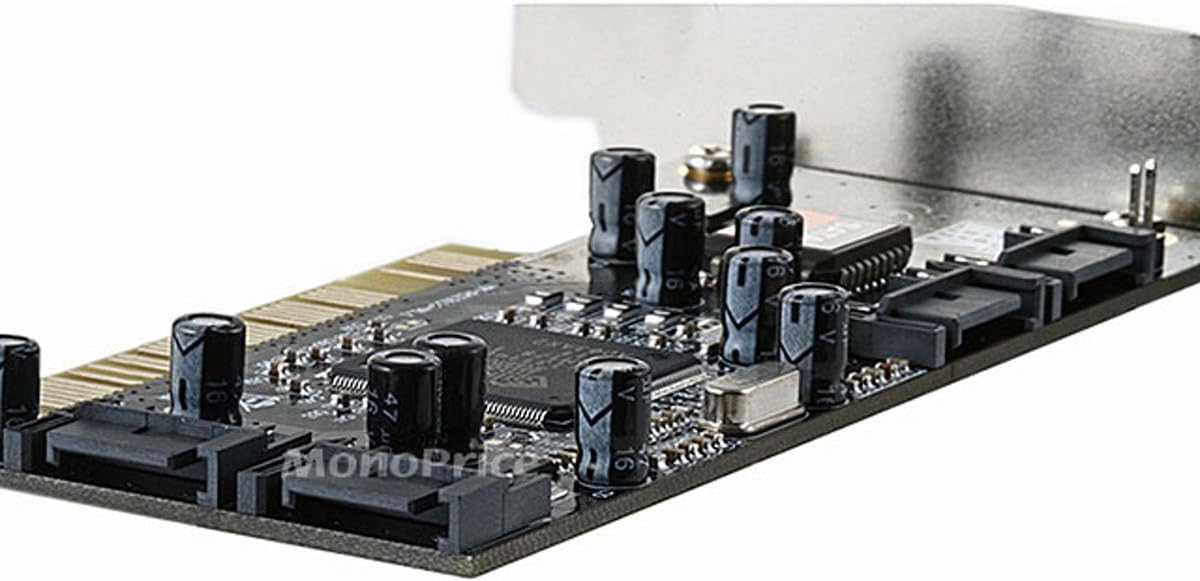
انځور: پورته view of the Monoprice 4 Port SATA PCI RAID Controller Card, showing the PCI connector, SATA ports, and main components.

انځور: نږدې انځور view of the Silicon Image SIL3114 chipset, the primary controller for the card's functionality.
د بسته محتويات
ډاډ ترلاسه کړئ چې ټول توکي په کڅوړه کې شتون لري:
- Monoprice 4 Port SATA PCI RAID Controller Card
- Driver CD (may be included, or drivers can be downloaded)
- د چټک نصبولو لارښود (که چیرې تطبیق شي)
د سیسټم اړتیاوې
- Available 32-bit PCI slot
- Compatible operating system (e.g., Windows, Linux)
- SATA hard drives or optical drives
- SATA data cables (not always included with card)
تنظیم او نصب کول
1. د هارډویر نصب کول
- بندول: Shut down your computer and disconnect the power cord.
- خلاصه قضیه: Open your computer's chassis to access the motherboard.
- د PCI سلاټ ومومئ: Identify an available PCI expansion slot on your motherboard.
- کارت داخل کړئ: Carefully align the controller card with the PCI slot and press firmly until it is securely seated.
- خوندي کارت: Use a screw or retention clip to secure the card to the computer chassis.
- Connect SATA Drives: Connect your SATA hard drives or optical drives to the SATA ports on the controller card using SATA data cables. Ensure drives are also connected to a power supply.
- قضیه وتړئ او بریښنا فعاله کړئ: Close the computer case, reconnect the power cord, and power on the computer.

Image: The controller card with SATA data cables connected to its four ports, demonstrating proper connection.
2. د ډرایور نصب کول
After hardware installation, the operating system may require drivers for the card to function correctly. Drivers are typically provided on a CD or can be downloaded from the Monoprice or Silicon Image website. Follow the on-screen instructions for driver installation. For Windows installations, you may need to provide the driver during the operating system setup if installing to a drive connected to this card.
Operating Instructions (RAID Configuration)
This card supports optional software RAID configurations. To access the RAID utility, typically press CTRL-S or F4 during the system boot process when prompted by the card's BIOS. The utility allows you to configure RAID arrays.
RAID 0 (پټه وهل)
RAID 0 combines two or more drives into a single logical unit, distributing data across them. This configuration improves performance but offers no data redundancy. If one drive fails, all data in the array is lost.
RAID 1 (عکس کول)
RAID 1 duplicates data across two drives. This provides data redundancy; if one drive fails, the data is still accessible from the other drive. Performance may be slightly improved for reads but can be slower for writes.
RAID 0+1 (Striping and Mirroring)
RAID 0+1 (or RAID 10) combines striping and mirroring. It requires at least four drives. Data is striped across two pairs of drives, and each pair is mirrored. This configuration offers both performance benefits and data redundancy.
Refer to the RAID utility's on-screen instructions for detailed steps on creating, managing, and rebuilding RAID arrays. It is recommended to back up all data before configuring or modifying RAID settings.
ساتنه
- پاک ساتل: Ensure the computer's interior, especially around the card, is free of dust to maintain proper airflow and prevent overheating.
- پیاوړې اړیکې: Periodically check that all SATA data and power cables are securely connected to the card and drives.
- د موټر چلوونکي تازه معلومات: Check the Monoprice or Silicon Image website for updated drivers, which may offer improved compatibility or performance.
- د RAID څارنه: For RAID configurations, regularly check the status of your array through the RAID utility during boot-up to ensure all drives are functioning correctly and the array is not degraded.
د ستونزو حل کول
- Card not detected by system:
- Ensure the card is fully seated in the PCI slot. Try a different PCI slot if available. Verify that your motherboard's BIOS recognizes the PCI slot.
- Connected drives not detected:
- Check all SATA data and power cable connections to the drives and the card. Ensure drivers for the controller card are correctly installed in your operating system. Verify that the drives themselves are functional.
- RAID array degraded or failed:
- Access the RAID utility during boot-up. Identify the faulty drive and replace it. Follow the utility's instructions to rebuild the RAID array. Ensure you have backups of critical data.
- "NO AHCI" warning during boot:
- This message is common for some older PCI SATA controllers that do not support AHCI (Advanced Host Controller Interface). It typically does not indicate a fault and will not prevent the card from functioning, though it may cause a slight delay during system startup.
- د سیسټم بې ثباتي یا ټکرونه:
- Ensure the card is properly installed and secured. Verify that the correct and latest drivers are installed. Check for conflicts with other PCI devices in your system.
For further assistance, consult the official Monoprice support resources or the Silicon Image website for chipset-specific information and drivers.
مشخصات
- نښه: مونوپریس
- د ماډل شمیره: 102667
- د هارډویر انٹرفیس: PCI
- چپ سیٹ: Silicon Image SIL3114
- د بندرونو شمیر: 4 x SATA-I
- د معلوماتو د لیږد نرخ: Up to 1.5 Gbps (SATA-I)
- د RAID ملاتړ: RAID 0, RAID 1, RAID 0+1 (software RAID)
- مطابقت لرونکي وسایل: شخصي کمپیوټر
- د توکي وزن: تقریبا ۳۰.۶ پونډه
تضمین او ملاتړ
This Monoprice product is covered by the manufacturer's warranty. For specific warranty terms and conditions, please refer to the documentation included with your purchase or visit the official Monoprice website. For technical support, driver downloads, or further inquiries, please contact Monoprice customer service or visit their support portal.