د تخلیقي انسپایر S2 بلوتوث بې سیم ملټي میډیا سپیکر سیسټم کارونکي لارښود
Model: Inspire S2 (51MF0390AA003)
محصول پای ته ورسیدview
The Creative Inspire S2 Bluetooth Wireless Multimedia Speaker System provides high-quality audio through its two satellite speakers and a subwoofer, with the added convenience of Bluetooth wireless connectivity. This system is designed for use with computers and other Bluetooth-enabled devices, offering a versatile audio solution.
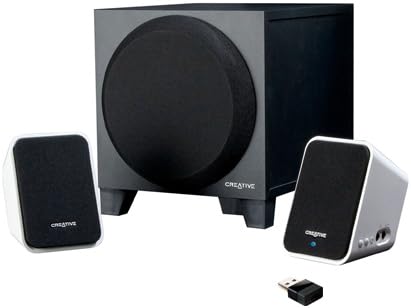
Image: The Creative Inspire S2 system, showing the central subwoofer unit, two compact satellite speakers, and a small USB Bluetooth transmitter. The satellite speakers are white with black grilles, and the subwoofer is black.
د بکس منځپانګې
ډاډ ترلاسه کړئ چې ټولې برخې په بسته بندۍ کې شتون لري:
- دوه سپوږمکۍ سپیکرونه
- یو Subwoofer
- د USB بلوتوټ لیږدونکی
- د یونیورسل بریښنا اډاپټر
- د چټک پیل لارښود (د تفصیلي لارښوونو لپاره دې لارښود ته مراجعه وکړئ)
- Warranty/Technical Support Leaflet
د تنظیم کولو لارښوونې
۳.۱. فزیکي اړیکه
- موقعیت: Place the subwoofer on the floor or a sturdy surface. Position the two satellite speakers on either side of your computer monitor or listening area for optimal stereo separation.
- د سپوږمکۍ سپیکرونه وصل کړئ: د سپوږمکۍ سپیکرو څخه کیبلونه د سب ووفر شاته اړوندو پورټونو سره وصل کړئ. خوندي اړیکه ډاډمن کړئ.
- بریښنا وصل کړئ: Plug the universal power adapter into the subwoofer's power input, then connect the adapter to a wall outlet.
2. Bluetooth Connection (Wireless Audio)
For Computers (using included USB Bluetooth Transmitter):
- Insert Transmitter: Plug the included USB Bluetooth transmitter into an available USB port on your computer. Your computer may automatically install necessary drivers.
- Power On Speakers: Ensure the speaker system is powered on. The power button is typically located on one of the satellite speakers. A green light should indicate power.
- اتوماتیک جوړه کول: The speaker system and USB transmitter should automatically pair. A blue light on the satellite speaker will indicate a successful Bluetooth connection.
- د آډیو آوټ پټ غوره کړئ: On your computer, navigate to your sound settings and select the "Creative Inspire S2" or similar Bluetooth audio device as your default playback device.
For Other Bluetooth Devices (e.g., Smartphones, Tablets, Laptops with built-in Bluetooth):
- Power Off Speakers: Ensure the speaker system is turned off.
- د جوړه کولو حالت دننه کړئ: With the speakers off, press and hold the '+' (volume up) button on the satellite speaker. Continue holding until a blue light begins to flash rapidly. This indicates the speakers are in pairing mode.
- په وسیله کې بلوتوث فعال کړئ: په خپل سمارټ فون، ټابلیټ یا لیپ ټاپ کې، د بلوتوټ ترتیباتو ته لاړ شئ او ډاډ ترلاسه کړئ چې بلوتوټ فعال دی.
- Select "Inspire S2": In the list of available devices, select "Inspire S2" (or similar). If prompted for a passcode, enter "0000" (four zeros).
- پیوستون تایید کړئ: Once paired, the blue light on the satellite speaker will become solid, indicating a successful connection.
3. Wired Connection (Auxiliary Input)
The Inspire S2 system also supports a wired connection for devices without Bluetooth or for a direct audio link.
- د آډیو کیبل سره وصل کړئ: Connect a 3.5mm audio cable (not included) from the audio output of your device (e.g., MP3 player, laptop headphone jack) to the "Audio In" port on the side of the satellite speaker.
- Power On Speakers: ډاډ ترلاسه کړئ چې د سپیکر سیسټم فعال دی.
- پلې بیک: Begin audio playback from your connected device. The system will automatically prioritize the wired input if a cable is connected.
عملیاتي لارښوونې
پاور آن/بند
- To power on the system, press the power button located on one of the satellite speakers. A green LED will illuminate.
- To power off, press the power button again. The LED will turn off.
د حجم کنټرول
- Use the '+' and '-' buttons on the satellite speaker to adjust the system's volume.
- You can also control the volume from your connected Bluetooth device or computer.
آډیو پلې بیک
- Once connected via Bluetooth or auxiliary cable, simply start playing audio from your source device.
- Ensure the volume on both the speaker system and your source device is adjusted appropriately.
ساتنه
- پاکول: Use a soft, dry cloth to clean the surfaces of the speakers and subwoofer. Avoid using liquid cleaners or abrasive materials.
- ځای په ځای کول: Ensure the speakers are placed on stable surfaces to prevent accidental falls. Avoid placing them in direct sunlight, near heat sources, or in excessively humid environments.
- وینټیلیشن: Do not block the ventilation openings on the subwoofer to ensure proper airflow and prevent overheating.
- د کیبل مدیریت: Keep cables organized and untangled to prevent damage and tripping hazards.
د ستونزو حل کول
| ستونزه | احتمالي حل |
|---|---|
| د سپیکرو څخه هیڅ غږ نشته. |
|
| Bluetooth device cannot pair or connect. |
|
| غږ تحریف شوی یا په وقفه ای ډول دی. |
|
| Speakers turn off unexpectedly when using auxiliary input. |
|
مشخصات
| فیچر | تفصیل |
|---|---|
| د ماډل نوم | Inspire S2 |
| د ماډل شمیره | 51MF0390AA003 |
| د سپیکر ډول | Desktop Multimedia Speaker System |
| د ارتباط ټیکنالوژي | Bluetooth Wireless, Wired (3.5mm Auxiliary) |
| د سپیکر اعظمي تولید ځواک | 7 واټ (RMS) |
| د سیګنال څخه تر شور پورې نسبت | 75 dB |
| Product Dimensions (Satellite) | 2.9 x 2.9 x 4.05 انچه (تقریبا) |
| د توکي وزن | ۲۹.۵ پونډه (ټول سیسټم) |
| د بریښنا سرچینه | د بریښنا تار شوی |
| ځانګړي ځانګړتیاوې | USB Bluetooth technology, Creative DIRECT-THROW subwoofer, easy-access controls, Energy Star qualified |
تضمین او ملاتړ
For warranty information and technical support, please refer to the warranty/technical support leaflet included in your product packaging. You may also visit the official Creative webد وروستي ملاتړ سرچینو، FAQs، او د اړیکو معلوماتو لپاره سایټ.
آنلاین ملاتړ: www.creative.com/support


