1. پیژندنه
This instruction manual provides essential information for the safe and efficient use of your Sony BDP-S470 3D Blu-ray Disc Player. Please read this manual thoroughly before operating the unit and retain it for future reference. The BDP-S470 supports Blu-ray Disc playback, DVD playback with upscaling, and access to internet streaming services.
2. د خوندیتوب معلومات
خبرداری: د اور یا برقي شاک د خطر کمولو لپاره، دا وسیله باران یا رطوبت ته مه ښکاره کوئ. د برقي شاک څخه د مخنیوي لپاره، کابینه مه خلاصوئ. یوازې وړ پرسونل ته خدمتونه راجع کړئ.
- د بریښنا سرچینه: Operate the unit only on 120V AC, 60Hz.
- وینټیلیشن: د هوا مناسبه هوا ورکول ډاډمن کړئ. د هوا د بهېدو لارې مه بندوئ.
- ځای په ځای کول: Do not place the unit in a confined space, such as a bookcase or built-in cabinet. Avoid placing it near heat sources or in direct sunlight.
- مایع او بهرني شیان: اجازه مه ورکوئ چې مایعات یا بهرني شیان واحد ته ننوځي.
- پاکول: د پاکولو دمخه د دیوال له ساکټ څخه د بریښنا تار جلا کړئ.
3. د بسته محتويات
ډاډ ترلاسه کړئ چې ستاسو کڅوړه لاندې توکي لري:
- د سوني BDP-S470 بلو رې ډیسک پلیر
- ریموټ کنټرول (RMT-B107A)
- AA Batteries (x2) for remote control
- د AC بریښنا تار
- د لارښود لارښود (دا سند)
4. ترتیب کول
۴.۲ ستاسو د تلویزیون سره وصل کیدل
For the best picture and sound quality, use an HDMI cable to connect the player to your TV. If your TV does not have an HDMI input, use component video or composite video connections.
Figure 1: Rear panel connections of the BDP-S470. This image displays the various input and output ports including HDMI, component video, composite video, Ethernet, and digital audio outputs.
HDMI Connection (Recommended for HD and 3D)
- Connect one end of an HDMI cable to the HDMI OUT port on the Blu-ray player.
- د HDMI کیبل بله پای په خپل تلویزیون کې د HDMI IN پورټ سره وصل کړئ.
- په خپل تلویزیون کې اړونده HDMI ان پټ غوره کړئ.
د اجزاو ویډیو پیوستون
- Connect component video cables (red, green, blue) from the COMPONENT VIDEO OUT ports on the player to the corresponding COMPONENT VIDEO IN ports on your TV.
- Connect audio cables (red, white) from the AUDIO OUT (L/R) ports on the player to the corresponding AUDIO IN ports on your TV or audio receiver.
جامع ویډیو پیوستون
- Connect a composite video cable (yellow) from the VIDEO OUT port on the player to the VIDEO IN port on your TV.
- Connect audio cables (red, white) from the AUDIO OUT (L/R) ports on the player to the corresponding AUDIO IN ports on your TV or audio receiver.
۳.۲ ستاسو د آډیو سیسټم سره نښلول
For enhanced audio, connect the player to an audio receiver or sound system.
- HDMI آډیو: If your receiver has HDMI input, connect the player's HDMI OUT to the receiver's HDMI IN, then the receiver's HDMI OUT to the TV.
- Digital Optical/Coaxial Audio: Connect a digital optical or coaxial cable from the player's DIGITAL OUT (OPTICAL or COAXIAL) port to the corresponding input on your audio receiver.
د شبکې اتصال
To access internet features like BRAVIA Internet Video, connect the player to your home network.
- د تار نښلول: Connect an Ethernet cable from the LAN port on the player to your router or modem.
- Wireless Connection (Optional): The BDP-S470 is Wi-Fi adapter ready. An optional Wi-Fi adapter (sold separately) can be connected to a USB port for wireless network access.
۳.۴ د ابتدايي تنظیم وزرډ
After connecting all cables and powering on the unit, an initial setup wizard will guide you through basic settings such as language, video output resolution, and network configuration. Follow the on-screen instructions.
5. عملیات
5.1 د ریموټ کنټرول فعالیتونه
Familiarize yourself with the remote control for easy operation of your Blu-ray player.
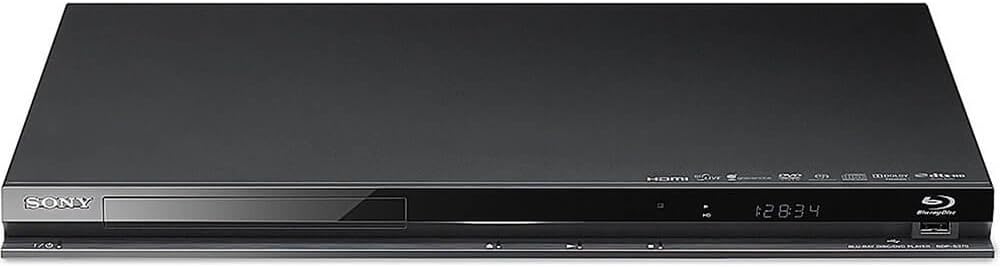
Figure 2: The RMT-B107A remote control for the BDP-S470. Key buttons include power, open/close, input, TV controls, volume, number pad, navigation, playback controls, and dedicated buttons for Home, Top Menu, and Pop Up/Menu.
- POWER (I/O): لوبغاړی چالان یا بندوي.
- خلاص / بندول: د ډیسک ټری خلاص یا بندوي.
- TV I/O: وصل شوی تلویزیون چالان یا بندوي.
- VOL (+/-): د تلویزیون حجم تنظیموي.
- د شمېرې تڼۍ (0-9): Selects tracks, chapters, or enters numbers.
- سرلیک MENU: Displays the disc's top menu.
- POP UP/MENU: Displays the disc's pop-up menu.
- کور: Accesses the player's home menu (XMB - XrossMediaBar).
- د نیویګیشن تڼۍ (پورته، ښکته، کیڼ، ښي، ننوتل): مینو ته ننوځي او انتخابونه تاییدوي.
- راستنیدنه: مخکینۍ سکرین یا مینو ته راستنیږي.
- اختیارونه: Displays options menu relevant to the current screen.
- PLAY, PAUSE, STOP, PREV, NEXT, REPLAY, ADVANCE: معیاري پلې بیک کنټرولونه.
- ښودنه: د پلې بیک معلومات ښیې.
۵.۱ د ډیسکونو غږول
- د پلیر د فعالولو لپاره د بریښنا تڼۍ فشار ورکړئ.
- د ډیسک ټری خلاصولو لپاره د خلاص / بند تڼۍ فشار ورکړئ.
- د بلو رې ډیسک یا DVD په ډیسک ټری کې د لیبل اړخ پورته سره ځای په ځای کړئ.
- Press the OPEN/CLOSE button to close the disc tray.
- Playback will usually start automatically. If not, select the disc icon from the Home menu and press ENTER.
5.3 Using BRAVIA Internet Video
Connect the player to the internet to access a variety of online content services.
- Ensure the player is connected to your network (wired or with optional Wi-Fi adapter).
- From the Home menu, navigate to the "Video" or "Network" category.
- Select "BRAVIA Internet Video" and press ENTER.
- Choose from the available services and follow on-screen instructions to access content.
۱۴ USB پلے بیک
You can play photos, music, and video files stored on a USB device.
- Connect a USB storage device to the USB port on the front or rear of the player.
- From the Home menu, navigate to the "Photo," "Music," or "Video" category.
- Select "USB Device" and browse for your files.
- غوره کړه a file and press ENTER to play.
۴.۲ درې بعدي پلې بیک
To enjoy 3D Blu-ray Discs, you need a 3D compatible TV, 3D glasses, and a high-speed HDMI cable.
- Connect the BDP-S470 to a 3D compatible TV using a high-speed HDMI cable.
- د درې بعدي بلو رې ډیسک دننه کړئ.
- Ensure your TV is set to 3D mode and wear your 3D glasses.
- The player will automatically detect the 3D content and initiate 3D playback.
6. ساتنه
6.1 د واحد پاکول
- د واحد بهرنۍ برخه د نرم، وچ ټوکر سره پاک کړئ.
- د کثافاتو پیډونه، د سکورینګ پوډر، یا محلولونه لکه الکول یا بینزین مه کاروئ.
- ډاډ ترلاسه کړئ چې واحد د پاکولو دمخه خلاص شوی دی.
6.2 د ډیسک اداره کول
- ډیسکونه د دوی څنډو ته ونیسئ ترڅو د لوبې په سطحه د ګوتو نښې ونه لیدل شي.
- ډیسکونه د نرم، لینټ نه پاک ټوکر سره پاک کړئ، له مرکز څخه بهر ته یې پاک کړئ.
- په ډیسکونو کې محلولونه یا د کثافاتو پاکوونکي مه کاروئ.
- ډیسکونه د دوی په بکسونو کې وساتئ ترڅو دوی د دوړو او سکریچونو څخه خوندي کړي.
7. ستونزه حل کول
If you encounter problems with your Blu-ray Disc player, refer to the following common issues and solutions before contacting support.
| ستونزه | د حل لاره |
|---|---|
| هیڅ ځواک نشته. |
|
| هیڅ انځور یا تحریف شوی انځور نشته. |
|
| هیڅ غږ یا تحریف شوی غږ نشته. |
|
| ډیسک لوبه نه کوي. |
|
| له انټرنیټ سره وصل نشو. |
|
8. مشخصات
Product specifications for the Sony BDP-S470 Blu-ray Disc Player:
| فیچر | تفصیل |
|---|---|
| د ماډل نوم | BDP-S470 |
| ابعاد (W x H x D) | 8.11 x 16.92 x 1.41 انچه (نږدې) |
| وزن | 2 پونډه (تقریبا) |
| د رسنیو ډول | بلو رې ډیسک، ډي وي ډي |
| ځانګړی ځانګړنه | 3D جریان |
| قرارداد | ۱۹۲۰x۱۰۸۰ (بشپړ HD ۱۰۸۰p) |
| د ارتباط ټیکنالوژي | Ethernet, HDMI, USB, Wi-Fi (adapter ready) |
| د نښلونکي ډول | HDMI, Component Video, Composite Video, USB (x2), Ethernet, Digital Audio (Optical, Coaxial) |
| د آډیو وتلې حالت | ډیجیټل آډیو |
| د بریښنا اړتیاوې | AC 120V ، 60Hz |
9. تضمین او ملاتړ
For warranty information and technical support, please refer to the warranty card included with your product or visit the official Sony support webسایټ
د سوني ملاتړ Webسایټ: https://www.sony.com/electronics/support
When contacting support, please have your model number (BDP-S470) and serial number ready.