1. پیژندنه
The Antec TruePower TPQ-1200 is a high-performance 1200-watt power supply designed for demanding computer systems. It features an 80 PLUS Silver certification, indicating high energy efficiency, and provides stable power delivery through its six +12V rails. This manual provides essential information for the safe installation, operation, and maintenance of your TPQ-1200 power supply.
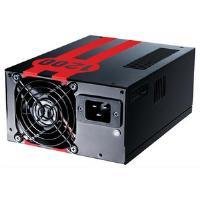
Image 1.1: The Antec TruePower TPQ-1200 Power Supply unit, showcasing its design and modular connectors.
2. د خوندیتوب معلومات
Please read and understand all safety instructions before installing or operating the power supply. Failure to do so may result in personal injury or damage to your equipment.
- د بریښنا رسولو نصبولو، لرې کولو یا پاکولو دمخه تل د دیوال له سایټ څخه د بریښنا تار جلا کړئ.
- دا برېښنا یوازې په شخصي کمپیوټرونو کې د کارولو لپاره ډیزاین شوې ده. د بل کوم هدف لپاره یې مه کاروئ.
- د برېښنا رسونه مه خلاصوئ casinج. لوړ حجمtages دننه شتون لري، او د کارونکي لپاره د خدمت وړ برخې شتون نلري. د c پرانیستلasing به تضمین باطل کړي.
- د خپل کمپیوټر سیسټم مناسب ځمکنۍ کولو ډاډ ترلاسه کړئ.
- Avoid operating the power supply in high humidity or extreme temperature environments.
- Keep the power supply away from liquids and sources of heat.
3. د بسته محتويات
ډاډ ترلاسه کړئ چې ستاسو کڅوړه لاندې توکي لري:
- Antec TruePower TPQ-1200 Power Supply Unit
- Modular Cable Set (PCIe, SATA, Molex, Floppy)
- د AC بریښنا تار
- د سکرو نصب کول
- د کارونکي لارښود (دا لاسوند)
If any items are missing or damaged, please contact your retailer or Antec customer support.
4. ځانګړتیاوې
The Antec TruePower TPQ-1200 power supply offers advanced features for reliable and efficient performance:
- 1200 Watts Continuous Power: برابروي ample power for high-end gaming and workstation systems.
- 80 PLUS Silver Certified: Achieves up to 88% efficiency, reducing heat generation and operating costs.
- Six +12V Rails: Delivers stable and clean power to critical components.
- د کیبل پرمختللی مدیریت: Semi-modular design allows for cleaner builds and improved airflow.
- PowerCache High Performance Capacitors: Enhances stability and transient response.
- Ultra-Quiet Pulse Width Modulation (PWM) Fan: Provides efficient cooling with minimal noise.
- Industrial Grade Protection Circuitry: Includes Over Current Protection (OCP), Over Voltagد ساتنې (OVP) ، د Vol لاندېtage Protection (UVP), Short Circuit Protection (SCP), Over Power Protection (OPP), and Over Temperature Protection (OTP).
5. ترتیب او نصب کول
Follow these steps carefully to install your Antec TruePower TPQ-1200 power supply.
5.1 د نصب څخه دمخه چیک لیست
- Ensure your computer case supports an ATX power supply.
- اړین وسایل راټول کړئ: د فیلیپس سر سکریو ډرایور.
- Unplug your computer from the wall outlet and discharge any residual power by pressing the power button.
5.2 د بریښنا رسولو نصبول
- Carefully place the power supply into the designated PSU bay in your computer case. Ensure the fan is oriented correctly (typically facing down for bottom-mounted PSUs, or according to case design for top-mounted).
- Align the screw holes on the power supply with those on the case.
- Secure the power supply using the provided mounting screws. Do not overtighten.
5.3 د بریښنا کیبلونو سره نښلول
Connect the necessary cables to your motherboard and components. The TPQ-1200 features both fixed and modular cables.
- 24-Pin ATX Motherboard Power: Connect the main 24-pin connector to the corresponding port on your motherboard. Ensure it clicks into place.
- 8-Pin EPS12V (CPU) Power: Connect the 8-pin (or 4+4 pin) EPS12V connector to the CPU power port on your motherboard.
- PCIe (Graphics Card) Power: For graphics cards requiring additional power, connect the appropriate 6-pin or 6+2 pin PCIe modular cables from the power supply to your graphics card(s).
- د SATA بریښنا: Connect SATA modular cables to your SATA hard drives, SSDs, and optical drives.
- Molex (Peripheral) Power: Use Molex modular cables for older peripherals or case fans that require this connector type.
- د کیبل مدیریت: Route cables neatly behind the motherboard tray or in other designated areas of your case to improve airflow and aesthetics.
5.4 ابتدايي پاور آن
- ډاډ ترلاسه کړئ چې ټولې اړیکې خوندي دي.
- د AC بریښنا تار د بریښنا رسولو سره وصل کړئ او بیا د دیوال سره تړلي ځای سره وصل کړئ.
- Flip the power switch on the back of the power supply to the 'ON' (I) position.
- خپل کمپیوټر ته بریښنا ورکړئ.
6. عملیاتي لارښوونې
The Antec TruePower TPQ-1200 is designed for continuous operation within its specified limits. Ensure adequate ventilation around your computer case to prevent overheating. The intelligent PWM fan will adjust its speed based on the power supply's temperature to maintain optimal cooling and noise levels.
Always shut down your computer properly through the operating system before turning off the power supply switch or unplugging the AC cord.
7. ساتنه
منظم ساتنه ستاسو د بریښنا رسولو اوږد عمر او غوره فعالیت ډاډمن کولو کې مرسته کوي.
- د دوړو پاکول: Periodically (e.g., every 6-12 months), disconnect the power supply from the wall outlet and use compressed air to gently clean dust from the fan grille and ventilation openings. Do not open the power supply casing.
- د کیبل معاینه: Occasionally check all power cable connections to ensure they are secure and free from damage.
8. ستونزه حل کول
If you encounter issues with your power supply, refer to the following troubleshooting guide:
| ستونزه | احتمالي لامل | د حل لاره |
|---|---|---|
| کمپیوټر نه چالانېږي. | AC power cord not connected or loose. Power supply switch is OFF. Faulty power supply. | Ensure AC cord is firmly connected. Flip PSU switch to 'ON' (I). Test with another power supply if possible. |
| سیسټم چالان کیږي مګر سمدلاسه بندیږي. | Overload, short circuit, or overheating. | Check for short circuits (e.g., loose screws). Ensure adequate ventilation. Disconnect non-essential components to check for overload. |
| د سیسټم بې ثباتي یا ناڅاپي ریبوټونه. | Insufficient power, faulty component, or power supply issue. | Verify all power connectors are secure. Ensure total system wattage does not exceed PSU capacity. Test components individually if possible. |
| د PSU څخه د فین لوړ غږ. | Dust accumulation, fan malfunction, or high load. | Clean dust from the fan grille. If noise persists and is excessive, contact support. |
If troubleshooting steps do not resolve the issue, contact Antec customer support for further assistance.
9. مشخصات
Detailed technical specifications for the Antec TruePower TPQ-1200 power supply:
- د موډل نوم: TruePower TPQ-1200
- د واټ محصولtage: 1200 واټ
- د فورم فکتور: ATX12V
- د نښلونکي ډول: ATX
- موثریت: 80 PLUS Silver Certified
- د یخولو طریقه: Air (PWM Fan)
- د مینه والو شمېر: 1
- مطابقت لرونکي وسایل: شخصي کمپیوټر
- د توکي وزن: ۶ پونډه (۳ کیلو ګرامه)
- د بسته ابعاد: 12.91 x 9.84 x 5.59 انچه (32.8 x 25 x 14.2 سانتي متره)
- د لومړي شتون نیټه: د اپریل 17، 2012
10. تضمین او ملاتړ
For warranty information and technical support, please refer to the official Antec webسایټ ته مراجعه وکړئ یا مستقیم د دوی د پیرودونکي خدماتو سره اړیکه ونیسئ. د تضمین شرایط او مقررات ممکن د سیمې او پیرود نیټې سره توپیر ولري.
د انټیک رسمي Webسایټ: www.antec.com


