1. پیژندنه
The Polk Audio SWA500 Power Amplifier is engineered to provide dedicated power for Polk Audio CSW Series built-in subwoofers. This Class D digital amplifier delivers 500 watts into 4 ohms, ensuring robust and distortion-free bass performance. Its design prioritizes long-term reliability and efficient operation. This manual provides essential information for the safe and effective installation, operation, and maintenance of your SWA500 ampلايف
2. د خوندیتوب مهمې لارښوونې
- د چلولو دمخه دا لارښوونې په دقت سره ولولئ ampلايف
- دا لارښوونې د راتلونکي حوالې لپاره وساتئ.
- په محصول او پدې لارښود کې ټولو اخطارونو ته پام وکړئ.
- Follow all instructions for safe use and installation.
- دا وسیله د اوبو یا رطوبت سره نږدې مه کاروئ.
- یوازې د وچې جامې سره پاک کړئ.
- د هوا د بهېدو لارې مه بندوئ. د جوړونکي د لارښوونو سره سم نصب کړئ.
- د تودوخې کومې سرچینې ته نږدې مه نصب کړئ لکه ریډیټرونه، د تودوخې راجسترونه، بخارۍ، یا نور وسایل (په شمول ampلایفیر) چې تودوخه تولیدوي.
- د قطبي یا ځمکني ډول پلګ خوندیتوب هدف مه ماتوئ. یو قطبي پلګ دوه تیغونه لري چې یو یې د بل په پرتله پراخ دی. د ګراونډنګ ډوله پلګ دوه تیغونه او دریم ګراونډنګ پرنګ لري. پراخه تیغ یا دریم پرنګ ستاسو د خوندیتوب لپاره چمتو شوي. که چیرې چمتو شوی پلګ ستاسو په پلورنځي کې مناسب نه وي، د ناببره پلورنځي ځای په ځای کولو لپاره د بریښنایی کارکونکي سره مشوره وکړئ.
- د بریښنا تار د چلولو یا پنچ کیدو څخه خوندي کړئ، په ځانګړې توګه په پلګونو، د اسانتیاو استخراج، او هغه ځای چې دوی د وسایلو څخه وځي.
- یوازې د جوړونکي لخوا مشخص شوي ضمیمې / لوازم وکاروئ.
- دا آله د بریښنا د طوفانونو په جریان کې یا کله چې د اوږدې مودې لپاره نه کارول کیږي خلاص کړئ.
- ټول خدمتونه وړ خدمت پرسونل ته راجع کړئ. خدمت کول اړین دي کله چې وسایل په هر ډول زیانمن شوي وي، لکه د بریښنا رسولو تار یا پلګ زیانمن شوی وي، مایع توی شوي وي یا توکي په وسایلو کې راوتلي وي، وسیله د باران یا رطوبت سره مخ شوې وي، په نورمال ډول کار نه کوي. ، یا غورځول شوی دی.
خبرداری: د اور یا بریښنا شاک خطر کمولو لپاره ، دا وسیله باران یا رطوبت ته مه رسوئ.
3. تنظیم او پیوستون
د هر ډول اړیکو جوړولو دمخه، ډاډ ترلاسه کړئ چې amplifier is powered off and unplugged from the AC outlet. The SWA500 is designed to power up to two Polk Audio CSW Series subwoofers of the same model.
3.1. SPEX Circuit Card Installation
The SWA500 amplifier utilizes SPEX circuit cards to optimize its performance for specific CSW subwoofer models. Ensure the correct SPEX card for your subwoofer model is inserted into the designated slot on the rear panel of the amplifier. These cards provide custom frequency shaping for optimal bass response.
3.2. د شا پینل نښلول
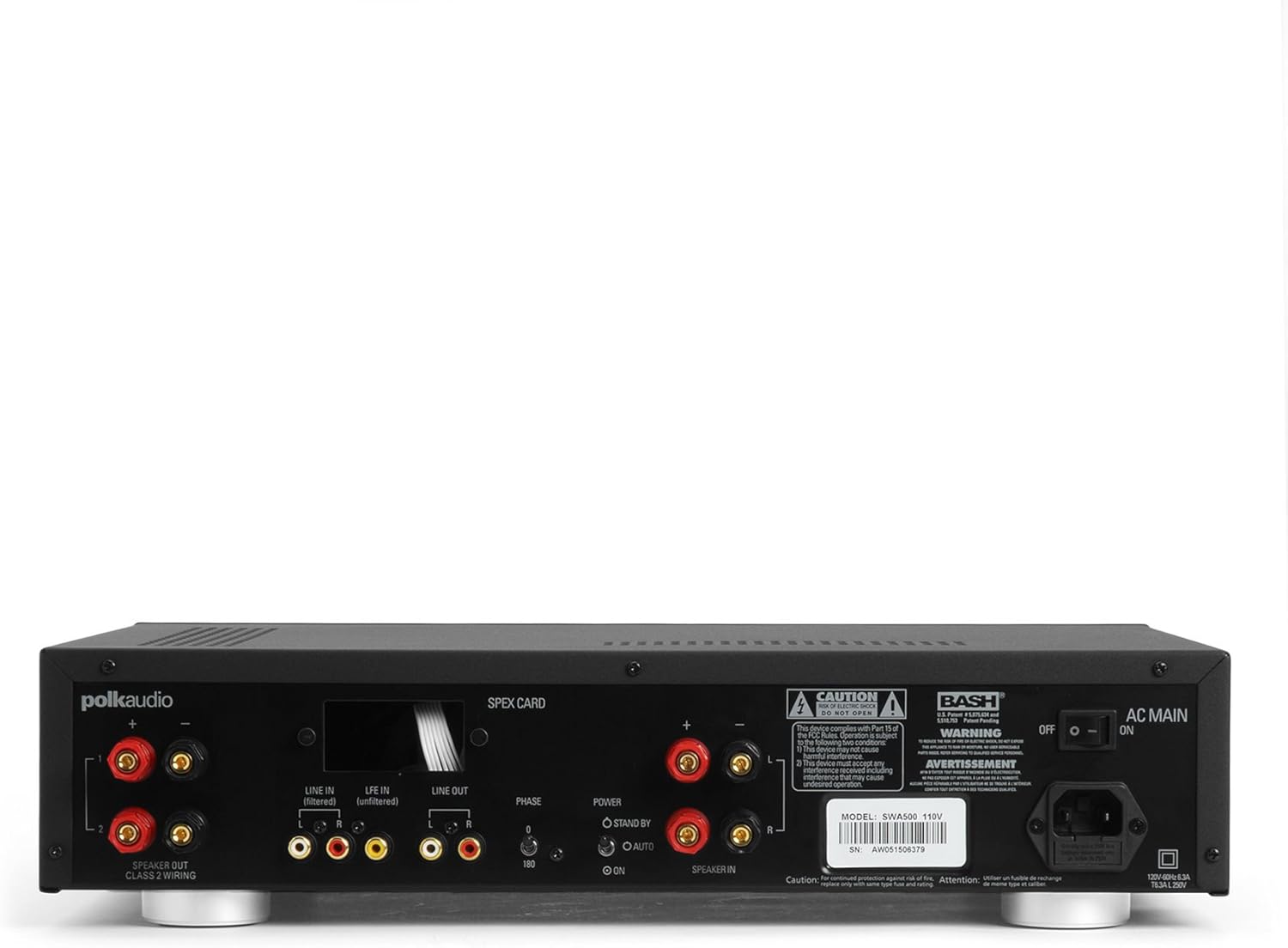
Figure 1: Rear panel of the SWA500 amplifier, illustrating various connection points including Line In, Line Out, Speaker Out, SPEX Card slot, Phase switch, Power mode switch, and AC Main input.
- Line In (Filtered/Unfiltered): Connect your audio source (e.g., AV receiver's subwoofer output) to the appropriate Line In jacks using RCA cables. The "Filtered" input applies a low-pass filter, while "Unfiltered" bypasses it, useful if your source provides its own filtered signal.
- لیکه بهر: These RCA outputs can be used to pass the audio signal to another amplifier or device.
- وینا کوونکی: Connect your Polk Audio CSW subwoofer(s) to these terminals using appropriate speaker wire. Ensure correct polarity (+ to + and - to -). The SWA500 supports Class 2 wiring.
- د پړاو بدلول: Adjust this switch (0° or 180°) to optimize the subwoofer's phase with your main speakers for seamless sound integration.
- د بریښنا حالت بدلول: Select between "ON" (always on), "AUTO" (turns on when an audio signal is detected), or "STANDBY" (low power mode, awaiting signal).
- AC اصلي: Connect the supplied power cord to this input and then to a suitable AC power outlet.
4. عملیات
Once all connections are made and the amplifier is plugged in, you can begin operating your SWA500.
4.1. د فرنټ پینل کنټرولونه

Figure 2: Front panel of the SWA500 amplifier, featuring the Power button, Protection indicator, Low Pass Filter control, and Volume control.
- د بریښنا تڼۍ: د بدلولو لپاره فشار ورکړئ ampلایفیر فعال یا بند. د بریښنا شاخص څراغ به هغه وخت روښانه شي کله چې واحد فعال وي.
- د ساتنې شاخص: This light illuminates if the amplifier enters protection mode due to overheating or an electrical fault. If this occurs, turn off the amplifier, check connections, and allow it to cool before restarting.
- Low Pass Filter (80Hz - 120Hz): This knob adjusts the upper frequency limit of the subwoofer's output. Adjust this to blend the subwoofer's sound seamlessly with your main speakers. Start with a setting around 80Hz and adjust by ear.
- Volume (Min - Max): This knob controls the overall output level of the subwoofer. Adjust to achieve the desired bass intensity relative to your main speakers.
4.2. Initial Sound Adjustment
Begin with the Low Pass Filter set to a mid-point (e.g., 100Hz) and the Volume knob at a low setting. Play a familiar piece of music or movie scene. Gradually increase the Volume until the bass is noticeable but not overpowering. Then, fine-tune the Low Pass Filter and Phase switch to achieve the most natural and integrated sound with your main speakers. The goal is for the subwoofer to enhance the low frequencies without drawing attention to its location.
5. ساتنه
- پاکول: Disconnect the power cord before cleaning. Use a soft, dry cloth to wipe the exterior surfaces of the amplifier. Do not use liquid cleaners or aerosol sprays.
- وینټیلیشن: ډاډ ترلاسه کړئ چې د هوا د بهېدو دروازې په amplifier are not blocked. Proper airflow is crucial for preventing overheating and maintaining long-term reliability.
- ذخیره کول: که ذخیره کول amplifier for an extended period, unplug it from the power outlet and store it in a cool, dry place, away from direct sunlight and extreme temperatures.
6. ستونزه حل کول
If you experience issues with your SWA500 ampد ژوندي کولو لپاره، لاندې د ستونزو حل کولو لارښود وګورئ:
| ستونزه | احتمالي لامل | د حل لاره |
|---|---|---|
| د بریښنا شاخص رڼا نشته | Power cord not connected; AC outlet not active; Power switch off. | Ensure power cord is securely connected. Check AC outlet with another device. Press the front panel power button. |
| د سب ووفر څخه غږ نشته | Incorrect input connection; Speaker wires loose or incorrect polarity; Volume too low; SPEX card missing or incorrect; Amplifier in standby/auto mode without signal. | Verify RCA input connections. Check speaker wire connections and polarity. Increase volume. Ensure correct SPEX card is installed. Set Power Mode switch to "ON" for testing. |
| Distorted or poor quality sound | Volume too high; Incorrect Low Pass Filter setting; Phase mismatch; Damaged speaker wire or subwoofer. | Reduce volume. Adjust Low Pass Filter. Toggle Phase switch (0°/180°). Inspect speaker wires and subwoofer for damage. |
| Protection indicator illuminated | Overheating; Short circuit in speaker wiring; Ampد ژوند تېروتنه | بندول amplifier and allow to cool. Check speaker wiring for shorts. If problem persists, contact customer support. |
7. مشخصات
- ماډل: SWA500
- د بریښنا تولید: 500 واټ په 4 ohms کې
- Ampد ژوند کولو ډول: د ډیجیټل ټولګي
- مطابقت: Designed for Polk Audio CSW Series built-in subwoofers (requires specific SPEX circuit card)
- د ټیټ پاس فلټر: Adjustable (Front Panel)
- د حجم کنټرول: Adjustable (Front Panel)
- مرحله کنټرول: 0°/180° (Rear Panel)
- د بریښنا طریقې: ON, AUTO, STANDBY (Rear Panel)
- د محصول ابعاد: ۱ x ۱ x ۱ انچه (تقریبا، د ورکړل شوي معلوماتو سره سم)
- د توکي وزن: ۲.۴۵ پونډه
- جوړونکی: پولک آډیو
- د لومړي شتون نیټه: د اپریل 18، 2005
8. تضمین او ملاتړ
For specific warranty information, please refer to the warranty card included with your product or visit the official Polk Audio webسایټ. د تضمین ادعاوو لپاره د پیرود ثبوت په توګه د پیرود رسید وساتئ.
If you require technical assistance or have questions not covered in this manual, please contact Polk Audio customer support. Contact information can typically be found on the official Polk Audio webپه سایټ یا ستاسو د محصول په بسته بندۍ کې.
د پولک آډیو رسمي Webسایټ: www.polkaudio.com


