پیژندنه
This manual provides comprehensive instructions for the installation, operation, and maintenance of your Aiphone 2-Call DA Series Door Station, model DA-2DS. Please read this manual thoroughly before attempting to install or operate the unit to ensure correct usage and to prevent damage.
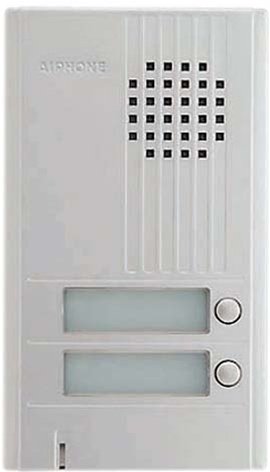
انځور: مخکینۍ برخه view of the Aiphone DA-2DS 2-Call Door Station. This silver unit features two call buttons for multi-tenant or multi-location communication.
د خوندیتوب معلومات
د ټپي کیدو او تجهیزاتو د زیان مخنیوي لپاره لاندې خوندیتوب احتیاطي تدابیر په پام کې ونیسئ:
- تل د هر ډول تارونو یا ساتنې ترسره کولو دمخه بریښنا قطع کړئ.
- ډاډ ترلاسه کړئ چې ټول تارونه د ځایی بریښنایی کوډونو او مقرراتو سره مطابقت لري.
- واحد د ډیر رطوبت یا سختې تودوخې سره مه مخ کوئ.
- Use only specified power supplies and accessories.
- نصب کول باید د وړ پرسونل لخوا ترسره شي.
د بسته محتويات
ډاډ ترلاسه کړئ چې ټول توکي په کڅوړه کې شتون لري:
- Aiphone DA-2DS Door Station Unit
- د سکرو او اینکرونو نصب کول
- د لارښود لارښود (دا سند)
چمتو کول
پورته کول
Select a suitable mounting location, typically near the entrance, at a height that allows easy access for all users. Ensure the surface is flat and secure. Use the provided mounting screws and anchors to firmly attach the door station to the wall.
تارونه
Connect the door station to the indoor master station using appropriate wiring. The DA-2DS requires a 2-wire connection for each call button to the corresponding indoor station. Refer to the wiring diagram provided with your indoor master station for specific connection points. Ensure all connections are secure and insulated.
ابتدايي ځواک پورته کول
After all wiring is complete and verified, apply power to the system. Test each call button to ensure proper communication with the indoor stations.
عملیاتي لارښوونې
زنګ وهل
To initiate a call from the door station, press the desired call button. This will activate the corresponding indoor master station, which will then ring to alert the occupant.
یو زنګ ته ځواب ورکول
When a call is initiated from the door station, the indoor master station will ring. The occupant can answer the call by pressing the talk button on the indoor station. Two-way communication will then be established.
ساتنه
پاکول
Clean the exterior of the door station periodically with a soft, damp ټوکر. د کثافاتو پاکوونکي، محلولونه، یا قوي کیمیاوي توکي مه کاروئ، ځکه چې دا کولی شي پای او داخلي برخو ته زیان ورسوي.
منظم چکونه
Periodically check the mounting screws for tightness and ensure all wiring connections remain secure. Test the call buttons and communication functionality regularly to ensure proper operation.
د ستونزو حل کول
| ستونزه | احتمالي لامل | د حل لاره |
|---|---|---|
| No sound from door station | Loose wiring connection; faulty speaker/microphone | Check wiring connections at both door and master stations. If problem persists, contact support. |
| Call button does not activate indoor station | Incorrect wiring; faulty button | Verify wiring connections for the specific call button. Test button functionality. |
| مداخله یا د غږ ضعیف کیفیت | Improper wiring; electrical interference | Ensure wiring is correctly installed and shielded if necessary. Check for nearby sources of electrical interference. |
مشخصات
- ماډل: DA-2DS
- جوړونکی: آیفون
- برخه شمیره: DA-2DS
- د توکي وزن: ۲.۴۵ پونډه
- رنګ: سره زر
- د توکو بسته بندي مقدار: 1
- بیټرۍ شاملې دي: نه
- د لومړي شتون نیټه: د می 8، 2008
د تضمین معلومات
Aiphone products are designed for reliability and performance. This product is covered by a limited warranty against defects in materials and workmanship. For specific warranty terms and conditions, please refer to the warranty card included with your purchase or visit the official Aiphone webسایټ. د تضمین ادعاوو لپاره د پیرود ثبوت وساتئ.
ملاتړ
For technical assistance, troubleshooting, or service inquiries, please contact Aiphone customer support. You can find contact information, including phone numbers and online resources, on the official Aiphone website. When contacting support, please have your model number (DA-2DS) and a description of the issue ready.


