محصول پای ته ورسیدview
The DIRECTV SWM16 Single Wire Multi-Switch is designed to efficiently distribute satellite signals. This multiswitch enables the distribution of up to 16 coax outputs using Single Wire Multi-switch (SWM) technology, significantly simplifying wiring. Traditionally, satellite installations required multiple DIRECTV lines from the dish to each receiver. With the SWM16, this process is streamlined, requiring only two coax cables for the primary connection. Each of the two outputs from the SWM16 has the capacity to be split up to eight times once inside the building, allowing for extensive multi-room viewوړتیاوې.

انځور: پورته view of the SWM16 Multi-Switch, highlighting its compact design and port layout.
تنظیم او نصب کول
Proper installation of the SWM16 is essential for optimal performance. This device is designed for both indoor and outdoor use, offering flexibility in placement.
Key Components Required:
- 29 Volt Power Supply: The SWM16 requires a 29 Volt Power Supply, which is sold separately. Ensure you use a DIRECTV Approved 29V Power Inserter (e.g., PI29R1-03) for proper operation.
- SWM Compatible Splitter: You will likely need at least one SWM compatible splitter to distribute the signal to multiple receivers within your home.
- کواکسیل کیبلونه: High-quality coaxial cables are necessary for connecting the satellite dish to the SWM16 and from the SWM16 to your receivers.
مطابقت:
The SWM16 is compatible with a range of DIRECTV receivers, including but not limited to: HR24, H24, HR23, H23, HR22, HR21, HR20, H25, H20 (with .2042 Firmware Update), R22, R16, D12, D11, and D10. It is also compatible with the HR34 Genie and C31 client.
د پیوستون مرحلې:
- Connect the coaxial cables from your satellite dish to the designated input ports on the SWM16. The SWM16 supports up to 16 DIRECTV satellite tuners.
- Connect the SWM output to your SWM compatible splitter.
- Connect the splitter outputs to your DIRECTV receivers.
- Connect the 29 Volt Power Supply to the appropriate port on the SWM16 or through a power-passing port on your SWM splitter, as per the power inserter's instructions.
- Once connected, configure your DIRECTV receivers to recognize the SWM system. This typically involves navigating to the satellite setup menu on your receiver and selecting the SWM option.
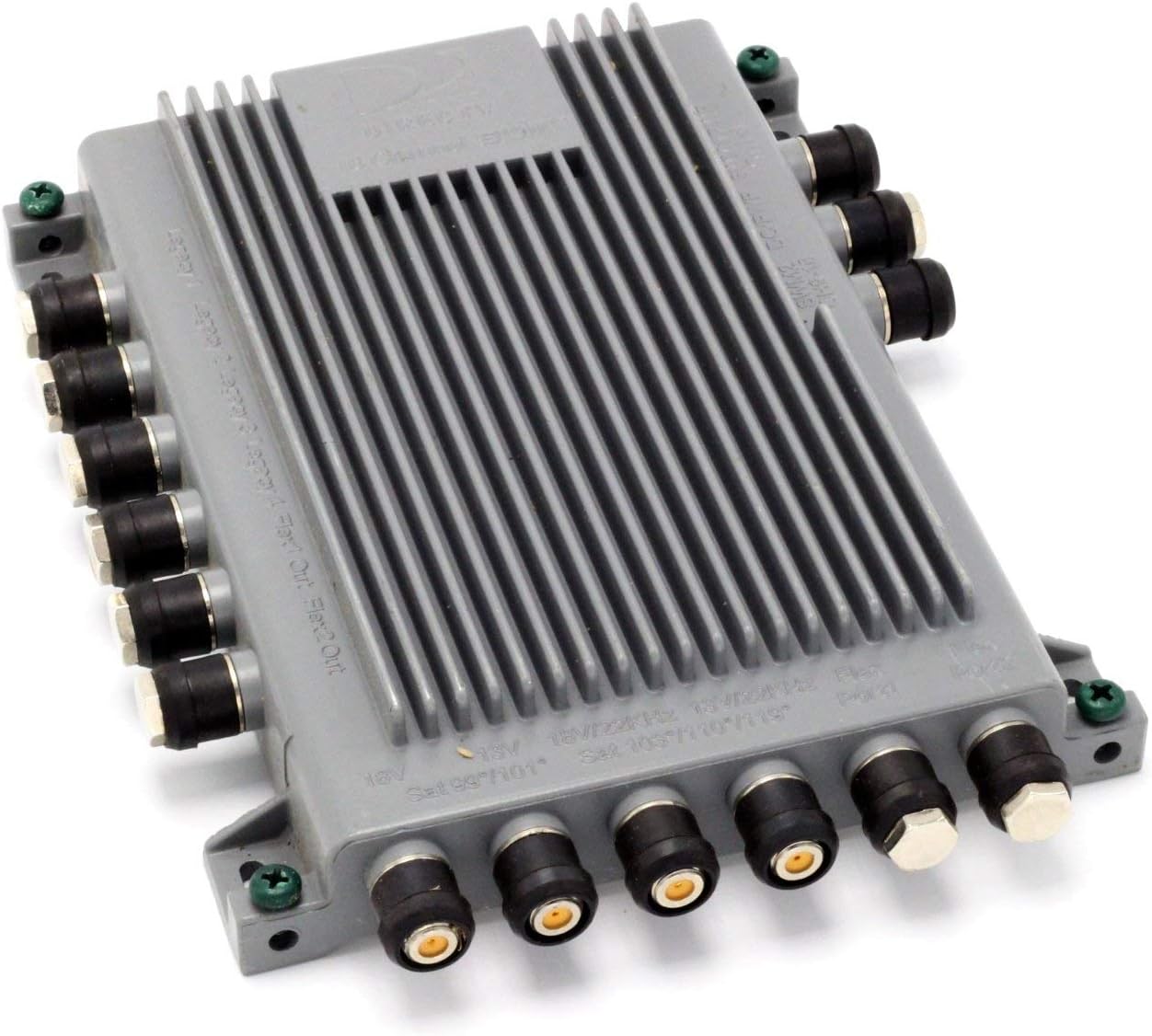
انځور: زاویه لرونکی view of the SWM16, illustrating the multiple coaxial connection points.

Image: Underside of the SWM16, displaying important compatibility information regarding the required power inserter.
Operating the SWM16
Once properly installed and powered, the SWM16 operates automatically to manage and distribute satellite signals to your connected DIRECTV receivers. Its primary function is to convert multiple satellite signals into a single wire format, allowing multiple receivers to share a single coaxial cable run from the multiswitch.
ګ-خونه Viewing (MRV):
A key benefit of the SWM16 is its support for Multi-Room Viewing (MRV). This feature allows compatible DIRECTV DVRs to share recorded content across different rooms in your home, provided they are connected through the SWM system.
د سیګنال توزیع:
The SWM16 efficiently handles up to 16 tuners, meaning it can support a large number of DIRECTV receivers or DVRs simultaneously, each accessing independent channels or recordings without interference.
ساتنه
The DIRECTV SWM16 Multi-Switch is designed for durability and requires minimal maintenance. Its die-cast housing makes it suitable for both indoor and outdoor environments.
- پاکول: Periodically inspect the unit for dust or debris, especially if installed outdoors. Gently wipe the exterior with a dry, soft cloth. Do not use liquid cleaners directly on the unit.
- اړیکې: Ensure all coaxial cable connections remain tight and free from corrosion. Loose connections can lead to signal degradation.
- د چاپیریال ساتنه: While suitable for outdoor use, consider protecting the unit from direct exposure to extreme weather conditions (e.g., heavy rain, snow, direct sunlight) to prolong its lifespan.
د ستونزو حل کول
If you encounter issues with your SWM16, consider the following troubleshooting steps:
- No Signal or Zero Signals on Transponders:
- Verify that the 29 Volt Power Supply is correctly connected and functioning. This is a common cause of signal issues.
- د کلکوالي او مناسب ناستې لپاره د ټولو کواکسیل کیبل اتصالونو معاینه وکړئ.
- Ensure your satellite dish is properly aligned and free from obstructions.
- Confirm that your receivers are configured for a SWM system in their satellite setup menus.
- If signals are specifically missing on "odd transponders" (e.g., of the 103 satellite), this could indicate an issue with the SWM unit itself or the LNB on your dish.
- Receivers Not Detecting SWM:
- Ensure your receivers are compatible with SWM technology. Refer to the compatibility list in the Setup section.
- Power cycle the SWM16 by unplugging its power supply for a few seconds and then plugging it back in.
- Verify that the SWM compatible splitter, if used, is functioning correctly.
- د اتصال عمومي مسلې:
- While this product does not come with detailed instructions, extensive resources and wiring diagrams are available online from DIRECTV and satellite enthusiast communities. Searching for "DIRECTV SWM16 wiring diagram" can provide valuable visual guides.
- Ensure all components (SWM16, power inserter, splitter, receivers) are receiving adequate power.
مشخصات
| فیچر | تفصیل |
|---|---|
| د محصول ابعاد | 7.8 x 6.6 x 1.9 انچه |
| د توکي وزن | ۲.۴۵ پونډه |
| ASIN | B003Z8TEF6 |
| د توکي ماډل شمیره | SWM16R0-03 |
| نیټه لومړی شتون لري | د اګست ۷، ۲۰۲۴ |
| جوړونکی | زینویل |
| د کور جوړولو مواد | مړ شو |
| Max Coax Outputs | 16 |
تضمین او ملاتړ
Specific warranty information for the DIRECTV SWM16 Single Wire Multi-Switch is not provided within this manual. For details regarding warranty coverage, terms, and conditions, please refer to the product packaging or contact the manufacturer, Zinwell, or the seller, SatelliteSale, directly.
For technical support or further assistance with installation and troubleshooting, it is recommended to consult the official DIRECTV support resources or contact SatelliteSale customer service. Online forums and communities dedicated to DIRECTV equipment can also be valuable sources of information and peer support.


