پیژندنه
The Casio SA-76 44-Key Mini Personal Keyboard is designed for beginners, offering an intuitive and engaging musical experience. Its compact size and user-friendly interface make it suitable for young musicians and those new to keyboard playing. This manual provides essential information for setting up, operating, and maintaining your SA-76 keyboard.
The keyboard features an easy-to-read LCD display that shows important data such as tone, rhythm, song number, metronome, tempo, and the note being played. With dedicated buttons for Piano and Organ sounds, switching between instrument voices is quick and simple. The 44 mini keys and 5 percussion pads are designed for comfortable play, especially for smaller hands, making it an excellent introduction to the world of keyboard music.
کلیدي ځانګړتیاوې
- 44 mini-sized keys for comfortable play.
- 5 percussion pads for rhythmic exploration.
- 100 built-in tones to explore various instrument sounds.
- 50 rhythm patterns to accompany your playing.
- Simple tone selection with dedicated PIANO and ORGAN buttons.
- Melody on/off lesson function for practice.
- Easy-to-read LCD display for clear information.
- Built-in speakers with 1.6 Watts output.
- Headphones jack (3.5mm) for private practice.
- Portable design, can be powered by batteries (6 AA, not included) or an optional AC adapter.
چمتو کول
1. د واحد ځواک ورکول
The Casio SA-76 can be powered by either an optional AC adapter or batteries.
- د AC اډاپټر (اختیاري): Connect a compatible 9V DC AC adapter (not included) to the DC 9V jack on the rear panel of the keyboard. Plug the adapter into a standard wall outlet.
- بیټرۍ: The keyboard requires 6 AA-size batteries (not included).
2. د بیټرۍ نصب کول
- ډاډ ترلاسه کړئ چې کیبورډ بند دی.
- د کیبورډ په ښکته برخه کې د بیټرۍ د برخې پوښ ومومئ.
- Slide the cover to open it.
- Insert 6 AA-size batteries, ensuring correct polarity (+/-) as indicated inside the compartment.
- د بیټرۍ کمپارټ پوښ په خوندي ډول بدل کړئ.
3. Attaching the Music Stand
The included music stand can be inserted into the slots on the top panel of the keyboard to hold sheet music or a tablet.
عملیاتي لارښوونې
1. بریښنا فعال/بند
- To turn on the keyboard, press and hold the پاور button until the LCD display lights up.
- To turn off the keyboard, press and hold the پاور تڼۍ بیا تر هغه وخته پورې فشار ورکړئ تر څو چې ښودنه بنده نشي.
2. د حجم تنظیم کول
د کارولو حجم + او حجم - buttons located next to the power button to increase or decrease the overall sound volume.
3. Selecting Tones
The SA-76 offers 100 different tones. You can select them using the dedicated buttons or the rotary dial.
- فشار ورکړئ پیانو or ارګان button for quick access to these common sounds.
- To select other tones, rotate the ټون dial to browse through the available options displayed on the LCD.
4. Playing Rhythms
The keyboard includes 50 rhythm patterns.
- وګرځوئ RhyTHM dial to select a desired rhythm pattern.
- فشار ورکړئ پیل / ودرول button to begin or end the rhythm playback.
- د دې په کارولو سره سرعت تنظیم کړئ TEMPO + او چټکتیا - تڼۍ
5. Playing Built-in Songs
The SA-76 features 10 built-in songs for listening or practicing with the melody on/off function.
- وګرځوئ د سندرو بانک dial to select a song.
- فشار ورکړئ پلی/پاز button to start or pause the song.
- د کارولو MELODY ON/OFF button to mute or unmute the melody part of the song, allowing you to play along.
6. Sustain Function
فعال کړئ سوسټاین function to make notes linger longer after the key is released, similar to a piano's sustain pedal.
- فشار ورکړئ سوسټاین button to toggle the effect on or off.
7. Percussion Pads
The 5 percussion pads allow you to add drum sounds to your performance. Simply press a pad to trigger a percussion sound.
8. د هیډفون کارول
For private practice, connect 3.5mm stereo headphones to the تلیفونونه / وسیلې jack on the rear panel. This will mute the built-in speakers.
محصول پای ته ورسیدview
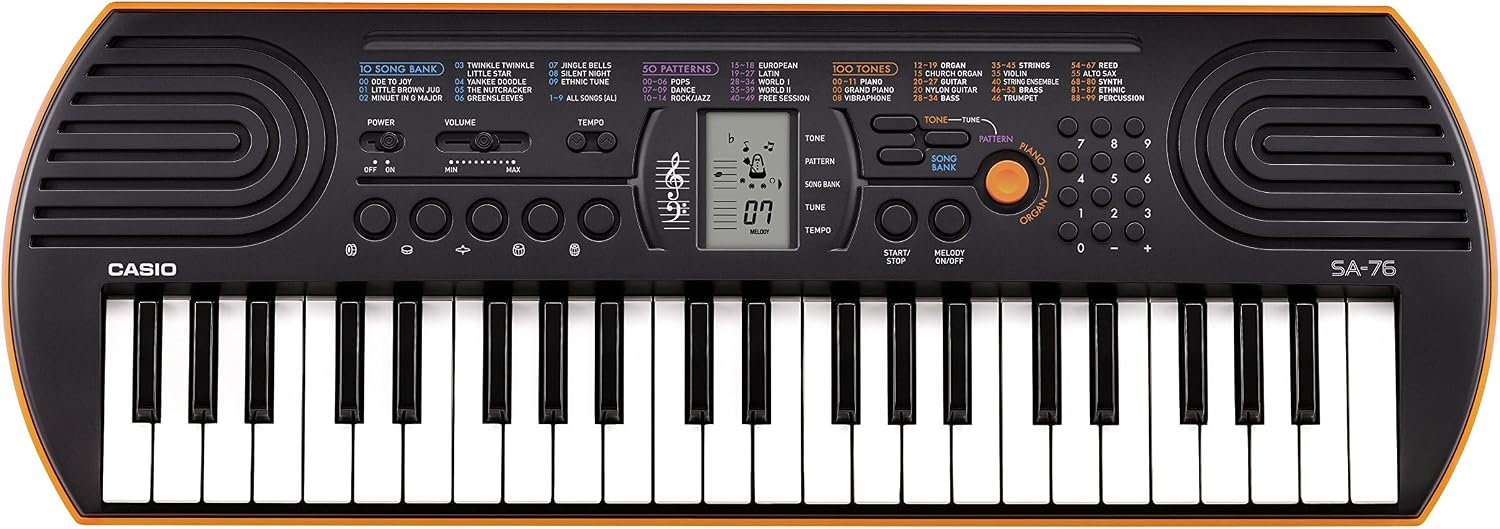
Figure 1: Casio SA-76 44-Key Mini Personal Keyboard. This image shows the overall design of the orange Casio SA-76 keyboard with its 44 mini keys and control panel.

Figure 2: Close-up of the control panel. This image provides a detailed view of the LCD display, tone/rhythm/song dials, volume buttons, and other function buttons on the Casio SA-76.

Figure 3: Diagram highlighting key features. This image illustrates various components of the Casio SA-76, including the 44 mini keys, drum pads, built-in speakers, and easy-to-use controls.

Figure 4: Casio SA-76 product dimensions. This image shows the physical measurements of the keyboard: 23.8 inches (W) x 8.3 inches (D) x 2.24 inches (H).
ساتنه
- پاکول: Wipe the keyboard with a soft, dry cloth. Avoid using abrasive cleaners, waxes, or solvents, as these can damage the finish.
- ذخیره کول: Store the keyboard in a cool, dry place away from direct sunlight, extreme temperatures, and high humidity. If storing for an extended period, remove the batteries to prevent leakage.
- سمبالول: د کیبورډ له غورځولو یا قوي ټکانونو سره مخ کیدو څخه ډډه وکړئ. د هغې په سر کې درانه شیان مه کیږدئ.
د ستونزو حل کول
| ستونزه | احتمالي لامل | د حل لاره |
|---|---|---|
| هیڅ ځواک نشته | Batteries are dead or incorrectly installed; AC adapter not connected or faulty. | Replace batteries or check polarity. Ensure AC adapter is securely connected and functional. |
| غږ نشته | Volume is too low; headphones are connected; speakers are muted. | Increase volume. Disconnect headphones. Check if any mute function is active. |
| کلیدونه ځواب نه ورکوي | Keyboard may be in a specific mode (e.g., lesson mode with melody off) or requires a reset. | Check current mode settings. Turn the keyboard off and on again to reset. |
مشخصات
| فیچر | تفصیل |
|---|---|
| د کلیدونو شمیر | 44 mini-sized keys |
| ټون | 100 |
| تالونه | 50 |
| سندرې | 10 |
| پرکوشن پیډونه | 5 |
| ويناوالو | 2 x 1.2 W (Amp Output: 1.6 Watts) |
| هیډفون جیک | د 3.5mm سټیریو مینی جیک |
| د بریښنا سرچینه | 6 AA batteries or optional AC adapter (DC 9V) |
| ابعاد (W x D x H) | ۱.۳۵" x ۳.۷۱" x ۳.۷۱" (۳.۴۳ سانتي متره x ۹.۴۲ سانتي متره x ۹.۴۲ سانتي متره) |
| د توکي وزن | ۶ پونډه (۳ کیلو ګرامه) |
تضمین او ملاتړ
For warranty information or technical support, please refer to the documentation included with your product or visit the official Casio webسایټ. د هر ډول تضمین ادعا لپاره د پیرود ثبوت په توګه د پیرود رسید وساتئ.


