1. پیژندنه
Thank you for choosing the Pro'sKit PK-2016 Belted Telecom Kit. This comprehensive kit is designed for professionals involved in the installation, maintenance, and troubleshooting of voice networks. It provides essential tools for communication installers, telecommunication technicians, and telephone line judges, ensuring efficiency and reliability in various tasks.
2. محصول ختم شوview او اجزا
The Pro'sKit PK-2016 Belted Telecom Kit is a practical and portable solution for field work. It includes a selection of high-quality tools housed within a durable, soft electrician's tool pouch designed for belt wear.
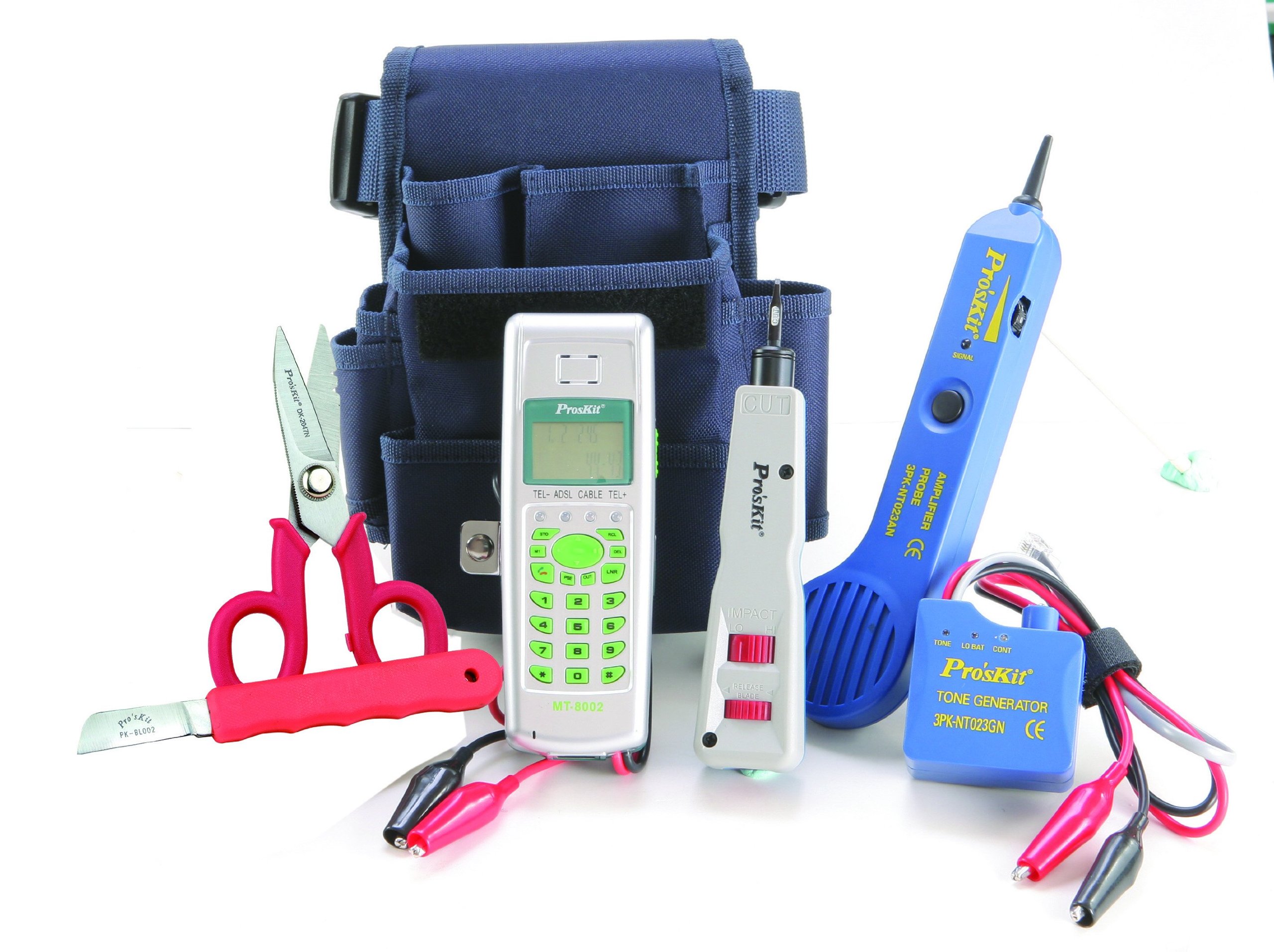
انځور 1: The Pro'sKit PK-2016 Belted Telecom Kit, featuring a collection of essential telecommunication tools neatly organized within a durable, soft electrician's tool pouch. The pouch is designed to be worn on a belt for easy access during work.
د کټ مینځپانګه:
- Telecom Test Set: For line testing and diagnostics.
- Punch Down Tool with 110/66 Blades: For terminating wires onto punch-down blocks.
- Cable Stripping Knife: For precise removal of cable insulation.
- قینچی: General purpose cutting tool for wires and other materials.
- Tone Probe Kit: For tracing and identifying cables.
- Soft Electrician's Tool Pouch: A durable, belt-mountable pouch for organizing and carrying tools.
3. ترتیب کول
- کټ خلاص کړئ: Carefully remove all tools from the packaging.
- د تنظیم وسایل: Place each tool securely into its designated slot or compartment within the soft electrician's tool pouch. This ensures easy access and prevents damage.
- Attach Pouch to Belt: Thread your work belt through the loops on the back of the tool pouch. Adjust for a comfortable and secure fit, ensuring tools are easily reachable during tasks.
- د تفتیش وسایل: Before first use, visually inspect all tools for any signs of damage or wear. Ensure all blades are sharp and handles are secure.
4. عملیاتي لارښوونې
This kit provides the fundamental tools for various telecommunication tasks. Always refer to specific industry standards and safety guidelines for each task you perform.
د کارونې عمومي لارښوونې:
- د وسیلې انتخاب: Choose the appropriate tool for the specific task. For example, use the punch down tool for terminating wires on blocks, and the tone probe kit for cable identification.
- لومړی خوندیتوب: Always wear appropriate personal protective equipment (PPE), such as safety glasses, when working with tools, especially when cutting or stripping wires.
- مناسب تخنیک: Use tools as intended. Incorrect usage can lead to damage to the tool, the network, or personal injury. If unsure, consult professional guides or training.
- Voice Network Installation: Utilize the punch down tool for secure and reliable wire terminations.
- ساتنه او د ستونزو حل کول: The Telecom Test Set and Tone Probe Kit are crucial for diagnosing line issues and tracing cables efficiently.
5. ساتنه
Proper maintenance extends the life of your tools and ensures their optimal performance.
- پاکول: After each use, wipe down tools with a clean, dry cloth to remove dirt, dust, and debris. For stubborn grime, a slightly damp cloth followed by thorough drying is recommended.
- ذخیره کول: Always return tools to their designated places within the soft electrician's tool pouch. Store the kit in a dry environment, away from extreme temperatures and corrosive substances.
- معاینه: Regularly inspect tools for wear, damage, or dull blades. Replace or sharpen blades as necessary to maintain efficiency and safety.
- Pouch Care: Keep the tool pouch clean. If it becomes soiled, clean it according to the material's recommendations and allow it to air dry completely before storing tools.
6. ستونزه حل کول
This section addresses common issues related to the application of the tools in telecommunication tasks.
- Difficulty Terminating Wires: Ensure the correct blade (110 or 66) is installed in the punch down tool and that the wire gauge matches the block. Apply firm, even pressure.
- Unable to Trace Cable: Verify the tone generator is properly connected to the cable and powered on. Ensure the tone probe is set to the correct frequency and sensitivity. Check for excessive interference from other electrical sources.
- Inaccurate Line Test Readings: Confirm the Telecom Test Set is correctly connected to the line. Check for proper battery levels if applicable. Ensure there are no shorts or open circuits on the line itself.
- Tool Malfunction: If a tool appears damaged or is not functioning correctly, do not attempt to repair it unless you are qualified. Contact Pro'sKit customer support or a qualified service technician.
7. مشخصات
| جوړونکی | د پرو کټ |
| برخه شمیره | PK-2016 |
| په بسته کې د واحدونو شمیر | 1 |
| د اندازه کولو سیسټم | US |
| بیټرۍ ته اړتیا ده | نه |
| د کڅوړې ابعاد | 25.4 x 20.32 x 11.43 سانتي متره |
| د بسته وزن | 1.22 کیلو ګرامه |
| د محصول ماډل شمیره | PK-2016 |
| ASIN | B0046QVIR8 |
| د لومړي شتون نیټه | ۱۲ اکتوبر ۱۸۴۷ |
8. تضمین او ملاتړ
For warranty information and technical support regarding your Pro'sKit PK-2016 Belted Telecom Kit, please refer to the documentation provided with your purchase or visit the official Pro'sKit webسایټ. د تضمین ادعاوو لپاره د پیرود ثبوت وساتئ.
If you encounter any issues not covered in this manual, or require further assistance, please contact Pro'sKit customer service directly. Contact details can typically be found on the manufacturer's webسایټ یا د محصول بسته بندي.


