پیژندنه
This manual provides instructions for the proper setup, operation, and maintenance of your RadioShack Pro-197 Radio Scanner. This base/mobile scanner offers advanced digital voice decoding capabilities and a range of features for monitoring various radio transmissions. Please read this manual thoroughly before operating your device.
د خوندیتوب معلومات
Observe the following safety precautions to prevent damage to the scanner or injury to yourself.
- د بریښنا سرچینه: Use only the specified power adapter. Incorrect voltage کولی شي واحد ته زیان ورسوي.
- انتن: Ensure the antenna is securely connected. Do not operate without an antenna for extended periods.
- چاپیریال: Avoid exposing the scanner to extreme temperatures, humidity, dust, or direct sunlight.
- پاکول: د پاکولو دمخه بریښنا قطع کړئ. نرم او وچ ټوکر وکاروئ. مایع پاکوونکي یا ایروسول مه کاروئ.
- خدمت کول: د واحد د خدمت کولو هڅه مه کوئ. ټولې خدمتونه وړ پرسونل ته راجع کړئ.
د بسته محتويات
ډاډ ترلاسه کړئ چې ستاسو کڅوړه لاندې توکي لري:
- RadioShack Pro-197 Radio Scanner
- د AC ځواک اډیپټر
- دوربینیک انتن
- د کارن لارښود
محصول پای ته ورسیدview
Familiarize yourself with the main components and controls of your Pro-197 scanner.
مخکینۍ پینل
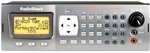
This image displays the front panel of the RadioShack Pro-197 Radio Scanner, featuring the large display screen, the numeric keypad, and various control buttons and knobs for operation.
- ښکاره کول: Shows frequency, channel information, and menu options.
- کیپیډ: Used for entering frequencies, channel numbers, and menu navigation.
- د فعالیت تڼۍ: Three buttons located under the display, whose purpose changes based on the current screen, with on-screen text help.
- د حجم نوب: د آډیو آوټ پټ کچه تنظیموي.
- Squelch Knob: Adjusts the threshold for signal reception, eliminating static.
- د نیویګیشن پیډ: Used for scrolling through lists and making selections.
د شا پینل پیوستون
The rear panel typically includes connections for the antenna, power input, and auxiliary ports for external speakers or computer connectivity.
چمتو کول
Follow these steps for initial setup of your Pro-197 scanner.
- انتن وصل کړئ: Screw the supplied telescopic antenna into the antenna jack on the rear of the scanner. Ensure it is finger-tight.
- بریښنا وصل کړئ: Plug the AC power adapter into the DC IN jack on the rear of the scanner, then plug the adapter into a standard AC outlet.
- پاور آن: Press the POWER button to turn on the scanner. The display should illuminate.
عملیاتي لارښوونې
This section details how to operate your Pro-197 scanner, including programming and utilizing its key features.
بنسټیز سکینګ
Once powered on, the scanner can begin scanning pre-programmed channels or user-defined frequencies. Refer to the on-screen prompts and the function buttons for initiating and controlling scan operations.
Programming Frequencies
The Pro-197 allows storage of up to 1,800 frequencies. Programming can be done manually or via computer software.
- لاسي پروګرام کول: Use the keypad to enter frequencies directly. This method can be complex due to the scanner's advanced features.
- د کمپیوټر پروګرامونه: For easier and more efficient programming, it is highly recommended to use compatible computer software (e.g., Win500) and a programming cable. Websites like Radio-Reference.com offer extensive databases of frequencies and support forums.
V-Scanner Memory
The scanner features 21 V-scanner memory banks, providing a total capacity to store over 39,000 objects (channels, talkgroups, etc.). This allows for organized storage and quick recall of different scanning configurations.
S.A.M.E. (Specific Area Message Encoding)
The Pro-197 includes S.A.M.E. reception capabilities, enabling the scanner to receive localized weather and emergency alerts specific to user-set counties. This feature helps ensure you receive relevant warnings without unnecessary alerts from distant areas.
د ټرک کولو سیسټمونه
The Pro-197 is designed to trunk all three popular system types, allowing it to follow conversations on complex trunked radio systems used by public safety and other organizations.
ساتنه
Proper care will ensure the longevity and optimal performance of your scanner.
- پاکول: Use a soft, dry, lint-free cloth to clean the exterior of the scanner. Do not use abrasive cleaners, solvents, or strong chemicals.
- ذخیره کول: When not in use for extended periods, store the scanner in a cool, dry place, away from direct sunlight and extreme temperatures.
- د انتن پاملرنه: Periodically check the antenna connection for tightness and ensure the antenna is not bent or damaged.
د ستونزو حل کول
If you encounter issues with your scanner, refer to the following table for common problems and solutions.
| ستونزه | د حل لاره |
|---|---|
| سکینر نه چالانېږي. | Check that the AC power adapter is securely connected to both the scanner and a working electrical outlet. Ensure the power button is pressed. |
| کمزوری استقبال یا جامد. | Verify the antenna is properly connected and undamaged. Adjust the squelch control. Ensure you are using an appropriate antenna for the frequency band you are trying to receive. Move the scanner away from sources of interference. |
| Difficulty programming frequencies. | Manual programming can be complex. Consider using computer programming software (e.g., Win500) and a compatible programming cable. Consult online resources like Radio-Reference.com for detailed guides and community support. |
| د سپیکر څخه هیڅ غږ نشته. | Check the volume level. Ensure no headphones are plugged into the headphone jack. |
مشخصات
Technical specifications for the RadioShack Pro-197 Radio Scanner.
| فیچر | تفصیل |
|---|---|
| د ماډل شمیره | پرو 197 |
| برانډ | رادیو شاک |
| د ارتباط ټیکنالوژي | معاون، USB |
| د تونر ټیکنالوژي | ډیجیټل |
| د بریښنا سرچینه | د بریښنا تار شوی |
| د راډیو بینډونو ملاتړ شوی | AM/FM (Note: Scanner supports a much wider range of frequencies) |
| د توکي وزن | ۲.۴۵ پونډه |
| د کڅوړې ابعاد | 14.3 x 8.1 x 4.2 انچه |
| UPC | 040293019341 |
| د حافظې ظرفیت | 1,800 frequencies; 21 V-scanner memory (over 39,000 objects) |
تضمین او ملاتړ
For warranty information, technical support, or service inquiries, please refer to the official RadioShack webسایټ ته مراجعه وکړئ یا د دوی د پیرودونکو خدماتو څانګې سره اړیکه ونیسئ. د هر ډول تضمین ادعا لپاره د پیرود ثبوت په توګه د پیرود رسید وساتئ.


