1. پیژندنه
This manual provides essential information for the proper installation, operation, and maintenance of your Behringer Truth B1031A Active 2-Way Reference Studio Monitor. Please read this manual thoroughly to ensure optimal performance and longevity of your device. The B1031A is designed for professional audio applications, offering ultra-linear frequency response and precise sound reproduction.
2. د خوندیتوب مهمې لارښوونې
- د بریښنا سرچینه: Connect the unit only to a power supply of the voltage specified in the manual or on the unit.
- ځمکني کول: ډاډ ترلاسه کړئ چې واحد په سمه توګه ځمکنی شوی ترڅو د بریښنا شاک مخه ونیسي.
- وینټیلیشن: د هوا د خلاصیدو مخنیوی مه کوئ. د تولید کونکي لارښوونو سره سم نصب کړئ.
- اوبه او رطوبت: دا وسیله د اوبو سره نږدې مه کاروئ یا یې باران یا رطوبت ته مه ښکاره کوئ.
- تودوخه: د تودوخې کومې سرچینې ته نږدې مه نصب کړئ لکه ریډیټرونه، د تودوخې راجسترونه، بخارۍ، یا نور وسایل (په شمول ampلایفیر) چې تودوخه تولیدوي.
- پاکول: یوازې د وچې جامې سره پاک کړئ.
- خدمت کول: ټول خدمتونه وړ خدمت پرسونل ته راجع کړئ. خدمت کول اړین دي کله چې وسایل په هر ډول زیانمن شوي وي، لکه د بریښنا رسولو تار یا پلګ زیانمن شوی وي، مایع توی شوي وي یا توکي په وسایلو کې راوتلي وي، وسیله د باران یا رطوبت سره مخ شوې وي، په نورمال ډول کار نه کوي. ، یا غورځول شوی دی.
3. د بسته محتويات
Upon unpacking your Behringer Truth B1031A, please verify that all components are present and in good condition:
- Behringer Truth B1031A Active Studio Monitor (1 unit)
- د بریښنا کیبل
- د کارونکي لارښود (دا لاسوند)
که کوم توکي ورک یا زیانمن شوي وي، مهرباني وکړئ سمدستي خپل ډیلر سره اړیکه ونیسئ.
4. محصول ختم شوview
The Behringer Truth B1031A is an active 2-way reference studio monitor featuring an 8-inch Kevlar woofer and a 1-inch silk dome tweeter. It incorporates precision Class A/B amplifiers with active protection circuits, delivering 100 W for low frequencies and 50 W for high frequencies. Its design aims for ultra-linear frequency response and wide dispersion characteristics.
4.1. د مخ پینل

The front panel features the primary acoustic components: the 8-inch Kevlar woofer for low-frequency reproduction and the 1-inch silk dome tweeter for high frequencies. Indicator LEDs provide visual feedback on the monitor's power status and signal clipping.
4.2. د شا پینل
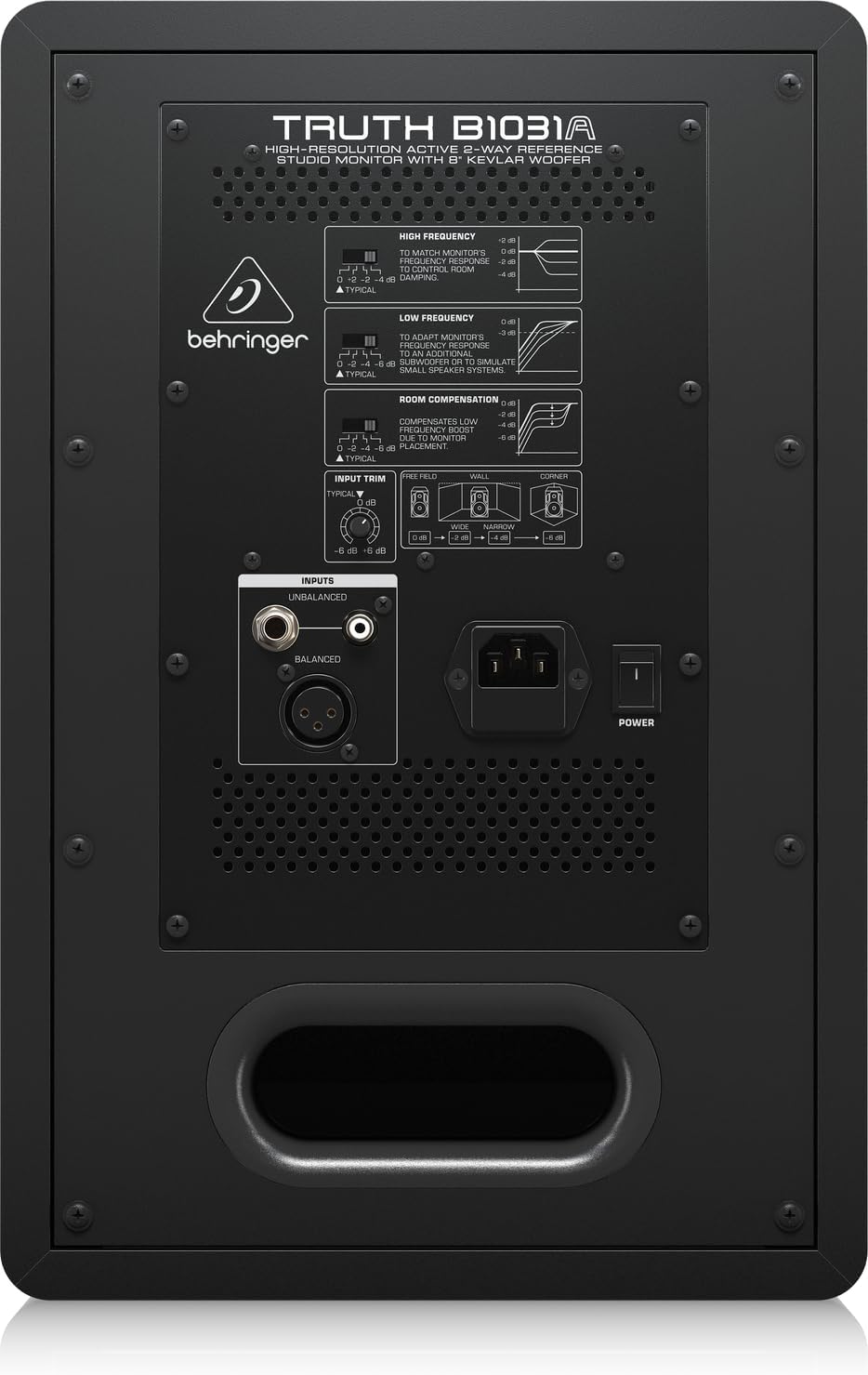
The rear panel houses all input connections and acoustic adjustment controls. These include:
- متوازن XLR وتنه: For professional audio connections.
- Balanced 1/4" TRS Input: For professional audio connections.
- Unbalanced RCA Input: د مصرف کونکو آډیو وسیلو لپاره.
- انپټ ټرم: د ننوتلو حساسیت تنظیموي.
- High Frequency Adjustment: Allows tailoring of the high-frequency response.
- Low Frequency Adjustment: Allows tailoring of the low-frequency response.
- Room Compensation Switches: Adjusts the monitor's response to compensate for room acoustics (e.g., placement near walls or corners).
- Power Switch and IEC Power Inlet: For connecting the power cable and turning the unit on/off.
5. ترتیب کول
5.1. ځای پرځای کول
Proper placement of your studio monitors is crucial for accurate sound reproduction. Consider the following guidelines:
- Stereo Triangle: Position the monitors and your listening position to form an equilateral triangle. The distance between the two monitors should be equal to the distance from each monitor to your head.
- Ear Level: The tweeters should ideally be at ear level when you are in your primary listening position.
- له دیوالونو څخه واټن: Avoid placing monitors directly against walls or in corners, as this can exaggerate bass frequencies. If unavoidable, use the د کوټې تاوان switches on the rear panel to adjust.
- همغږي: Ensure the left and right monitors are placed symmetrically within the room to maintain a balanced stereo image.
5.2. ارتباطات
Before making any connections, ensure the monitor is powered off and unplugged from the mains.
- آډیو داخلول: Connect your audio source (e.g., audio interface, mixer) to the B1031A using either an XLR, 1/4" TRS, or RCA cable. For optimal signal integrity, balanced XLR or TRS connections are recommended.
- د بریښنا پیوستون: Insert the supplied power cable into the IEC power inlet on the rear panel of the monitor, then plug the other end into a suitable AC power outlet.
6. چلول
6.1. بریښنا کول/بندول
- Ensure all audio connections are secure and the input trim is set to a low level.
- Flip the power switch on the rear panel to the 'ON' position. The power indicator LED on the front panel will illuminate.
- To power off, flip the power switch to the 'OFF' position. It is recommended to power off your audio source first, then the monitors.
6.2. د کنټرول تنظیمول
- انپټ ټرم: Use this knob to match the output level of your audio source. Start with a low setting and gradually increase until you achieve a comfortable listening level without distortion.
- High Frequency Adjustment: This switch allows you to boost or cut high frequencies to suit your listening environment or preference.
- Low Frequency Adjustment: This switch allows you to boost or cut low frequencies. This is particularly useful for compensating for room acoustics or if you are using a separate subwoofer.
- د خونې تاوان: These switches are designed to optimize the monitor's performance based on its placement in your room. Refer to the diagram on the rear panel for recommended settings when placing the monitor near walls or in corners.
7. ساتنه
To ensure the longevity and optimal performance of your Behringer Truth B1031A monitor, follow these maintenance guidelines:
- پاکول: Use a soft, dry cloth to clean the exterior of the monitor. Avoid using abrasive cleaners, solvents, or waxes, as these can damage the finish.
- دوړې: Regularly dust the speaker cones and vents to prevent accumulation, which can affect sound quality and cooling.
- چاپیریال: Operate the monitor in a stable environment, away from extreme temperatures, humidity, and direct sunlight.
- ترانسپورت: When moving the monitor, ensure it is powered off and disconnected. Use appropriate packaging to protect it from physical damage.
8. ستونزه حل کول
If you encounter issues with your B1031A monitor, consult the following table for common problems and solutions:
| ستونزه | احتمالي لامل | د حل لاره |
|---|---|---|
| غږ نشته | No power; incorrect input connection; input trim too low; audio source issue. | Check power cable and switch; verify audio cable connections; increase input trim; check audio source output. |
| تحریف شوی غږ | Input signal too high; damaged cable; faulty audio source. | Reduce input trim or output level from source; try a different audio cable; test with another audio source. |
| د ګونګېدو یا ګونګېدو غږ | Ground loop; interference from other electronics; unbalanced cable used for long runs. | Ensure proper grounding; move monitor away from other electronic devices; use balanced cables (XLR/TRS). |
| Uneven stereo image | Improper monitor placement; differing acoustic settings between monitors. | Adjust monitor placement for symmetry; ensure High/Low Frequency and Room Compensation settings are identical on both monitors. |
که چیرې د دې حلونو له هڅه کولو وروسته هم ستونزه دوام ومومي، مهرباني وکړئ د بهرینګر پیرودونکي ملاتړ یا د خدماتو وړ تخنیکین سره اړیکه ونیسئ.
9. مشخصات
Technical specifications for the Behringer Truth B1031A Active Studio Monitor:
| فیچر | مشخصات |
|---|---|
| د ماډل نوم | باور B1031A |
| د سپیکر ډول | Active 2-Way Reference Studio Monitor |
| د ووفر قطر | 8 Inches (Kevlar cone) |
| د ټویټر ډول | 1 Inch Silk Dome |
| Ampژوندی ډول | A/B ټولګي |
| LF Ampژوندی محصول | 100 واټ |
| HF Ampژوندی محصول | 50 واټ |
| د ټول محصول واټtage | 150 واټ |
| د ارتباط ټیکنالوژي | XLR, 1/4" TRS, RCA |
| د بریښنا سرچینه | د بریښنا تار (110 ولټه) |
| د محصول ابعاد (د x څلویښتم x څلویښتم) | ۸۳.۸" x ۵۵.۷" x ۴۴.۱" |
| د توکي وزن | 24.91 پونډه |
| رنګ | تور |
| مواد | فلزي |
10. تضمین او ملاتړ
Behringer products are designed and manufactured to high-quality standards. For detailed warranty information, including terms and conditions, please refer to the warranty card included with your product or visit the official Behringer website. For technical support, service, or spare parts, please contact your local Behringer dealer or authorized service center. You can also find support resources and contact information on the د بهرینګر پلورنځی.


