1. پیژندنه او د خوندیتوب معلومات
This manual provides essential instructions for the safe and efficient operation of your NEC NP-V300X projector. Please read this manual thoroughly before using the projector and retain it for future reference.
د خوندیتوب مهم احتیاطونه:
- د هوا د جریان لپاره د پروجیکټر شاوخوا کافي ځای ډاډمن کړئ.
- په مستقیم ډول د پروجیکټر لینز ته د کتلو څخه ډډه وکړئ کله چې lamp فعال دی، ځکه چې روښانه رڼا کولی شي سترګو ته زیان ورسوي.
- پروجیکټر په بې ثباته کارټ، سټینډ یا میز کې مه کیږدئ.
- د پاکولو دمخه د دیوال له ساکټ څخه د بریښنا تار جلا کړئ.
- ټول خدمتونه وړ خدمت پرسونل ته راجع کړئ.
۳. د پروجیکټر اجزاview
Familiarize yourself with the main components of your NEC NP-V300X projector.
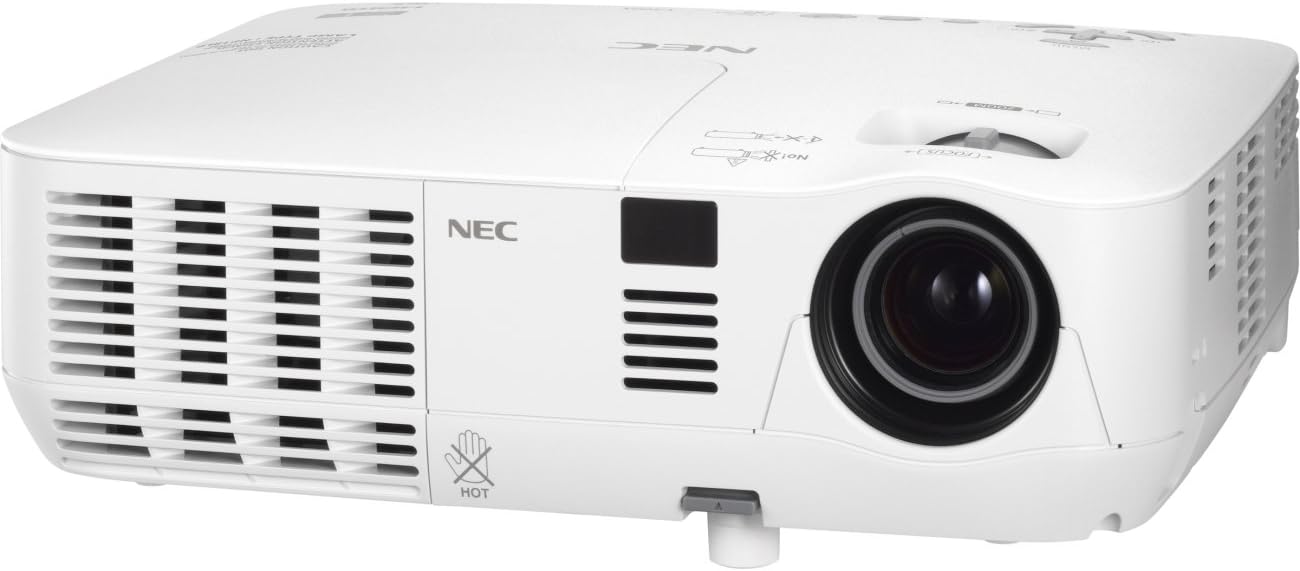
An image showing the front and left side of the white NEC NP-V300X projector, highlighting the lens, ventilation grilles, and control panel area.
مهمې برخې:
- د پروجیکشن لینز: Emits the image onto the screen. Features manual focus adjustment.
- د وینټیلیشن ګریلونه: Located on the sides, these ensure proper cooling of the projector. Do not obstruct.
- د تضمین اداره: Buttons for power, menu navigation, input selection, and image adjustments.
- د ننوتلو ترمینلونه: Various ports for connecting external devices (e.g., HDMI, VGA).
- د تنظیم وړ پښه: Allows for minor height adjustments to align the projected image.
۴. د تنظیم لارښوونې
Follow these steps to set up your projector for initial use.
3.1 ځای پرځای کول
- پروجیکټر په یوه مستحکم، فلیټ سطحه کېږدئ یا یې په خوندي ډول نصب کړئ.
- Ensure the projector is positioned at an appropriate distance from the screen to achieve the desired image size.
- Adjust the projector's height using the adjustable foot to align the image with the screen.
3.2 د نښلولو بریښنا
- ورکړل شوی بریښنا تار د پروجیکټر د بریښنا داخل سره وصل کړئ.
- د برښنا تار بله پای په یو ځمکني بریښنایی پلورنځي کې ولګوه.
۱.۳ د ننوتلو سرچینو نښلول
The NP-V300X supports various input sources, including HDMI.
- Connect your video source (e.g., laptop, Blu-ray player) to the appropriate input terminal on the projector (e.g., HDMI port).
- Ensure the connection cables are securely fastened.
۴. د پروجیکټر چلول
Instructions for basic operation of your NEC NP-V300X projector.
4.1 بریښنا کول / بندول
- د فعالولو لپاره: Press the power button on the projector's control panel or remote control. The power indicator light will change.
- د بریښنا بندولو لپاره: Press the power button again. A confirmation message may appear. Press the power button a second time to confirm shutdown. Allow the projector to cool down before unplugging.
۶.۲ د ننوتنې سرچینې انتخاب
Use the 'Input' button on the control panel or remote control to cycle through available input sources (e.g., HDMI, VGA).
4.3 د انځور سمون
- تمرکز: Rotate the focus ring around the lens manually until the image appears sharp and clear.
- زوم: Adjust the zoom ring (if present) to change the image size without moving the projector.
- د کیسټون سمون: If the image is trapezoidal, use the keystone correction function in the projector's menu to square the image.
- روښانتیا/ تضاد: Adjust these settings via the on-screen display (OSD) menu to optimize image quality for your viewد چاپیریال.
5. ساتنه
منظم ساتنه د غوره فعالیت ډاډ ورکوي او ستاسو د پروجیکټر عمر اوږدوي.
۴.۱ د پروجیکټر پاکول
- بهر: پروجیکټر پاک کړئ casing د نرم، وچ، لینټ نه پاک ټوکر سره. د کثافاتو پاکوونکي یا محلول مه کاروئ.
- لینز: په نرمۍ سره لینز د لینز پاکولو ټوکر یا لینز کاغذ سره پاک کړئ. د خپلو ګوتو سره د لینز سطحې ته د لمس کولو څخه ډډه وکړئ.
- د وینټیلیشن ګریلونه: Periodically clean the ventilation grilles to prevent dust buildup, which can lead to overheating. Use a soft brush or compressed air.
۴ لamp پاملرنه
پروجکټور lamp محدود عمر لري. کله چې lamp شاخص روښانه کیږي یا انځور تیاره کیږي، lamp may need replacement. Refer to the on-screen display for lamp hour information. Always allow the projector to cool down completely before attempting any lamp ساتنه
6. ستونزه حل کول
دا برخه هغه عامې ستونزې په ګوته کوي چې تاسو یې د خپل پروجیکټر سره مخ کیدی شئ.
عام مسایل او حل لارې:
- هیڅ انځور ندی ښودل شوی:
- Ensure the projector is powered on and the power indicator is active.
- Verify the input source is correctly selected and the cable is securely connected.
- Check if the connected device (e.g., laptop) is outputting a signal.
- Dim or Poor Image Quality:
- Adjust the focus and zoom settings.
- l چک کړئamp hours; the lamp may be nearing the end of its life.
- د پروجیکټر لینز پاک کړئ.
- د روښانتیا او برعکس ترتیبات تنظیم کړئ.
- د پروجیکټر ډیر ګرمیدل:
- ډاډ ترلاسه کړئ چې د هوا د بهېدو جالونه بند شوي نه دي.
- Clean any dust from the grilles.
- پروجیکټر په ښه هوا لرونکي ځای کې وکاروئ.
If problems persist, contact customer support or a qualified service technician.
7. تخنیکي مشخصات
Detailed technical specifications for the NEC NP-V300X projector.
| فیچر | مشخصات |
|---|---|
| د ماډل شمیره | NP-V300X |
| ټیکنالوژي ښکاره کول | ډي ایل پي (۰.۶۵" ډي ایم ډي) |
| اصلي حل | XGA 1024x768 |
| اعظمي حل | UXGA 1600 x 1200 |
| روښانتیا | 3000 Lumens |
| تمرکز | لارښود |
| د کمپیوټر سیګنال مطابقت | SVGA, XGA, WXGA, WXGA+, SXGA, SXGA+, UXGA |
| د فین شور | 37 dB |
| د ارتباط ټیکنالوژي | HDMI |
| ځانګړی ځانګړنه | 3D-Ready, 3D-built-in |
| د محصول ابعاد | 12.2 x 3.78 x 9.72 انچه |
| د توکي وزن | ۲.۴۵ پونډه |
| جوړونکی | NEC |
8. تضمین او ملاتړ
For warranty information and technical support, please refer to the documentation provided with your purchase or visit the official NEC webسایټ. د تضمین ادعاوو لپاره د پیرود ثبوت وساتئ.
If you require assistance with troubleshooting or repairs beyond the scope of this manual, please contact NEC customer service or an authorized service center.


