1. پیژندنه
The SteelSeries Sensei Laser Gaming Mouse is designed for precision and customization, catering to both casual and competitive gamers. It features an advanced laser sensor, an ambidextrous design, and extensive customization options through its dedicated software. This manual provides detailed instructions for setup, operation, maintenance, and troubleshooting to ensure optimal performance of your device.

انځور ۲: پورته څخه ښکته view of the SteelSeries Sensei Laser Gaming Mouse, showcasing its sleek grey finish and central scroll wheel.
2. د بسته محتويات
مهرباني وکړئ تصدیق کړئ چې ټول توکي ستاسو په کڅوړه کې شتون لري:
- SteelSeries Sensei Laser Gaming Mouse
- د چټک پیل لارښود (که شامل وي)

Image 2: Retail packaging for the SteelSeries Sensei Laser Gaming Mouse, displaying the product name and brand logo.
3. ترتیب کول
3.1 د هارډویر اتصال
- Unpack the SteelSeries Sensei Laser Gaming Mouse from its packaging.
- Connect the USB cable of the mouse to an available USB port on your computer. The mouse is plug-and-play compatible, and your operating system should automatically detect and install the necessary basic drivers.
3.2 Software Installation (SteelSeries Engine)
For full customization and advanced features, it is recommended to install the SteelSeries Engine software:
- Visit the official SteelSeries webسایټ (اسټیلزریګینز / انجینګ) to download the latest version of the SteelSeries Engine software.
- د سافټویر نصبولو لپاره په سکرین کې لارښوونې تعقیب کړئ.
- Once installed, launch the SteelSeries Engine to configure your mouse settings, including CPI, button assignments, macros, and lighting effects.
انځور ۲.۱: ښکته view of the SteelSeries Sensei Laser Gaming Mouse, showing the laser sensor and product information label.
۴. د موږک چلول
4.1 Ambidextrous Design
The Sensei mouse features an ambidextrous shape, making it comfortable for both left-handed and right-handed users. The side buttons are mirrored on both sides to accommodate different grip styles and preferences.
4.2 د پروګرام وړ بټن
The mouse is equipped with 7 programmable buttons. These buttons can be customized using the SteelSeries Engine software to perform various functions, including:
- Standard mouse clicks (left, right, middle)
- Keyboard key assignments
- Complex macros
- CPI switching

انځور ۵.۱: اړخ view of the SteelSeries Sensei Laser Gaming Mouse, highlighting the two programmable side buttons.
4.3 CPI Adjustment
The Sensei mouse allows for on-the-fly CPI (Counts Per Inch) adjustment. The dedicated CPI indicator button, typically located behind the scroll wheel, allows you to cycle between two user-defined CPI settings. These settings can be configured within the SteelSeries Engine software to match your preferred sensitivity levels for different tasks or games.
4.4 روښانه کول
The mouse features three-zone illumination: the scroll wheel, the CPI indicator, and the SteelSeries logo. The color and lighting effects (e.g., steady, pulse) for these zones can be customized through the SteelSeries Engine software.
5. SteelSeries Engine Software
The SteelSeries Engine is a powerful software suite that unlocks the full potential of your Sensei mouse. Key functionalities include:
- د تڼۍ نقشه کول: Assign any function, keyboard key, or macro to any of the 7 programmable buttons.
- CPI Settings: Fine-tune and save multiple CPI profileد مختلفو غوښتنلیکونو یا لوبو لپاره.
- د مکرو مدیر: Create and manage complex macros for in-game actions or productivity tasks.
- د رای ورکولو کچه: Adjust the mouse's polling rate for optimal responsiveness.
- د رڼا کنټرول: Customize LED colors and effects for the scroll wheel, CPI indicator, and logo.
- پروfile مدیریت: ګڼ شمېر پرو جوړ او خوندي کړئfiles, allowing you to switch between different configurations quickly.
- د فرم ویئر تازه معلومات: Keep your mouse's firmware up-to-date for improved performance and new features.

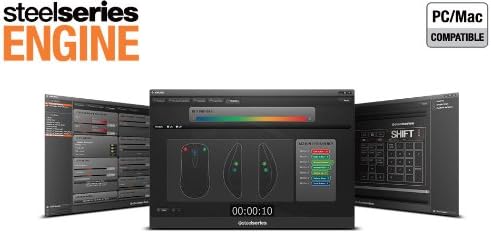
Image 5: Screenshot of the SteelSeries Engine software interface, showing options for button mapping, CPI adjustment, and lighting customization.
6. ساتنه
To ensure the longevity and optimal performance of your SteelSeries Sensei mouse, follow these maintenance guidelines:
- پاکول: د موږک سطحه د پاکولو لپاره نرم، وچ ټوکر وکاروئ. د سختې خاورې لپاره، یو څه damp ټوکر کارول کیدی شي، مګر ډاډ ترلاسه کړئ چې رطوبت موږک ته ننوځي. د سختو کیمیاوي موادو یا د کثافاتو پاکوونکو څخه ډډه وکړئ.
- د سینسر پاملرنه: Keep the laser sensor on the bottom of the mouse clean and free from dust or debris. Use a cotton swab or compressed air if necessary.
- د کیبل مدیریت: د زیان څخه د مخنیوي لپاره د USB کیبل د تیزو کږو یا ډیر کشولو څخه ډډه وکړئ.
7. ستونزه حل کول
If you encounter issues with your SteelSeries Sensei mouse, refer to the following common solutions:
- موږک ځواب نه ورکوي:
- ډاډ ترلاسه کړئ چې USB کیبل په خوندي ډول ستاسو کمپیوټر سره وصل دی.
- هڅه وکړئ چې موږک د بل USB پورټ سره وصل کړئ.
- خپل کمپیوټر بیا پیل کړئ.
- Inconsistent Tracking:
- د موږک په ښکته برخه کې د لیزر سینسر پاک کړئ.
- ډاډ ترلاسه کړئ چې تاسو موږک په مناسب سطحه کاروئ (د مثال په توګه، د موږک پیډ).
- Check for dust or debris on your mouse pad.
- تڼۍ کار نه کوي:
- Verify button assignments in the SteelSeries Engine software.
- Ensure the software is running correctly and profiles are loaded.
- د سافټویر مسلې:
- Update the SteelSeries Engine software to the latest version.
- Reinstall the SteelSeries Engine software.
- Check for any available firmware updates for your mouse within the software.
8. مشخصات
| فیچر | تفصیل |
|---|---|
| برانډ | د فولادو لړۍ |
| د ماډل شمیره | 62150 |
| د حرکت کشف ټیکنالوژي | لیزر |
| د ارتباط ټیکنالوژي | USB |
| رنګ | خړ |
| د هارډویر پلیټ فارم | PC |
| د عملیاتي سیسټم مطابقت | All Major PC Operating Systems |
| د توکي وزن | 14.6 اونس |
| د محصول ابعاد (LxWxH) | 7.9 x 6.8 x 2.3 انچه |
| د پروګرام وړ تڼۍ | 7 |
| Illumination Zones | 3 (Scroll Wheel, CPI Indicator, Logo) |
9. تضمین او ملاتړ
The SteelSeries Sensei Laser Gaming Mouse is covered by a manufacturer's warranty. For detailed information regarding warranty terms, conditions, and duration, please refer to the warranty card included with your product or visit the official SteelSeries website. For technical support, driver downloads, and frequently asked questions, please visit the SteelSeries support page.
SteelSeries Official Webسایټ: اسټیلریز. com
SteelSeries Support: ملاتړ.steelseries.com


