1. پیژندنه
The Intermatic T101P ON/Off T100 Series Mechanical Timer Switch is a dependable device designed to control electrical loads up to 40 Amperes. It allows for scheduled ON/OFF operations over a 24-hour period, offering convenience and energy management for various applications. This manual provides essential information for the safe installation, operation, and maintenance of your timer switch.
2. د خوندیتوب معلومات
Please read and understand all instructions before installing or operating this device. Failure to follow these instructions may result in electrical shock, fire, or serious injury.
- خبرداری: Disconnect power at the main circuit breaker or fuse box before installing or servicing the timer switch.
- نصب کول باید د ټولو ملي او محلي بریښنایی کوډونو سره سم د وړ بریښنایی متخصص لخوا ترسره شي.
- د المونیم تارونه په مستقیم ډول د سویچ ترمینلونو سره مه نښلوئ. که اړتیا وي نو د مسو او المونیم مناسب نښلونکي وکاروئ.
- Ensure the timer switch is installed in a suitable NEMA 3R enclosure for outdoor or damp ځایونه
- تایید کړئ چې والیtage and current ratings of the timer switch match your application requirements.
3. د بسته محتويات
د نصبولو پیل کولو دمخه ډاډ ترلاسه کړئ چې ټولې برخې شتون لري:
- Intermatic T101P Mechanical Timer Switch
- د لارښود لارښود (دا سند)
- Mounting hardware (if included with specific packaging)
4. د محصول ب Featuresې
- ۲۴ ساعته عملیات: Provides up to 12 ON/OFF operations per day.
- لوړ ظرفیت: Handles electrical loads up to 40 Amperes per pole.
- لاسي بیارغونه: Features a convenient manual lever for temporary ON/OFF control without affecting programmed settings.
- دوامدار احاطه: NEMA 3R rated plastic enclosure suitable for indoor and outdoor use.
- څو اړخیز غوښتنلیکونه: Ideal for lighting, signs, filters, electric fences, fans, conveyors, pool heaters, blowers, and pumps.
5. نصب کول
Follow these steps for proper installation of the Intermatic T101P timer switch:
- د بریښنا قطع کول: Turn OFF power at the main service panel before beginning any wiring. Ensure the circuit is de-energized using a voltage ټیسټر.
- پورته کول: Select a suitable location for the timer switch. Mount the enclosure securely using appropriate screws and anchors.
- تارونه: Refer to the wiring diagram inside the timer switch enclosure and the image below. Connect the incoming power (LINE) and outgoing load (LOAD) wires to the designated terminals.

شکل 1: داخلي view of the Intermatic T101P timer switch, showing the dial, manual lever, and wiring terminals. Note the 'OFF' and 'ON' positions for the manual lever, and the 'LINE' and 'LOAD' connections.
- د تارونو مهم یادښتونه:
- Observe the warning: DO NOT REMOVE THIS INSULATOR. This component is crucial for safety and proper operation. Wire, lift, and swing the insulator as needed, then replace it after wiring.
- DO NOT CONNECT ALUMINUM WIRES TO SWITCH TERMINALS. Use only copper conductors or approved copper-to-aluminum connectors.
- تړلی احاطه: Once wiring is complete and verified, securely close the timer switch enclosure.
- د بریښنا بیرته راګرځول: په اصلي خدمت پینل کې بریښنا بیرته راګرځوئ.
6. عملیات
The T101P timer switch features a 24-hour dial for setting automatic ON/OFF times and a manual override lever.
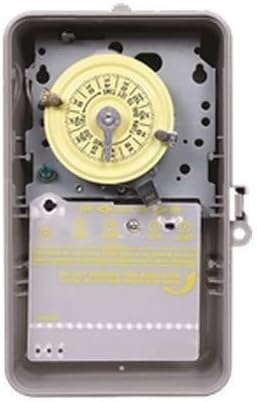
شکل 2: داخلي view of the Intermatic T101P timer switch, showing the yellow dial and the protective insulator covering the wiring terminals.
6.1 Setting Automatic ON/OFF Times
- اوسنی وخت ټاکل: Rotate the yellow dial clockwise until the current time of day aligns with the time arrow indicator.
- Install ON/OFF Trippers: The timer comes with ON (green) and OFF (red) trippers. Slide these trippers onto the dial at the desired ON and OFF times. Ensure they are securely fastened. The minimum ON/OFF time is 1 hour.
- عملیات تایید کړئ: The timer will now automatically turn the connected device ON and OFF according to the set schedule.
6.2 Using the Manual Override Lever
The manual override lever allows you to temporarily switch the connected device ON or OFF without disturbing the programmed schedule.
- To manually turn the device ON, push the lever to the 'ON' position.
- To manually turn the device OFF, push the lever to the 'OFF' position.
- ټایمر به خپل پروګرام شوی مهالویش په راتلونکي ټاکل شوي ON یا OFF پیښه کې بیا پیل کړي.
7. ساتنه
The Intermatic T101P is designed for minimal maintenance. Periodically inspect the unit for any signs of damage or loose connections. Ensure the enclosure is free from debris and moisture. No user-serviceable parts are inside; refer servicing to qualified personnel.
8. ستونزه حل کول
| ستونزه | احتمالي لامل | د حل لاره |
|---|---|---|
| ټایمر کار نه کوي. | No power to the unit. Incorrect wiring. | Check circuit breaker/fuse. Verify wiring connections are secure and correct. |
| وسیله په پروګرام شوي وختونو کې نه فعالیږي/بندیږي. | Trippers incorrectly set. Current time not set correctly. Manual override engaged. | Ensure trippers are firmly in place at desired times. Adjust the dial to the correct current time. Check if the manual override lever is in the neutral position. |
| Timer makes unusual noise. | داخلي میخانیکي ستونزه. | Disconnect power immediately. Contact a qualified electrician or Intermatic customer support. Do not attempt to repair. |
9. مشخصات
| مشخصات | ارزښت |
|---|---|
| ډول | 24 Hour Mechanical Timer |
| Maximum Number of Operations | په ورځ کې 12 |
| لږ تر لږه د کار پیل/بند وخت | 1 ساعت |
| د سویچ ډول | SPST (واحد قطب واحد غورځول) |
| Current Rating (Resistive/Inductive/Tungsten) | 40 Amp |
| Current Rating (Ballast) | 16 Amp په 277 ولټ AC کې |
| Current Rating (Motor, Full Load) | 24 Amp at 120 Volt AC, 28 Amp په 240 ولټ AC کې |
| والیtage درجه بندي | 120 Volt AC at 60 Hertz |
| Power Rating (Motor) | 2 HP at 120 Volt AC, 5 HP at 240 Volt AC |
| Power Rating (Pilot Duty) | 1000 ولټ Amp |
| Power Rating (Input) | 3 واټ |
| د عملیاتي حرارت درجه | -40 to 130 Deg F |
| تړل | NEMA 3R |
| مواد | پلاستیک |
| ابعاد (W x D x H) | 6.5 انچه x 4 انچه x 10 انچه |
| رنګ | بیج |
| د توکي وزن | 1.29 پونډه |
| تصویبونه | UL (کاناډا او امریکا)، CSA (کاناډا او امریکا) |
10. تضمین او ملاتړ
For warranty information or technical support, please refer to the official Intermatic webسایټ ته مراجعه وکړئ یا د دوی د پیرودونکو خدماتو څانګې سره اړیکه ونیسئ. د پیرود ثبوت په توګه د پیرود رسید وساتئ.


