1. محصول ختم شوview
د Amped Wireless AP600EX High Power Wireless-N Pro Access Point is designed to extend wireless network access for existing wired networks. It features a high-power 600mW amplifier and a high-gain directional antenna, enabling extended wireless coverage. The device is housed in a weatherproof enclosure, making it suitable for both indoor and outdoor installations.
This access point supports Wireless-N standards and offers robust security features to protect your network. It is ideal for providing long-range wireless coverage in large indoor/outdoor areas or for building-to-building applications.

شکل 1: Amped Wireless AP600EX High Power Wireless-N Pro Access Point.
۲. په بکس کې څه دي؟
ډاډ ترلاسه کړئ چې ټول توکي په کڅوړه کې شتون لري:
- Amped Wireless High Power Wireless-N 600mW Pro Access Point
- Power over Ethernet Adapter
- 30 ft Power over Ethernet cable
- معیاري ایترنیټ کیبل
- د بریښنا اډاپټر
- Metal desktop stand
- Metal pole mounting clamp
- Plastic pole mounting tie
- CD with User's Guide
- د تنظیم کولو لارښود
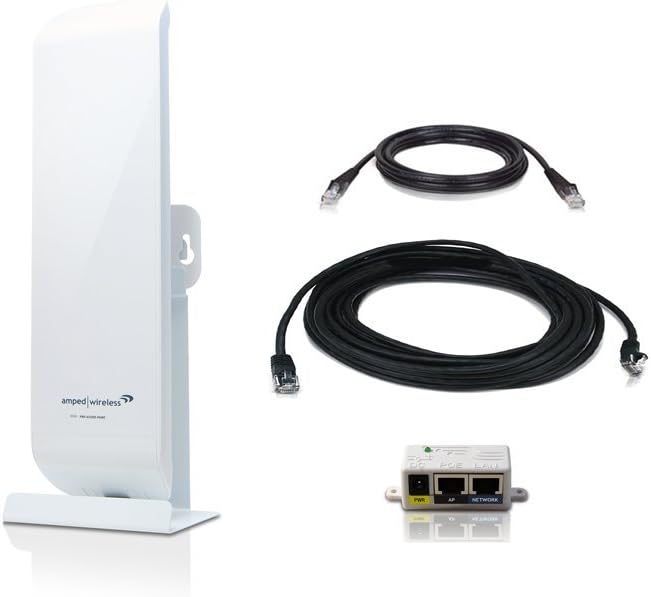
Figure 2: AP600EX with Power over Ethernet adapter, cables, and mounting hardware.
۴. د تنظیم لارښوونې
The AP600EX is designed for true Plug and Play setup, requiring minimal configuration for basic operation.
۳.۱ لومړنۍ اړیکه
- Connect one end of the included Ethernet cable to an available network port on your existing router or network switch.
- Connect the other end of this Ethernet cable to the 'Network' port on the Power over Ethernet (PoE) Adapter.
- Connect the 30 ft Power over Ethernet cable from the 'PoE' port on the PoE Adapter to the 'PoE' port on the AP600EX Access Point.
- Plug the power adapter into the PoE Adapter and then into a power outlet. The AP600EX will power on and automatically configure itself to your network.

شکل 3: شاته view of the AP600EX, highlighting the PoE and LAN ports for connection.
3.2 د نصبولو اختیارونه
The AP600EX features a weatherproof design and includes a desktop stand, wall mounting kit, and pole mounting clamp for flexible installation:
- د ډیسټاپ نصب کول: Use the provided metal desktop stand for placement on a flat surface.
- دیوال یا قطب ایښودل: Utilize the metal pole mounting clamp or wall mounting kit for secure installation in desired indoor or outdoor locations. Ensure the device is positioned for optimal signal coverage.
For optimal wireless range of up to 1.5 miles, line of sight between Amped Wireless Pro Series products (e.g., Pro Smart Repeater, Pro Access Point, Pro USB Adapter) is necessary. Indoor performance will vary based on the wireless environment and building materials.
ویډیو ۱: محصول پای ته ورسېدview Video demonstrating features and potential setup scenarios for the Amped Wireless AP600EX.
4. عملیاتي لارښوونې
4.1 Extending Wireless Coverage
Once connected, the AP600EX will broadcast a high-power Wireless-N signal, extending the range of your existing wired network. Connect your wireless devices (laptops, smartphones, tablets) to the new wireless network broadcast by the AP600EX.
4.2 Smart Security Features
The access point includes smart security features to manage network access:
- Access Restriction: Configure settings to restrict network access to specific users or devices.
- مهال ویش: Set daily time schedules for when the wireless network is available.
- Wireless Output Power Adjustment: Control the reach of your extended wireless network coverage by adjusting the wireless output power.
4.3 Additional Wired Connections
The AP600EX provides an additional wired port for connecting other networking devices, such as a PC, an additional network switch, or another Pro Access Point, expanding your network's capabilities.
4.4 Optional External Antenna
For further range customization, the access point includes an external antenna port. This allows for the connection of an optional outdoor high-gain antenna, providing more options for extending wireless coverage.
5. ساتنه
ستاسو د غوره فعالیت او اوږد عمر ډاډ ترلاسه کولو لپاره Amped Wireless AP600EX, consider the following maintenance tips:
- د فرم ویئر تازه معلومات: په منظمه توګه چک کړئ Amped بېسیم website for firmware updates. Keeping the firmware up-to-date can improve performance, add new features, and enhance security.
- فزیکي معاینه: Periodically inspect the device and its connections for any signs of damage or wear, especially if installed outdoors. Ensure all cables are securely connected.
- پاکول: Keep the device clean and free from dust and debris. For outdoor units, ensure vents are not obstructed. Use a soft, dry cloth for cleaning.
- غوره ځای پرځای کول: Review the device's placement periodically to ensure it still provides the best possible coverage, especially if there have been changes in the environment (e.g., new obstructions).
6. ستونزه حل کول
If you encounter issues with your AP600EX, try the following troubleshooting steps:
- ځواک نشته: Ensure the power adapter is securely connected to the PoE adapter and a working power outlet. Check the PoE cable connection to the AP600EX.
- د انټرنیټ اتصال نشته: Verify that your main router has an active internet connection. Check all Ethernet cable connections between the router, PoE adapter, and AP600EX.
- Poor Wireless Signal/Range:
- Ensure the AP600EX is placed in an optimal location, away from major obstructions (thick walls, metal objects, large appliances).
- Adjust the wireless output power settings if accessible through the device's management interface.
- Consider using an optional external high-gain antenna for improved range.
- د تنظیم پاڼې ته لاسرسی نشم کولی: Ensure your computer is connected to the network provided by the AP600EX or your main router. Try restarting both the AP600EX and your computer.
- موقتي اړیکه: Check for sources of interference (e.g., cordless phones, microwaves, neighboring Wi-Fi networks). Try changing the wireless channel.
- د فابریکې رییس: If issues persist, perform a factory reset. This will revert all settings to their default values. Refer to the full user manual for specific instructions on how to perform a factory reset.
7. مشخصات
| فیچر | تفصیل |
|---|---|
| بيسيم ستندرد | 802.11n (Backwards compatible w/ 802.11b/g) |
| د فریکونسی بند | 2.4 GHz |
| بېسیم Ampژوندی ځواک | 600 میګاواټه |
| د بې سیمه تولید بریښنا | تر 29 dBm پورې |
| Wireless Sensitivity | -95 dBm |
| بې سیم امنیت | WEP، WPA، WPA2، WPA مخلوط، WPS |
| انتن | 1 x High Gain Directional Panel Antenna, 1 x RJ-RMA Port for Optional External Antenna |
| بندرونه | AP: 2 x RJ-45 Ports (PoE, LAN); PoE Adapter: 2 x RJ-45 Ports (PoE, Network) |
| د محصول ابعاد | 3.1 x 2.25 x 11.1 انچه |
| د توکي وزن | 10.9 اونس |
8. تضمین او ملاتړ
8.1 د تضمین معلومات
د Amped Wireless AP600EX comes with a 1-Year Limited Warranty. Please retain your proof of purchase for warranty claims. For full details on warranty coverage and limitations, refer to the official warranty documentation included with your product or visit the Amped بېسیم webسایټ
8.2 تخنیکي ملاتړ
For technical assistance, product registration, or to access the latest drivers and firmware, please visit the official Amped Wireless support website or contact their customer service. Industry-leading technical support and customer service are available to assist you.
جوړونکی: Amped بېسیم


